
【20% OFF】 eSIM cards for four Southeast Asian countries (Singapore, Malaysia, Thailand, Indonesia) | Daily high speed/total amount
- KKday is a new choice for eSIM card Internet access in four Southeast Asian countries (Singapore, Malaysia, Thailand, and Indonesia), allowing you to quickly and easily enjoy 4G Internet access without any hassle.
- Supports Apple and various Android phones. * Samsung phones purchased in different countries have different versions. Before purchasing, you must confirm whether they support eSIM (Samsung phones purchased in Taiwan do not support eSIM function)
Package Options
Product Info
The content of this product is provided by machine translation and may not reflect the actual information, please take this into consideration before booking.
- eSIM installation precautions -
- When installing the eSIM, interrupting or exiting the installation program will cause the eSIM installation to fail and the eSIM cannot be reissued.
- To install the eSIM, you must be connected to a stable network (WiFi or mobile network). It is recommended to complete the installation before boarding the plane and turn on the phone when you arrive at your destination.
- The usage period of the eSIM begins after installation. If you are taking a long-distance or overnight flight, it is recommended to purchase an extra day of usage. You can install the eSIM before boarding the plane to get the best usage experience.
Please confirm that your phone can use eSIM before purchasing. You cannot cancel or refund the order after ordering.


Before activating eSIM, please update iOS to the latest version and connect to a stable WiFi network. Old iOS versions and unstable networks are common reasons for eSIM activation failure.


Open the camera to scan the eSIM and click "Action Plan".


The activation time is about 2-3 minutes, and the installation may fail if the activation screen pops up.


You can customize the eSIM name to facilitate the management of multiple eSIMs


Select the preset number to specify the original main number to receive messages (you need to apply to the original telecommunications operator to open an international roaming main number before you can receive text messages)


You can specify the primary phone number to use iMessage and Facetime functions


Choose to use eSIM's mobile data. "eSIM's mobile data is not turned on" is a common reason for not being able to access the Internet.


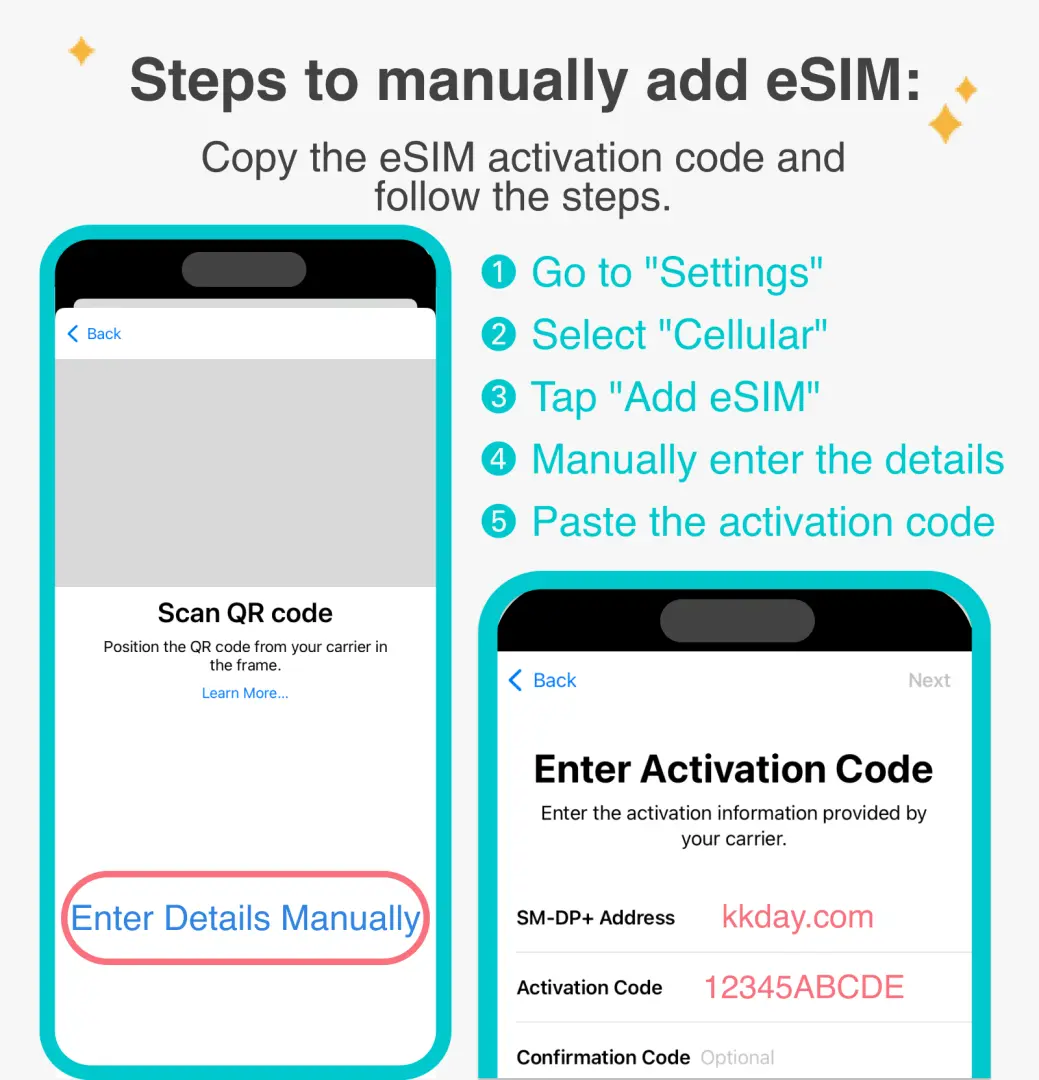
You can also manually add eSIM when you cannot scan the QR Code


After copying the eSIM activation code, please follow the steps to manually add eSIM information.

SIM Card Specifications
| Data Usage Specifications | Unlimited data, 1GB, 2GB |
| Transmission Specifications | 4G |
| Signal Coverage Area | Thailand, Malaysia, Singapore, Indonesia |
| Mobile Carrier | Singapore: Singtel, M1, StarHub / Malaysia: Celcom, DiGi / Thailand: DTAC / Indonesia: XL |
| Supported Sizes | eSIM |
| Hotspot Sharing | Available |
| Supported Frequencies(4G) | B1(2100 MHz) |
| Top-Up Availability | Top-up unavailable |
| Excludes | Voice calls, Texts |
| Not Supported | SIM-locked device, Carrier-customized device, Mobile hotspot, modified phones, 3G phones, translation machines, phones without eSIM function |
| Reminders | ・After the daily high-speed data usage is completed, the speed will be reduced to 128Kbps and the high-speed data usage will be recalculated at 0:00 (GMT+8) every day. ・Validity period calculation method: The calendar day system, the day from when the eSIM is installed and activated to 23:59 (GMT+8) is considered the first day. |
Purchase Notice
- Please make sure your phone and its operating system support the eSIM function before purchasing. If you cancel the order due to device incompatibility, no refund will be given.
- iOS version 12.1 or higher is required; Please note that iPhones sold in mainland China do not support eSIM. In Hong Kong and Macau, only iPhone 13 mini, iPhone 12 mini, iPhone SE 2020 and iPhone XS have eSIM functionality. (Please visit Apple's official website for more information)
- Samsung phones vary in different countries. Samsung phones purchased in Taiwan do not support eSIM. Please confirm with Samsung's official website for other regions first.
- Each QR code can only be scanned and installed once. Once bound, you cannot change the device or delete it. Once deleted, you cannot scan and install again and need to purchase it again.
Reminders
The eSIM must be installed and activated at the destination within 30 days of ordering, otherwise it will become invalid and cannot be used.
An Internet connection is required to install the eSIM. Please make sure there is available WiFi or mobile data before installation.
Please remember to turn off data roaming on the original SIM card to avoid using the mobile network of the original SIM card and incurring high roaming charges.
When you finish using the eSIM plan in your phone, click [Remove Action Plan] at the bottom to remove it.
Please be aware that the quality of Internet access may be affected by factors such as location, terrain, building shielding, number of users and weather.
How to Use
- Installation steps:
After scanning the QRCode, follow the instructions to add an eSIM.
(Please do not use your camera or other apps to scan the QR code, it must be done through your phone's "Settings".)
- Usually the APN will be automatically identified. If it cannot be identified automatically, you need to set it manually.
APN: internet
Cancellation Policy
- Once the order has been completed, it cannot be canceled, modified, or refunded
- Due to time zone differences, the confirmed cancellation date is based on the supplier’s local time. Please allow 2–5 business days to process your cancellation request, after which the cancellation fee will be charged according to the product’s cancellation policy. Once the cancellation is confirmed, you will receive your refund within 14 working days.
FAQ
When selecting a data plan for a Southeast Asia 4-country eSIM, you should assess your internet usage habits. If you primarily use it for map navigation, messaging, and light social media browsing, 500MB to 1GB per day is usually sufficient. If you plan to watch videos, make video calls, or frequently upload photos, it's recommended to choose a plan with over 2GB per day or a high total data allowance. Consider your travel duration and the number of people traveling together to avoid insufficient data that could disrupt your trip's convenience.
For setting up and activating your Southeast Asia 4-country eSIM, it's recommended to complete some steps in an environment with a stable internet connection, such as in Taiwan. You will receive a QR Code or manual setup information. After scanning the QR Code, follow your phone's instructions to add a mobile plan. Upon arriving in Singapore, Malaysia, Thailand, or Indonesia, simply enable roaming for this eSIM to start using it. Make sure to confirm that your device has successfully added the eSIM setup before your trip.
Yes, if your device supports dual SIM dual standby, you can keep and use your original physical SIM card number concurrently. You can set up the Southeast Asia 4-country eSIM for data usage while using your physical SIM card for receiving calls or messages. This way, you can enjoy fast local internet access without missing important calls or messages, making it convenient to stay connected during international roaming.
Most phone settings allow you to check your mobile data usage to monitor your Southeast Asia 4-country eSIM data consumption. It's advisable to check regularly to avoid exceeding your limit. If you unfortunately run out of data, you can choose to purchase a new eSIM plan or utilize free local Wi-Fi hotspots. Some eSIM providers may also offer options to purchase additional data packs, but you'll need to confirm if your purchased plan supports this feature first.
The Southeast Asia 4-country eSIM typically supports your phone's personal hotspot (internet sharing) feature, allowing you to share the eSIM's network with other devices of your travel companions. However, please note that enabling a hotspot will increase your phone's battery consumption and may accelerate data usage. It's recommended to only enable it when you have ample data or for urgent needs, and to turn it off periodically to save battery and data.
Before purchasing a Southeast Asia 4-country eSIM, be sure to verify if your phone supports eSIM functionality. Major supported devices include Apple iPhones XR and later models, some Google Pixel series, and a few flagship Android phones. It's worth noting that due to different regional sales versions, Samsung phones require confirmation before purchase; for example, Samsung phones purchased in Taiwan currently do not support eSIM. Please refer to your phone manufacturer's official information to ensure compatibility.
You can conveniently purchase this Southeast Asia 4-country eSIM through the KKday online platform. KKday provides clear product information and a variety of data plan options, allowing you to quickly place an order based on your personal needs. Purchasing online not only saves you the hassle of queuing at physical stores or picking up cards at the airport but also allows you to instantly receive the QR Code needed for activation after payment, ensuring a seamless setup before your trip.
During travel in Singapore, Malaysia, Thailand, and Indonesia, high data consumption habits include watching high-definition online videos, engaging in prolonged video calls, frequently uploading large amounts of photos and videos to the cloud or social media, and downloading large applications or system updates. Additionally, if you use the eSIM as a personal hotspot to share internet with multiple devices, data will be consumed rapidly. It is recommended to prioritize using free Wi-Fi and to download maps or content while offline to save data.
Get Help


