

Global eSIM Unlimited Data eSIM|Dosirak eSIM
- An essential item for global travel, try using a usable eSIM without replacing your SIM card.
- You can enjoy Internet data right away after arriving at your destination without having to receive a separate SIM card.
- You can use it by simply scanning the QR code on the voucher sent after confirming your reservation and installing it.
- There is no risk of losing it as it is not a physical SIM card.
Package Options
Product Info
The content of this product is provided by machine translation and may not reflect the actual information, please take this into consideration before booking.
- This product is provided by Wide Mobile Co., Ltd.
- Option Description
- Available countries
〈Global 143 Countries〉:
Ghana, Guadeloupe, Guatemala, Guam, Grenada, Greece, South Africa, Netherlands, Nepal, Norway, New Zealand, Nicaragua, Taiwan, South Korea, Denmark, Dominica, Dominican Republic, Germany, Laos, Liberia, Latvia, Russia, Romania, Luxembourg, Rwanda, Lithuania, Madagascar, Martinique, Macao, Malawi, Malaysia, Mexico, Morocco, Mauritius, Mozambique, Montenegro, Moldova, Malta, Mongolia, United States, Vanuatu, Barbados, Bangladesh, Bermuda, Vietnam, Belgium, Belarus, Bosnia and Herzegovina, Bulgaria, Brazil, Brunei, Saudi Arabia, Serbia, Seychelles, Saint Lucia, Saint Vincent and the Grenadines, Saint Kitts Nevis, Sudan, Sri Lanka, Sweden, Switzerland, Spain, Slovakia, Slovenia, Sierra Leone, Singapore, United Arab Emirates, Aruba, Armenia, Argentina, Iceland, Haiti, Ireland, Azerbaijan, Albania, Algeria, Antigua and Barbuda, Anguilla, Eswatini, Estonia, Ecuador, El Salvador, United Kingdom, British Virgin Islands, Yemen, Oman, Austria, Honduras, Jordan, Uganda, Uruguay, Uzbekistan, Ukraine, Iran, Israel, Egypt, Italy, India, Indonesia, Japan, Jamaica, Zambia, Georgia, Central Africa Republic, Gibraltar, Czech Republic, Chile, Cameroon, Kazakhstan, Qatar, Cambodia, Canada, Kenya, Cayman Islands, Costa Rica, Côte d'Ivoire, Colombia, Democratic Republic of the Congo, Kuwait, Croatia, Kyrgyzstan, Cyprus, Tajikistan, Tanzania, Thailand, Turks and Caicos Islands, Turkey, Tonga, Tunisia, Trinidad and Tobago, Panama, Paraguay, Pakistan, Papua New Guinea, Faroe Islands, Peru, Portugal, Poland, France, French Guiana, Fiji, Finland, Philippines, Hungary, Australia, Hong Kong
- How to check if your phone has an eSIM module
*#06# on the dial screen → If there is an EID in the device information, eSIM can be used.
eSIM QR code sent on the same day


eSIM enabled terminals


Data Rate Plan Guide


How to install and use Dosirak eSIM

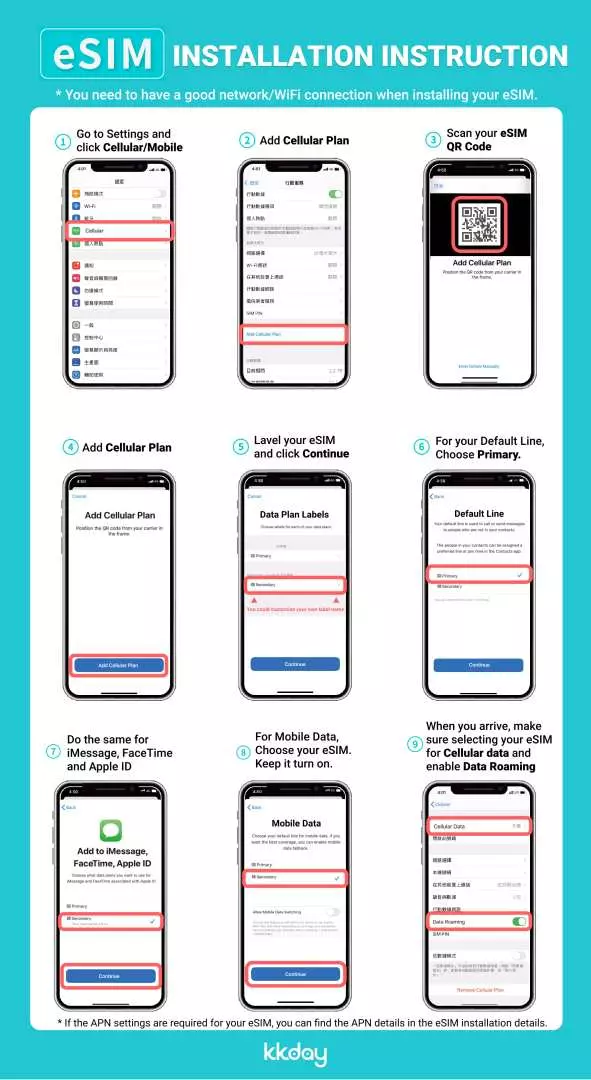
eSIM Notes


eSIM Installation Video - iPhone (iOS)
eSIM Installation Video - Android
Important Info
Reminders
Please make sure that the model of the mobile phone you wish to use eSIM with supports eSIM service before purchasing. [Refer to the details page]
If you are a customer who has set up a mobile phone protection service, you must unlock the SIM card and deactivate the mobile phone protection service at your mobile carrier's customer service center or on their website in order to use the service.
After purchase, product information (QR code) will be sent via email and KakaoTalk notification. Exchanges and refunds are not possible after the QR code is sent or scanned.
To register the eSIM product you purchased on your device, you must have data available (cellular network or Wi-Fi connection mode).
If you delete the registered cellular plan after scanning the QR code, eSIM cannot be used, so please maintain the plan until use is terminated.
It can be pre-installed at the departure location and the usage period starts from the time of connection to the destination network.
If possible, turn off data roaming for your domestic telecommunications company before leaving the country. (Incorrect operation may result in roaming charges overseas.)
Depending on the communication environment of the local telecommunications company, data usage may not be smooth in some areas, and depending on the model used, if the frequency band does not match that of the local telecommunications company, it may connect to 3G or 2G.
The terms and conditions of the telecommunications company that provides the service apply and product options (data provision, number of days of use, promotions, etc.) may change without prior notice.
Once deleted, eSIM cannot be rescanned or recovered. If you are unable to use the service due to your own negligence or lack of understanding of the usage instructions, as above, you will not be eligible for a refund.
Exchanges and refunds are not possible after the QR code has been sent or scanned.
In case of unavailability due to local telecommunications company network maintenance, natural disaster, or other reasons, no refund will be made.
How to Use
STEP 1. ▶Purchase◀
- Please select the desired eSIM data capacity and usage period.
- Once your order is confirmed, a QR code will be sent to your email and mobile phone. (* If you do not receive it, please request it again through the customer center and we will send it immediately.)
*Orders placed between 9:00 and 18:00 every day will be shipped on the same day at 4-hour intervals. (Orders placed after 18:00 will be shipped the next day. Shipping time may be slightly delayed depending on the order volume.)
STEP 2. ▶Settings◀
1. Open Settings > Settings menu
- Select ‘Add Cellular Plan’.
(Additional rate plans are only available in network environments)
2. Add cellular plan > Scan QR code
- Scan the QR code image received via text or email.
- If the QR code cannot be scanned, you can set it manually.
3. Rate plan label and usage line designation
[Rate Plan Label]
- Existing SIM → Main
- eSIM (local SIM) → Auxiliary (freely set for travel, work, etc.)
[Basic line]
- Existing SIM → Calls/Messages, iMassage/FaceTime
- eSIM (local SIM) → Cellular data (switching allowed OFF)
4. Settings > Cellular > Turn off Cellular Data Toggle
- When using overseas, block cellular data conversion before use so that the existing SIM (main) cannot be used for data.
* If you turn on data roaming while selecting 'Main' as your cellular plan, roaming charges may be charged by your domestic carrier (main line).
5. APN manual setting (when data is not available)
- Settings > Cellular > Cellular Plans > Select eSIM Plan > Cellular Data Network
- In most cases it is set automatically, but sometimes you may need to change the APN information.
* Check the details page of the product you purchased for APN information.
Cancellation Policy
- Once the order has been completed, it cannot be canceled, modified, or refunded
- Due to time zone differences, the confirmed cancellation date is based on the supplier’s local time. Please allow 2–5 business days to process your cancellation request, after which the cancellation fee will be charged according to the product’s cancellation policy. Once the cancellation is confirmed, you will receive your refund within 14 working days.
FAQ
This Global eSIM offers extensive coverage in numerous countries worldwide, allowing travelers to maintain internet connectivity without needing physical SIM card swaps. It operates by utilizing local network partnerships, ensuring stable and reliable data service wherever you travel internationally. Users can enjoy continuous access to maps, communication apps, and online resources throughout their journey.
Installation is straightforward and digital. After your reservation is confirmed, you will receive a voucher containing a unique QR code. Simply scan this QR code with your compatible device, and follow the on-screen instructions to install the eSIM profile. Activation typically occurs automatically within 24 hours of purchase, or upon arrival at your destination, allowing immediate data usage.
The Global eSIM Unlimited Data eSIM is specifically designed as a data-only solution for internet access while traveling. It provides unlimited data usage, which is ideal for browsing, streaming, and using messenger apps. It does not natively include voice call or SMS services, but you can use internet-based calling and messaging applications that rely on data.
This Global eSIM significantly enhances travel convenience by eliminating the need for physical SIM cards, reducing the risk of loss, and avoiding complicated setup processes. Its digital nature means activation is quick via a QR code, allowing immediate internet access upon arrival. This ensures travelers stay connected effortlessly for navigation, communication, and sharing their experiences.
To use a Global eSIM, your smartphone or tablet must be eSIM-compatible. Most newer iPhone models (XR and later), select Samsung Galaxy models, Google Pixel phones, and other Android flagships support eSIM. It's crucial to check your device's specifications before purchase. Ensure your device is unlocked by your carrier, as locked phones may not support eSIM from other providers.
Once activated, ensure your device's mobile data settings are configured to use the eSIM profile. You can typically switch between your primary physical SIM and the eSIM within your phone's cellular settings. It is recommended to enable data roaming for the eSIM if prompted, and disable data for your physical SIM to avoid unexpected charges. Monitor your data usage through your device settings.
Travelers can expect to use the internet almost immediately upon arriving at their destination. The Global eSIM is designed for quick activation, often within 24 hours of purchase, and allows for instant data access once installed and configured on a compatible device. This eliminates typical waiting times associated with acquiring a local physical SIM card, ensuring seamless connectivity from the moment you land.
When evaluating a Global eSIM, travelers should consider its coverage areas, data allowances (e.g., unlimited options), ease of activation, and overall convenience compared to traditional roaming or physical SIM cards. Factors like device compatibility, customer support availability, and the simplicity of managing your plan digitally also contribute to its value for a hassle-free international data experience.
Get Help


