




Interrail Czech Republic Mobile Pass
- Use the Interrail Czech Republic Mobile Pass to take your vacation to a whole new level
- Enjoy unlimited railroad access and special discounts in the Czech Republic
- Take advantage of various package options to best accommodate your travel needs
Package Options
Product Info
— What You Can Expect —
Travel in ease and comfort throughout your trip to the Czech Republic! Get a Interrail Czech Republic Mobile Pass that offers a variety of validity options. You may use it on non-consecutive days within a month, and the number of days is up to your personal preference to suit your itinerary.
Delight in unlimited České dráhy, Leo Express, and RegioJet train rides, and explore the best of the Czech Republic in your own time. So book now to experience the convenience this pass offers, and explore Czech at your own preferred pace at discounted prices.
-How to use-
— More Interrail Passes —

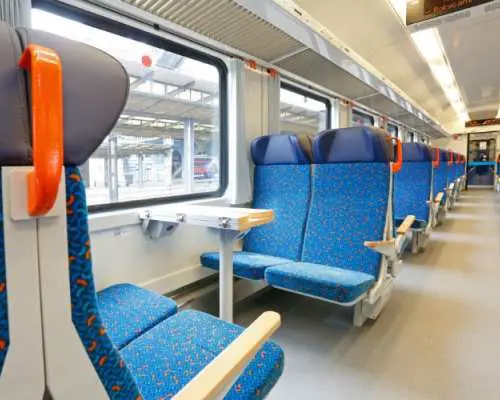
Board České dráhy's trains and gain access to some of the most beautiful sights and scenes
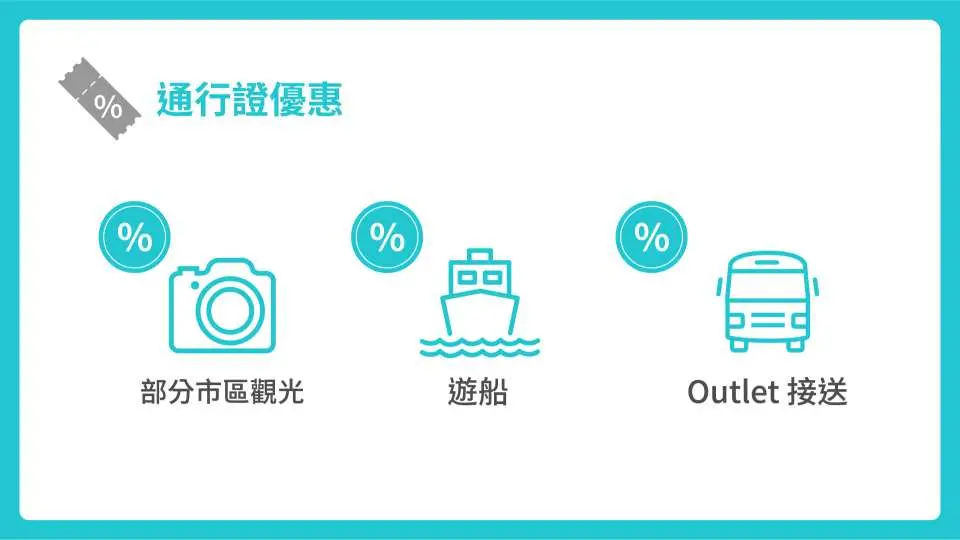
Get big discounts for city tours, cruises, and transport services to certain outlet

Simply download the Interrail Rail Planner app to activate the Pass and add a journey
Purchase Notice
-Interrail Czech Republic Mobile Pass Requirements-
- The name specified on the pass must be identical to the name specified on the passport
- The pass must be activated within 11 months after issuance via the Interrail App
- The pass must be activated before the first train boarding or discount using
- Czech Republic is one of the popular destinations in Europe, therefore, reservations are required for high speed trains and night trains in Czech Republic. Please check the seat reservation information.
- 1st class Passes are valid in both 1st and 2nd class coaches. 2nd class Passes are only valid in 2nd class coaches
- Seat reservation fees are not included in Interrail Czech Republic Mobile Pass. To reserve a seat, please access Rail Europe or a local train station ticket counter
- To enjoy a discount offer included in Interrail Czech Republic Mobile Pass, you must at least consume 1 valid day of the pass first
- If you lose your mobile phone, you may request a pass replacement for free, please click here for details
- The services and discounts offered by Interrail Europe Pass are subject to change or cancellation due to the pandemic, traffic, weather, and force majeure. Please visit the official website to check the operating info to avoid disappointments Pass
-Child Policy-
- Free admission for children aged under 4, must not occupy a seat, and must be accompanied by at least 1 paying adult; proof of age is required (e.g. passport)
- Each adult can only accommodate 2 children aged 4-11. Seats are included in child passes. If you are traveling with 3 or more children, please book youth tickets for them
- Children under 12 travel in the same travel class as the accompanying adult
-Cancellation Policy-
- Partial refund application is applicable to passes that are not activated within 360 days after the date of purchase
- Activated passes are non-refundable, please consider before booking
Includes/Excludes
- Interrail Czech Republic Mobile Pass
- Handling fee
- Other expenses not mentioned
- Reservations, meals, or beds
Eligible Users
Ineligible Nationalities/Regions
- Cuba, Czechia, Ghana, Iran, North Korea, Sudan, Syria
Reminders
According to EU regulations, it's mandatory that the passengers MUST hold a valid visa for the countries passing through the route even they don't get off the train or enter the border.
Interrail Czech Republic Mobile Pass is only applicable to Czechia's domestic trains
Travelers may apply for refunds within 360 days from the date of purchase provided that they have not activated or used the pass. Please note that used passes are non-refundable
The passes can be used at the same electronic devices. Please notice that once the passes are activated, you'll not be able to swap to another one.
Please bring your valid passport with you for inspection by station staff.
The voucher you receive after booking is not a valid ticket. Please refer to the reminders on the voucher for the Pass Number, and follow the instructions specified in the "How to Use" section on this page to activate the pass
If you would like to make a seat reservation, please go to an applicable ticket counter or Rail Planner in the eligible train station to do so and pay the handling fees
Interrail Czech Republic Mobile Pass does not include seat reservations. Pass holders are required to reserve their seats at the ticket counters in applicable train stations or via Rail Europe
The services, offered by Interrail Czech Republic Mobile Pass are subject to change or cancellation due to the pandemic, traffic, weather, and force majeure. Please visit the official website to check the operating info to avoid disappointments: https://www.eurail.com/en/eurail-passes/one-country-pass/france
Please be advised that this voucher is NOT a valid travel document or ticket for train boarding. Below you will find the quick guide on how to retrieve, add, activate and use your mobile pass via the Rail Planner App:
Step 1: Download the Rail Planner App on APP Store or Google Play, tap “Get started” and select “Interrail Pass”
Step 2: “Add a pass” by selecting “Mobile Pass” and entering your last name and 6-digit pass number (please refer to the “Reminder” section above on your voucher)
Step 3: “Connect a trip” by entering a trip name as you like. A trip would be an e-folder storing your multiple train journeys. Each Pass needs its own trip
Step 4: “Active this Pass” by entering passport no. and selecting your first travel day that you are going to use your mobile pass for train boarding. *IMPORTANT: The date you selected during booking doesn’t matter. You can activate the Pass and choose any day that is within 11 months from the date of purchase as your first travel day during pass activation. You can cancel your first travel day any time before the start of that day 00:00 CET
Step 5: Go to “Planner” on the bottom menu, search and plan a train journey by entering departure train station, arrival train station, date and time
Step 6: Select your preferred train journey and tap “save journey” to save it to “My Trip”. IMPORTANT: Reservations are NOT included in your Interrail Pass. If reservations are required on your train journey (marked with “seat reservation required”), you will need to book and pay for a seat reservation separately in advance. The seats available for pass holders’ reservation are limited and on a first come, first served basis
Step 7: Go to “My Trip” on the bottom menu and add your saved train journeys to your Pass and the ticket of that travel day. Once your saved train journey is added successfully, it will be marked with a yellow light
Step 8: Go to “My Pass” on the bottom menu and tap “Show ticket” under that travel day for inspection. Each travel day has a separate ticket with a QR code. You can open the gates at some train stations (e.g. Netherlands) with the QR code on your ticket. IMPORTANT: The ticket inspector will scan the QR code and check whether the train journey you are on has been added to your ticket. They will also check your seat reservation, personal information and may ask to see your passport
More information about seat reservation, refund policy, and FAQs, please refer to the voucher
How to Use
— Seat Reservation —
- Reservations are required for certain domestic trains and high-speed rails in the Czech Republic, such as SuperCity and InterCity
- Please click Tap More (at the lower right corner) and select Rail Network Guides in the Rail Planner app to find details on reservations
— How to Use —
- Download Interrail Rail Planner app on Google Play or App Store
- My Pass
• Add your pass
• Mobile Pass
• Enter your last name and Pass Number (please refer to your e-voucher in the email) - Add a Journey
• Connect a trip
• Create a new trip and name it - Activate This Pass
• The pass will be viable for activation within 11 months after purchase, please activate it within the aforesaid period
• Enter your passport number
• Choose your first travel day - Plan Your Trip
• Pick your preferred train, add a journey, and save it to My Trip
• Add the journey to your pass: go to My Trip, and tap Add to Pass - Present Your Pass (certain European stations do not have ticket gates, the ticket inspector on a train will be in charge of ticket verification)
• In case of ticket verification, tap My Pass
• Tap Show Tickets
• The ticket inspector will scan the QR code
• Please carry your passport as well, in case of identity verification - Journey Cancellation
• Free cancellation applies to requests made before 11:59 pm 1 day in advance
• You may edit your journey on the day of the journey, the editing function allows you to make journey cancellations or changes, please note that the journey date cannot be cancelled
— Cancellation Policy —
- Partial refund application is applicable to passes that have not been activated within 360 days after the date of purchase
- Activated passes are non-refundable; please consider before booking
Validity Period
- Valid for use within 11month(s) from the date of issue; Invalid after expiration
Experience Location
Location Name: Czech Republic
Address: Czech RepublicFAQ
1. Where is the Eurail Czech Republic Pass valid for travel?
The Eurail Czech Republic Pass is specifically designed for extensive train travel exclusively within the Czech Republic. It provides comprehensive coverage for domestic routes across the country, allowing you to explore various cities and regions from Prague to Brno, Plzeň, and České Budějovice. This pass is not valid for international travel outside the Czech Republic.
2. What types of trains are covered by the Eurail Czech Republic Pass?
The Eurail Czech Republic Pass generally covers travel on national rail services operated by the Czech Railways (ČD). This includes most regional, intercity, and express trains, allowing you to reach major cities and popular tourist destinations. It's designed to provide access to standard class services on these trains, making it convenient for exploring the country's rail network.
3. Are there any specific train types or routes in the Czech Republic not included with the Eurail Czech Republic Pass?
While the Eurail Czech Republic Pass covers most ČD trains, it typically does not include private railway companies or specialized tourist trains that operate independently. High-speed international trains often require supplementary fees or reservations not covered by the pass. Always check specific route details, especially for night trains or premium services, as these might require additional bookings or separate tickets.
4. How long is the Eurail Czech Republic Pass typically valid for use after activation?
The Eurail Czech Republic Pass comes with flexible validity options to suit different travel plans. You can choose from passes that are valid for a certain number of travel days within a specific overall period, such as 3, 4, 5, 6, or 8 days within a 1-month period. Once activated, you must use your travel days within this designated timeframe.
5. Are train reservations always required when traveling with the Eurail Czech Republic Pass?
Reservations are not always mandatory for all trains in the Czech Republic, especially for regional or slower services. However, for most express, intercity, and especially international routes, seat reservations are highly recommended or sometimes compulsory to guarantee a seat, particularly during peak travel times. You can easily check reservation requirements and book these alongside your pass through platforms like KKday, ensuring a smooth and hassle-free travel experience.
6. How do I activate the Eurail Czech Republic Pass before starting my journey?
To activate your Eurail Czech Republic Pass, you generally need to fill in your travel dates and personal details on the pass document itself or via the associated mobile app. Passes often require validation at a train station ticket office before your first journey. Ensure your pass is fully activated and validated according to the instructions provided to avoid any issues during your travels.
7. Can the Eurail Czech Republic Pass be used for unlimited travel days within its validity period?
The Eurail Czech Republic Pass offers a certain number of "travel days" within an overall validity period, not truly unlimited travel every day for a month. For example, a "5 days within 1 month" pass allows you to choose any 5 days to travel by train during that month. On each chosen travel day, you can take an unlimited number of trains.
8. Are night trains or scenic routes in the Czech Republic covered by the Eurail Czech Republic Pass?
The Eurail Czech Republic Pass generally covers night trains and scenic routes that are part of the ČD national rail network. However, for night trains, a mandatory reservation for a couchette or sleeping car often comes with an additional fee not included in the pass. For scenic routes, the pass covers the journey, but it's advisable to check schedules and specific train operators.


