Get Exclusive App Deals
This product is being optimized. It may not display correctly.
Product #580603
1
[20% OFF] Korea eSIM | SK Telecom Native Data Unlimited Data

[20% OFF] Korea eSIM | SK Telecom Native Data Unlimited Data


No cancellation

  • High-speed unlimited data provided by native SKT in South Korea
  • Enjoy fast and seamless 4G internet access without changing your SIM card – no fumbling around!
  • You can scan the eSIM QR code upon receiving it to install and use the service, without having to travel back and forth to pick up a physical SIM card or wait for it to be mailed to you.
[5% App discount] Code: APP5OFF , HK: APP15HK
Instant confirmation

Package Options

Product Info

The content of this product is provided by machine translation and may not reflect the actual information, please take this into consideration before booking.

eSIM Specifications

1. Data: Provides unlimited data with no speed limits on 4G/LTE.

2. Voice calls and SMS:

- The 1-day pass only provides data; it does not include any voice or SMS services.

- After arriving in South Korea and activating eSIM, After online verification (click here for website) , you can enable voice calls and SMS functions (one passport per person). You will need to enter the rental contract number during verification; please contact customer service for details.

3. Usage period: 1 / 2 / 3 / 4 / 5 / 6 / 7 / 8 / 9 / 10 / 15 / 20 / 30 / 60 / 90 days

4. Usage Day Calculation Method: 1 day is calculated based on 24 hours from the start of connection to the local Korean network. (Example: 3-day pass – Activated at 22:00 on June 1st (Korean local time), valid until 22:00 on June 4th.)

5. Validity period: eSIM installation and usage must be completed within 60 days of purchase.

6. Hot Topic Sharing: Available

SIM Card Specifications

Data Usage SpecificationsUnlimited data
Transmission Specifications4G
Signal Coverage AreaSouth Korea
Mobile CarrierSKT
Supported SizeseSIM
Hotspot SharingAvailable
Supported Frequencies(4G)B3(1800 MHz), B5(850 MHz), B7(2600 MHz)
Top-Up AvailabilityTop-up unavailable
ExcludesVoice calls, Texts
Not SupportedSIM-locked device, Carrier-customized device, Mobile hotspot
Network TypeLocal

Important Info

Includes/Excludes

  • eSIM QRCode

Reminders

  • Once the QR code is scanned and the order is successfully downloaded, cancellation and refunds are not possible.

  • Installing an eSIM requires an internet connection. Before installation, please ensure that there is available WiFi or mobile data in your environment.

  • Each QR code can only be scanned once, and once bound, it cannot be changed to a different device or deleted.

  • The number of days for this product is calculated from the start of the connection to the local Korean internet network, with 24 hours counting as one day. (Example: A 3-day card starts at 10 PM Korean time and ends at 10 PM on June 4th.)

  • The 010 number included with this product is a reused phone number and is therefore only for receiving general SMS messages. It cannot receive any SMS messages requiring real-name authentication (such as NAVER account authentication). All SMS messages requiring real-name authentication must be sent to a phone number registered with an Alien Registration Card.

  • If your phone already has the same SKT eSIM installed, you must install the second SKT eSIM after you have finished using the first one; otherwise, the new eSIM will not work properly.

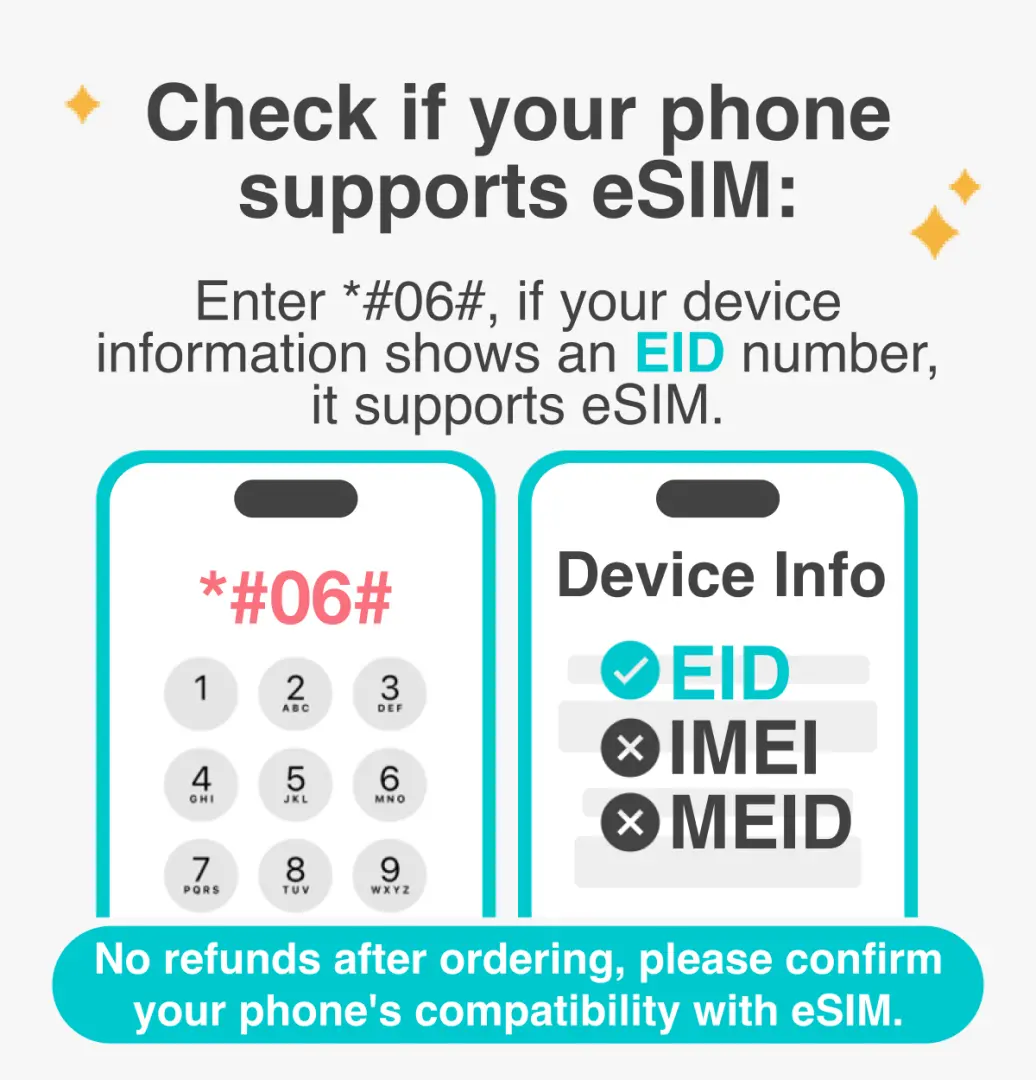
  • iOS needs to be updated to the latest version; please note that iPhones sold in mainland China do not support eSIM. In Hong Kong and Macau, only the iPhone 13 mini, iPhone 12 mini, iPhone SE 2020, and iPhone XS have eSIM functionality.

  • Samsung phones vary by country. Samsung phones purchased in Taiwan do not support eSIM. For other regions, please check with the Samsung website first.

  • Please be aware that signal quality may be affected by factors such as location, terrain, building obstruction, number of users, and weather.

How to Use

  • How to install:
    iOS: Settings > Mobile Services > Join the mobile plan > Scan QR code > Join the mobile plan Android: Settings > Internet (Connectivity) > SIM card administrator > Add SIM card (Join the mobile plan) > Scan QR code
  • Configure eSIM's APN:
    APN is usually automatically recognized; if it cannot be recognized automatically, it needs to be set manually.

    APN: lte.sktelecom.com

Cancellation Policy

  • Once the order has been completed, it cannot be canceled, modified, or refunded
NOTE
  • Due to time zone differences, the confirmed cancellation date is based on the supplier’s local time. Please allow 2–5 business days to process your cancellation request, after which the cancellation fee will be charged according to the product’s cancellation policy. Once the cancellation is confirmed, you will receive your refund within 14 working days.

FAQ

1. Which network provider does the Korea eSIM utilize for internet access in Korea?

The Korea eSIM utilizes SK Telecom (SKT), a leading native network provider in Korea. This ensures high-speed, stable, and reliable internet connectivity throughout your trip, providing an optimal online experience for navigation, communication, and entertainment.

2. What is the process for purchasing and receiving the Korea eSIM?

You can easily purchase the Korea eSIM through KKday, a convenient platform that provides instant access. After placing your order, you will immediately receive a QR code via email. This eliminates the need to pick up a physical card or wait for delivery, allowing for quick setup and use upon arrival.

3. Does the Korea eSIM provide unlimited data for internet usage in Korea?

Yes, the Korea eSIM offers unlimited high-speed data. This means you can enjoy continuous internet access without worrying about data caps, making it ideal for extensive use like navigation, streaming, social media, and staying connected throughout your journey in Korea.

4. What are the steps to activate and set up the Korea eSIM after purchase?

Activating the Korea eSIM is straightforward. Once you receive the QR code, simply scan it with your compatible device. Follow the on-screen prompts to complete the installation. Ensure your device is connected to Wi-Fi during the initial setup process for a smooth and immediate activation.

5. Can the Korea eSIM support hotspot tethering for other devices?

Yes, the Korea eSIM generally supports hotspot tethering. This feature allows you to share your unlimited high-speed internet connection with other Wi-Fi enabled devices such as laptops or tablets, ensuring multiple devices can stay connected while traveling in Korea.

6. How does the QR code setup for the Korea eSIM simplify the internet connection process?

The QR code setup for the Korea eSIM significantly simplifies getting online by eliminating the need for a physical SIM card. This means no hassle of finding a local store, waiting for delivery, or fumbling with tiny card trays and ejection pins. You simply scan and activate for instant connectivity.

7. Does the Korea eSIM require any physical SIM card swapping during installation or use?

No, the Korea eSIM is an embedded digital SIM and does not require any physical card swapping. You can keep your primary physical SIM card in your phone while using the eSIM, ensuring convenience and preventing the risk of losing your original card or needing a SIM tray ejector tool.

8. What kind of internet speed and stability does the Korea eSIM offer?

The Korea eSIM provides high-speed and stable 4G internet. As it uses SK Telecom's native resources, you can expect excellent network coverage and smooth performance, even in high-traffic areas, ensuring a seamless online experience for all your travel needs.

Get Help

KKday Help Center