

[25% Off] Hong Kong & Macau Daily/Total/Unlimited Data eSIM Card
- The telecom data roaming service of this eSIM is provided by CMHK China Mobile Hong Kong
- KKday Hong Kong and Macau eSIM card, personally tested by 3C expert Tim, and the designated eSIM card for use when traveling abroad!
- KKday Hong Kong and Macau eSIM card, compatible with iOS and several Android phones (not Samsung phones)
- KKday Hong Kong and Macau eSIM cards support one-click installation on iOS: Update to the latest iOS App version and iOS 17.4 or above to install the eSIM in one click on the KKday App.
Product Info
The content of this product is provided by machine translation and may not reflect the actual information, please take this into consideration before booking.
eSIM self-detection (please confirm whether your phone supports eSIM before purchasing)

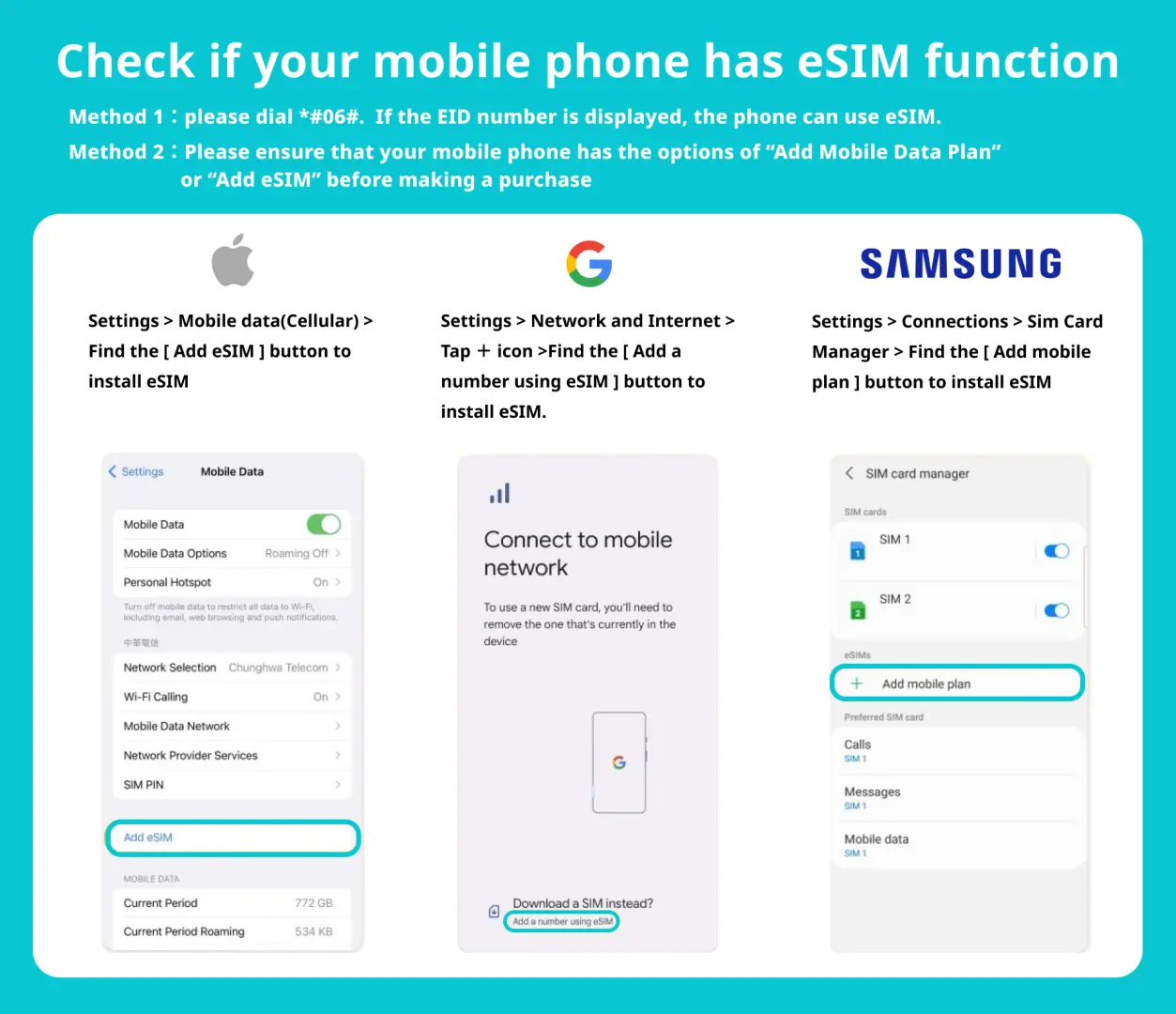
eSIM compatible models


Recommended by 3C Expert Tim
iOS eSIM installation steps reference


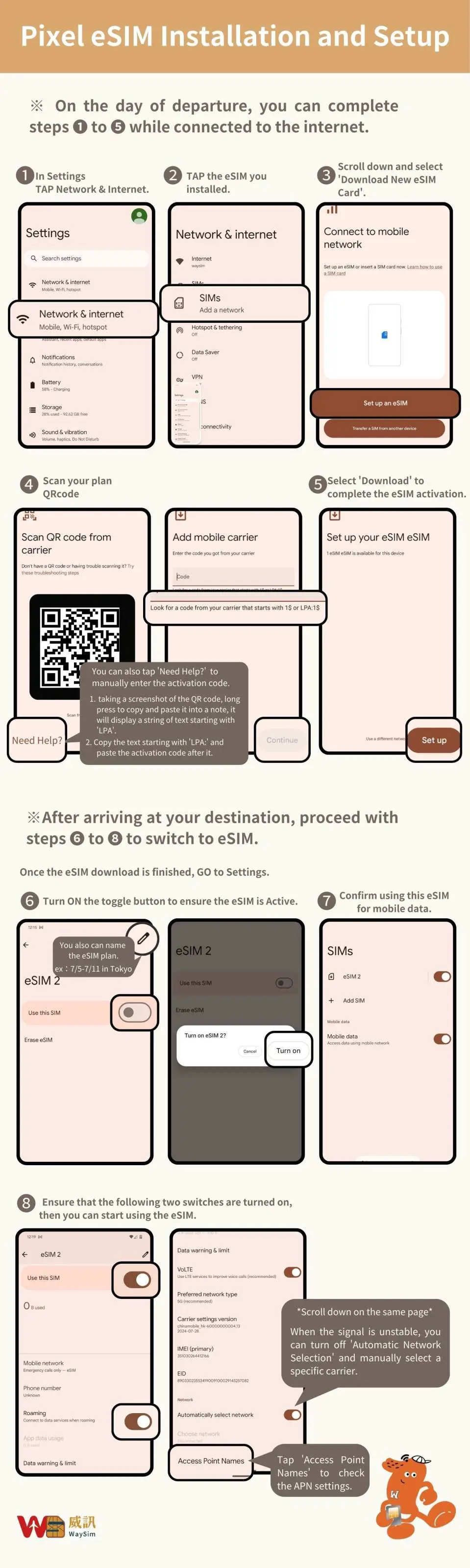
Android eSIM installation steps reference

Purchase Notice
- Please activate the eSIM within 30 days of receiving it.
- The eSIM QR code can only be scanned once. If you are prompted to contact your carrier or other prompts, please turn your phone off and back on or contact technical support.
- Days calculated: After you activate your eSIM card upon arrival in your destination, the first day will be 23:59 on the day you activate your eSIM card. The card will expire at 12:00 PM on the selected day (time calculation is based on Taiwan time).
- Please turn off your eSIM number after scanning and binding at the Taiwan airport on the day of departure. Turn on your eSIM number and eSIM roaming after landing, otherwise there will be a time difference. Time calculations are based on Taiwan time. Please set up your eSIM again on the day of departure. If the eSIM QR code expires due to premature scanning, it is a personal factor and cannot be reissued or refunded.
- Before installing the eSIM, please make sure you are connected to WiFi or mobile network and then scan the QR code to join the mobile plan.
- Please save this QR Code. Once scanned, it will become invalid and cannot be reissued. Please follow the installation instructions and do not exit the screen during the installation process to avoid misjudging the eSIM plan and deleting it.
- To maintain network quality, telecommunications companies adhere to the Fair Use Policy (FUP). High traffic volumes within a short period of time are easily automatically throttled, potentially resulting in internet inaccessibility or slowed speeds. If your speed is reduced due to the FUP, please contact our technical support team.
- The network may change with factors such as the number of users, climate, building shadows, and location. If the reception is unstable, please be sure to contact technical customer service.
- The quality of telecommunications networks varies from country to country, and the base station construction is not as dense as in Taiwan. Each country has different geographical locations and telecommunications construction. We cannot request a refund due to signal conditions in a few areas.
Includes/Excludes
- eSIM
Reminders
For any questions regarding eSIM operation and use, please contact the supplier's technical customer service (see the order notes for contact information) and provide the KKday order number to quickly obtain professional assistance.
How to Use
eSIM activation steps
- Settings → Mobile Services
- Add eSIM
- Scan the QR code to join the action plan
- Set as secondary → Click ''Continue''
*It is recommended to change the action plan label to the local name (e.g. Hong Kong and Macau)
5. Mobile Services → Mobile Data
6. Select Secondary (e.g. Hong Kong and Macau)
→ Turn off the Allow mobile data switch
7. Open this number
→Start roaming
8. Complete the setup
Cancellation Policy
- Once the order has been completed, it cannot be canceled, modified, or refunded
- Due to time zone differences, the confirmed cancellation date is based on the supplier’s local time. Please allow 2–5 business days to process your cancellation request, after which the cancellation fee will be charged according to the product’s cancellation policy. Once the cancellation is confirmed, you will receive your refund within 14 working days.
FAQ
Yes, the Hong Kong and Macau eSIM is specifically designed for seamless use across both regions. This eSIM provides telecom data roaming service through CMHK China Mobile Hong Kong, ensuring reliable network coverage and connectivity whether you are in Hong Kong or Macau. This allows for uninterrupted internet access during your entire trip to both destinations.
When choosing an eSIM for Hong Kong and Macau, key factors include device compatibility (e.g., iOS and specific Android models, noting that Samsung phones are typically not supported for this eSIM), the duration of your trip to match flexible daily options, the available data allowances (such as unlimited data), and the quality of the network provided by the telecom roaming partner. Ease of installation is also a valuable consideration.
To use an eSIM in Hong Kong and Macau, your device must be eSIM-compatible. This includes most iOS devices and several Android phones. It is crucial to verify your device's compatibility before purchase, as certain models, specifically Samsung phones, are generally not compatible with this particular eSIM. Ensuring compatibility guarantees smooth activation and usage.
Generally, there are no specific eligibility requirements for tourists to use an eSIM in Hong Kong beyond possessing an eSIM-compatible device. The Hong Kong and Macau eSIM is designed for international travelers, offering convenient data access. As long as your smartphone supports eSIM functionality, you can easily purchase and activate an eSIM for your visit to Hong Kong, providing immediate connectivity.
Most eSIM plans tailored for international travel to Hong Kong and Macau primarily focus on providing data-only services. These plans are optimized for internet access, navigation, streaming, and using messaging and VoIP apps. Traditional voice calls and SMS functionality are typically not included with data-only eSIMs, but you can utilize internet-based communication tools seamlessly with your active data plan.
Potential limitations of using an eSIM for Hong Kong and Macau include device compatibility restrictions, as not all smartphones support eSIM technology. For instance, this specific eSIM is not compatible with Samsung phones. While installation is often straightforward, some users might find the initial setup different from traditional physical SIM cards. However, once installed, eSIMs offer comparable performance and convenience.
An eSIM data plan for Hong Kong and Macau operates by digitally embedding your network profile directly onto your smartphone, eliminating the need for a physical SIM card. Once activated, your device automatically connects to the designated local network, which for this eSIM is provided by CMHK China Mobile Hong Kong. This enables you to access mobile data for internet browsing, apps, and navigation throughout your journey in both regions.
For iOS devices, installing an eSIM for Hong Kong and Macau is designed to be very user-friendly. If you have updated to the latest iOS App version and iOS 17.4 or above, you can often utilize a one-click installation process directly through the app. Alternatively, the standard installation method involves scanning a QR code provided after purchase or manually entering the eSIM details, then following the guided prompts on your device.
Get Help


