

[UP TO 40% OFF]China & HongKong & Macau eSIM 3-30Days 500MB-50GB Unlimited 5G/4G Data
- New choice for Internet access in China, Hong Kong and Macau, no need to change eSIM cards, enjoy 4G Internet access quickly and smoothly without any hassle.
- Once you receive the voucher, you can scan it and install it, without having to go back and forth to get the physical card or wait for it to be delivered.
- Environmentally friendly, no consumables, free shipping, zero risk of loss.
Package Options
What You Can Expect
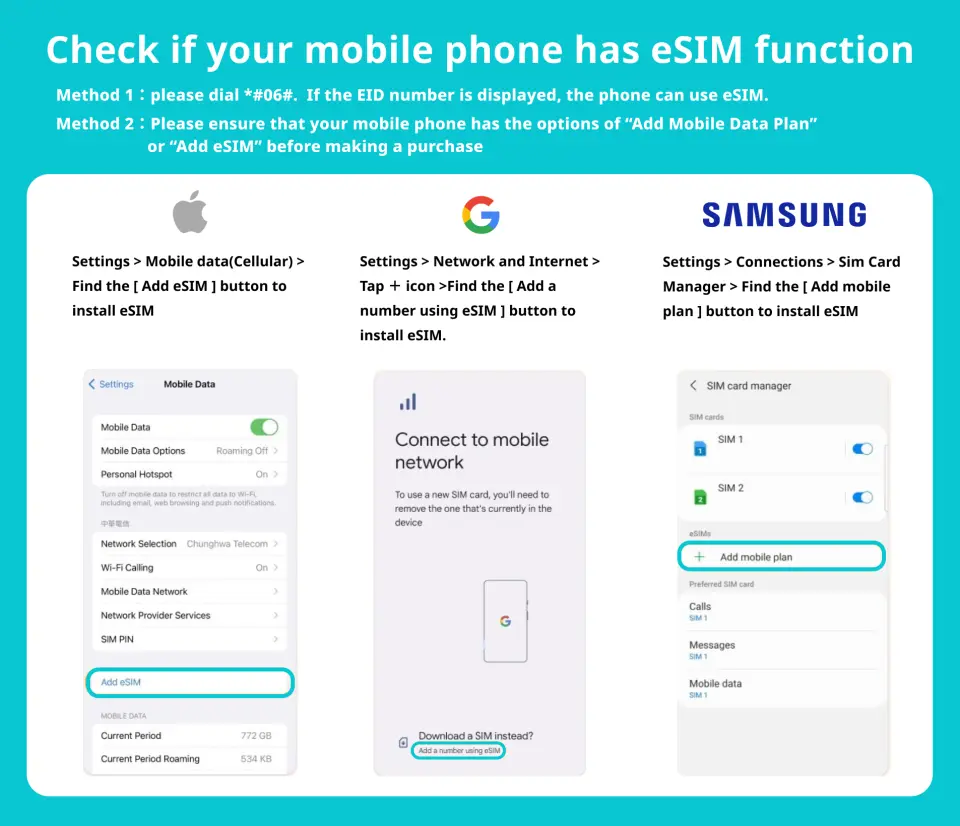
Please confirm that your device is compatible with eSIM before purchasing. After sending the eSIM QR code, this product is non-refundable.

eSIM compatible mobile phone models

eSIM iOS Installation Instructions
Purchase Notice
- Hotspot sharing will occupy bandwidth, and the network speed will vary depending on the terminal device and geographical location, so the minimum network speed is not guaranteed. Please confirm before placing an order.
- In order to maintain network quality, telecommunications companies adhere to the Fair Use Principles (FUP) of network communications. Controlling large amounts of network traffic in a short period of time may result in inability to access the Internet or slowing down the Internet speed. If your speed is slowed down due to the Fair Use Principle (FUP) of Internet Communications, please contact technical customer service.
- The network may change depending on factors such as the number of users, climate, building shadows, and location. If the reception is unstable, please be sure to contact technical customer service.
Includes/Excludes
- eSIM
Reminders
If your phone is locked (e.g. purchased from the United States, Canada, Japan, or the Philippines, etc.), please confirm with the local carrier that the phone has been unlocked (Country Lock).
After placing an order and completing the payment, a receipt will be sent within 28 days before departure. Please receive the eSIM letter and activation information after receiving the eSIM before departure or after arriving at the destination to avoid premature activation, which may affect your usage rights.
Before installing the eSIM, please make sure you are connected to WiFi or mobile network to scan the QR code or enter manually to join the mobile plan (if you need to enter manually, please contact customer service to obtain the activation code)
Please be sure to save the QR code. Once scanned, it will be considered as binding. Please follow the instructions to install. Do not exit the screen during the process to avoid the phone misjudging and causing the eSIM plan to be deleted.
Once a QR code is bound, it can only be scanned again using the same mobile phone. It cannot be reissued or manually input to another mobile phone.
If the eSIM plan is not fully used or deleted without the approval of customer service staff, resulting in an abnormal plan, we will not be able to reissue or refund.
Days calculation method: 24-hour system (user purchases a 3-day Internet plan, installs and activates it at 10:00 am on 9/1, and this plan will end at 9:59 am on 9/4)
How to Redeem Your Voucher
Voucher Redemption Period
- The voucher must be redeemed on the selected date and within operating hours; Invalid after expiration
Cancellation Policy
- Once the order has been completed, it cannot be canceled, modified, or refunded
- Due to time zone differences, the confirmed cancellation date is based on the supplier’s local time. Please allow 2–5 business days to process your cancellation request, after which the cancellation fee will be charged according to the product’s cancellation policy. Once your refund request is confirmed, KKday will initiate the refund to your original payment method within 15 days. The actual refund timing depends on your card-issuing bank’s policy.
FAQ
1. How do I choose the most suitable China, Hong Kong, and Macau eSIM plan for my trip?
To choose the most suitable China, Hong Kong, and Macau eSIM plan, consider your trip duration and daily data needs. Plans typically range from 3 to 30 days and offer varying data allowances, such as 500MB up to 50GB of high-speed 5G/4G data, often with unlimited throttled data thereafter. Evaluate your expected usage for navigation, social media, and communication to select a plan that best fits your travel style.
2. Does a China, Hong Kong, and Macau eSIM cover all three regions seamlessly?
Yes, a China, Hong Kong, and Macau eSIM is designed for seamless connectivity across all three regions. It eliminates the need to switch between different physical SIM cards or manage multiple local plans. Once activated, the eSIM automatically connects to available networks in China, Hong Kong, and Macau, providing continuous internet access as you travel between these destinations without interruption.
3. What are the steps to set up and activate a China, Hong Kong, and Macau eSIM?
Setting up and activating your China, Hong Kong, and Macau eSIM is straightforward. After purchasing, you will typically receive a voucher with a QR code. Simply scan this QR code using your eSIM-compatible device. Follow the on-screen prompts to install the eSIM profile. Ensure your device is connected to the internet during the initial setup to complete the activation process successfully. This eliminates the need for physical card changes.
4. Which local carriers support the China, Hong Kong, and Macau eSIM for reliable service?
The China, Hong Kong, and Macau eSIM typically partners with major local network providers in each region to ensure reliable service. While specific carriers may vary, these partnerships are designed to offer strong 4G and 5G connectivity, providing quick and smooth internet access. This approach aims to deliver stable network performance across diverse locations within China, Hong Kong, and Macau.
5. Are there data-only plans available for the China, Hong Kong, and Macau eSIM?
Yes, the China, Hong Kong, and Macau eSIM primarily offers data-only plans. These plans are specifically designed for internet access, providing high-speed 5G/4G data ranging from 500MB to 50GB, often with unlimited data at reduced speeds once the high-speed allowance is used. This focus on data ensures you have dedicated internet connectivity for all your online needs while traveling in these regions.
6. What are some potential limitations or disadvantages of using an eSIM for travel?
One main limitation of using an eSIM is device compatibility; your smartphone must support eSIM technology. Additionally, the initial setup requires an internet connection to download the eSIM profile. Unlike physical SIMs, you cannot physically swap an eSIM to another device instantly, as it's digitally embedded. It's crucial to ensure your device is unlocked and eSIM-compatible before purchase.
7. How does an eSIM data plan function for internet access in different regions?
An eSIM data plan works by embedding a digital SIM profile directly into your device, eliminating the need for a physical card. When traveling across China, Hong Kong, and Macau, the eSIM seamlessly connects to partner networks in each region. This allows you to access 4G or 5G internet without manually changing SIM cards, offering continuous and hassle-free data connectivity throughout your multi-region trip.
8. What troubleshooting steps can I take if my China, Hong Kong, and Macau eSIM is not connecting to data?
If your China, Hong Kong, and Macau eSIM isn't connecting to data, first check that your device's cellular data is turned on and that the correct eSIM profile is selected. Verify that data roaming is enabled for the eSIM. You might also try restarting your device or manually selecting a network operator in your phone's cellular settings. Ensure your device is updated to the latest software version.


