

【35% OFF】Singapore, Malaysia, Thailand, Indonesia Daily/Total Data eSIM
Stay connected with a hassle-free eSIM for high-speed internet during your travels in Singapore, Malaysia, Thailand, Indonesia. Book through KKday and enjoy exclusive discounts. Enjoy a quick activation process for instant connectivity.
- Stay connected with affordable, unlimited 4G data while traveling in Singapore, Malaysia, Thailand, Indonesia
- Eliminate concerns about switching, installing, or misplacing SIM cards
- Quickly activate the user-friendly eSIM for easy internet access
- Receive an emailed user manual for effortless eSIM utilization
Package Options
Product Info
Product info
- Please check if your phone supports eSIM, and make sure your phone is not locked version before purchasing.
- When the max capacity is reached, the speed will drop to 128Kbps.
- It must be installed and activated at the destination within 30 days after receiving the eSIM, otherwise the eSIM will become invalid and unusable.
- If you do not receive email having eSIM, kindly check spam/junk email or contact us via message.
- Please do not delete eSIM after activating. The eSIM QR code can only be activated once. We are not able to assist you if the eSIM has been deleted from the device.
- All iPhones bought from China mainland, Hong Kong and Macau DO NOT support eSIM, and all Samsung purchased from China mainland, Hong Kong, Macau and Taiwan DO NOT support eSIM.
Please check your device is compatible with eSIM
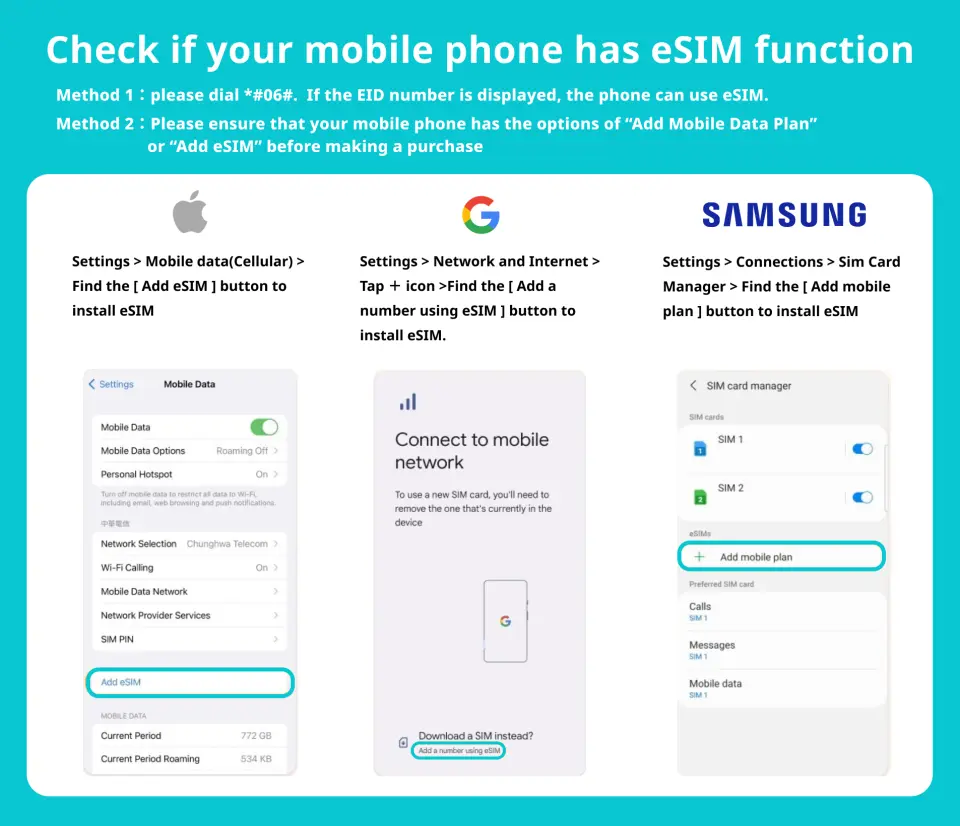

eSIM compatible devices


eSIM installation (ios)


Take Google Pixel 3a as an example on eSIM Android installation


SIM Card Specifications
| Data Usage Specifications | 500MB, 1GB, 2GB, 3GB, 10GB, 20GB, 30GB |
| Transmission Specifications | 4G |
| Signal Coverage Area | Thailand, Malaysia, Singapore, Indonesia, Signals can be affected in remote areas and rough terrain |
| Mobile Carrier | Singapore (Singtel), Malaysia (Maxis), Thailand (Ais), Indonesia (Telkomsel) |
| Supported Sizes | eSIM |
| Hotspot Sharing | Available |
| Supported Frequencies(4G) | B1(2100 MHz) |
| Excludes | Voice calls, Texts |
| Not Supported | SIM-locked device, Carrier-customized device, Mobile hotspotDevices that do not support eSIM |
Purchase Notice
- iPhones bought in China, Hong Kong, and Macau, as well as Samsung devices purchased in China, Hong Kong, Macao, and Taiwan, do not have eSIM support
— Cancellation Policy —
Not responsible for refunds in the following cases:
- Product activation has expired
- The product has been successfully activated
- The location of use does not fully meet the broadcast reception conditions
- Due to variations in mobile device settings, certain or all product features may not be accessible
- The mobile device is SIM-locked to a specific network
- Dissatisfaction with internet transmission speed may arise from factors such as the network operator's facilities at the location or the client computer line not meeting the necessary requirements
- Other causes after the product has been activated
- Customers do not initiate contact with the supplier when encountering issues with the product
Includes/Excludes
Reminders
The eSIM and guidelines will be sent to the customer's email within 6 hours
If you do not receive email having eSIM, please check spam/junk email or contact us via message
Please check whether your device supports eSIM before purchasing
iPhones bought in China, Hong Kong, and Macau, as well as Samsung devices purchased in China, Hong Kong, Macao, and Taiwan, do not have eSIM support
Please do not delete the eSIM after activation, as the eSIM QR code can only be used once. If the eSIM is deleted from the device, we cannot provide assistance
Install and activate the eSIM at the destination within 30 days of receiving it; otherwise, the eSIM will become invalid and unusable
The quality of communication may be affected by outside conditions; surrounding landforms (e.g. mountains), weather, obstruction by buildings, the number of users, or locations may affect the speed and quality of the internet
In accordance with the Fair Usage Policy, excessive video streaming or data consumption may cause slower or weaker signal reception
How to Use
- The eSIM and guidelines will be sent to the customer's email within 6 hours
- If you do not receive email having eSIM, kindly check spam/junk email or contact us via message
- Please do not delete the eSIM after activation, as the eSIM QR code can only be used once. If the eSIM is deleted from the device, we cannot provide assistance
[eSIM] Guide to Check eSIM Compatibility with Phones
— IOS —
- Method 1:
Step 1: Go to Settings > Cellular
Step 2: Check the SIM entry. If there is a line "Add eSIM", your device supports eSIM
- Method 2:
Step 1: Go to Settings > General > About
Step 2: Check in the item Model name and compare with the list of eSIM supported devices
Step 3: Check the Network lock section with the line "Unlimited SIM" and the available SIM section with IMEI2 number, then your device supports eSIM
— Android —
- Method 1
Step 1: Open the calling app and enter *#06#. Press call
Step 2: Your IMEI number will pop up and pay attention to the EID information (if any), which is the information of the eSIM on your phone
- Method 2:
Step 1: Open Settings on your phone
Step 2: In the search bar, enter “IMEI” and select IMEI Information. If this information is available, your device supports eSIM
Validity Period
- The voucher must be used on the selected date and within operating hours; Invalid after expiration
Cancellation Policy
- Once the order has been completed, it cannot be canceled, modified, or refunded
- Due to time zone differences, the confirmed cancellation date is based on the supplier’s local time. Please allow 2–5 business days to process your cancellation request, after which the cancellation fee will be charged according to the product’s cancellation policy. Once the cancellation is confirmed, you will receive your refund within 14 working days.
FAQ
Most smartphones released in recent years support eSIM functionality. You can check this in your phone's settings: iPhone: Go to Settings > General > About. Look for an 'Available SIM' or 'eSIM' option. Android: Go to Settings > About phone > SIM card status or Network. Look for eSIM-related information. If you're unsure, it's best to check your phone manufacturer's official specifications to confirm if your device supports eSIM.
Yes, you can complete most of the setup for this eSIM service in Taiwan before your trip. You will receive a detailed user guide on how to scan the QR Code and add the eSIM to your phone. We recommend completing the setup while connected to a stable internet connection in Taiwan. However, to avoid roaming charges, please activate your eSIM plan only after arriving in your destination country (Singapore, Malaysia, Thailand, Indonesia).
You can easily purchase this multi-country Southeast Asia eSIM service through the KKday online platform. KKday offers a convenient booking process, allowing you to quickly obtain your eSIM and receive the necessary QR Code and detailed instructions for activation immediately after payment. This saves you the hassle of finding a physical SIM card locally, ensuring you have planned your internet access in advance for a smooth and worry-free travel experience.
When activating the eSIM, your phone will need to be connected to Wi-Fi or use your existing mobile data to scan the QR Code and download the eSIM profile. After activation, when using this eSIM service in Singapore, Malaysia, Thailand, or Indonesia, your phone does NOT need to have 'Data Roaming' enabled. The eSIM will automatically identify as a local network provider, connecting you directly to the internet and avoiding extra roaming charges.
This eSIM service is designed to provide high-speed and stable 4G data connections, covering major tourist areas in Singapore, Malaysia, Thailand, and Indonesia. It automatically connects to the best local network provider to ensure you enjoy a smooth internet experience throughout your trip. However, actual signal quality and speed may still be affected by factors such as geographical location, building obstructions, or local network conditions.
This eSIM service is specifically designed for multi-country travel and offers a variety of flexible data plans to suit different needs. You can choose plans calculated 'daily' or plans providing a 'total data amount.' Both types of plans offer high-speed 4G data connections, ensuring you stay connected throughout your journey in Singapore, Malaysia, Thailand, and Indonesia, allowing you to easily look up information, navigate, or share your travel moments with friends and family.
The main advantages of an eSIM lie in its convenience and hassle-free experience. You don't need to swap physical SIM cards, avoiding the risk of loss or damage, and saving you the trouble of finding local SIM card vendors. eSIM activation is quick; you can easily install it by scanning a QR Code, and it allows you to store multiple eSIM profiles on the same device, making it convenient to switch between different country plans.
The activation and installation process for this Southeast Asia eSIM is very user-friendly and quick. You will receive a detailed QR Code and a step-by-step illustrated user manual via email. Simply follow the instructions to scan the QR Code and complete a few simple steps in your phone's settings to add the eSIM to your device. The entire process is designed to be straightforward, enabling you to get online easily without complex operations.
Get Help


