

Global eSIM for 143 Countries | Unlimited Daily Data | Dosirak eSIM
- A must-have for global travel, try using an E-SIM that doesn't require a physical SIM card swap.
- Upon arrival at your destination, you can immediately enjoy internet data without needing to pick up a separate SIM card.
- Simply scan the QR code on the voucher sent after booking confirmation to install and use.
- Since it is not a physical SIM card, there is no risk of losing it.
Package options
Product Info
- This product is provided by Wide Mobile Co., Ltd.
- Option Description
- Available Countries
[Global 143 Countries]:
Ghana, Guadeloupe, Guatemala, Guam, Grenada, Greece, South Africa, Netherlands, Nepal, Norway, New Zealand, Nicaragua, Taiwan, South Korea, Denmark, Dominica, Dominican Republic, Germany, Laos, Liberia, Latvia, Russia, Romania, Luxembourg, Rwanda, Lithuania, Madagascar, Martinique, Macau, Malawi, Malaysia, Mexico, Morocco, Mauritius, Mozambique, Montenegro, Moldova, Malta, Mongolia, USA, Vanuatu, Barbados, Bangladesh, Bermuda, Vietnam, Belgium, Belarus, Bosnia and Herzegovina, Bulgaria, Brazil, Brunei, Saudi Arabia, Serbia, Seychelles, Saint Lucia, Saint Vincent and the Grenadines, Saint Kitts and Nevis, Sudan, Sri Lanka, Sweden, Switzerland, Spain, Slovakia, Slovenia, Sierra Leone, Singapore, United Arab Emirates, Aruba, Armenia, Argentina, Iceland, Haiti, Ireland, Azerbaijan, Albania, Algeria, Antigua and Barbuda, Anguilla, Eswatini, Estonia, Ecuador, El Salvador, UK, British Virgin Islands, Yemen, Oman, Austria, Honduras, Jordan, Uganda, Uruguay, Uzbekistan, Ukraine, Iran, Israel, Egypt, Italy, India, Indonesia, Japan, Jamaica, Zambia, Georgia, Central African Republic, Gibraltar, Czech Republic, Chile, Cameroon, Kazakhstan, Qatar, Cambodia, Canada, Kenya, Cayman Islands, Costa Rica, Ivory Coast, Colombia, Democratic Republic of the Congo, Kuwait, Croatia, Kyrgyzstan, Cyprus, Tajikistan, Tanzania, Thailand, Turkmenistan, Turks and Caicos Islands, Turkey, Tonga, Tunisia, Trinidad and Tobago, Panama, Paraguay, Pakistan, Papua New Guinea, Faroe Islands, Peru, Portugal, Poland, France, French Guiana, Fiji, Finland, Philippines, Hungary, Australia, Hong Kong
- How to check if your phone has an eSIM module installed
*Dial *#06# → If there is an EID in the device information, you can use eSIM

eSIM QR Code Delivered Same Day
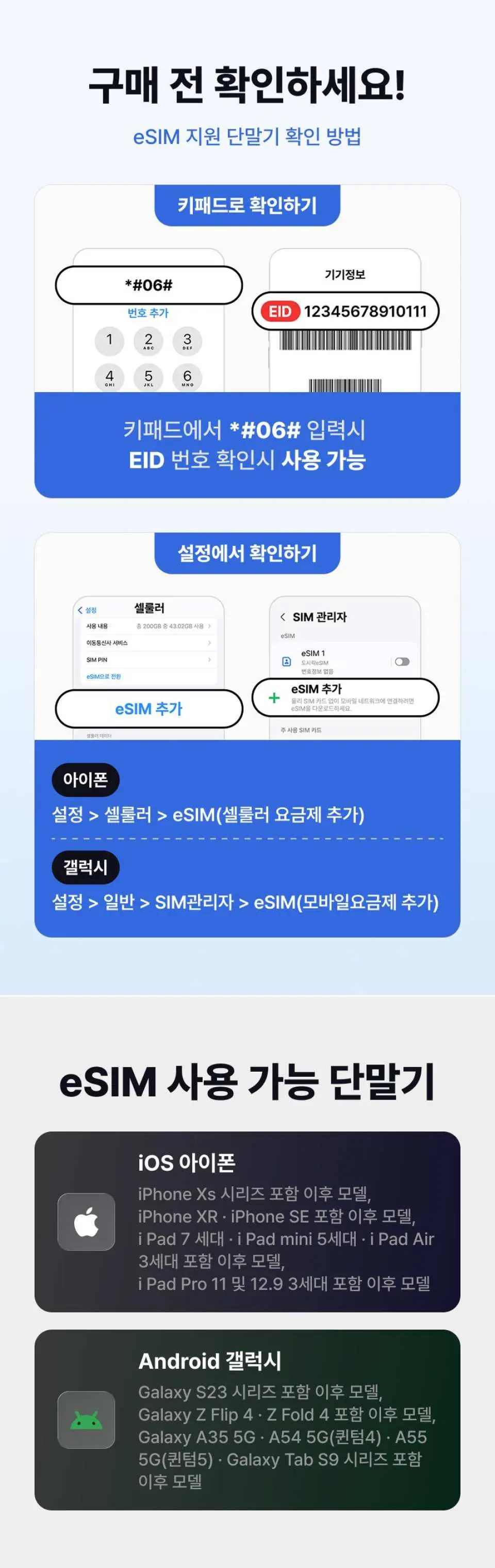
Devices Supporting eSIM

How to Install and Use Dosirak eSIM

eSIM Important Notes
eSIM Installation Guide - iPhone (iOS)
eSIM Installation Guide - Android
Know before you book
Reminders
Before purchasing, please be sure to check if your phone model supports eSIM service. [See details page]
If you have an active mobile protection service, you must visit your carrier's customer service center or website to unlock your SIM and cancel the protection service before you can use it.
After purchase, product information (QR code) will be sent via email and notification message. Exchanges and refunds are not possible once the QR code has been sent or scanned.
Data must be available to register the purchased eSIM product on your device. (Cellular network or Wi-Fi connection)
If you delete the registered cellular network plan after scanning the QR code, you will not be able to use the eSIM, so please keep the plan until your usage ends.
Can be installed in advance at the departure point; the usage period begins when connected to the destination network.
If possible, please turn off data roaming for your domestic mobile carrier before departure. (Failure to do so may result in overseas roaming charges.)
Depending on the local carrier's communication environment, data usage may not be smooth in some areas. Depending on the model used, if the frequency band does not match the local carrier's network, you may connect to 3G or 2G.
Product options (data provided, usage days, promotions, etc.) are subject to change without notice as they are governed by the terms and conditions of the providing carrier.
Once an eSIM is deleted, it cannot be re-scanned or recovered. As stated above, refunds are not available if you cannot use the service due to your own reasons or a misunderstanding of the instructions.
Exchanges and refunds are not possible once the QR code has been sent or scanned.
No refunds will be provided if the service is unavailable due to local carrier network maintenance, natural disasters, etc.
How to Use
Step 1. ▶Purchase◀
- Please select the eSIM data capacity and duration you require.
- Once your order is confirmed, the QR code will be sent to your email and mobile phone. (*If you do not receive it, please contact customer service to request it again, and we will send it to you immediately.)
*Orders placed daily between 09:00-18:00 will be shipped on the same day, processed every 4 hours. (Orders placed after 18:00 will be shipped the following day; shipping times may be slightly delayed depending on order volume.)
Step 2. ▶Setup◀
1. Open Settings > Cellular menu
- Select 'Add Cellular Plan'.
(Cellular plans can only be added in a network environment)
2. Add Cellular Plan > Scan QR Code
- Scan the QR code image received via text message or email.
- If you are unable to scan the QR code, you can set it up manually.
3. Assign Cellular Plan Label and Line Usage
[Plan Label]
- Existing SIM → Primary
- eSIM (Local SIM) → Secondary (Freely set for travel, work, etc.)
[Default Line]
- Existing SIM → Calls/Messages, iMessage/FaceTime
- eSIM (Local SIM) → Cellular Data (Allow switching off)
4. Settings > Cellular > Turn off 'Allow Cellular Data Switching'
- When using abroad, please use it after disabling cellular data switching to prevent your existing SIM (Primary) from being used for data.
* If you turn on Data Roaming while 'Primary' is selected for cellular data, your domestic carrier (Primary) may charge roaming fees.
5. Manual APN Setup (If there is no data)
- Settings > Cellular > Cellular Plans > Select eSIM Plan > Cellular Data Network
- In most cases, it is set automatically, but sometimes you need to change the APN information.
* Please check the product details page of your purchase to obtain the APN information.
Cancellation Policy
- Once the order has been completed, it cannot be canceled, modified, or refunded
- Due to time zone differences, the confirmed cancellation date is based on the supplier’s local time. Please allow 2–5 business days to process your cancellation request, after which the cancellation fee will be charged according to the product’s cancellation policy. Once your refund request is confirmed, KKday will initiate the refund to your original payment method within 15 days. The actual refund timing depends on your card-issuing bank’s policy.
FAQs
1. How does the Global eSIM Unlimited Data eSIM provide seamless internet access across different countries?
This Global eSIM offers extensive coverage in numerous countries worldwide, allowing travelers to maintain internet connectivity without needing physical SIM card swaps. It operates by utilizing local network partnerships, ensuring stable and reliable data service wherever you travel internationally. Users can enjoy continuous access to maps, communication apps, and online resources throughout their journey.
2. What is the step-by-step process to install and activate the Global eSIM Unlimited Data eSIM?
Installation is straightforward and digital. After your reservation is confirmed, you will receive a voucher containing a unique QR code. Simply scan this QR code with your compatible device, and follow the on-screen instructions to install the eSIM profile. Activation typically occurs automatically within 24 hours of purchase, or upon arrival at your destination, allowing immediate data usage.
3. Does the Global eSIM Unlimited Data eSIM solely offer data services, or does it include voice calls and SMS?
The Global eSIM Unlimited Data eSIM is specifically designed as a data-only solution for internet access while traveling. It provides unlimited data usage, which is ideal for browsing, streaming, and using messenger apps. It does not natively include voice call or SMS services, but you can use internet-based calling and messaging applications that rely on data.
4. What specific features of this Global eSIM enhance the travel experience for users?
This Global eSIM significantly enhances travel convenience by eliminating the need for physical SIM cards, reducing the risk of loss, and avoiding complicated setup processes. Its digital nature means activation is quick via a QR code, allowing immediate internet access upon arrival. This ensures travelers stay connected effortlessly for navigation, communication, and sharing their experiences.
5. What are the common device compatibility requirements for using a Global eSIM, and are there any limitations to be aware of?
To use a Global eSIM, your smartphone or tablet must be eSIM-compatible. Most newer iPhone models (XR and later), select Samsung Galaxy models, Google Pixel phones, and other Android flagships support eSIM. It's crucial to check your device's specifications before purchase. Ensure your device is unlocked by your carrier, as locked phones may not support eSIM from other providers.
6. After activation, what are the recommended steps for managing and utilizing the Global eSIM for data during a trip?
Once activated, ensure your device's mobile data settings are configured to use the eSIM profile. You can typically switch between your primary physical SIM and the eSIM within your phone's cellular settings. It is recommended to enable data roaming for the eSIM if prompted, and disable data for your physical SIM to avoid unexpected charges. Monitor your data usage through your device settings.
7. How quickly can travelers expect to use the internet with the Global eSIM Unlimited Data eSIM upon arriving at their destination?
Travelers can expect to use the internet almost immediately upon arriving at their destination. The Global eSIM is designed for quick activation, often within 24 hours of purchase, and allows for instant data access once installed and configured on a compatible device. This eliminates typical waiting times associated with acquiring a local physical SIM card, ensuring seamless connectivity from the moment you land.
8. What factors should travelers consider when evaluating the value of a Global eSIM for their international data needs?
When evaluating a Global eSIM, travelers should consider its coverage areas, data allowances (e.g., unlimited options), ease of activation, and overall convenience compared to traditional roaming or physical SIM cards. Factors like device compatibility, customer support availability, and the simplicity of managing your plan digitally also contribute to its value for a hassle-free international data experience.


