


Europe & USA & Australia & New Zealand High-Speed 300MB up to 500GB data eSIM (USA includes Hawaii, excluding Guam and Saipan)
- Save your valuable time to get SIM card and receive eSIM QRCode within 24 hours
- Scan the QRCode to set up an eSIM (Embedded-SIM), eliminating the complicated steps of changing SIM card
- Enjoy high speed mobile network through local carrier.
Package Options
What You Can Expect
Check if your mobile phone has eSIM function


eSIM-Compatible Devices


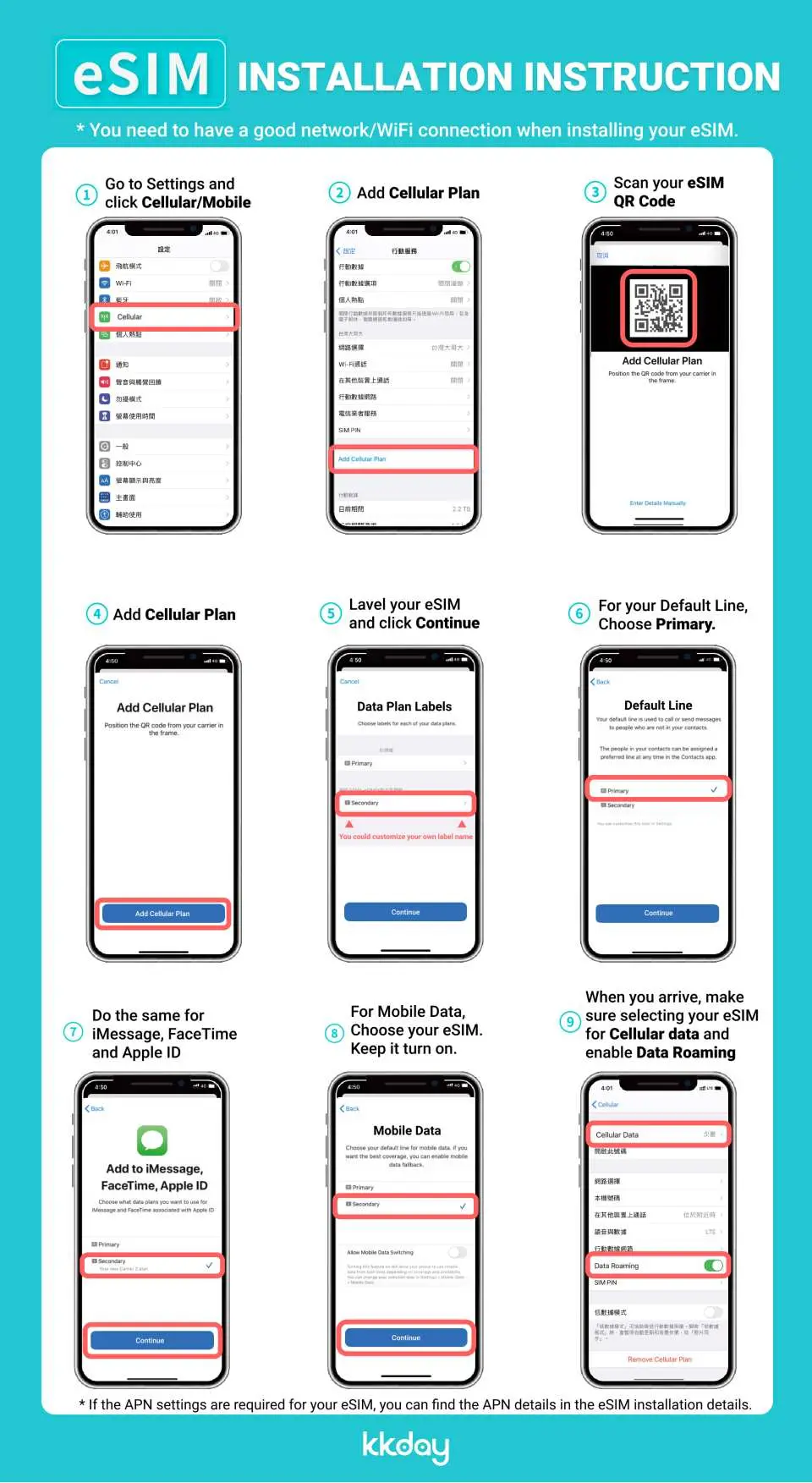
eSIM installation guideline

SIM Card Specifications
| Data Usage Specifications | Unlimited data, 800MB, 1GB, 2GB, 5GB, 10GB, 15GB, 20GB, 50GB, 100GB, 200GB |
| Transmission Specifications | 4G |
| Signal Coverage Area | Latvia, Slovenia, Bulgaria, France, United States, Australia, Slovakia, Romania, New Zealand, United Kingdom, Italy, Germany, Czechia, Portugal, Spain, Netherlands, Austria, Poland, Ireland, Hungary, Croatia, Lithuania, Estonia, Sweden, Norway, Malta, Belgium, Greece, Denmark, Finland, Switzerland, IcelandAndorra, Belarus, Bosnia and Herzegovina, Bulgaria, Cyprus, Faroe Islands, Georgia, Gibraltar, Kosovo, Liechtenstein, Macedonia, Moldova, Montenegro, Serbia |
| Mobile Carrier | Vodafone, Telecom, UCOM, Azercell, 3, Proximus, BH, Telenor, Tele2, Cytamobile, O2, TDC, Elisa, Orange, Geocell, Pelephone, Wind, KaRTel, IPKO, Sky, FL1, BITE, Mobitel, Salt, Turkcell, KyivStar, T-Mobile/AT&T. |
| Supported Sizes | eSIM |
| Hotspot Sharing | Available |
| Supported Frequencies(4G) | B4(AWS), B1(2100 MHz), B5(850 MHz), B12(700 MHz), B2(1900 MHz), B30(2300 MHz) |
| Excludes | Voice calls, Texts |
| Not Supported | Dual-SIM device, SIM-locked device, Carrier-customized device, Mobile hotspot |
| Reminders | This eSIM is data only. It does not include a phone number to make phone calls or send SMS messages. |
Purchase Notice
- Data plan validity starts immediately when eSIM is installed.
- Please make sure your cell phone and its operating system are compatible with eSIM, failure to do so may result in activation failure, refunds will not be granted
- iOS requires version 12.1 or later; please note that iPhones sold in China do not support eSIM and certain cell phones sold in Hong Kong and Macao do not support eSIM
Includes/Excludes
Reminders
This eSIM is data only. It does not include a phone number to make phone calls or send SMS messages.
High Speed Data throughout, there is no daily data limit, once data is utilized, unlimited data with reduce speed up to 128 kbps (Messaging apps)
eSIM QRCode will be sent to your email address once your booking is confirmed
Please ensure that you have an eSIM compatible and network-unlocked device, and the travel itinerary is confirmed
No Refunds or Cancellation due compatibility issues or changes in itinerary or past expiry date
You may install eSIM before traveling(before your flight) or, at your destination when you need it
eSIM can only be installed once. Do NOT DELETE/REMOVE your eSIM from your device after successful installation
Expiry date - 45 days from the purchase date.
How to Use
Need an internet connection to install
Step By Step on How to use:
- iOS- Settings > Cellular/Mobile Data > eSIM > Add Data Plan , Scan QR and label accordingly. (example, Country eSIM)
- Android- Settings > Network> Sim Card Manager > eSIM > Add mobile plan > Scan QR and label accordingly.
Complete step 1 and step 2.
- iOS
Step 1. Settings>Cellular Data/Mobile Data > Turn on your eSIM > Turn on Data Roaming
Step 2. Settings>Cellular Data/Mobile Data > In Mobile Data > Select your eSIM
- Android
Step 1. Connections> SIM Card Manager> Turn on (eSIM)> Scroll bottom > Mobile Data > Select your eSIM
Step 2. Connections >Mobile Network > Turn on Data Roaming
Cancellation Policy
- Once the order has been completed, it cannot be canceled, modified, or refunded
- Due to time zone differences, the confirmed cancellation date is based on the supplier’s local time. Please allow 2–5 business days to process your cancellation request, after which the cancellation fee will be charged according to the product’s cancellation policy. Once the cancellation is confirmed, you will receive your refund within 14 working days.
FAQ
An eSIM, or embedded SIM, is a digital SIM card that allows you to activate a cellular plan from a carrier without needing a physical SIM card. For international travel, an eSIM functions by connecting you to a local mobile network in your destination, providing high-speed data access. This allows you to stay connected for navigation, communication, and internet use without needing to swap physical SIM cards or rely on Wi-Fi hotspots, ensuring a seamless travel experience across regions like Europe, USA, Australia, and New Zealand.
eSIM compatibility is primarily found in newer smartphone models from major manufacturers, including Apple (iPhone XR and later), Samsung (Galaxy S20 and later), Google Pixel (Pixel 3 and later), and some other Android devices. However, not all models or regions support eSIM functionality, so it's crucial to verify your specific device's compatibility with eSIM technology before purchasing. You can usually find this information in your phone's settings or by checking the manufacturer's official website.
The main advantages of using a travel eSIM include convenience, as it eliminates the need to physically swap SIM cards, and the ability to switch between data plans digitally. It also allows you to keep your primary SIM card active for calls and texts while using the eSIM for data. Potential disadvantages include device compatibility limitations, as not all phones support eSIMs, and a steeper learning curve for first-time users in setting up the digital profile. Additionally, if an issue arises, troubleshooting might require internet access.
When selecting a data eSIM for these regions, consider several factors to find the most suitable option. Evaluate the amount of data offered to match your usage needs, the validity period of the plan, and the specific countries covered within the regions (Europe, USA, Australia, New Zealand). Look for eSIMs that partner with reliable local carriers to ensure strong network coverage and stable high-speed connectivity. Checking user reviews and support availability can also help in making an informed decision for a seamless connection abroad.
Yes, it is absolutely possible and common to purchase eSIMs that are solely for data services when traveling internationally. These data-only eSIM plans are designed for users who primarily need internet access for navigation, communication apps, social media, and general browsing. They typically do not include local phone numbers or call/SMS allowances but allow you to make calls via VoIP apps like WhatsApp or Facetime, using your data connection. This offers a cost-effective way to stay connected.
Setting up and activating an eSIM typically involves a few straightforward steps. First, after purchasing, you will receive an eSIM QR code, usually via email. Next, go to your phone's cellular or mobile data settings and select the option to 'Add Cellular Plan' or 'Add Data Plan.' Then, scan the provided QR code. Your device will then guide you through adding the plan, often prompting you to label it (e.g., 'Travel eSIM'). Once added, ensure the eSIM profile is enabled for mobile data usage in your phone's settings when you arrive at your destination.
Users can generally expect high-speed 4G network performance from an international data eSIM in Europe, USA, Australia, and New Zealand. These eSIMs typically leverage local carrier networks, providing reliable and stable connectivity comparable to what local residents experience. This allows for smooth browsing, streaming, video calls, and use of navigation apps without significant daily data limitations. The exact speeds can vary based on your specific location, network congestion, and the local carrier's infrastructure in each country.
An eSIM simplifies mobile connectivity by eliminating the need to physically handle small, easily lost SIM cards. Instead, you can activate data plans digitally by scanning a QR code, which saves valuable time and removes the complicated steps of changing SIM cards. This means you can arrange your connectivity before you even depart. Furthermore, an eSIM allows you to store multiple data plans on one device and switch between them effortlessly, offering greater flexibility and convenience, especially when visiting multiple countries.
Get Help


