

Airalo Japan eSIM: 1-20GB unlimited data eSIM for Japan
- A new choice for Internet access, no need to change SIM cards, enjoy 4G Internet access quickly and smoothly without any hassle
- Once you receive the voucher, you can scan it and install it, without having to go back and forth to get the physical card or wait for it to be delivered.
- Environmentally friendly, no consumables, free shipping, zero risk of loss
Package Options
Product Info
The content of this product is provided by machine translation and may not reflect the actual information, please take this into consideration before booking.
- eSIM installation process
For iOS devices, please refer to this link or the pictures and videos below. For Android devices, please refer to this link or the pictures below.
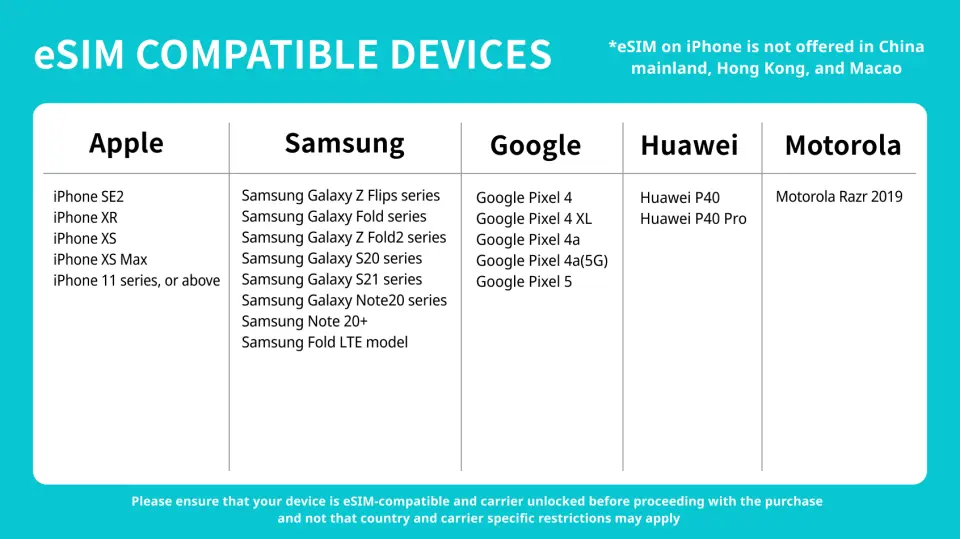
- eSIM supported device models
Please refer to this link for a complete list of eSIM-supported device models. Please also refer to the tutorial steps ( iOS / Android ) to test whether your phone supports the eSIM function before placing an order.
- Precautions
- iPhones purchased in China do not support the eSIM function. In Hong Kong and Macau, only iPhone 12 mini, iPhone SE2 and iPhone XS support the eSIM function. Other models do not support it. Please confirm the place where the phone was purchased before placing an order.
- Samsung S20 Series, Samsung Galaxy S21 5G Series, Samsung Galaxy Z Flip 5G, Samsung Note 20 Ultr, Samsung Galaxy Z Fold 2 purchased in the United States do not support eSIM function
- Samsung Note 20 Ultra and Samsung Galaxy Z Fold 2 purchased in Hong Kong do not support eSIM function
- Samsung Note 20 purchased in South Korea does not support eSIM function
- Although Samsung Galaxy Z Flip3 has developed eSIM function, it is not stable yet and is not recommended for customers to buy
eSIM compatible mobile phone models

eSIM installation and activation process


iOS system: eSIM installation and activation process
Purchase Notice
- Please pay attention to whether the mobile phone version and model are suitable for this product. If it cannot be used due to non-confirmation, no refund will be given.
- Samsung phones have different versions depending on the country of purchase. Please check the list of countries that support eSIM before purchasing.
- iOS version 12.1 or above is required. iPhones sold in China do not support the eSIM function, and some mobile phones in Hong Kong and Macau do not support the eSIM function.
Reminders
A QR code can only be scanned once with one mobile phone. Please do not change or delete it after binding.
When you finish using the eSIM plan in your phone, click [Remove Action Plan] at the bottom to remove it.
Internet usage must comply with the Fair Usage Policy (FUP). If excessive usage in a short period of time causes a surge in traffic, telecom operators have the right to regulate it, which will cause a short-term speed reduction or network disconnection. It is recommended to turn off automatic app updates and automatic video playback on your phone.
International Fair Use Terms To ensure that all users have fair access to mobile network services at all times, each telecom operator has its own fair use agreement to regulate fair network usage. When a user uses too much data in a busy network area within a short period of time, causing other users to be unable to use the network normally, the telecommunications company may temporarily limit the speed. Our company will not be able to intervene and your mobile network may be temporarily affected. To ensure normal use, please try to avoid watching videos for a long time or updating software and other tools that consume a lot of data.
Please be aware that the quality of Internet access may be affected by factors such as location, terrain, building shielding, number of users and weather.
Please remember to turn off data roaming on the original SIM card to avoid using the mobile network of the original SIM card and incurring high roaming charges.
Cancellation Policy
- Once the order has been completed, it cannot be canceled, modified, or refunded
- Due to time zone differences, the confirmed cancellation date is based on the supplier’s local time. Please allow 2–5 business days to process your cancellation request, after which the cancellation fee will be charged according to the product’s cancellation policy. Once the cancellation is confirmed, you will receive your refund within 14 working days.
FAQ
The Airalo Japan eSIM is designed to provide extensive 4G internet access throughout various regions of Japan, ensuring travelers can stay connected whether in major cities or exploring more remote areas. It leverages local network infrastructure to offer quick and smooth internet service. Users can enjoy reliable connectivity for navigation, communication, and online activities during their trip.
Setting up the Airalo Japan eSIM is straightforward. After completing your order, you will receive a digital voucher. Simply scan the provided QR code with your eSIM-compatible device. This process automatically installs the eSIM profile, eliminating the need for physical SIM card changes or manual configuration. Once installed, you can activate it according to the instructions, and your internet service will be ready for immediate use.
Yes, the Airalo Japan eSIM is highly suitable for short-term visitors to Japan. Its primary advantage is the convenience of digital activation, meaning you don't need to pick up or exchange a physical SIM card. This saves time upon arrival and eliminates the risk of losing a tiny physical card. It offers quick and smooth 4G internet access, allowing travelers to effortlessly navigate, communicate, and share their experiences.
The Airalo Japan eSIM offers significant convenience compared to traditional physical SIM cards. With an eSIM, there's no need to physically swap cards, which means no tools like ejection needles are required, and there's no risk of losing your original SIM. Activation is instant via a QR code after purchase, avoiding any waiting time for delivery or pick-up. This streamlined process provides hassle-free and swift internet access from the moment you land.
For a one-week trip, 5GB of data from the Airalo Japan eSIM can be sufficient depending on your usage habits. This amount generally covers light browsing, map navigation, messaging, and occasional social media use. However, heavy streaming, frequent video calls, or large downloads will consume data quickly. It's advisable to monitor your data usage throughout your trip and utilize Wi-Fi where available to conserve your eSIM data.
If your Airalo Japan eSIM isn't connecting to the internet, several factors could be at play. First, ensure your device is eSIM-compatible and unlocked. Check that the eSIM profile is correctly installed and activated in your phone's settings. Verify that data roaming is enabled for your eSIM line. Sometimes, incorrect APN settings can cause issues; follow the provider's instructions for APN configuration. If problems persist, restarting your device often resolves minor connection glitches.
The Airalo Japan eSIM is compatible with most modern smartphones, tablets, and other mobile devices that support eSIM technology. This includes recent models from major manufacturers such as Apple (iPhone XR and later), Samsung (Galaxy S20 and later), Google Pixel (Pixel 3 and later), and others. To ensure seamless use, it is essential to confirm that your specific device model supports eSIM functionality before purchasing and activating the service.
The Airalo Japan eSIM ensures stable 4G network performance by utilizing Japan's robust local telecommunication infrastructure. This allows for quick and smooth internet access across various locations. By connecting to established networks, the eSIM provides reliable connectivity for all your online needs, from navigating urban centers to sharing moments from more scenic routes, ensuring a consistent high-speed data experience.
Get Help


