

[Buy One Get One Free on Selected Plans] Thailand eSIM Card | Thailand DTAC Telecom Total/Unlimited Data eSIM | Unlimited Data with Local Phone Number | Install Upon Arrival in Thailand
- Once this product is installed, it will be automatically activated, starting from the first day. Please be sure to scan and install it after arriving in Thailand. Installation outside of Thailand will render it invalid
- Thailand DTAC Telecom original eSIM, excellent signal, with phone number, can book a Thai restaurant
- The eSIM QR code will be sent within 24 hours after placing the order, regardless of weekdays or holidays.
Package Options
Product Info
The content of this product is provided by machine translation and may not reflect the actual information, please take this into consideration before booking.
- Before purchasing, please make sure your phone supports eSIM. Please click this link to view the list of eSIM compatible mobile phones.
- After purchase, please make sure to update iOS to the latest version and have a stable WiFi connection before installing eSIM. Please click this link to refer to the instructional pictures.
- Please click this link for eSIM installation instruction video.


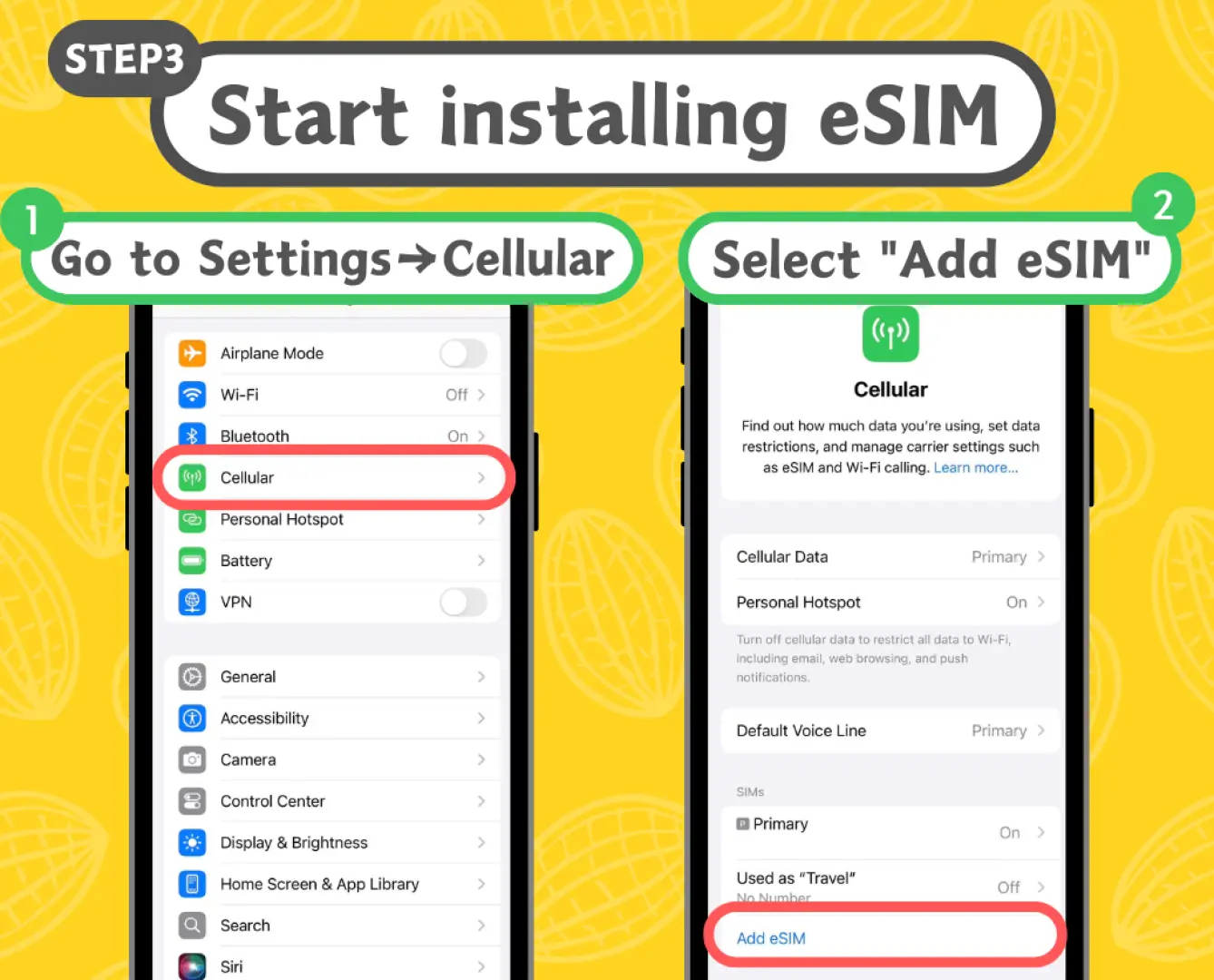


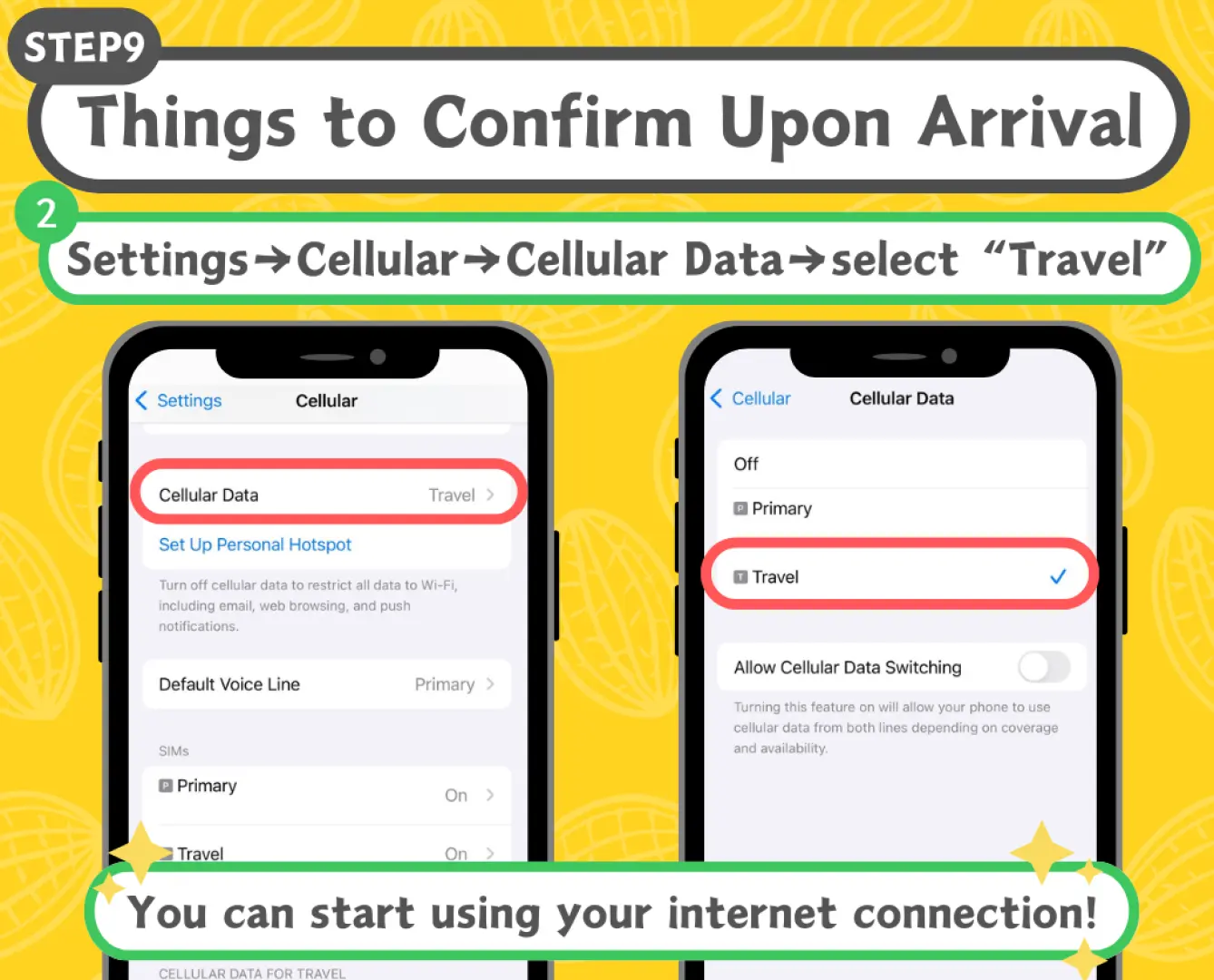
Purchase Notice
- Validity period: Calculated based on natural days in Thailand time. No matter what time the scan and installation is, it will be the first day. After 00:00 in the evening, it will be the second day. For example: Scan and install on 12/20, and it will be automatically enabled no matter where you are. The first day will be 23:59 on that day, and the second day will be after 00:00 on 12/21 Thailand time.
- Note: This product will be automatically activated once installed, starting from the first day. Please be sure to scan and install again on the day you want to use it.
- The phone number included in this product can be used to make local calls in Thailand, but cannot be used to register software such as Grab.
- The eSIM QR code will be sent to your email within 24 hours after placing the order, regardless of weekdays and holidays.
- It is recommended to purchase eSIM 2 days before departure and install it on the day of departure.
- Please install and activate the eSIM within 30 days after receiving the QR code.
Includes/Excludes
Reminders
Please be sure to scan and install this product after arriving in Thailand. Installation outside of Thailand will render it invalid.
Principle of fair network traffic usage: For users who use a large amount of data traffic in a short period of time, such as mobile games, uploading and downloading large amounts of photos and videos in the cloud, iCloud automatic/manual backup, Google Cloud automatic/manual backup, etc., telecommunications companies may limit their traffic as appropriate. and speed, please avoid watching videos for a long time or processing large amounts of data in a short time.
Please make sure your phone supports eSIM before purchasing. Please refer to the [Applicable Mobile Phone Models] list on this product page. It is recommended to refer to the official information of the mobile phone manufacturer. Mobile phones shipped from factories in China, Hong Kong and Macau cannot use eSIM. Most Samsung phones sold in Taiwan cannot use eSIM. Mobile phones with numbers locked by telecom operators cannot be used.
Please refer to the official website of the mobile phone brand to confirm whether it supports eSIM. This product is non-refundable once the eSIM has been sent.
Hotspot sharing will affect traffic and speed, and the effect of hotspot sharing involves equipment and environmental conditions. There is no guarantee that all devices can be connected.
Internet speed will be affected by the signal strength of the area and local telecommunications company, and refunds cannot be requested on the grounds of speed reduction.
How to Redeem Your Voucher
Validity Period
- Valid for use within 30day(s) from the date of issue; Invalid after expiration
Cancellation Policy
- Once the order has been completed, it cannot be canceled, modified, or refunded
- Due to time zone differences, the confirmed cancellation date is based on the supplier’s local time. Please allow 2–5 business days to process your cancellation request, after which the cancellation fee will be charged according to the product’s cancellation policy. Once the cancellation is confirmed, you will receive your refund within 14 working days.
FAQ
The DTAC eSIM offers reliable network coverage across Thailand. Key features include total or unlimited data options to suit various travel needs, and crucially, it comes with a local Thai phone number. This number is highly convenient for making local calls, booking restaurants, or contacting local services, enhancing your travel experience significantly.
Yes, the Thailand DTAC Telecom eSIM operates on the original DTAC network, known for its excellent signal strength across major cities and popular tourist destinations in Thailand. This ensures reliable mobile data connectivity for navigation, communication, and social media, as well as clear call quality for your local phone number.
The DTAC eSIM is designed for easy activation. Once installed on your device, it will automatically activate, starting from the first day of use. It is crucial to scan and install the eSIM QR code only after you have arrived in Thailand, as installation outside of Thailand will render it invalid and unusable.
For extended trips in Thailand, consider choosing an unlimited data plan offered by the DTAC eSIM to avoid worrying about data caps. If you opt for a total data plan, monitor your usage through your phone's settings to ensure it lasts. The DTAC network's consistent performance supports seamless navigation, communication, and access to online services throughout your journey.
To acquire a Thailand DTAC eSIM, you typically place an order through a trusted online travel platform. The eSIM QR code will then be sent to you via email, usually within 24 hours of placing the order, including on weekdays and holidays. You can easily purchase this eSIM through KKday, which offers a convenient and reliable way to secure your connectivity before your trip.
Absolutely. The Thailand DTAC Telecom eSIM includes a local Thai phone number. This feature is incredibly useful for making local calls within Thailand, contacting tour operators, booking local transportation, and making restaurant reservations, ensuring you can easily communicate with local services during your trip.
Yes, a key precaution is to install the DTAC eSIM only after you have physically arrived in Thailand. Installing it outside of Thailand will cause it to become invalid and unusable. Ensure your device is eSIM compatible before purchase. Once installed in Thailand, the eSIM activates automatically, providing immediate connectivity.
The Thailand DTAC Telecom eSIM package typically includes a specified amount of total data or unlimited data, depending on the plan chosen. Crucially, it also provides a local Thai phone number, enabling calls and SMS. The package ensures you have reliable internet access and local communication capabilities upon arrival, making your travel in Thailand more convenient.
Get Help


