


[20% Off] Japan 5G WiFi device rental | docomo unlimited data | Pick up at Japanese airports (Narita, Haneda, Kansai, Itami, Komatsu, Chubu, New Chitose, Fukuoka, Kagoshima, Naha Airport)
- GLOBAL WiFi, a Japanese company, offers reliable and trustworthy quality.
- We offer pickup services at Narita, Haneda, Kansai, Itami, Komatsu, Chubu, New Chitose, Fukuoka, Kagoshima, and Naha airports. Pick up at one airport and return at another, so you can travel all day without worry!
- Ordering through KKday offers discounted prices, no deposit required, and free shipping – great value and savings!
- It can connect multiple devices simultaneously, making it the top choice for internet access when traveling with family and friends in Japan.
- Show your receipt and passport to receive a WiFi router.
- Positive reviews extended! When applying, you can select the "Rent Free Power Bank" option and the "WiFi Device Compensation Reduction" option to add to your purchase, ensuring you have fun and peace of mind!
Package Options
Product Info
- The new generation 5G pocket WiFi sharer brings you a high-speed Internet experience.
- GLOBAL WiFi is a Japanese company, so service quality is guaranteed!
-Instructions on how to collect and return-
- receive:
Please present your order confirmation letter to the designated airport counter on the day of departure, and be sure to collect it during business hours. If you do not collect it during business hours, no refund will be issued. - return:
Please return it to the designated airport counter on the return day. If it exceeds the counter's operating hours, you can put it in a return box for return (not all airport counters provide return boxes, please be sure to pay attention before applying).
- Billing rules -
- Rental billing:
From the date of departure to the date of return, the fee is calculated on a daily basis.
Please note that the selected usage date is your departure date, and be sure to fill in your flight information. - Overdue charges: Original rent NT$399 x number of overdue days

Japan travel WiFi sharer

Ordering process

WiFi accessories

Introduction to models and mobile power supplies

Compensation reduction and exemption plan and introduction to mobile power supply
.
Purchase Notice
- It needs to be used according to the reservation date and opening hours on the day. It will be invalid after the expiration date.
- Do not turn on the machine in a country other than the destination country to avoid roaming charges.
- If you need to purchase a free mobile power supply, please be sure to click the "Purchase a free mobile power supply" option when applying, otherwise it will not be provided, please be informed.
- Please pay attention to the time required for customs inspection and verification and the opening hours of the counter for machine pick-up.
- The WiFi model and equipment in the picture are schematic diagrams. The actual machine and accessory models will be subject to on-site pickup and actual shipment.
- If you apply for a non-all-you-can-eat plan, it is recommended to turn off functions such as automatic APP updates, automatic video browsing, cloud photo album synchronization, etc. to avoid heavy data consumption.
- If the item is not returned on the designated return date/or needs to be extended, please go to this KKday webpage to make a repayment by swiping your card, and provide the original order number in the order notes to speed up the process.
Includes/Excludes
- Special package
- USB cable
- Transformer (charger)
- manual
- Refund handling fee
- freight
- Damage costs (if any incurred)
- Compensation reduction and exemption plan (recommended to purchase additionally)
Equipment Damage & Loss Fee Policy
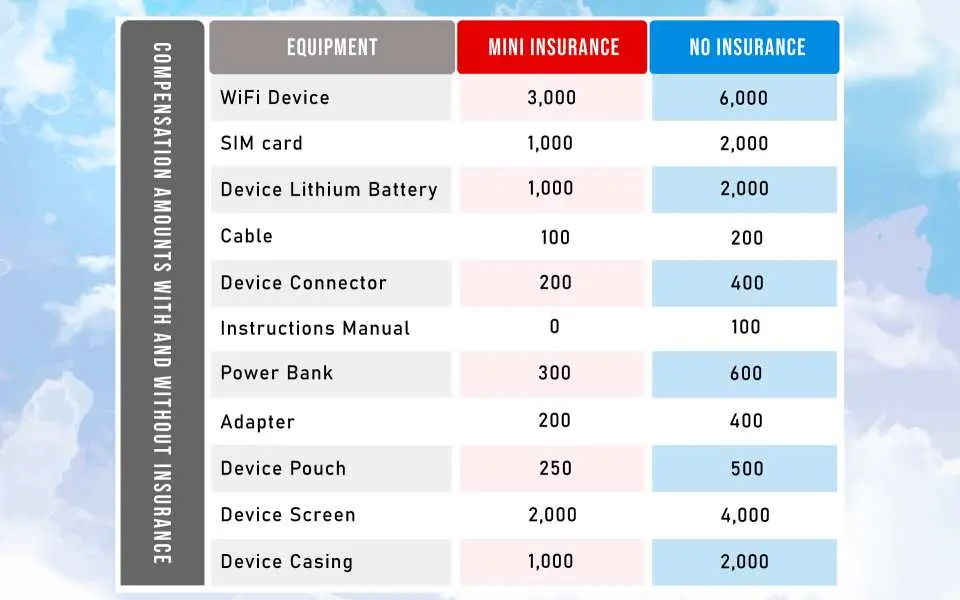
Damage policy (it is recommended to purchase the compensation reduction plan, the compensation fee in the following situations will be reduced by 50%)
・Original Wi-Fi equipment lost/damaged beyond repair: NT$ 6,000
・Lost SIM card: NT$ 2,000
・Wi-Fi battery lost/damaged beyond repair: NT$ 2,000
・USB transmission cable lost: NT$ 200
・Transformer lost/damaged beyond repair: NT$ 400
・Lost instruction manual: NT$100
・Power bank lost/damaged beyond repair: NT$ 600
・Adapter lost/damaged beyond repair: NT$ 400
・WiFi carrying bag: NT$ 500
・WiFi machine screen: NT$ 4,000
・WiFi machine back cover: NT$ 2,000
Reminders
The machine can only be picked up by country A and returned to country A. It is not allowed to be picked up by country A and returned by country B. Once the above situation occurs, an international logistics processing fee of NT$1,000 will be incurred.
Please present the "Order Confirmation Letter" at the counter to pick up the WiF machine during service hours. If you do not pick up the machine or are unable to pick up the machine during service hours due to personal reasons, refunds will not be available. Please be careful.
Please do not turn on the machine in countries other than Japan to avoid roaming charges.
Since communication quality is affected by different usage environments, network speed will vary depending on factors such as terrain, climate, building shelter, number of users, location, etc. Please be informed.
In accordance with the International Data Communications Fair Utilization Policy, if your Internet speed slows down or you are unable to access the Internet due to long-term viewing of online TV, videos, or downloading of high-volume files, online games, etc., please be aware that you cannot apply for a refund or compensation.
If you need to extend your return time due to extended travel period or other force majeure reasons, please be sure to contact us to apply for an extension of the rental during your stay abroad. If the return period is exceeded without applying for an extension of the lease, the return will be deemed to be delayed.
Please abide by local laws when using this product and do not try to break the law. Any legal issues arising from improper use will be borne by the lessee.
Please turn off the mobile phone data roaming function before going abroad. If you use it without turning it off, you may be charged high roaming fees by the telecommunications company you contracted with. Please be careful.
Do not place WiFi devices or power banks in high temperatures or in environments with poor ventilation and heat dissipation, and try to avoid using them while charging to avoid affecting the quality of the Internet.
If the machine is damaged due to theft, loss, external force, or self-disassembly, the cost of the machine must be compensated. Please see the damage policy for details.
Please fill in the return departure flight information accurately in the passenger information to facilitate the note of return location.
Pickup/Return Point
New Chitose Airport (CTS) -
Domestic Terminal - GLOBAL WiFi Counter

Monday 07:00 - 20:00
Tuesday 07:00 - 20:00
Wednesday 07:00 - 20:00
Thursday 07:00 - 20:00
Friday 07:00 - 20:00
Saturday 07:00 - 20:00
Sunday 07:00 - 20:00
New Chitose Airport (CTS) -
International Terminal 2nd Floor Arrival Hall GLOBAL WiFi Counter

Monday 08:00 - 19:00
Tuesday 08:00 - 19:00
Wednesday 08:00 - 19:00
Thursday 08:00 - 19:00
Friday 08:00 - 19:00
Saturday 08:00 - 19:00
Sunday 08:00 - 19:00
Narita International Airport (NRT) T1
Central Building 1F International Arrival Hall JAL ABC Counter

Monday 06:30 - 21:30
Tuesday 06:30 - 21:30
Wednesday 06:30 - 21:30
Thursday 06:30 - 21:30
Friday 06:30 - 21:30
Saturday 06:30 - 21:30
Sunday 06:30 - 21:30
Narita International Airport (NRT) T2
International Arrival Hall GLOBAL WiFi Counter

Monday 07:00 - 21:00
Tuesday 07:00 - 21:00
Wednesday 07:00 - 21:00
Thursday 07:00 - 21:00
Friday 07:00 - 21:00
Saturday 07:00 - 21:00
Sunday 07:00 - 21:00
Tokyo Haneda International Airport (HND) T2
GLOBAL WIFI counter

Monday 06:00 - 23:00
Tuesday 06:00 - 23:00
Wednesday 06:00 - 23:00
Thursday 06:00 - 23:00
Friday 06:00 - 23:00
Saturday 06:00 - 23:00
Sunday 06:00 - 23:00
Tokyo Haneda International Airport (HND) T3
GLOBAL WiFi counter in the arrival hall on the second floor
Monday 06:00 - 23:45
Tuesday 06:00 - 23:45
Wednesday 06:00 - 23:45
Thursday 06:00 - 23:45
Friday 06:00 - 23:45
Saturday 06:00 - 23:45
Sunday 06:00 - 23:45
Kansai International Airport (KIX) T1
GLOBAL WiFi counter on the 1st floor of the International Arrival Hall
Monday 06:30 - 22:30
Tuesday 06:30 - 22:30
Wednesday 06:30 - 22:30
Thursday 06:30 - 22:30
Friday 06:30 - 22:30
Saturday 06:30 - 22:30
Sunday 06:30 - 22:30
Kansai International Airport (KIX) T2
Terminal 2 International Departure Hall, GLOBAL WiFi Counter
Monday 07:00 - 21:30
Tuesday 07:00 - 21:30
Wednesday 07:00 - 21:30
Thursday 07:00 - 21:30
Friday 07:00 - 21:30
Saturday 07:00 - 21:30
Sunday 07:00 - 21:30
Osaka International (Itami) Airport (ITM) -
GLOBAL WiFi counter on the 1st floor of South Terminal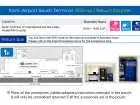
Monday 10:00 - 19:00
Tuesday 10:00 - 19:00
Wednesday 10:00 - 19:00
Thursday 10:00 - 19:00
Friday 10:00 - 19:00
Saturday 10:00 - 19:00
Sunday 10:00 - 19:00
Chubu Centrair International Airport (NGO) T1
GLOBAL WIFI counter
Monday 06:30 - 20:00
Tuesday 06:30 - 20:00
Wednesday 06:30 - 20:00
Thursday 06:30 - 20:00
Friday 06:30 - 20:00
Saturday 06:30 - 20:00
Sunday 06:30 - 20:00
Chubu Centrair International Airport (NGO) T2
Terminal 2, 2nd floor, departure hall, GLOBAL WiFi counter

Monday 10:00 - 15:00
Tuesday 10:00 - 15:00
Wednesday 10:00 - 15:00
Thursday 10:00 - 15:00
Friday 10:00 - 15:00
Saturday 10:00 - 15:00
Sunday 10:00 - 15:00
Fukuoka Airport (FUK) -
International Terminal 1F Arrival Hall, GLOBAL WiFi Counter
Monday 07:30 - 21:00
Tuesday 07:30 - 21:00
Wednesday 07:30 - 21:00
Thursday 07:30 - 21:00
Friday 07:30 - 21:00
Saturday 07:30 - 21:00
Sunday 07:30 - 21:00
Komatsu Airport (KMQ) -
Domestic Terminal 1F Arrival Hall, GLOBAL WiFi Counter
Monday 09:15 - 18:30
Tuesday 09:15 - 18:30
Wednesday 09:15 - 18:30
Thursday 09:15 - 18:30
Friday 09:15 - 18:30
Saturday 09:15 - 18:30
Sunday 09:15 - 18:30
Kagoshima Airport (KOJ) -
Domestic Terminal 1F Arrival Hall, J WiFi x GLOBAL WiFi Counter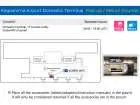
Monday 08:00 - 18:00
Tuesday 08:00 - 18:00
Wednesday 08:00 - 18:00
Thursday 08:00 - 18:00
Friday 08:00 - 18:00
Saturday 08:00 - 18:00
Sunday 08:00 - 18:00
Naha Airport (OKA) -
GLOBAL WIFI counter
Monday 07:30 - 21:00
Tuesday 07:30 - 21:00
Wednesday 07:30 - 21:00
Thursday 07:30 - 21:00
Friday 07:30 - 21:00
Saturday 07:30 - 21:00
Sunday 07:30 - 21:00
How to Redeem Your Voucher
How to Use Your Voucher
- Please present the e-voucher on-site
Validity Period
- The voucher must be used on the selected date and within operating hours; Invalid after expiration
FAQ
1. What is the process for renting a portable WiFi device for travel in Japan?
Renting a portable WiFi device for Japan typically involves a few simple steps. First, you make your reservation online through a travel platform like KKday, where you can easily select your desired rental period and specify your preferred pickup and return locations, often at major Japanese airports. Booking through KKday offers the advantage of a streamlined process and transparent details, allowing you to secure your device conveniently before your trip. Upon arrival, you present your booking voucher and passport at the designated counter to receive the device. After your trip, you return the device to any of the specified airport counters.
2. When is renting a portable WiFi device recommended for tourists visiting Japan?
A portable WiFi device is highly recommended for tourists traveling to Japan, especially for groups or families who need to connect multiple devices simultaneously. It's ideal for those who require a consistent and reliable internet connection for navigation, accessing travel information, or staying connected with friends and family without incurring high roaming charges. It ensures stable connectivity across various locations throughout your trip.
3. How does a portable WiFi device compare to other internet options for tourists in Japan?
Compared to other internet options, a portable WiFi device offers several distinct advantages for tourists in Japan. Unlike a local SIM card, which provides internet access only for a single phone, a WiFi device allows multiple phones, tablets, and laptops to connect simultaneously. This makes it an efficient choice for groups. Compared to public WiFi, a portable device offers a private, secure, and more reliable connection across various locations, ensuring consistent access for navigation and communication without frequent disconnections or the need to search for hotspots.
4. What are the key features of the Japan 5G WiFi rental device, especially for group travelers?
The Japan 5G WiFi rental device offers several key features beneficial for group travelers. It provides high-speed 5G connectivity, typically operating on a reliable network like docomo, ensuring stable internet access throughout your journey. A major advantage for groups is its ability to connect multiple devices simultaneously, such as smartphones, tablets, and laptops. This eliminates the need for each individual to acquire separate internet access, making it convenient and easy to share connectivity among family and friends.
5. Which airports in Japan offer pickup and return services for portable WiFi rental devices?
Portable WiFi rental devices can be conveniently picked up and returned at several major airports across Japan. These include Narita, Haneda, Kansai, Itami, Komatsu, Chubu, New Chitose, Fukuoka, Kagoshima, and Naha airports. This extensive network of locations provides flexibility for travelers to manage their device collection and return based on their specific flight schedules and travel plans within Japan.
6. Can a Japan portable WiFi device be picked up at one airport and returned at a different airport?
Yes, many portable WiFi rental services in Japan offer the flexibility to pick up your device at one airport and return it at a different major airport. For instance, you could pick up your device at Narita Airport upon arrival and return it at Kansai Airport before your departure. This feature is particularly convenient for travelers with multi-city itineraries, allowing for seamless travel without needing to backtrack to the original pickup location.
7. What documents are required to pick up a rented portable WiFi sharer at Japanese airports?
When picking up your rented portable WiFi sharer at Japanese airports, you will typically need to present two main documents. These include your booking voucher or confirmation, which serves as proof of your rental reservation. Additionally, you will need to show your valid passport for identification purposes. Ensuring these documents are readily available will help facilitate a smooth and quick pickup process at the designated service counter.
8. What types of data plans are typically offered for Japan portable WiFi rental services?
Japan portable WiFi rental services typically offer various data plans to suit different travel needs. Common options include unlimited data plans, which are ideal for heavy internet users, groups, or those who plan to stream content or use navigation extensively. Other plans might involve a daily data allowance, suitable for travelers with lighter internet usage. These plans allow users to select the best option based on their anticipated data consumption, ensuring a tailored and efficient internet experience throughout their trip.


