


$1 Per Day China Mainland Data Roaming eSIM Card|10-Day Unlimited Use|Top Choice for Returning to China Mainland
Whether you're an overseas student or an immigrant returning to China, this is your perfect short-term solution. China Mobile Hong Kong’s high-quality data network allows you to access Google and other foreign websites in mainland China without the need for a VPN. Plus, with the eSIM, you no longer need to swap physical SIM cards or manually activate it—just scan the QR code and you're ready to go!
- Access Google and other foreign websites in mainland China.
- Perfect for overseas students and expatriates returning to China temporarily.
- Enjoy 1/2GB of high-speed data daily, with unlimited low-speed data after exceeding the limit.
- Eliminate telecom spam with a data card that has no phone number.
- Use instantly with eSIM by scanning a QR code
- Compatible with various iPhone and Android devices
- Important: Please contact customer service before booking to confirm whether your device supports eSIM. No refunds will be issued if the device does not support eSIM.
Product Info
The content of this product is provided by machine translation and may not reflect the actual information, please take this into consideration before booking.
—————— Pre-purchase Information——————
In order to ensure that you can use this eSIM product smoothly, please read the following information carefully before placing an order:
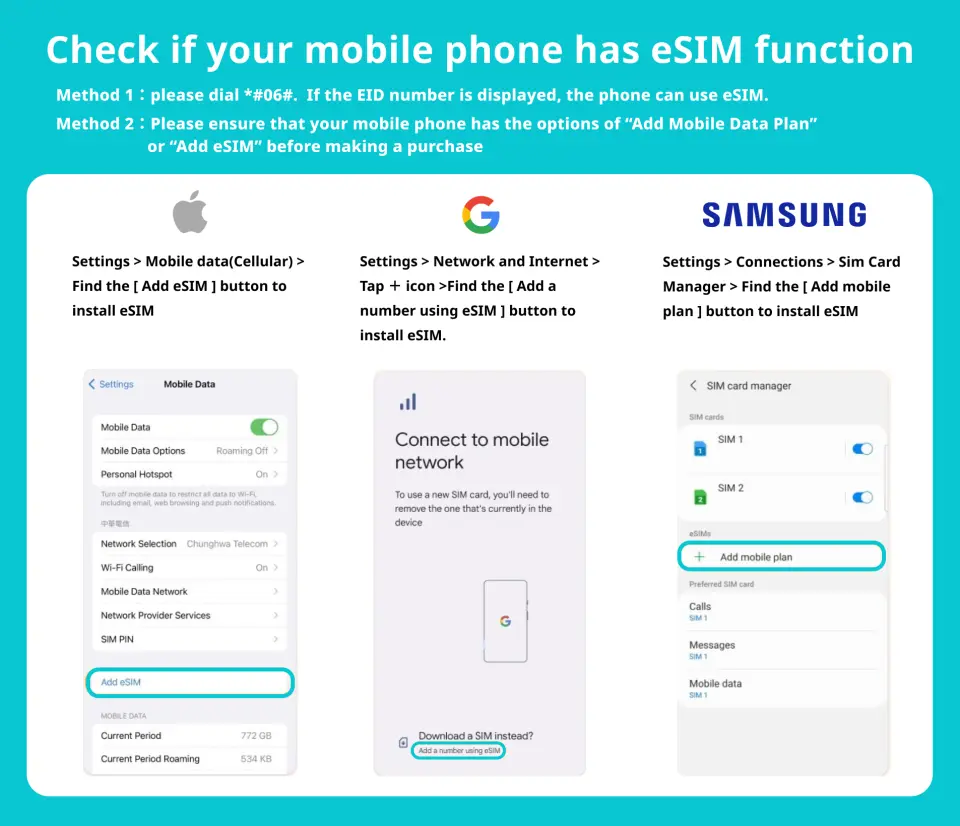
- Please make sure your mobile phone and its operating system support the eSIM function before purchasing. No refunds will be issued if the order is canceled due to device incompatibility.
- The Chinese mainland version of the smartphone does not contain the eSIM module. Users of mainland mobile phones should be careful when placing orders.
- Check whether the eSIM module is installed on the phone: dialing interface *#06# → If there is an EID in the device information, you can use eSIM
- This product is a pure data card and does not include phone and text messaging functions.
- The validity period of eSIM is calculated from the time of installation. Please install it on the day of arrival or when needed.
—————— eSIM Instructions for Use——————
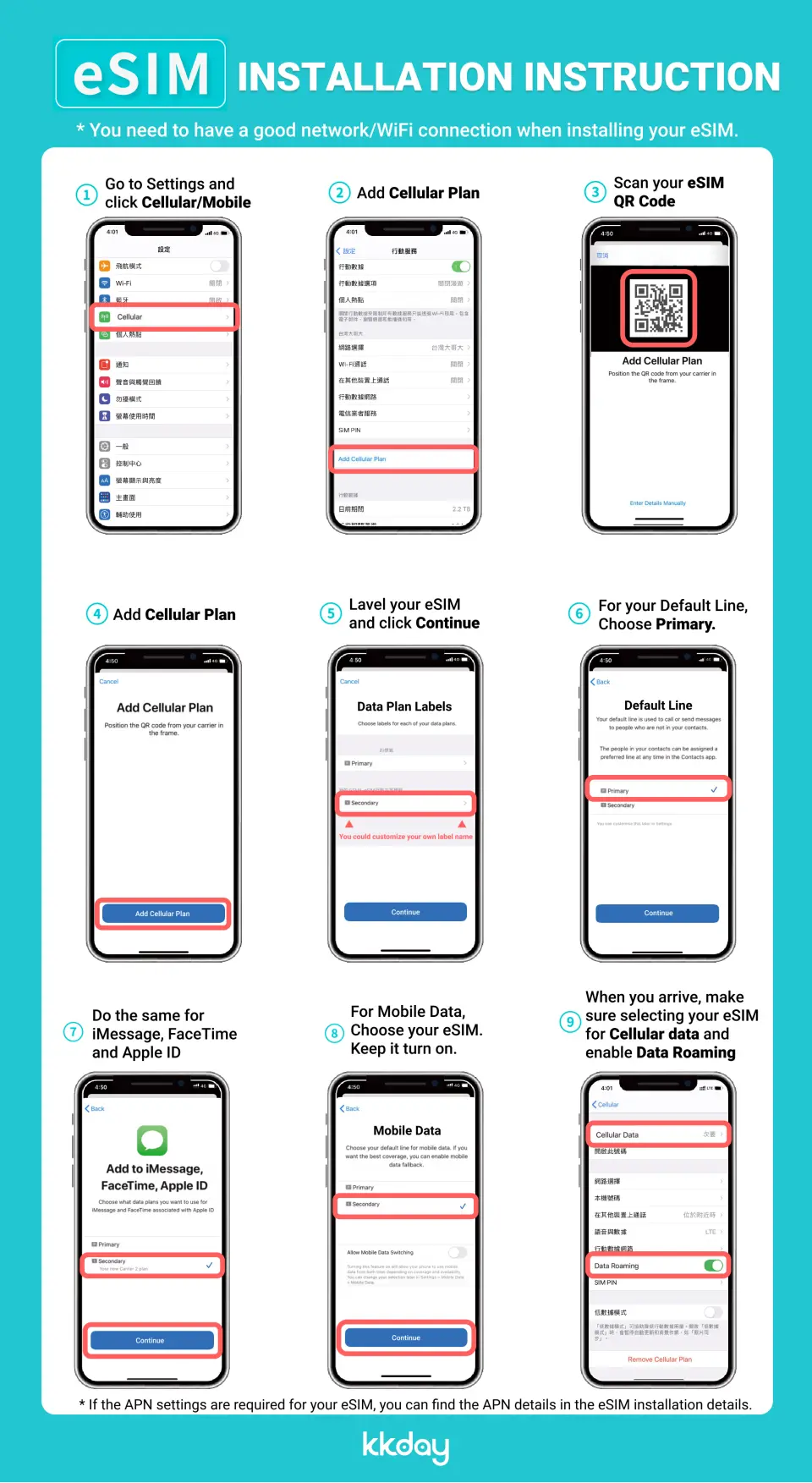
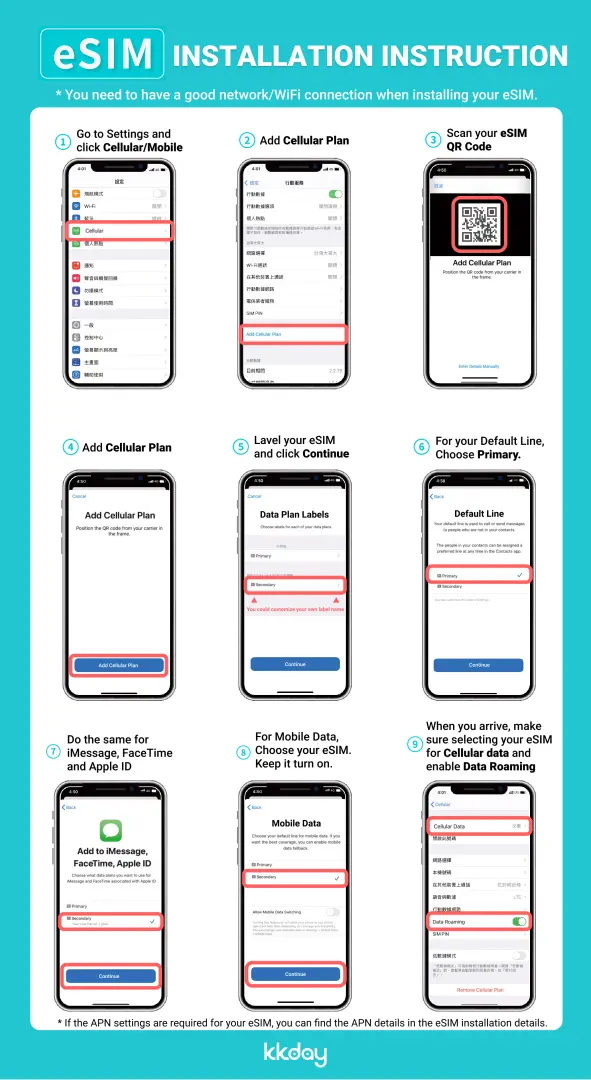
- Installing eSIM requires an Internet connection. Please confirm that there is available WiFi or available mobile data in the environment before installation.
- Please do not use your camera or other APP to scan the QR code. This must be done through the "Network Settings" of your phone. Please refer to the icon.
- Each QR code can only be scanned and installed once. After binding, the device cannot be changed or deleted. Once deleted, it cannot be rescanned and installed and needs to be purchased again.
- After arriving at the destination and completing the installation, the eSIM package service starts timing.
- Package days are calculated every 24 hours from activation.
Please confirm that your device is suitable for eSIM before purchasing. This product is non-refundable after sending the eSIM QR code.

eSIM installation and activation process
How to enter the enabler code manually


SIM Card Specifications
| Data Usage Specifications | 10GB, 20GB |
| Transmission Specifications | 4G |
| Signal Coverage Area | China |
| Mobile Carrier | China Mobile International |
| Supported Sizes | eSIM |
| Hotspot Sharing | Available |
| Supported Frequencies(4G) | B1(2100 MHz) |
| Excludes | Voice calls, Texts |
| Not Supported | Contract card locking machine, Wi-Fi sharer, modification machine, translator, mobile phone without eSIM function |
Purchase Notice
- Please make sure your phone and its operating system support the eSIM function before purchasing
- iOS version 12.1 or higher is required; please note that iPhones sold in mainland China do not support eSIM. In Hong Kong and Macau, only iPhone 13 mini, iPhone 12 mini, iPhone SE 2020 and iPhone XS have eSIM functionality.
- The versions of Samsung mobile phones vary from country to country. Samsung mobile phones purchased in Taiwan do not support eSIM. In other regions, please check with Samsung’s official website first.
- The eSIM QR code will be automatically sent to the email address provided by the customer after the order is successfully placed. Please provide a correct and valid email address when placing an order
---24 hours customer service---
Online customer service (click the live chat icon in the lower right corner)
Hotline: +85239756662
Customer service email: cs@cmlink.com
Reminders
Before purchasing, please make sure your phone and its operating system support the eSIM function
iOS requires version 12.1 or higher; please note that iPhones sold in mainland China do not support eSIM. In Hong Kong and Macau, only iPhone 13 mini, iPhone 12 mini, iPhone SE 2020 and iPhone XS have eSIM functionality
The versions of Samsung mobile phones vary from country to country. Samsung mobile phones purchased in Taiwan do not support eSIM. In other regions, please check with Samsung’s official website first.
The eSIM QR code will be automatically sent to the email address you provided after the order is successfully placed. Please provide a correct and valid email address when placing an order
After receiving the eSIM QR code, please follow the instructions in the product description to install and use it. If you encounter problems during the process, please contact customer service
Online customer service: https://global.cmlink.com/esim?LT=en (click the live chat icon in the lower right corner) Hotline: +85239756662 Customer service email: cs@cmlink.com
How to Use
1. How to download and use eSIM after purchasing it?
After you purchase, the system will send the QR code for downloading the eSIM to the email address of your order.
2. Can I download the eSIM profile on different devices?
No, one eSIM profile can only be downloaded to one device for use.
3. Why can’t I “join the mobile network plan” after scanning the eSIM QR code on my device?
Please make sure your device is connected to WiFi and try again.
4. How to switch data to eSIM?
Please check if the cellular number is turned on, select "Cellular Network - Cellular Number - Enable this number". If you still have problems, please contact customer service.
5. How to check ICCID?
If the cellular number is turned on, you can go to "General - About This Device - ESIM" to view the ICCID.
6. I have successfully activated the eSIM service, but the applicable device cannot connect to the mobile network. What should I do?
Please shut down and restart your device and update the iOS version before trying again.
Validity Period
- Valid for use within 6month(s) from the date of issue; Invalid after expiration
Cancellation Policy
- Once the order has been completed, it cannot be canceled, modified, or refunded
- Due to time zone differences, the confirmed cancellation date is based on the supplier’s local time. Please allow 2–5 business days to process your cancellation request, after which the cancellation fee will be charged according to the product’s cancellation policy. Once the cancellation is confirmed, you will receive your refund within 14 working days.
FAQ
This China Mainland data roaming eSIM is designed to ensure you can connect normally in China. It utilizes China Mobile Hong Kong's high-quality data network, allowing you to smoothly access overseas websites and apps like Google, LINE, WhatsApp, and Facebook without any extra steps, providing the convenience of no VPN required.
Yes, when using this China Mainland eSIM, you can use overseas social media apps like LINE, WhatsApp, Facebook, and Instagram without any issues. This eSIM provides service through the China Mobile Hong Kong network, allowing you to directly access these platforms without needing a VPN to stay connected with the world.
This China Mainland eSIM data roaming service supports multiple iPhone models. Generally, iPhone XR and later models (such as iPhone 11, 12, 13, 14, 15 series) all support eSIM functionality. We recommend contacting customer service before booking to confirm if your specific iPhone model supports eSIM for smooth usage.
Yes, after setting up and activating the China Mainland eSIM on your phone, you need to set it as your primary mobile data source and enable the "Data Roaming" function for this eSIM. This is a crucial step to ensure the eSIM can successfully connect to the network in China. Please make sure it is correctly enabled.
This China Mainland data roaming eSIM provides service through China Mobile Hong Kong's high-quality data network. This is different from China Mobile within mainland China, as it allows users to directly connect to the international network within mainland China without needing a VPN to access overseas websites and applications.
Installing and activating this eSIM service is very simple. After completing your booking, you will receive a QR code via email. Simply scan this QR code with your phone to install. Once installation is complete, follow your phone's system instructions to set it as your mobile data source and enable data roaming. You can then use it immediately without needing to swap SIM cards or manually activate.
This China Mainland data roaming eSIM offers daily high-speed data options of 1GB or 2GB. Once you have exhausted your daily high-speed data allowance, your internet connection will switch to unlimited, but slower, speeds. The reduced speed connection can still be used for basic messaging and web browsing, but activities requiring higher bandwidth, such as video streaming, may be affected.
The most important consideration before booking this China Mainland eSIM is to ensure your mobile device supports eSIM functionality. Some older phone models or iPhones purchased within mainland China may not support eSIM. We strongly advise contacting customer service before placing your order and providing your phone model to confirm compatibility. Refunds are typically not provided if the service cannot be used due to device incompatibility.
Get Help


