

eSIM for Malaysia: High-Speed 500MB/1GB/2GB Per Day
- Use the cost-effective eSIM to surf the internet while traveling in Malaysia
- Alleviate SIM Card pin needle and installation trivialities with the help of eSIM
- Delight in the easy-to-use design and stay connected throughout your trip
- Internet speed will be reduced to 128kbps after exceeding 500MB/1GB/2GB per day
Package Options
Product Info
The content of this product is provided by machine translation and may not reflect the actual information, please take this into consideration before booking.
Please confirm that your device is suitable for eSIM before purchasing. This product is non-refundable after sending the eSIM QR code.

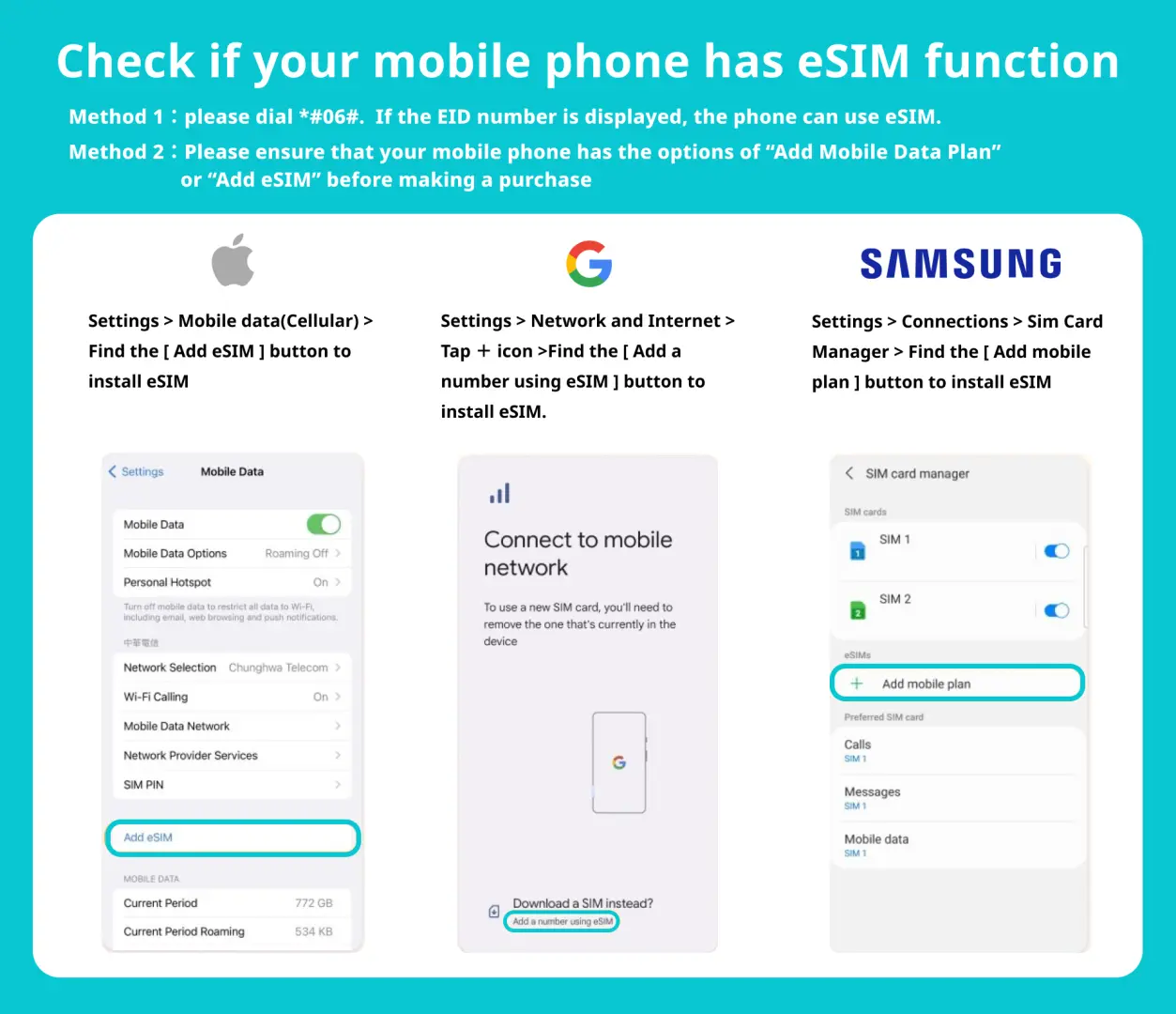
eSIM-Compatible Devices


eSIM installation instruction (ios)


eSIM Installation Instructions(Android) - Taking Google Pixel 3a as an Example


SIM Card Specifications
| Data Usage Specifications | 500MB, 1GB, 2GB |
| Transmission Specifications | 4G |
| Signal Coverage Area | Malaysia |
| Mobile Carrier | 【Roaming Resources】U Mobile, Celcom |
| Supported Sizes | eSIM |
| Hotspot Sharing | Available |
| Supported Frequencies(4G) | B1(2100 MHz) |
| Excludes | Texts, Voice calls |
| Not Supported | SIM-locked device, Carrier-customized device, Mobile hotspot, customized mobile phone, 3G mobile phone, translator, phones without eSIM |
| Network Type | Roaming |
Purchase Notice
- Please make sure your mobile phone and its operating system are compatible with eSIM, failure to do so may result in activation failure, refunds will not be granted
- iOS must be the newest version; please note that iPhones sold in mainland China do not support eSIM. In Hong Kong and Macau, only iPhone 13 mini, iPhone 12 mini, iPhone SE 2020 and iPhone XS have eSIM capabilities.
- The versions of Samsung mobile phones vary from country to country. Samsung mobile phones purchased in Taiwan do not support eSIM. For other regions, please check with Samsung's official website first.
- Each QRcode can only be scanned once, and no changes can be made once the QRcode is scanned
Includes/Excludes
Reminders
Please make sure your mobile phone and its operating system are compatible with eSIM, failure to do so may result in activation failure, refunds will not be granted
iOS must be the newest version; please note that iPhones sold in mainland China do not support eSIM. In Hong Kong and Macau, only iPhone 13 mini, iPhone 12 mini, iPhone SE 2020 and iPhone XS have eSIM capabilities.
Each QRcode can only be scanned once, and no changes can be made once the QRcode is scanned
eSIM could be used after activated. Please be noted that you need to have a good network/WiFi connection when installing eSIM.
The eSIM must be installed and activated within the validity period (Within 90 days after placing the order), otherwise the eSIM will become invalid and cannot be used
Please turn off the data roaming function of the original SIM Card to avoid high roaming fees
To end the eSIM function, please tap "Remove Cellular Plan"
The quality of communication may be affected by outside conditions; surrounding landforms (e.g. mountains), weather, obstruction by buildings, the number of users, or locations may affect the speed and quality of the internet
How to Use
After placing the order, you will receive an email "eSIM Information and Quick start guide", prompt the latest installation time and installation method
Method 1 : Scan QRcode
Method 2: Manually add the SM-DP address and activation code
*For more details of setting, please check the email.
*Internet connection is required for eSIM installation, please make sure that you can access Wi-Fi or mobile data
*Please do not use your camera or other apps to scan the QR code, it must be done through your phone's "Network Settings", please refer to the above illustration.
*Each QRcode can only be scanned once, and no changes can be made once the QRcode is scanned
*Please install the eSIM after arriving at the destination. After the installation is complete, the data generated by the eSIM package will start counting.
*Some mobile phones need to set APN if there is no network after the above operation. For details, please check the email "eSIM Information and Quick start guide"
APN: mobile.three.com.hk
Cancellation Policy
- Once the order has been completed, it cannot be canceled, modified, or refunded
- Due to time zone differences, the confirmed cancellation date is based on the supplier’s local time. Please allow 2–5 business days to process your cancellation request, after which the cancellation fee will be charged according to the product’s cancellation policy. Once the cancellation is confirmed, you will receive your refund within 14 working days.
FAQ
When selecting an eSIM for Malaysia, travelers should prioritize daily high-speed data allowances, clarity on speed reduction policies after exceeding daily limits, ease of activation, and compatibility with their device. Look for plans that offer sufficient data for your typical usage and ensure straightforward setup via a QR code for a seamless experience throughout your trip.
Yes, an eSIM for Malaysia is readily available and convenient for international travelers. It simplifies connectivity by eliminating the need for a physical SIM card and its associated installation. Travelers can easily purchase and activate an eSIM digitally by scanning a QR code, often even before arriving in Malaysia, making it a hassle-free option for foreign visitors.
The main limitation when using an eSIM for Malaysia is ensuring your smartphone is eSIM-compatible and unlocked by your home carrier. Only newer device models support eSIM technology. While activation is typically simple, it's crucial to confirm your device meets these requirements to avoid any connectivity issues during your trip.
An eSIM for Malaysia offers cost-effectiveness by allowing travelers to avoid expensive international roaming charges from their home provider. You can choose a data plan that precisely matches your travel duration and expected usage, which helps prevent overpaying for unused data or unexpected fees. Its digital nature also eliminates any physical shipping costs.
Most eSIM plans for Malaysia, including this one, offer a specific daily allocation of high-speed data, such as 500MB, 1GB, or 2GB. Once this daily limit is reached, the internet speed will typically be reduced to a lower speed, like 128kbps, for the rest of the day. While data access continues, it is not truly unlimited at high speeds.
Activating an eSIM for Malaysia is designed for simplicity. After acquisition, you'll receive a QR code, usually via email. By scanning this QR code with your eSIM-compatible device, the data profile is installed automatically. This process bypasses the need for physical SIM card insertion, providing a quick and easy way to get connected and surf the internet without hassle.
If you exceed your daily high-speed data allowance on an eSIM in Malaysia, your internet speed will be reduced significantly. For instance, the speed might be throttled to 128kbps until the next day's data cycle begins. You will still have internet access, but it will be much slower, suitable for basic tasks like messaging but not for streaming or heavy browsing.
Yes, an eSIM can reliably provide internet access for essential travel needs in Malaysia. With a properly activated eSIM, you can confidently use navigation applications to explore, stay in touch with family and friends via messaging apps, and easily access important travel information online. It ensures consistent connectivity to make your trip smoother and more enjoyable.
Get Help


