
[Southern Hemisphere Travel Essential 50% OFF] New Zealand & Australia Universal eSIM | Supports Multiple AI Apps | Selected Plans Include Voice Calls
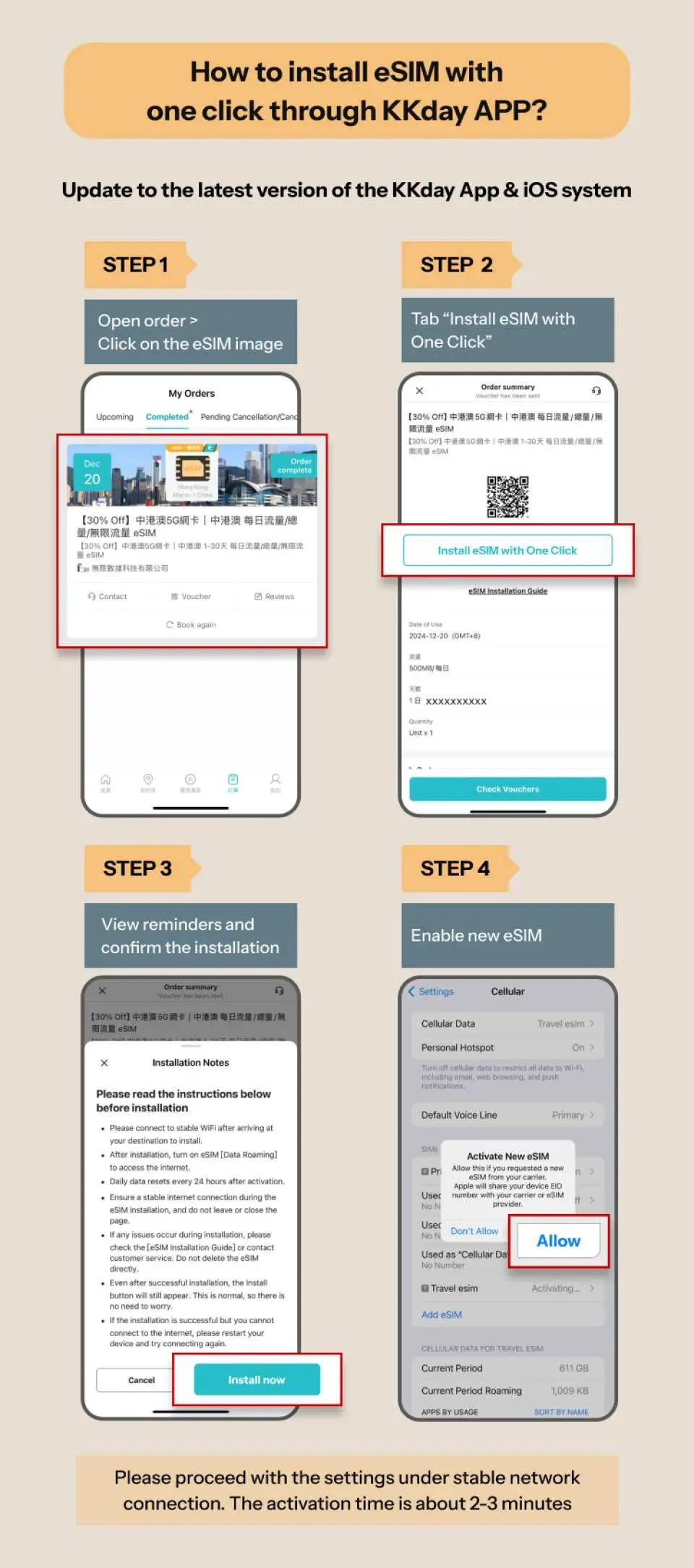
- [Top Choice for iOS Users: One-Tap Installation, No Manual Input Needed!]
Update to iOS 17.4 or later and use the latest KKday App to quickly install your eSIM, eliminating the need for manual entry and making overseas connectivity easier.
⚠️ For Android users: if your phone supports eSIM, please contact customer service to receive a dedicated one-tap installation link.
- Instant redemption, no waiting
Once your order is confirmed, a QR code will be sent immediately. No shipping or physical SIM ejector pin required—buy anytime, travel anytime.
- Keep your original number active
The eSIM works alongside your physical SIM, so you don’t need to remove your card and can continue receiving important calls and SMS on your original number.
Package Options
Product Info
[Plan Options]
- New Zealand & Australia Dual-Country Roaming Plan
Powered by local telecom partners, this roaming plan allows internet access in both New Zealand and Australia, helping you stay connected effortlessly throughout your trip.
- New Zealand Voice Roaming Plan (iPhone only)
A separate plan is available for New Zealand, including 10GB high-speed data + 100 minutes of local calls, ideal for contacting hotels, car rental companies, and other local services.
⚠️ This plan is currently recommended for iPhone users. Android devices may experience compatibility issues.



SIM Card Specifications
| Data Usage Specifications | Unlimited data, 500MB, 1GB, 2GB, 10GB |
| Transmission Specifications | 5G/4G |
| Signal Coverage Area | Australia, New Zealand |
| Mobile Carrier | New Zealand & Australia Universal Plan: Spark / Optus. New Zealand Voice Plan: One NZ. |
| Supported Sizes | eSIM |
| Hotspot Sharing | Available |
| Supported Frequencies(4G) | B1(2100 MHz) |
| Top-Up Availability | Top-up unavailable |
| Not Supported | SIM-locked device, Carrier-customized device, Pocket WiFi |
Purchase Notice
- Hotspot sharing is supported; however, continuous hotspot usage may affect internet speed and overall performance. It is recommended that each device uses its own eSIM. For group sharing or extended high-definition streaming, a “total data plan” is recommended for a more generous data allocation.
- Network coverage varies by local telecom operators and may be affected by terrain, building obstructions, or heavy user traffic, which can cause temporary signal fluctuations. Your device will automatically switch to the best available frequency band depending on conditions. If 5G signal is weak, it will automatically switch to 4G/LTE to maintain stable connectivity. If you experience abnormal speeds, it is recommended to move to a different location, toggle airplane mode to reconnect to the network, or contact online customer service for assistance.
- For common eSIM questions, please refer to the Help Center.
Includes/Excludes
- eSIM
Reminders
An internet connection (Wi-Fi or wireless network) is required to install the eSIM. It is recommended to complete the installation before departure, or use free airport Wi-Fi upon arrival to set it up.
When installing via QR code, please print the voucher before departure or prepare another device that can display the voucher.
If you need to manually join eSIM, please refer to the eSIM details in "Pre-departure Reminder", copy and paste <SM-DP_Address> and <Activation Code> in the box, there is no need to enter the <Confirmation Code>
Please enable “Data Roaming” and “Automatic Network Selection” for the eSIM, and ensure that any VPN is turned off and any existing configuration profiles are removed (Settings > General > VPN & Device Management). Then wait 1–3 minutes for the network to connect automatically.
This eSIM must be activated after issuance: the New Zealand & Australia universal plan must be activated within 90 days, and the New Zealand voice plan must be activated within 30 days. It is recommended to activate it as soon as you arrive at your destination to ensure your usage benefits.
To use the voice calling feature, please enable VoLTE in your phone settings. This is required to make and receive calls properly; otherwise, you may not be able to use the calling function.
New Zealand Voice Plan instructions: When dialing a New Zealand number, please add the country code +64. If the number starts with 0, remove the 0 before dialing (e.g., 021 123 4567 → +64 21 123 4567). This plan provides a number starting with +44. Incoming calls may be treated as international calls by the caller’s telecom provider, depending on their carrier’s charging policy.
eSIM data usage and installation status: Please enter your order number starting with “26KK” to check details at https://search.t-sim.hk/dataplan/order (voice plans are not currently supported for inquiry).
Calculation method of days: 24-hour system (users purchase a 3-day Internet plan, install it at 9/1 at 10:00 am, and this plan will end at 9/4 at 9:59 am)
Some applications (such as mobile payment services, online banking, video streaming platforms, short-form video apps, or AI applications) may impose restrictions based on regional IP addresses or security policies. This is an app-side mechanism and does not indicate a network connectivity issue. It is recommended to check the roaming compatibility of your commonly used apps before departure to ensure a smooth user experience.
During roaming, internet performance may vary depending on location, terrain, building obstructions, user traffic, and weather conditions. These fluctuations are normal. If you experience abnormal speeds, it is recommended to change your location, toggle airplane mode to reconnect to the network, or contact online customer service for assistance.
Hotspot sharing is supported; however, continuous hotspot usage may affect overall internet performance. It is recommended that each device uses a separate eSIM. If you plan to stream videos for long periods or perform large downloads/uploads within a short time, moderate usage is advised, or you may consider a total data plan to ensure a smoother browsing experience.
How to Use
- If you purchase a 100-minute call plan, please add New Zealand's country code 64 when dialing. If the phone number begins with "0", please remove the leading "0" before dialing. For example, the phone number is 021 123 4567. Please dial 64 21 123 4567.
Cancellation Policy
- Once the order has been completed, it cannot be canceled, modified, or refunded
- Due to time zone differences, the confirmed cancellation date is based on the supplier’s local time. Please allow 2–5 business days to process your cancellation request, after which the cancellation fee will be charged according to the product’s cancellation policy. Once your refund request is confirmed, KKday will initiate the refund to your original payment method within 15 days. The actual refund timing depends on your card-issuing bank’s policy.
FAQ
1. Which eSIM is most suitable for travelers visiting New Zealand?
For travel to New Zealand, an eSIM that utilizes established local operators like One NZ is highly recommended. These eSIMs offer stable signal quality and extensive coverage across the country. They provide convenient daily or total data options, ensuring reliable internet access for navigation, communication, and sharing travel experiences without the need for physical SIM card changes.
2. Can I set up a New Zealand eSIM before arriving in the country?
Yes, you can typically set up a New Zealand eSIM before your arrival. After purchase, you usually receive a digital voucher with a QR code. By scanning this QR code, you can install and activate the eSIM on your compatible device, often within hours of ordering. This allows you to have mobile data ready immediately upon landing, avoiding the need to find a physical SIM card or wait for delivery.
3. Are unlimited mobile data options available for a New Zealand eSIM?
While many New Zealand eSIM plans offer generous daily or total data allowances with robust bandwidth, true unlimited data options can vary. It's important to check the specific plan details, as some might offer 'unlimited' data with a fair usage policy that reduces speed after a certain threshold. For most travelers, plans with ample daily or total data are sufficient for seamless use.
4. What is the typical cost range for data plans with a New Zealand eSIM?
The cost of data plans for a New Zealand eSIM varies based on factors such as data allowance (daily or total), duration of validity, and included network speeds. Plans are designed to suit different travel durations and data usage needs, offering competitive value for reliable connectivity. Travelers can select options that best match their individual requirements.
5. What types of mobile devices are compatible with a New Zealand eSIM?
Most modern smartphones are compatible with New Zealand eSIMs, including many recent iPhone models, Google Pixel phones, and Samsung Galaxy devices. For iOS users, compatibility typically starts from iPhone XS/XR models and newer. It's always advisable to verify your specific device's eSIM compatibility in its settings or the manufacturer's specifications before purchasing to ensure seamless operation.
6. What conveniences does a New Zealand eSIM offer for travelers?
A New Zealand eSIM provides significant conveniences, such as eliminating the need for a physical SIM card, meaning no card pins to manage or worry about losing. It allows for quick setup via a QR code, ensuring immediate connectivity upon arrival. Travelers can also keep their original phone number active for calls while using the eSIM for data, which is ideal for business trips or staying reachable.
7. How does the iOS one-click installation work for a New Zealand eSIM?
For eligible iOS users, specifically those with iOS 17.4 or above and the latest version of the platform's app, a New Zealand eSIM can be installed with a single click directly within the application. This streamlined process eliminates manual QR code scanning, making the setup exceptionally fast and user-friendly, allowing for immediate internet access after purchase.
8. What is the process for acquiring and activating a New Zealand eSIM?
Acquiring and activating a New Zealand eSIM is a straightforward process. You can easily purchase it through KKday, which provides a convenient and seamless booking experience. After placing your order, you'll receive a digital voucher containing a QR code. Simply scan this QR code with your compatible device, and the eSIM will automatically connect to the network, providing internet access typically within 12 hours of your order. KKday ensures you can get online quickly and hassle-free without needing physical card pickup.


