

Japan Unlimited Data eSIM: 1GB Daily (up to 50GB) For 30 Days High-Speed Data
- Save your valuable time and receive your eSIM QR Code instantly, without waiting for SIM card delivery.
- Embrace the future of connectivity by effortlessly scanning the QR Code, eradicating the complexities of traditional SIM card swaps
- Elevate your mobile experience to new heights with blazing-fast speeds from Japan's leading carriers: DOCOMO, KDDI, and SoftBank
Package Options
What You Can Expect
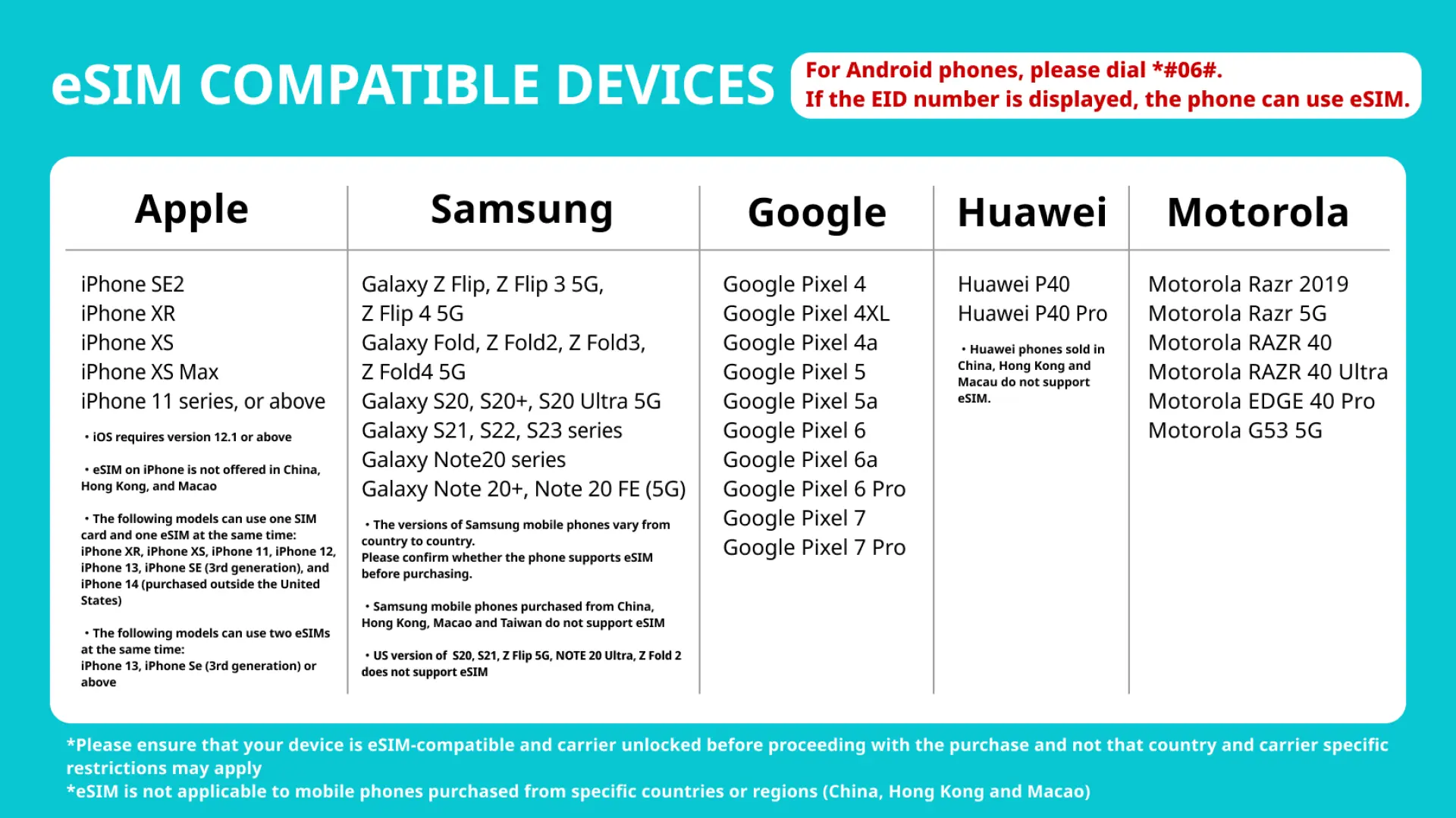
Check if your mobile phone has eSIM function


Gear up with the latest and greatest eSIM-compatible devices

Installation is a breeze with our easy-to-follow eSIM installation guidelines!


SIM Card Specifications
| Data Usage Specifications | Unlimited data, 1GB, 2GB, 3GB, 8GB, 10GB, 15GB, 20GB, 30GB, 50GB |
| Transmission Specifications | 4G |
| Signal Coverage Area | Japan |
| Mobile Carrier | DOCOMO, KDDI and SoftBank |
| Supported Sizes | eSIM |
| Hotspot Sharing | Available |
| Supported Frequencies(4G) | B18(800 MHz), B11 (1500 MHz), B3(1800 MHz), B1(2100 MHz) |
| Top-Up Availability | Top-up unavailable |
| Excludes | Voice calls, Texts |
| Not Supported | Dual-SIM device, SIM-locked device, Carrier-customized device, Mobile hotspot |
| Reminders | This eSIM is data only. It does not include a phone number to make phone calls or send SMS messages |
Purchase Notice
- This eSIM is specifically designed for data usage only and does not include a phone number for making calls or sending SMS messages
- The validity of the data plan begins immediately upon installation of the eSIM. It is important to ensure that your cell phone and its operating system are compatible with eSIM. Failure to do so may result in activation issues, and refunds will not be provided
- For iOS devices, please make sure your device is running on version 12.1 or later. Note that eSIM is not supported on iPhones sold in China, and certain cell phones sold in Hong Kong and Macao may also not support eSIM
Includes/Excludes
Reminders
This eSIM is exclusively for data usage and does not include a phone number for making calls or sending SMS messages
Experience uninterrupted high-speed data without any daily data limits. Once you've utilized your data, you can still enjoy unlimited messaging app usage with reduced speeds of up to 128 kbps
Upon confirmation of your booking, the eSIM QR Code will be sent to your provided email address
Before using the eSIM, please ensure that you have a compatible and network-unlocked device and that your travel itinerary is confirmed
Please note that refunds or cancellations will not be granted for compatibility issues, changes in itinerary, or expiration beyond the specified date
You have the flexibility to install the eSIM either before your travel (prior to your flight) or at your destination when you require it
Remember, the eSIM can only be installed once. After successful installation, avoid deleting or removing the eSIM from your device
The eSIM has an expiration date of 45 days from the date of purchase
How to Use
Before proceeding with the installation, ensure that you have an active internet connection:
- iOS: Open Settings. Go to Cellular or Mobile Data. Select eSIM. Choose "Add Data Plan." Scan the QR code provided and label the eSIM accordingly (e.g., Country eSIM)
- Android: Open Settings. Navigate to Network or Connections. Select Sim Card Manager. Choose eSIM. Add a mobile plan. Scan the QR code provided and label the eSIM accordingly
Step-by-step instructions for iOS:
- Step 1: Open Settings > Cellular/Mobile Data > Turn on your eSIM > Enable Data Roaming
- Step 2: Open Settings > Cellular/Mobile Data > In Mobile Data, select your eSIM
Step-by-step instructions for Android:
- Step 1: Open Settings > Connections > SIM Card Manager > Turn on (eSIM) > Scroll to the bottom > Mobile Data > Select your eSIM
- Step 2: Open Settings > Connections > Mobile Network > Turn on Data Roaming
Cancellation Policy
- Once the order has been completed, it cannot be canceled, modified, or refunded
- Due to time zone differences, the confirmed cancellation date is based on the supplier’s local time. Please allow 2–5 business days to process your cancellation request, after which the cancellation fee will be charged according to the product’s cancellation policy. Once the cancellation is confirmed, you will receive your refund within 14 working days.
FAQ
This Japan eSIM provides 1GB of high-speed 4G data each day. Once you reach the 1GB daily limit, your data speed will be reduced to 128kbps until the next day, resetting every 24 hours. The total high-speed data allowance for the entire 30-day period is capped at 50GB. After exhausting the 50GB total within the 30 days, your speed will remain at 128kbps for the rest of the period, ensuring continuous basic connectivity.
With this Japan eSIM, you can expect blazing-fast 4G network speeds. The service operates on Japan's leading carriers: DOCOMO, KDDI, and SoftBank. This multi-carrier support ensures robust and reliable connectivity across a wide range of locations in Japan, from major cities to more rural areas, allowing for smooth browsing, streaming, and navigation throughout your trip.
Data consumption varies based on activity. For example, general web browsing uses about 50-100MB/hour, social media around 100-200MB/hour, and standard-definition video streaming can consume 300MB-700MB/hour. Video calls might use 200-500MB/hour. Navigation apps typically use minimal data, around 5-10MB/hour. Understanding these benchmarks can help you manage your daily 1GB high-speed allowance effectively.
To estimate your personal data needs for your Japan trip, consider your daily usage habits. Factor in how much you rely on navigation, social media, photo sharing, video streaming, or video calls. If you plan to heavily use data-intensive apps, your consumption will be higher. If you primarily use Wi-Fi at hotels and attractions, your mobile data usage will be lower. Reviewing your phone's data usage history can provide a good baseline.
Activating your Japan eSIM is straightforward. You will receive an eSIM QR Code instantly after purchase. Upon arrival in Japan, ensure your device is connected to Wi-Fi. Go to your phone's settings, typically under 'Cellular' or 'Mobile Data,' and select 'Add eSIM' or 'Add Data Plan.' Then, scan the provided QR Code. Follow the on-screen prompts to complete the setup, eliminating the need for physical SIM card swaps.
After you have consumed the total 50GB of high-speed data provided by your Japan eSIM within the 30-day validity period, your data speed will be reduced to 128kbps for the remainder of the 30 days. You will still have unlimited data, ensuring continuous basic connectivity for messaging and light browsing, but at a slower speed. The daily 1GB high-speed resets will no longer apply once the total 50GB cap is reached.
To use a Japan eSIM, your mobile device must be eSIM-compatible and unlocked by your carrier. Most newer smartphone models, including recent iPhones, Samsung Galaxy phones, Google Pixel phones, and others, support eSIM technology. It is recommended to check your specific device model's specifications or consult your phone manufacturer's website to confirm eSIM compatibility before purchasing.
The Japan eSIM service offers excellent network coverage throughout Japan, powered by leading local carriers DOCOMO, KDDI, and SoftBank. This extensive network ensures strong 4G connectivity in major cities like Tokyo, Osaka, and Kyoto, as well as reliable service in many popular tourist destinations and transportation routes across the country. Coverage in extremely remote or mountainous areas might vary, as is typical with any mobile network.
Get Help


