
![[50% OFF Best-Seller] Asia Multi-Country 5G eSIM | China, Japan, Korea, Singapore, Malaysia, Thailand, Indonesia, Vietnam, Philippines | ChatGPT Supported](https://image.kkday.com/v2/image/get/c_fill%2Ch_800%2Cq_55%2Ct_webp%2Cw_2280/s1.kkday.com/product_135661/20260127062918_WrzlL/jpg)
[50% OFF Best-Seller] Asia Multi-Country 5G eSIM | China, Japan, Korea, Singapore, Malaysia, Thailand, Indonesia, Vietnam, Philippines | ChatGPT Supported
- [iOS Users’ Top Choice: One-Tap Installation, No Manual Input!] Update to iOS 17.4 or above and use the latest KKday App to enable one-tap installation for quick setup—skip the tedious manual input and enjoy hassle-free internet abroad.
⚠️ Android Users: If your phone supports eSIM, contact customer service to get the one-tap installation link for easy activation. - [Instant Redemption, No Waiting] After order confirmation, a QR Code is sent immediately—no need for mailing or physical SIM pins. Buy anytime, go anytime.
- [Stable Connection, No SIM Swap Needed] Data roaming service provided by China Mobile International Limited, partnered with local high-quality carriers for smooth and reliable internet abroad.
- [Keep Your Original Number] The eSIM works alongside your physical SIM, allowing you to keep your original number and continue receiving important calls and messages without swapping cards.
- [Service Coverage] Supported regions: Japan, South Korea, Singapore, Malaysia, Thailand, Indonesia, Vietnam, China (including Macau), Philippines.
⚠️ Important: This product cannot be used in Hong Kong.
Package Options
Product Info
- eSIM (virtual SIM card): just scan the QR Code on the voucher to bind the eSIM to the mobile phone and immediately connect to the Internet. It's fast, convenient, environmentally friendly and has zero consumables. It's the best new choice for staying connected while travelling
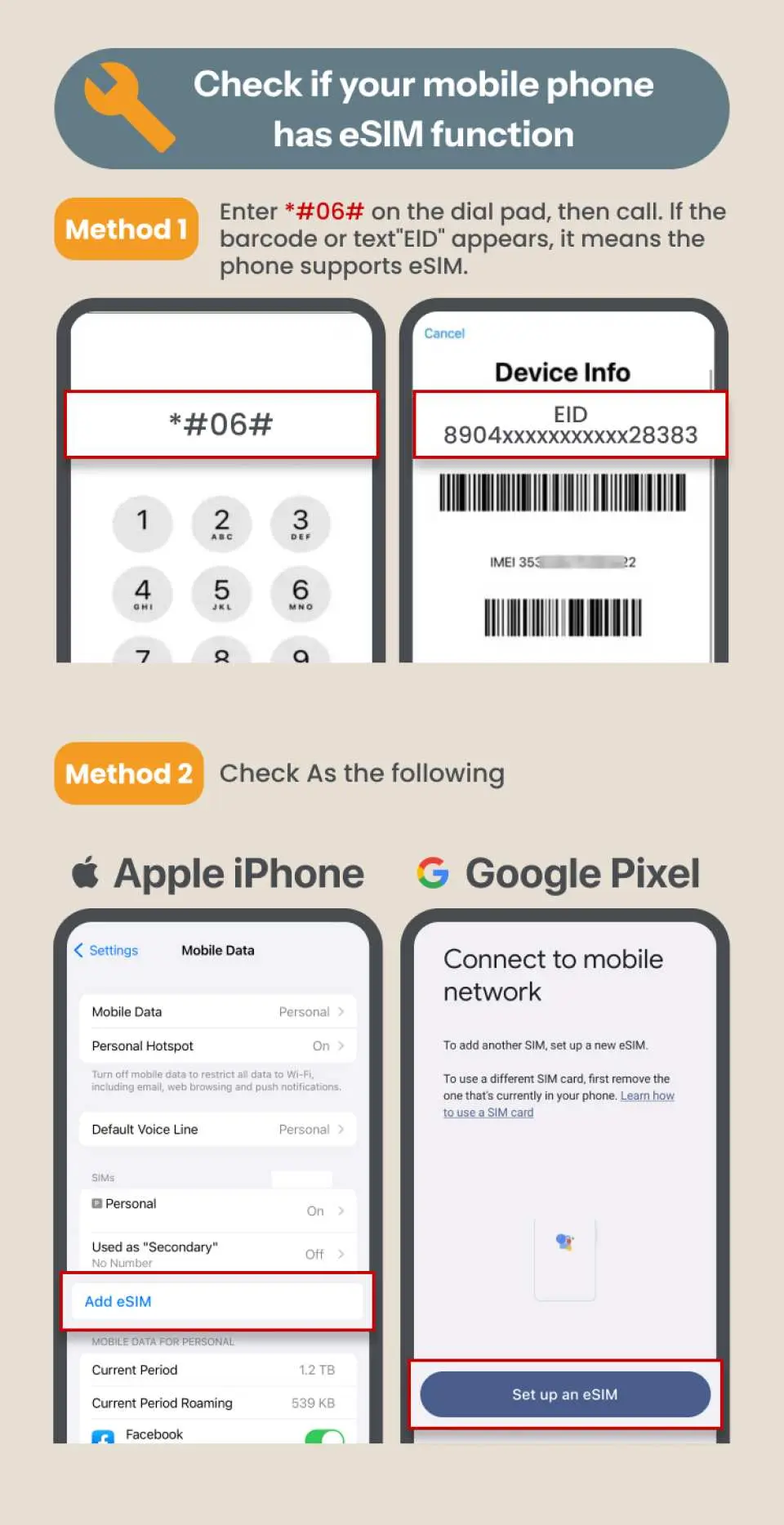
- Please make sure your device support eSIM and is without any SIM card restriction before booking. Returns/cancellation for any reasons is not possible after booking




SIM Card Specifications
| Data Usage Specifications | Unlimited data, 500MB, 1GB, 2GB, 3GB, 5GB, 10GB, 20GB, 30GB, 50GB |
| Transmission Specifications | 5G/4G |
| Signal Coverage Area | Japan, South Korea, Thailand, Malaysia, Singapore, China, Vietnam, Indonesia, Macau, Philippines |
| Mobile Carrier | Japan (KDDI), South Korea (SKT), Thailand (DTAC/True), Malaysia (Maxis/Celcom/Digi), Singapore (Singtel), Indonesia (XL/Telkomsel), Vietnam (Viettel/Mobifone/Vinaphone), Philippines(Globe/Smart), China (CMCC), and Macau (CTM) |
| Supported Sizes | eSIM |
| Hotspot Sharing | Available |
| Supported Frequencies(4G) | B1(2100 MHz) |
| Top-Up Availability | Top-up unavailable |
| Not Supported | SIM-locked device, Carrier-customized device, Mobile hotspot |
| Network Type | Roaming |
Purchase Notice
- The eSIM only offers internet connection; local phone number is not included
- Supports hotspot sharing, but continuous use may affect internet speed and performance. It is recommended that each device uses its own eSIM. For multiple users sharing a hotspot or for extended high-definition video streaming, consider the “Total Data Plan” for more generous data allocation.
- Coverage may vary due to differences in local carrier tower distribution, terrain, building obstructions, or crowded areas, which can cause brief signal fluctuations. The phone will automatically switch to the best available band—if 5G signal is weak, it will fall back to 4G/LTE to maintain a stable connection. If internet speed is abnormal, try moving locations, toggling Airplane Mode to reconnect to towers, or contact online customer service for assistance.
Includes/Excludes
Reminders
This plan will automatically activate once installed and connected. If you are currently in a covered country (e.g., Japan, Thailand), please wait to install until the day of departure and keep it turned off. Turn it on only after arriving at your destination to avoid early activation affecting your usage.
When scanning the QR Code to install, please print your voucher before departure or have another device ready to display the voucher.
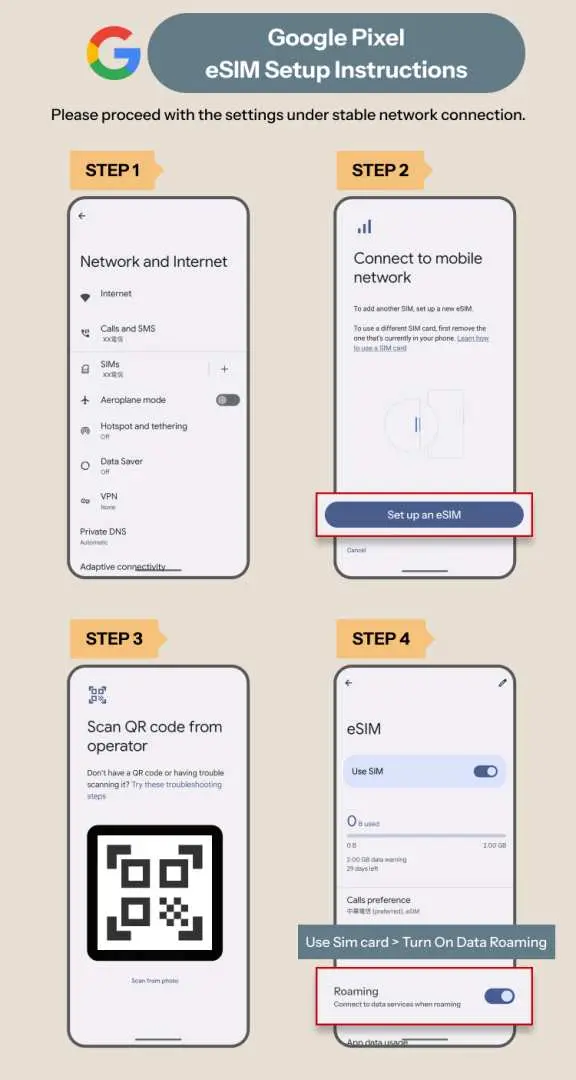
To add eSIM manually, please refer to the eSIM detailed info in the "pre-departure reminder". Copy and paste <SM-DP_Address> and <Activation Code> in the column. No need to enter <cConfirmation Code>
Please enable “Data Roaming” and “Automatic Network Selection” for the eSIM, and make sure any VPN is turned off and old profiles are removed (Settings > General > VPN & Device Management). Wait 1–3 minutes for the network to connect automatically.
This eSIM must be activated within 90 days of issuance. It is recommended to activate it as soon as you arrive at your destination to ensure full usage rights.
Check eSIM Data and Installation Status: Enter your order number starting with 26KK at https://search.t-sim.hk/dataplan/order
Some apps (e.g., mobile payments, online banking, video streaming, short-video, or AI apps) may restrict usage based on regional IP or security policies. These limitations are set by the app itself and are not network connection issues. It is recommended to check your frequently used apps’ roaming support before departure to ensure smooth usage.
During roaming, internet performance may vary slightly due to location, terrain, building obstructions, number of users, or weather. This is normal. If you experience abnormal speeds, try moving to a different location, toggling Airplane Mode to reconnect to the network, or contact online customer service for assistance.
Supports hotspot sharing, but continuous use may affect internet performance. It is recommended that each device uses its own eSIM. For extended video streaming or heavy downloads/uploads in a short period, consider moderate use or opting for the “Total Data Plan” to ensure a smooth online experience.
Cancellation Policy
- Once the order has been completed, it cannot be canceled, modified, or refunded
- Due to time zone differences, the confirmed cancellation date is based on the supplier’s local time. Please allow 2–5 business days to process your cancellation request, after which the cancellation fee will be charged according to the product’s cancellation policy. Once the cancellation is confirmed, you will receive your refund within 14 working days.
FAQ
Yes, modern smartphones typically support multiple eSIM profiles. You can store several eSIMs on your device and switch between them as needed, making it convenient to manage data plans for different regions or purposes. However, only one eSIM can be actively used for data at a time. This feature allows for greater flexibility when traveling across multiple countries in Asia.
Asia 5G eSIMs usually offer a variety of data plans to suit different travel needs. These often include options for fixed data allowances (e.g., 5GB, 10GB, 20GB) with varying durations (e.g., 7 days, 15 days, 30 days). Some plans might also feature unlimited data with a fair usage policy, where speeds may reduce after a certain threshold. It's designed to provide flexibility for short trips or extended stays.
The cost of an eSIM for Asia travel is primarily determined by several factors: the amount of data included (e.g., 5GB, 10GB), the duration of the plan (e.g., 7 days, 15 days), the network speed (e.g., 5G vs. 4G), and the specific countries covered within the Asia region. Providers may also offer different tiers of support or additional features that influence the overall value.
Activating a 5G eSIM for Asia is typically a straightforward process. After purchase, you will receive a QR code via email. To activate, go to your phone's settings, select "Add eSIM" or "Cellular Plan," and scan the QR code. Follow the on-screen prompts to complete the installation. For iOS 17.4 and higher, some eSIMs offer a one-tap installation directly through the app, simplifying the setup even further.
An Asia 5G eSIM generally provides access to high-speed 5G networks where available, relying on trusted local carriers in each supported country. This ensures reliable and fast internet connectivity for activities like streaming, video calls, and navigation. When 5G isn't available, it typically seamlessly switches to 4G LTE, offering consistent performance throughout your journey.
No, the Asia 5G eSIM does not require a physical SIM card, eliminating the need for swapping cards or visiting local stores. For enhanced convenience, it supports instant connection by scanning a QR code from your voucher. Additionally, on iOS 17.4 and the KKday app, a one-tap installation feature is available, streamlining the setup process significantly for a hassle-free experience.
The Asia 5G eSIM provides broad coverage across numerous countries within the Asia region, ensuring wide connectivity for travelers. Key regions are typically included to cover popular travel destinations. However, it is important to note that service explicitly excludes Hong Kong and Macau. Always confirm the full list of supported countries for your specific plan before purchase.
An Asia eSIM offers a more seamless internet experience than traditional roaming by allowing instant digital activation without physical SIM card changes. This means you can arrive in a new country and connect immediately, avoiding high roaming fees or the hassle of finding local SIM cards. It integrates directly into your device, providing consistent data access across multiple Asian destinations without interruption.
Get Help


