【50% Off】Australia & New Zealand eSIM | 1-30 Day Daily/Total Data Plans
- Supports iOS one-click installation: Update to the latest version of the iOS App and iOS 17.4 or above to install eSIM with one click in the KKday App.
- Experience seamless, high-speed 4G/5G connectivity with no need to swap SIM cards—just activate your eSIM data plan directly from your email
- Stay connected throughout your journey on the most reliable local network
- Enjoy peace of mind with our satisfaction guarantee: if you're not completely satisfied with the product, contact us for assistance or a refund
Package Options
Product Info
Booking Guidelines:
- This is a Data-only eSIM. There is generally no phone number (except where expressly mentioned). Calls and texts are still possible via messenger services (WhatsApp, FB etc.)
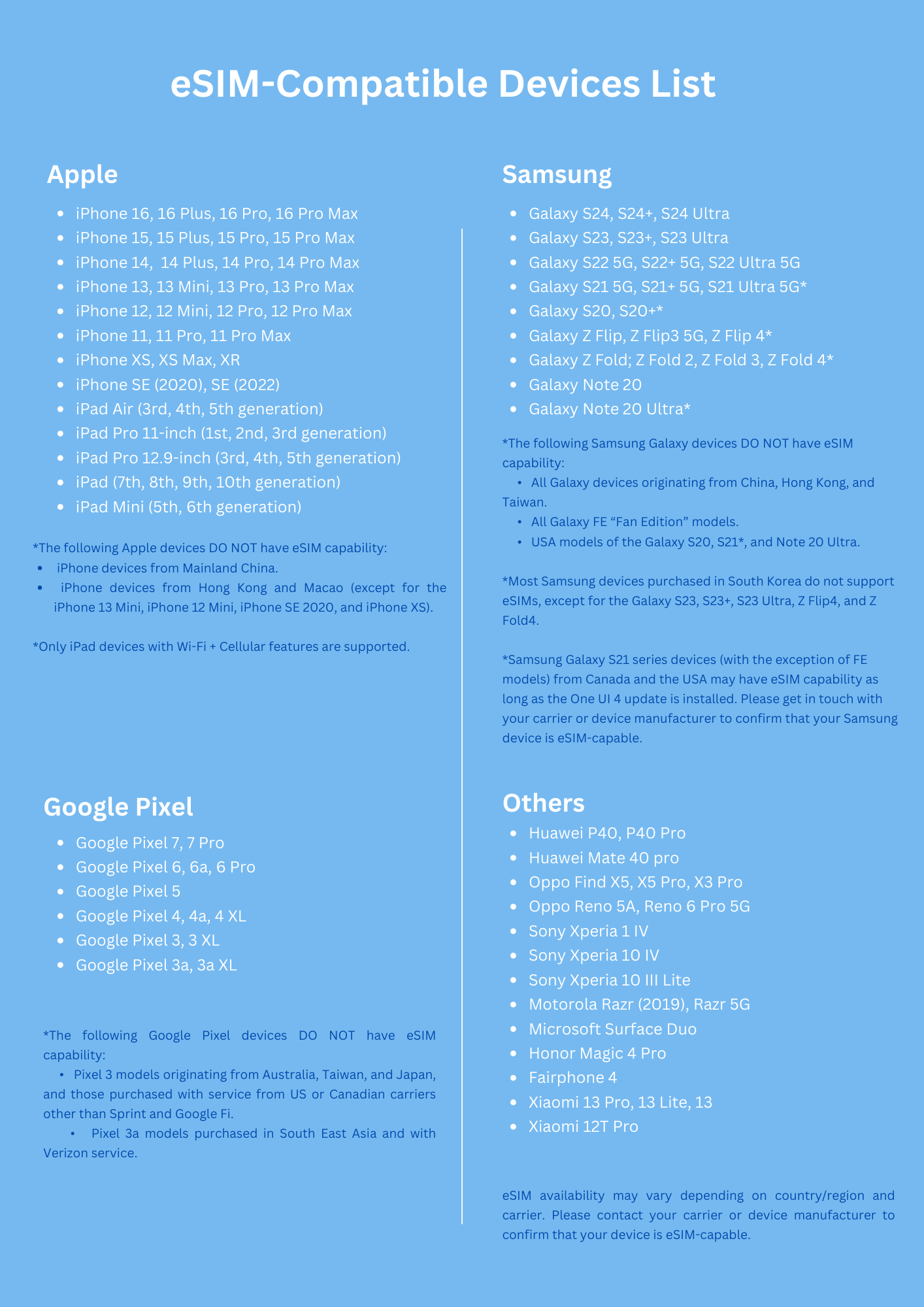
- Before booking, please ensure your mobile device supports the usage of eSIMs. You can find a list of compatible devices here.
- Dial "*#06#" on your mobile phone. If the EID barcode appears, it means your mobile phone supports the eSIM function.
Activation Procedure:
- The eSIM should be activated within 30 days after redeeming the QR code. It is recommended to activate your eSIM on day of departure (can be done in your country) to avoid causing unintended early start of data usage.
- The eSIM is valid for the selected number of days after activation, calculated on a daily basis. For example, if you purchase a 3-day eSIM and activate it at either 08AM or 10PM on October 1, it will remain valid until October 3 at 23:59 (timezone is GMT+8).
- Scan the QR code and activate it automatically. No registration is required.
- Internet connection is required to install the eSIM (using either Cellular or WiFi).
- Do not delete the eSIM. QR code can often only be scanned and activated only once. After scanning, eSIM cannot be transferred to another device.


SIM Card Specifications
| Data Usage Specifications | Unlimited data, 600MB, 1.5GB, 15GB, 25GB, 30GB, 60GB |
| Transmission Specifications | 4G |
| Signal Coverage Area | Australia, New Zealand |
| Mobile Carrier | Optus & 2Degrees |
| Supported Sizes | eSIM |
| Hotspot Sharing | Available |
| Supported Frequencies(4G) | B3(1800 MHz), B1(2100 MHz) |
| Top-Up Availability | Top-up unavailable |
| Excludes | Voice calls, Texts |
| Not Supported | SIM-locked device, Carrier-customized device, Mobile hotspot |
| Network Type | Roaming |
Purchase Notice
Customer Support:
- If you experience any service disruptions, such as inability to connect to the internet, slow speeds, or issues with APN settings after inserting the card, please reach out to our customer service at listen@xplori.world or +852 5382 7074 (WhatsApp).
- If you're still not satisfied with our service, we are happy to process a refund. However, we encourage you to contact us first as soon as the issue arises. Leaving a negative review can complicate the support or refund process. Thank you for your understanding!
Usage Reminder:
- Under the Fair Usage Policy, data speed and usage may be limited for users who process large amounts of data in a short period of time. This is at the discretion of the subscribed telecommunications company and may occur without prior notice.
- Please refrain from extensive video streaming and/or processing a huge amount of data in a short time.
- The connection speed depends on your reception coverage and the local tele company. No refund will be issued for any speed drop.
- Please reach out to us in case you require hotspot sharing for the eSIM. Note that long sharing will lead to slow down of data speed.
Includes/Excludes
Reminders
Cancellation Policy: Offered in case of technical issues. You need to contact us when the issue occurs.
Cancellation Policy
- Once the order has been completed, it cannot be canceled, modified, or refunded
- Due to time zone differences, the confirmed cancellation date is based on the supplier’s local time. Please allow 2–5 business days to process your cancellation request, after which the cancellation fee will be charged according to the product’s cancellation policy. Once the cancellation is confirmed, you will receive your refund within 14 working days.
FAQ
The Australia & New Zealand eSIM offers flexible daily data plans ranging from 1 to 30 days, designed for seamless high-speed 4G/5G connectivity. It utilizes reliable local networks in both countries, ensuring stable internet access throughout your journey. Travelers can select a plan duration that perfectly matches their trip length and data needs.
Yes, the Australia & New Zealand eSIM is specifically designed to provide continuous, high-speed internet access across both countries. It eliminates the need to switch physical SIM cards when moving between Australia and New Zealand, ensuring a hassle-free and connected experience throughout your journey on reliable local networks.
An eSIM data plan works by digitally embedding a subscriber profile into your device, eliminating the need for a physical SIM card. For international travelers, this means you can activate your Australia & New Zealand data plan directly from an email, often with a simple one-click installation for iOS users. Your device then connects to local 4G/5G networks, providing seamless internet access throughout your journey.
The installation process for the Australia & New Zealand eSIM is straightforward. You typically receive the eSIM profile via email, which can be scanned as a QR code or installed manually. For iOS users with iOS 17.4 or above, updating the iOS App allows for a convenient one-click installation directly within the App, making activation quick and easy.
Most modern smartphones allow you to easily manage and switch between your physical SIM and an active eSIM through your device's cellular settings. You can designate which line to use for data, calls, or messages, giving you flexibility to use your existing physical SIM for calls and texts while the eSIM handles data, or vice versa.
Potential challenges with an eSIM include device compatibility, as not all phones support eSIM technology. Activation typically requires an internet connection, which might be a concern if you arrive without existing connectivity. Also, switching phones can be slightly more involved than swapping a physical SIM, as the eSIM profile needs to be transferred or re-downloaded.
The Australia & New Zealand eSIM is designed primarily as a data-only plan. It provides high-speed 4G/5G mobile data for internet access, browsing, and using messaging apps or Voice over IP (VoIP) services for communication. Traditional call and text services (SMS) are typically not included with these data-focused eSIM plans.
The Australia & New Zealand eSIM offers seamless, high-speed 4G/5G connectivity. It operates on reliable local networks in both Australia and New Zealand, aiming to provide consistent and strong signal quality. This ensures travelers can enjoy fast internet speeds for streaming, navigation, social media, and staying connected throughout their trip.
Get Help