

【25% OFF】Asia Network Card | Daily high-speed data eSIM in 14 Asian countries (recommended for travel to Laos, Cambodia, Indonesia, and Singapore)
- Supports iOS one-click installation: Update to the latest version of the iOS App and iOS 17.4 or above to install eSIM with one click in the KKday App.
- You can travel to 14 countries in Asia without changing your card. It is the best companion for cross-border business trips and traveling around Asia.
- Once you receive the eSIM QRcode, you can scan, install and use it. There is no need to run back and forth to pick up the physical card or wait for physical delivery.
- Supports Apple and multiple Android phones * Samsung phones purchased in different countries have different versions, so you must first confirm whether they support eSIM before purchasing (Samsung phones purchased in Taiwan do not support the eSIM function)
Package Options
Product Info
- Telecom operators in Japan: KDDI/Softbank
South Korea: KT
Singapore: Singtel
Malaysia: Maxis/Celcom/Umobile
Thailand: Truemove
Indonesia: XL/Indosat
Vietnam: Vinaphone / Mobifone / Viettel
Cambodia: CamGSM
Philippines: Smart
Laos: LTC
China: CMCC
Hong Kong: CMHK
Macau: CTM
Taiwan: Chunghwa Telecom - Special notes:
Hong Kong and Taiwan are MVNO roaming services provided by "China Mobile Hong Kong", and the local network uses CMHK and Chunghwa Telecom base stations. If you plan to use eSIM in these two places, please first go to the official website of China Mobile Hong Kong and complete the real-name registration.
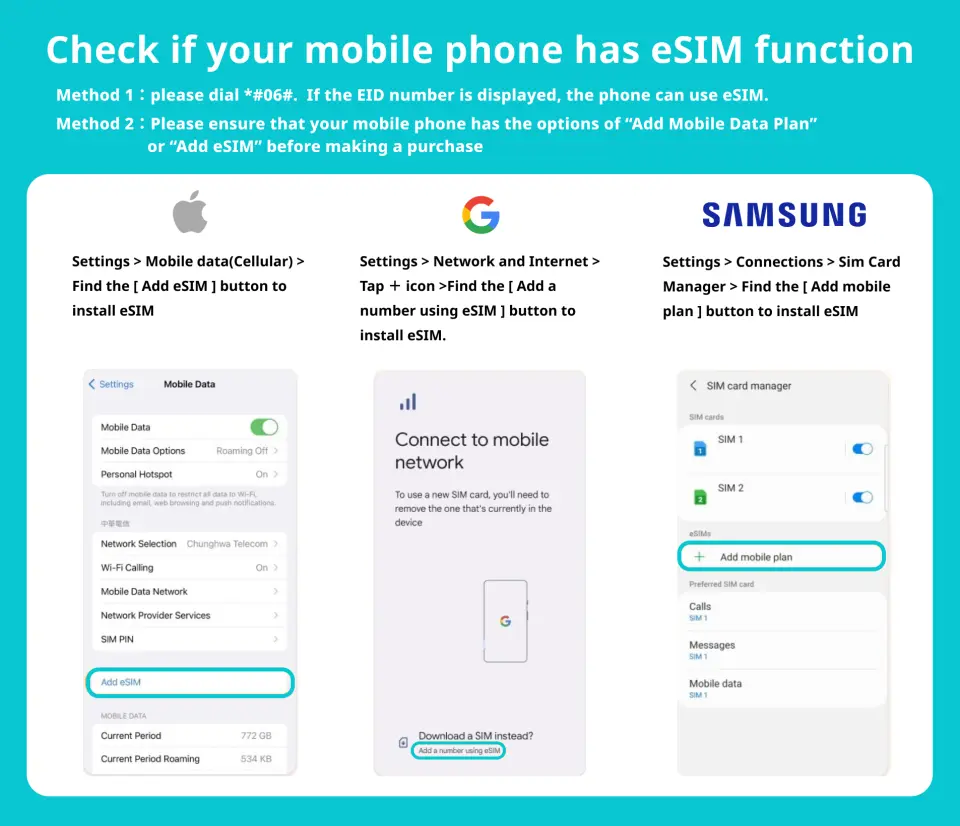
Please confirm that your device supports eSIM before purchasing.

eSIM applicable models

eSIM installation instructions (ios)

eSIM installation instructions (Android)
SIM Card Specifications
| Data Usage Specifications | 500MB, 1GB, 2GB |
| Transmission Specifications | 4G |
| Signal Coverage Area | Japan, South Korea, Taiwan, Thailand, Malaysia, Singapore, Hong Kong, China, Vietnam, Indonesia, Philippines, Cambodia, Laos, Macau |
| Mobile Carrier | Varies by region |
| Supported Sizes | eSIM |
| Hotspot Sharing | Available |
| Supported Frequencies(4G) | B1(2100 MHz), B8(900 MHz), B3(1800 MHz), B7(2600 MHz) |
| Top-Up Availability | Top-up unavailable |
| Excludes | Voice calls, Texts |
| Not Supported | SIM-locked device, Carrier-customized device, Pocket WiFi, Modified phones, 3G mobile phones, translators, mobile phones without eSIM function |
| Reminders | ・After the high-speed traffic is used up, the speed will be reduced to 128Kbps without interrupting the network. ・Hong Kong and Taiwan are MVNO roaming services provided by "China Mobile Hong Kong". The local network uses CMHK and Chunghwa Telecom base stations. If you plan to use eSIM in these two places, please go to the official website of China Mobile Hong Kong and complete the real-name registration. https://global.cmlink.com/store/realname?LT=hk ・This product is provided by TGT Technology Hong Kong Limited. |
Important Info
Reminders
After scanning the QRcode to successfully download the order, the order cannot be canceled or refunded.
Installing eSIM requires an Internet connection. Please confirm that there is available WiFi or available mobile data in the environment before installation.
Please scan and install the eSIM after arriving at the destination on the start day of the journey to avoid starting the validity period calculation early.
Hong Kong and Taiwan are MVNO roaming services provided by "China Mobile Hong Kong", and the local network uses CMHK and Chunghwa Telecom base stations. If you plan to use eSIM in these two places, please go to the official website of China Mobile Hong Kong and complete the real-name registration. https://global.cmlink.com/store/realname?LT=hk
Each QR code can only be scanned and installed once. Once activated, the device cannot be replaced or deleted.
Please use the eSIM within 30 days after receiving it, otherwise it will become invalid.
iOS requires version 12.1 or higher; please note that iPhones sold in mainland China do not support eSIM. In Hong Kong and Macau, only iPhone 13 mini, iPhone 12 mini, iPhone SE 2020 and iPhone XS have eSIM functionality.
The versions of Samsung mobile phones vary from country to country. Samsung mobile phones purchased in Taiwan do not support eSIM. For other regions, please check with Samsung’s official website first.
Please be aware that the signal may affect the quality of the Internet depending on factors such as location, terrain, building coverage, number of users, weather, etc.
In accordance with the International Data Communications Fair Utilization Policy, it is recommended to turn off the automatic Facebook video browsing function, automatic APP program update or automatic synchronization function to avoid excessive use of data. Please note that due to the slowdown in Internet speed or inability to access the Internet due to mobile games, etc., you cannot apply for refund or compensation.
How to Use
- How to install:
ios: Settings > Mobile Services > Join Mobile Plan > Scan QRcode > Join Mobile Plan Android: Settings > Internet (Connections) > SIM Administrator > Add SIM Card (Join Mobile Plan) > Scan QRcode - Set eSIM APN:
Usually the APN will be automatically recognized. If it cannot be automatically recognized, you need to set it manually. Please contact customer service and ask the supplier to provide the APN in your location. - Hong Kong and Taiwan are MVNO roaming services provided by "China Mobile Hong Kong", and the local network uses CMHK and Chunghwa Telecom base stations. If you plan to use eSIM in these two places, please first go to the official website of China Mobile Hong Kong and complete the real-name registration.
Cancellation Policy
- Once the order has been completed, it cannot be canceled, modified, or refunded
- Due to time zone differences, the confirmed cancellation date is based on the supplier’s local time. Please allow 2–5 business days to process your cancellation request, after which the cancellation fee will be charged according to the product’s cancellation policy. Once your refund request is confirmed, KKday will initiate the refund to your original payment method within 15 days. The actual refund timing depends on your card-issuing bank’s policy.
FAQ
1. What makes the Asia Network Card eSIM suitable for multi-country travel in Asia?
The Asia Network Card eSIM is ideal for multi-country travel because it offers seamless connectivity across 14 Asian countries with a single QR code. Travelers avoid the hassle of swapping physical SIM cards, ensuring continuous high-speed data. It supports one-click installation for iOS users (iOS 17.4 and above), providing convenience for cross-border trips or extensive travel within Asia.
2. Are there any device compatibility requirements for using the Asia Network Card eSIM?
Yes, to use the Asia Network Card eSIM, your device must support eSIM functionality. It is compatible with Apple phones and multiple Android models. For Samsung phones, especially those purchased in different regions, it's crucial to confirm eSIM support before purchase, as some versions (e.g., Samsung phones purchased in Taiwan) do not support this function.
3. How does the Asia Network Card eSIM work across multiple Asian countries without changing cards?
The Asia Network Card eSIM works as a universal digital SIM profile. Once installed and activated via a QR code, it automatically connects to local networks in the 14 covered countries. This digital setup eliminates the need for physical card changes, providing continuous high-speed data as you move between destinations, with speed reductions only after daily volume limits are reached.
4. Does the Asia Network Card eSIM provide data-only service, or does it include calls and SMS?
The Asia Network Card eSIM is designed primarily for data-only service. It provides daily high-speed internet access for staying connected, browsing, and using messaging apps while traveling. It does not typically include local call minutes or SMS services. For voice communication, you can utilize internet-based calling applications such as WhatsApp or Line.
5. How do I purchase and activate the Asia Network Card eSIM?
You can easily purchase the Asia Network Card eSIM through KKday. After your purchase, you will receive an eSIM QR code. To activate, simply scan the QR code with your compatible device. For iOS users with iOS 17.4 or above, one-click installation is available directly within the KKday App, simplifying the setup process significantly and offering a streamlined purchasing and activation experience.
6. Can the Asia Network Card eSIM be used in China, and are there any specific considerations?
Yes, the Asia Network Card eSIM can be used in China as it is one of the 14 covered countries. When using any internet service in China, be aware that access to certain international websites and services might be restricted by local internet regulations. While the eSIM provides data connectivity, you may need a Virtual Private Network (VPN) if you require access to blocked services.
7. What are the installation steps for the Asia Network Card eSIM?
The installation process for the Asia Network Card eSIM is straightforward. After receiving your QR code, access your phone's cellular settings to add a new cellular plan by scanning the provided QR code. For iOS users with iOS 17.4 or above, you can also install the eSIM with a single click directly through the KKday App, making the setup quick and convenient. Ensure a stable internet connection during installation.


