

China-Japan-Korea SIM Card | Daily High-Speed 600MB/1GB/1.8GB/3GB Unlimited Total eSIM | Compatible with China, Japan, and Korea
- A new choice for Internet access, no need to change cards, enjoy 4G Internet access quickly and neatly, no need to rush around
- Once you receive the voucher, you can scan it and install it. You don’t have to run back and forth to get the physical card or wait for physical delivery.
- Environmentally friendly, no consumables, free shipping, zero risk of loss
Package Options
Product Info
The content of this product is provided by machine translation and may not reflect the actual information, please take this into consideration before booking.
- Introduction to eSIM
eSIM (Embedded-SIM), also known as "embedded SIM card" or "virtual SIM card". Unlike traditional network cards, which are removable and need to be inserted into the card slot of the mobile device to use them, eSIM adopts a "virtual" form. Users only need to scan the exclusive QR Code to set up, and the card can be directly implanted into the mobile phone. , you can download the traffic plan to your phone without inserting another physical card. Book now on KKday to add another layer of fun to your trip!
- Things to know before buying
- Please make sure your mobile phone and its operating system support the eSIM function before purchasing. No refunds will be issued if the order is canceled due to device incompatibility.
- iOS requires version 12.1 or higher; please note that iPhones sold in mainland China do not support eSIM. In Hong Kong and Macau, only iPhone 13 mini, iPhone 12 mini, iPhone SE 2020 and iPhone XS have eSIM functionality. (Please go to Apple’s official website to check)
- The versions of Samsung mobile phones vary from country to country. Samsung mobile phones purchased in Taiwan do not support eSIM. In other regions, please check with Samsung’s official website first.
- Each QR code can only be scanned and installed once. After binding, the device cannot be changed or deleted. Once deleted, it cannot be rescanned and installed and needs to be purchased again.
- The customer service hours for this product are 9:30~18:00 (GMT+8), please be informed.
Please confirm that your device is compatible with eSIM before purchasing.


Applicable models


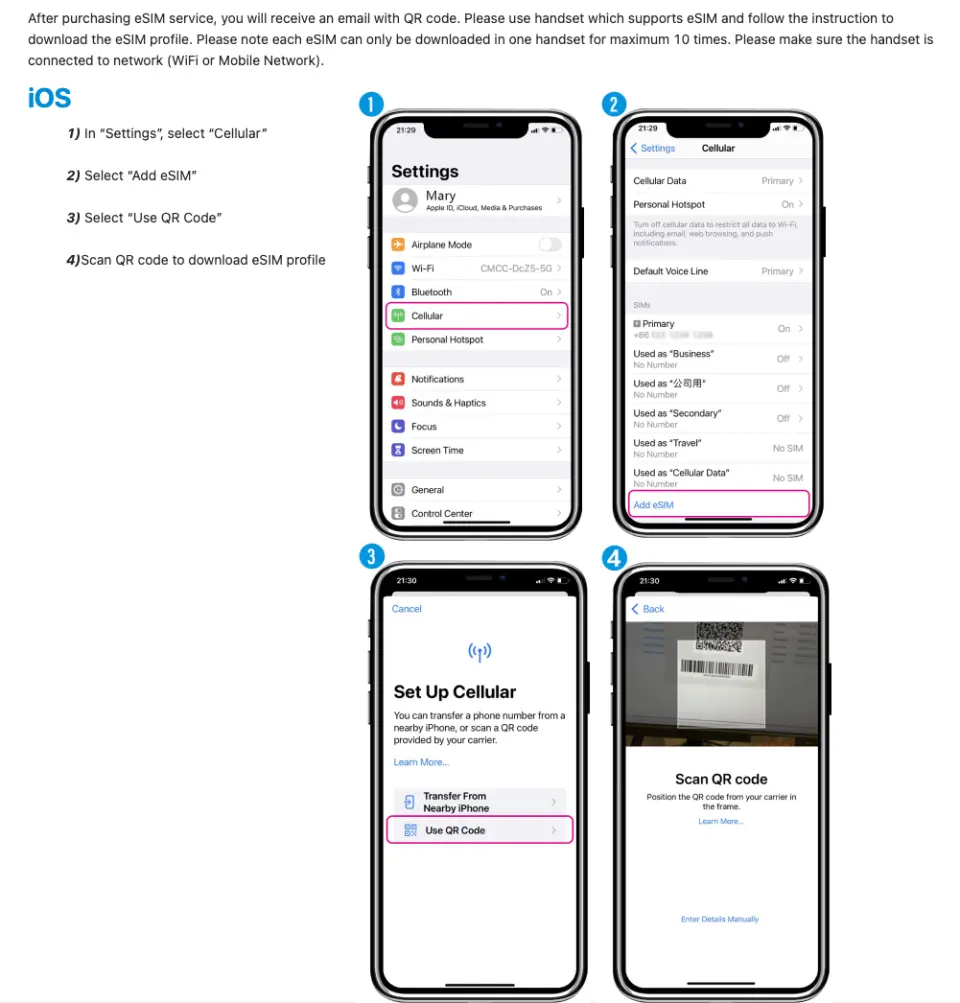
eSIM installation instructions (ios)

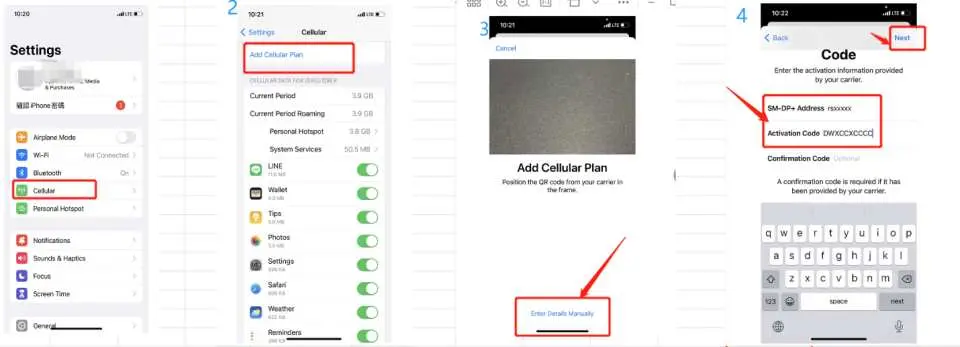
Method two

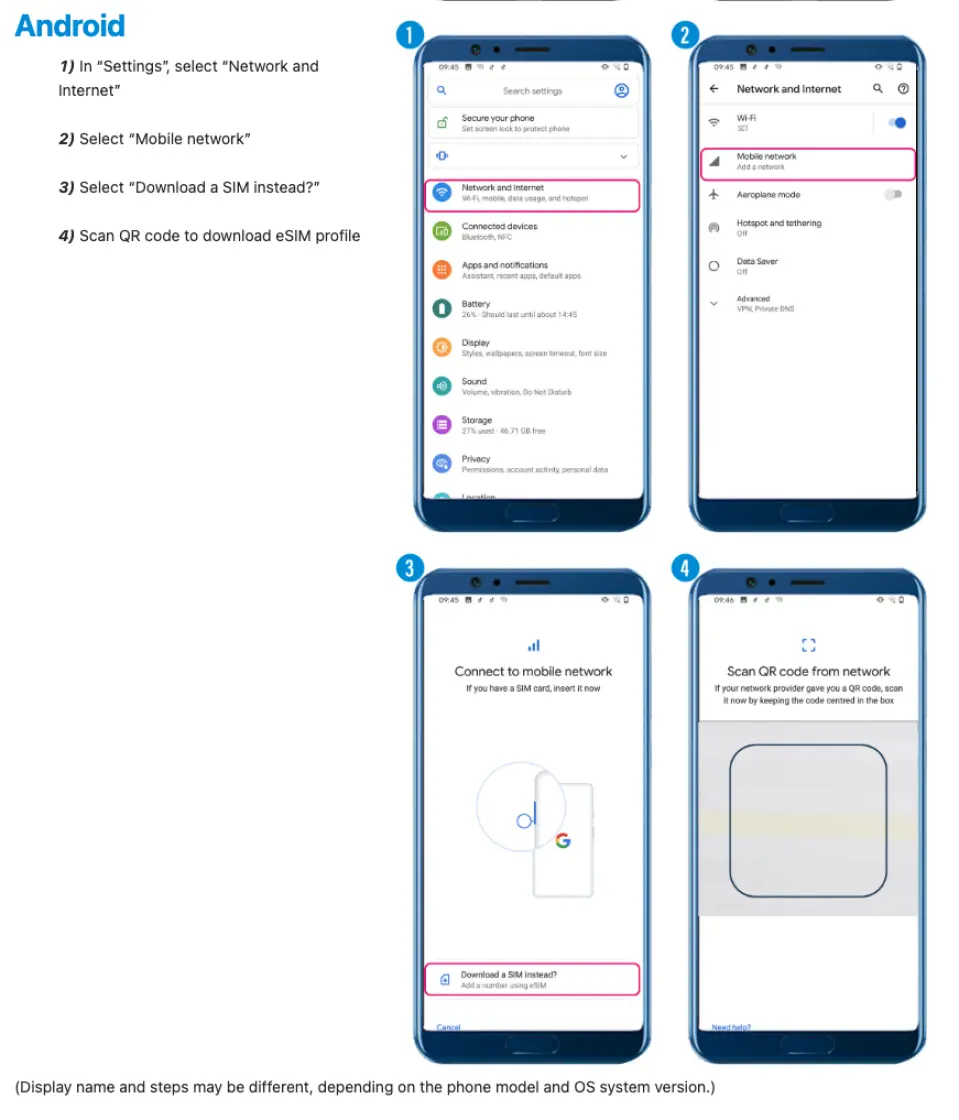
eSIM installation instructions (android)

Purchase Notice
- Please make sure your mobile phone and its operating system support the eSIM function before purchasing. No refunds will be issued if the order is canceled due to device incompatibility.
- iOS requires version 12.1 or higher; please note that iPhones sold in mainland China do not support eSIM. In Hong Kong and Macau, only iPhone 13 mini, iPhone 12 mini, iPhone SE 2020 and iPhone XS have eSIM functionality. (Please go to Apple’s official website to check)
- The versions of Samsung mobile phones vary from country to country. Samsung mobile phones purchased in Taiwan do not support eSIM. In other regions, please check with Samsung's official website first.
- Each QR code can only be scanned and installed once. After binding, the device cannot be changed or deleted. Once deleted, it cannot be rescanned and installed and needs to be purchased again.
- The customer service hours for this product are 9:30~18:00 (GMT+8), please be informed.
Reminders
Please make sure that your mobile phone and its operating system support the eSIM function before purchasing. No refunds will be issued if the order is canceled due to incompatibility of the device.
iOS requires version 12.1 or higher; please note that iPhones sold in mainland China do not support eSIM. In Hong Kong and Macau, only iPhone 13 mini, iPhone 12 mini, iPhone SE 2020 and iPhone XS have eSIM functionality.
Each QR code can only be scanned once. After binding, the device cannot be changed or deleted. Once deleted, it cannot be rescanned and installed.
Installing eSIM requires an Internet connection. Please confirm that there is available WiFi or available mobile data in the environment before installation.
It must be installed and activated at the destination within 90 days of ordering, otherwise the eSIM will become invalid and cannot be used.
Please remember to turn off data roaming on the original SIM card to avoid using the mobile network of the original SIM card and incurring high roaming charges.
To end using the eSIM plan available on your phone, click [Remove Action Plan] at the bottom to remove it.
Please be aware that the signal may affect the quality of the Internet depending on factors such as location, terrain, building coverage, number of users, weather, etc.
The customer service hours for this product are 9:30~18:00 (GMT+8), please be informed.
How to Use
- ios
1) Select the "Settings" page and select "Mobile Network" 2) Click "Add Mobile Network" 3) When the scanning box appears, scan the QRcode 4) After the download is completed, make some basic settings to start using it - Android
1) On the "Settings" page, select "Network and Internet" 2) Select "Mobile Network" 3) Select "Do you want to download the SIM card instead?" 4) When the scanning screen appears, scan the QRcode - If the APN does not load automatically, please set the APN manually.
APN: mobile - The customer service hours for this product are 9:30~18:00 (GMT+8), please be informed.
- FAQ
- How to check ICCID?
If the mobile network is turned on, you can check the ICCID in "Settings - About This Mac - ESIM". - I have successfully activated the eSIM service, but the applicable device cannot connect to the Internet. What should I do?
Please shut down and restart your device and update the iOS version before trying again. - The problem of eSIM not being able to share hotspots. If the eSIM can be used normally but cannot share hotspots, please refer to the following guidelines to try to see if it can be restored:
1) Whether the mobile phone is a contract phone or a card lock machine
2) Whether the VPN has been turned off
3) Whether data roaming is turned on
4) Whether to set eSIM as the main phone number
5) Whether the phone is updated to the latest iOS version (iOS13.6)
6) Please use a physical card to access the Internet, turn on the hotspot sharing function on your phone (make sure the hotspot is available), then do not turn off the hotspot, and then switch your phone to eSIM to access the Internet. Please try several times and turn on and off the machine.
7) If the above problems have been eliminated, please contact customer service
Cancellation Policy
- Once the order has been completed, it cannot be canceled, modified, or refunded
- Due to time zone differences, the confirmed cancellation date is based on the supplier’s local time. Please allow 2–5 business days to process your cancellation request, after which the cancellation fee will be charged according to the product’s cancellation policy. Once the cancellation is confirmed, you will receive your refund within 14 working days.
FAQ
Yes, a single multi-country eSIM is specifically designed to provide data coverage across multiple destinations like China, Japan, and South Korea. This simplifies international travel, as you only need one eSIM to stay connected in all three countries without swapping physical SIM cards. It offers a seamless transition between networks as you cross borders, ensuring consistent internet access throughout your trip.
When using an eSIM in China, it's important to be aware of local internet regulations. Access to certain international apps and websites may be restricted due to internet censorship. Travelers often use a Virtual Private Network (VPN) service to access these services. Ensure your device is compatible with eSIM technology and unlocked for international use. The eSIM typically provides data services, allowing you to access the internet for navigation, communication, and information.
A multi-country eSIM data plan works by downloading a digital SIM profile to your compatible device using a QR code. Once activated, the eSIM automatically connects to partner mobile networks in China, Japan, and South Korea, providing internet access. These plans usually offer a daily high-speed data allowance (e.g., 600MB, 1GB, 3GB), after which speeds may be reduced, but data typically remains unlimited for the day. This ensures consistent connectivity during your travels.
While highly convenient, eSIMs do have some limitations. Not all older smartphone models support eSIM technology, requiring device compatibility. Many travel eSIMs are data-only, meaning they typically don't include a local phone number for traditional calls or SMS, which might be inconvenient for local contacts. Initial activation usually requires an internet connection (Wi-Fi) to download the profile. Also, transferring an eSIM profile between different devices can sometimes be more complex than swapping a physical SIM card.
The primary advantages of an eSIM for travel to China, Japan, and South Korea include unparalleled convenience. There's no need to physically swap cards or use a card ejection tool, eliminating the risk of losing your original SIM. Activation is quick and digital, often via a QR code, allowing immediate internet access upon arrival. eSIMs are also environmentally friendly as they produce no physical waste. They offer flexibility, letting you switch between carriers or plans digitally without hassle, making international travel smoother.
This China, Japan, South Korea eSIM is primarily designed to provide data services for internet access. Typically, travel-focused eSIMs like this offer robust data connectivity without including traditional local call minutes or SMS messaging. For voice communication, users can leverage various Voice over IP (VoIP) applications such as WhatsApp, Line, or Messenger, which utilize the eSIM's data connection, allowing you to stay connected with friends and family.
The activation process for a multi-country eSIM for China, Japan, and South Korea is straightforward. After purchasing, you will receive a QR code, typically via email or your booking confirmation. You then go to your phone's settings, usually under 'Cellular' or 'Mobile Data', and select 'Add eSIM' or 'Add Data Plan'. Scan the provided QR code, and your device will download and install the eSIM profile. Ensure your device is connected to Wi-Fi during installation. Once installed, you can activate the plan when you arrive at your destination.
When using an eSIM in Japan or South Korea, you can generally expect high-speed 4G (LTE) network access. The product typically offers a daily allowance of high-speed data, such as 600MB, 1GB, 1.8GB, or 3GB. After this daily allowance is consumed, the speed may be throttled to a lower but still usable rate for the remainder of the day. Actual speeds can vary based on network congestion, coverage in specific areas, and your device's capabilities, but overall, you should experience reliable internet.
Get Help


