

【50% Off】 Japan and South Korea eSIM|Daily 1-3GB Dual-Carrier Roaming Plan|Supports ChatGPT (Recommended for Cruise Travel)
- KKday Japan and South Korea eSIM cards provide 5G/4G/LTE service and support hotspot sharing.
- KKday Japan and South Korea eSIM cards utilize roaming resources from Softbank and Rakuten in Japan, and SKT and LG in South Korea. Simply scan to install and use once you receive the voucher.
- eSIM functionality is not available on mobile phones from China, Hong Kong, or Macau. Please verify your device compatibility before purchasing. If you are unable to set up the eSIM on your iPhone, please refer to the Apple official website for instructions.
Package Options
What You Can Expect
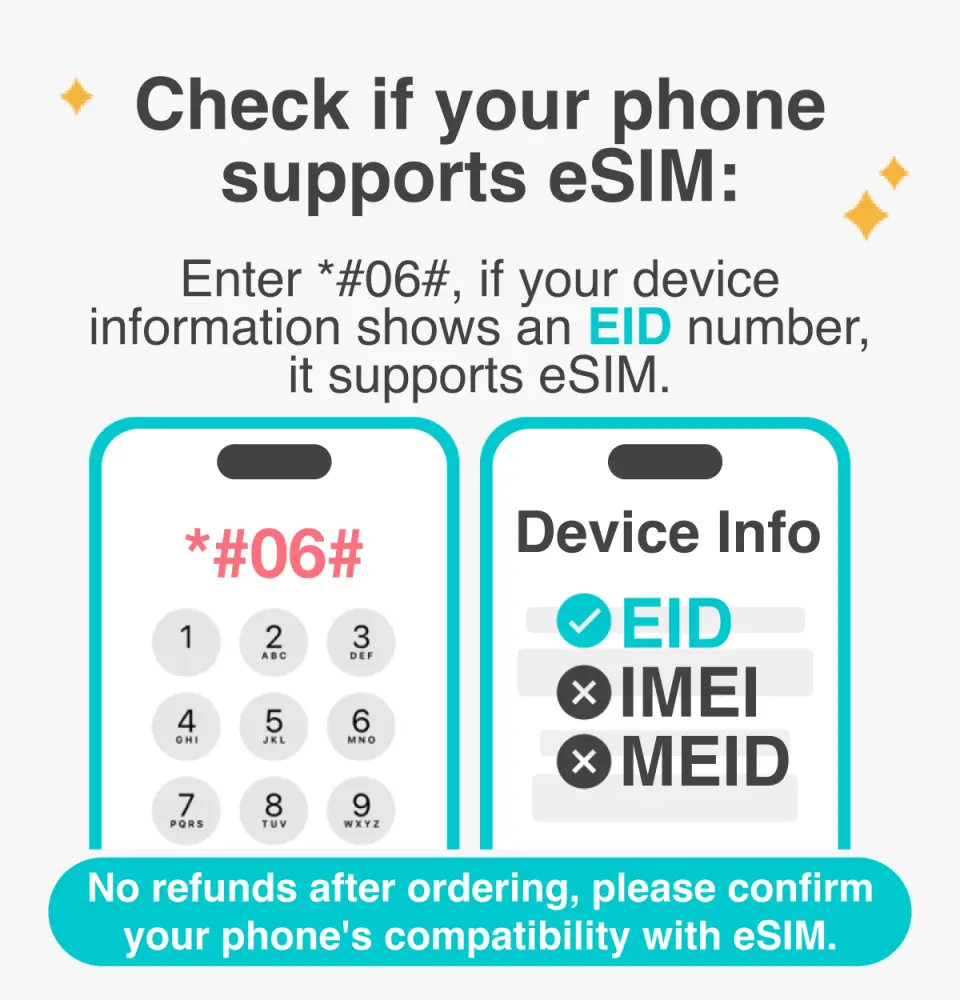
Please confirm your phone is compatible with eSIM before purchasing. Orders cannot be cancelled or refunded after purchase.

Before enabling eSIM, please update your iOS to the latest version and connect to a stable Wi-Fi network. Older iOS versions and unstable networks are common reasons for eSIM activation failure.

Open your camera to scan for the eSIM, then tap "Action Plan".

The startup time is about 2-3 minutes, and the installation may fail if the startup screen pops up.

You can customize the eSIM name for easy management of multiple eSIMs.

Selecting a preset number allows you to specify your primary mobile number to receive messages (you need to apply to your original telecom operator to activate international roaming for your primary mobile number before you can receive SMS messages).

You can specify the primary phone number to use iMessage and FaceTime features.

Choosing to use eSIM mobile data, "eSIM mobile data is not enabled" is a common reason for being unable to access the internet.

The roaming plan requires data roaming to be enabled.
Purchase Notice
- Orders cannot be cancelled and refunds cannot be issued after an eSIM is sent. Please ensure your phone supports eSIM (iPhones and Android phones sold in China, Hong Kong, and Macau do not support eSIM; most Android phones sold in Taiwan do not support eSIM).
- For Android phones that support eSIM, please refer toFigures 1 and2 for the steps to manually enter the activation code.
Cancellation Policy
- Once the order has been completed, it cannot be canceled, modified, or refunded
- Due to time zone differences, the confirmed cancellation date is based on the supplier’s local time. Please allow 2–5 business days to process your cancellation request, after which the cancellation fee will be charged according to the product’s cancellation policy. Once your refund request is confirmed, KKday will initiate the refund to your original payment method within 15 days. The actual refund timing depends on your card-issuing bank’s policy.
FAQ
1. Can Japan and South Korea eSIMs be set up and activated in Taiwan in advance?
Yes, you can choose to receive the Japan and South Korea eSIM certificate in Taiwan and complete the scan installation before departing for Japan or South Korea. The eSIM will automatically activate when you arrive at your destination and your phone detects the local telecom network, allowing you to enjoy internet service immediately upon arrival without complex local setup.
2. How can I check if my phone supports Japan and South Korea eSIM functionality?
You need to check if your phone supports eSIM functionality yourself. In particular, some phones purchased in Mainland China, Hong Kong, and Macau may not support eSIM services, so be sure to check before purchasing. For iPhone users encountering setup issues, please refer to the detailed instructions provided on the Apple official website. Generally, most mainstream international smartphone models already support eSIM.
3. What are the things to note or potential situations when using Japan and South Korea eSIMs?
There are a few things to pay attention to when using Japan and South Korea eSIMs. Firstly, some phones sold in Mainland China, Hong Kong, and Macau may not support eSIM functionality, so please confirm your phone's compatibility yourself before purchasing. Secondly, once an eSIM is installed on a phone, it is usually bound to that device and cannot be directly transferred to another phone. Therefore, please ensure you confirm the phone device you will be using during your trip.
4. Do I need to visit a physical store to apply for a Japan and South Korea eSIM?
No, you do not need to visit a physical store. Japan and South Korea eSIMs can be easily applied for through online platforms. After ordering on KKday, you will receive an electronic voucher, and you can quickly install it by scanning the QR Code on the voucher. This offers great convenience, saving you valuable travel time and allowing you to enjoy fast and convenient service without queuing or dealing with physical SIM cards.
5. What telecom roaming services and network types do Japan and South Korea eSIMs offer?
Japan and South Korea eSIMs offer cross-border dual-telecom roaming services. In Japan, you can use Softbank and Rakuten telecom networks, while in South Korea, you can choose from SKT and LG telecom, aiming to provide more stable and wider network coverage. Additionally, this eSIM supports 5G/4G/LTE high-speed internet services, ensuring you have a smooth network experience during your travels in both countries.
6. Is the 1-3GB daily data allowance for Japan and South Korea eSIMs sufficient for general travel internet needs?
The 1-3GB daily data allowance is sufficient for most general internet needs during travel in Japan and South Korea, usable for map navigation, information lookup, social media interaction, instant messaging apps, etc. If you are a heavy internet user, such as watching high-definition videos for extended periods or frequently attending online meetings, it is recommended to assess your actual data usage or consider using the hotspot sharing feature to meet your needs.
7. Does the Japan and South Korea eSIM support hotspot sharing?
Yes, the Japan and South Korea eSIM supports hotspot sharing. You can share your phone's internet connection with travel companions or other devices (such as tablets, laptops), allowing multiple devices to connect to the internet simultaneously. However, please note that hotspot sharing will consume data faster. It is recommended to keep an eye on your daily data usage when using this feature to ensure sufficient network resources.
8. What is the voucher delivery and installation process after purchasing a Japan and South Korea eSIM?
After purchasing a Japan and South Korea eSIM, you will immediately receive an electronic voucher. This voucher contains a dedicated QR Code. You simply need to scan this QR Code with your mobile phone and follow the on-screen instructions to complete the installation and setup. The entire process does not require inserting or removing a physical SIM card, making it a quick and convenient operation.


