

【50% OFF】Japanese eSIM Cards | 500MB/1GB/2GB/3GB/Daily Data/Unlimited Data and Total Plans | Softbank/KDDI/Docomo (IIJ)
- KKday Japan eSIM card uses Softbank/KDDI/Docomo telecom roaming resources and has smooth signal without any worries
- KKday Japan eSIM card, offering a variety of days and plans to meet all needs
- KKday Japan eSIM card, please install and use it within one month after receiving the certificate
Package Options
Product Info
The content of this product is provided by machine translation and may not reflect the actual information, please take this into consideration before booking.
Please confirm that your device is compatible with eSIM before purchasing. After sending the eSIM QR code, this product is non-refundable.

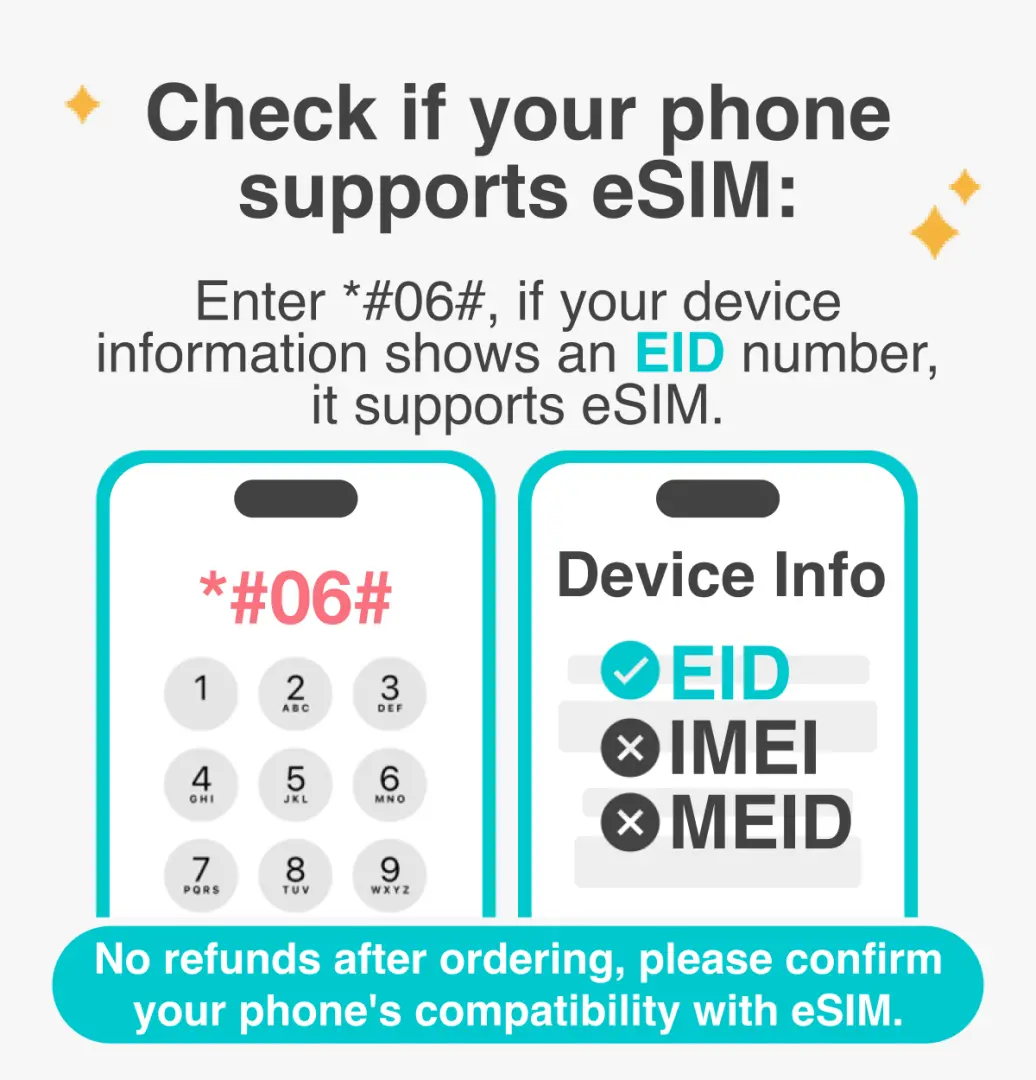
eSIM compatible phone models


eSIM iOS Installation Instructions


SIM Card Specifications
| Data Usage Specifications | Unlimited data, 500MB, 1GB, 2GB, 3GB, 5GB, 10GB, 15GB, 20GB, 30GB, 40GB, 50GB |
| Transmission Specifications | 4G |
| Signal Coverage Area | Japan |
| Mobile Carrier | Softbank/KDDI |
| Supported Sizes | eSIM |
| Hotspot Sharing | Available |
| Supported Frequencies(4G) | B1(2100 MHz), B3(1800 MHz) |
| Top-Up Availability | Top-up unavailable |
| Excludes | Voice calls, Texts |
| Not Supported | SIM-locked device, Carrier-customized device, Mobile hotspot |
| Network Type | Roaming |
| Mobile Virtual Network Operator (MVNO) | CMLINK 香港中國移動國際有限公司 |
Purchase Notice
- Please confirm whether your phone supports eSIM before purchasing. If the device is incompatible and cannot be used, no refund will be given.
- The quality of telecommunications networks varies from country to country, and the base station construction is not as dense as in Taiwan. Each country has different geographical locations and telecommunications construction. We cannot request a refund due to signal conditions in a few areas.
- The actual signal and connection speed of this card will vary due to factors such as region, terrain, climate, building obstruction, number of users, network system or terminal equipment. If the local area or mobile phone cannot support 4G network, it will automatically switch to 3G signal.
- In addition, you cannot request a return or exchange if the network is unstable, disconnected, or unavailable due to force majeure events such as earthquakes and typhoons.
- It is not recommended to transfer large amounts of files (upload/download), watch videos, live broadcasts, play mobile games, etc.; it is also recommended to turn off the automatic update and backup function, the automatic play function of social software, the satellite map navigation mode (normal mode can be used for navigation), and the cloud hard drive data transfer function.
- According to the principle of fair use of the Internet, telecommunications companies may restrict the data usage of users who use a large amount of data in a short period of time. Please avoid watching online videos for a long time or using a large amount of data in a short period of time.
Reminders
Please confirm whether your phone supports eSIM before purchasing. If your device is incompatible and cannot be used, no refund will be given. (Please refer to the inquiry method below)
Before installing the eSIM, please make sure you are connected to a Wi-Fi or mobile network and scan the QR code to join the mobile plan. The eSIM can be installed in Taiwan first and activated at your destination.
The eSIM is valid for 30 days, starting from the first day of ordering. Please use it within the validity period. No refund or extension will be given if the expiration date is exceeded.
A QR code can only be scanned once with one mobile phone. Once bound, you cannot change the device or delete it. Once deleted, you cannot rescan and install it and need to purchase it again. If you are prompted to contact your telecom operator or other prompts, please turn off and restart your phone or contact customer service.
Please save this QR Code. Once scanned, it will become invalid and cannot be reissued. Please follow the installation instructions and do not exit the screen during the installation process to avoid the phone misjudging and causing the eSIM plan to be deleted or incorrectly installed.
After placing an order, a voucher will be issued within 48 hours before the selected departure date. Please use it within 30 days of receipt. If used after 30 days, the voucher will become invalid.
Some mobile phones in China, Hong Kong and Macau do not support eSIM. Please confirm whether it can be used before purchasing. If the mobile phone model cannot be used, please do not place an order and it cannot be cancelled.
How to Use
eSIM activation steps:
1. Settings → Mobile Services
2. Add eSIM
3. Scan the QR code to join the action plan
4. Set as secondary → Click ''Continue''
*Suggest changing the action plan label to the local name
5. Mobile Services → Mobile Data
6. Click Secondary
→ Turn off the Allow mobile data switch
7. Open this number
→Start roaming
8. Complete the setup
* For iPhone, please delete the description file (check steps: Settings -> General -> Device Management, scroll to the bottom, if there is no description file, it is normal) to avoid problems with smooth use. You can also refer to the APPLE official website for more information.
Cancellation Policy
- Once the order has been completed, it cannot be canceled, modified, or refunded
- Due to time zone differences, the confirmed cancellation date is based on the supplier’s local time. Please allow 2–5 business days to process your cancellation request, after which the cancellation fee will be charged according to the product’s cancellation policy. Once the cancellation is confirmed, you will receive your refund within 14 working days.
FAQ
To fully activate a Japanese eSIM card, navigate to your device's cellular or mobile data settings. Look for an option to 'Add eSIM' or 'Add Data Plan'. You will then typically scan a QR code provided with your eSIM purchase. Follow the on-screen prompts to complete the installation. After installation, make sure to set the eSIM as your preferred line for cellular data and enable data roaming if you are already in Japan.
If your iPhone is stuck activating a Japanese eSIM, first ensure your device is updated to the latest iOS version and is factory unlocked. Try restarting your iPhone. Verify that you have a stable Wi-Fi connection during the activation process. If the eSIM profile appears partially installed in your settings, try deleting it and repeating the installation process. Additionally, check that the correct APN settings are automatically configured or manually entered if needed.
To use a Japanese eSIM card, your mobile device must be eSIM-compatible and completely factory unlocked, not tied to a specific carrier. Ensure your device's operating system is up-to-date, as older software versions may not fully support eSIM functionality. A stable internet connection is also necessary for the initial download and activation of the eSIM profile.
Japanese eSIM cards commonly utilize the robust roaming resources of major local telecom providers in Japan. These typically include leading networks such as Softbank, KDDI, and Docomo. Leveraging these established networks ensures comprehensive coverage and reliable, high-speed internet connectivity across various regions in Japan, providing a smooth experience for travelers.
Yes, Japanese eSIM cards offer a variety of data plans and usage durations to accommodate different travel needs. You can typically find options ranging from daily high-speed data allowances, such as 500MB, 1GB, 2GB, or 3GB per day, to total data packages or even unlimited data plans. Durations often vary from 1 day up to 30 days, providing flexibility for short trips or extended stays.
It is generally recommended to install and activate your Japanese eSIM card within one month of receiving your purchase certificate. This timeframe ensures the eSIM remains valid and fully functional for your intended travel dates. Activating it closer to your departure or arrival in Japan helps align the service period with your actual usage, preventing any potential expiry issues.
A Japanese eSIM profile is typically tied to a single device once it has been successfully activated. While some devices allow for the transfer of an eSIM profile to another compatible device, it generally cannot be simultaneously active or used on multiple devices at the same time. Each device requires its own unique eSIM profile for independent cellular connectivity.
Get Help


