

[50% Diskwento | Agarang Paggamit] US eSIM (kasama ang Hawaii) | Garantisado ang 5G network, T-Mobile, AT&T, Verizon sa lahat ng network | Sinusuportahan ang ChatGPT/Gemini/TikTok
- Hindi na kailangang magpalit ng SIM card o gumamit ng anumang consumables, handa nang gamitin agad ang eSIM, masiyahan sa mabilis at maayos na 5G internet access, nakakatipid ng oras at environment-friendly.
- Maaari itong gamitin sa mga sikat na app tulad ng TikTok, ChatGPT, Instagram, Google Maps, at Facebook.
- Sinusuportahan ang tatlong network, na nagbibigay-daan sa iyong lumipat anumang oras at tamasahin ang pinakamahusay na kalidad ng network.
- Maraming data plan ang magagamit.
- Sinusuportahan ang one-click installation sa iOS 17.4 at mas bago.
- Ang 24/7 na serbisyo sa customer ay handang maglingkod sa iyo.
Ang iyong kasiyahan ang aming pangunahing prayoridad! Kung mayroon kang anumang mga alalahanin tungkol sa aming mga produkto, mangyaring makipag-ugnayan agad sa amin. Gagawin namin ang aming makakaya upang matulungan ka at masiguro ang isang pagbili nang walang pag-aalala!
Pumili ng opsyon
Impormasyon ng produkto
Hindi na kailangang magpalit ng SIM card o gumamit ng anumang consumables, handa nang gamitin agad ang eSIM, masiyahan sa mabilis at maayos na 5G internet access, nakakatipid ng oras at environment-friendly.
Maaari itong gamitin sa mga sikat na app tulad ng TikTok, ChatGPT, Instagram, Google Maps, at Facebook.
Sinusuportahan ang tatlong network, na nagbibigay-daan sa iyong lumipat anumang oras at tamasahin ang pinakamahusay na kalidad ng network.
Maraming data plan ang magagamit.
Sinusuportahan ang one-click installation sa iOS 17.4 at mas bago.
Ang 24/7 na serbisyo sa customer ay handang maglingkod sa iyo.
Ang iyong kasiyahan ang aming pangunahing prayoridad! Kung mayroon kang anumang mga alalahanin tungkol sa aming mga produkto, mangyaring makipag-ugnayan agad sa amin. Gagawin namin ang aming makakaya upang matulungan ka at masiguro ang isang pagbili nang walang pag-aalala!

Pakitiyak na compatible ang iyong device sa eSIM bago bumili.
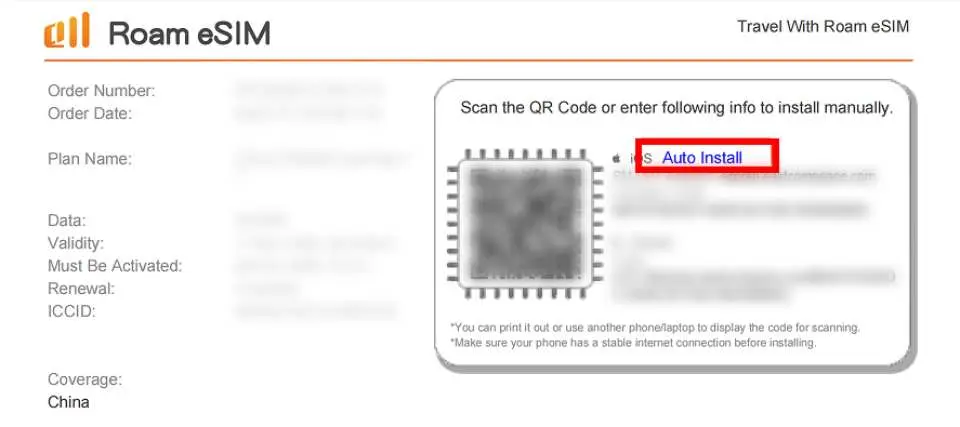
May one-click activation na available sa loob ng certificate (iOS system lamang).

Mga Tagubilin sa Pag-install ng eSIM (iOS)


Paalala sa pagbili
- Mobile data lamang; hindi sinusuportahan ang mga voice call at SMS functionality.
- Maaari itong gamitin sa mga application tulad ng TikTok, ChatGPT, Instagram, Google Maps, at Facebook.
- Kinakailangan ang iOS bersyon 12.1 o mas bago. Pakitandaan: Ang mga iPhone na ibinebenta sa mainland China ay hindi sumusuporta sa eSIM. Sa Hong Kong at Macau, tanging ang iPhone 13 mini, 12 mini, SE 2020, at XS lamang ang sumusuporta sa eSIM functionality.
- Nag-iiba-iba ang mga teleponong Samsung ayon sa bansa. Hindi sinusuportahan ng mga teleponong Samsung na binili sa Taiwan ang eSIM. Para sa ibang mga rehiyon, mangyaring sumangguni muna sa website ng Samsung.
- Pakilagay ang *#06# sa dial pad ng iyong telepono para malaman kung sinusuportahan ang eSIM. Kung ang EID ay nakalagay, ibig sabihin ay sinusuportahan ang eSIM; kung hindi, hindi sinusuportahan ang eSIM.
- Upang mapanatili ang kalidad ng koneksyon sa network at masunod ang Patakaran sa Patas na Paggamit (Fair Usage Policy o FUP), ang mga kompanya ng telekomunikasyon sa buong mundo ay minsan nagpapataw ng pagraranggo ng datos sa mga gumagamit na kumokonsumo ng malaking halaga ng datos sa maikling panahon, na maaaring magresulta sa pagkaantala ng internet access o mas mabagal na bilis. Upang matiyak ang matatag na koneksyon sa internet, mangyaring iwasan ang matagal na panonood o pag-download ng mga video, pag-update ng software, pagbabahagi ng iyong hotspot sa iba, o pakikisali sa iba pang mga aktibidad na kumokonsumo ng labis na datos.
Mga paalala
Kapag na-scan na ang QR code at matagumpay na na-download ang order, hindi na maaaring mag-cancel at mag-refund.
Ang pag-install ng eSIM ay nangangailangan ng koneksyon sa internet. Paki-install ito kapag mayroon kang stable na koneksyon sa Wi-Fi o mobile data (maaaring mabigo ang pag-install dahil sa Wi-Fi sa ilang paliparan).
Paki-scan at i-install lamang ang iyong eSIM pagdating sa iyong destinasyon upang maiwasan ang maagang pagsisimula ng pagkalkula ng validity period ng eSIM.
Bago gumamit ng eSIM, siguraduhing i-disable ang data roaming sa iyong domestic SIM card upang maiwasan ang aksidenteng paggamit ng mobile data network ng iyong domestic SIM card at ang pagkakaroon ng mataas na singil sa international roaming. Ikaw ang mananagot sa lahat ng kaugnay na gastos; walang karagdagang subsidiya ang ibibigay, kabilang ang mga bayarin sa roaming, gastos sa pagbili ng SIM card/eSIM sa ibang bansa, at mga gastos sa transportasyon.
Kinakailangan ang iOS bersyon 12.1 o mas bago. Pakitandaan na ang mga iPhone na ibinebenta sa mainland China ay hindi sumusuporta sa eSIM. Sa Hong Kong at Macau, tanging ang iPhone 13 mini, iPhone 12 mini, iPhone SE 2020, at iPhone XS lamang ang may eSIM functionality.
Nag-iiba-iba ang mga teleponong Samsung ayon sa bansa. Hindi sinusuportahan ng mga teleponong Samsung na binili sa Taiwan ang eSIM. Para sa ibang mga rehiyon, mangyaring sumangguni muna sa website ng Samsung.
Pakitandaan na ang kalidad ng signal ay maaaring maapektuhan ng mga salik tulad ng lokasyon, lupain, bara sa gusali, bilang ng mga gumagamit, at panahon.
Upang mapanatili ang kalidad ng koneksyon sa network at masunod ang Patakaran sa Patas na Paggamit (Fair Usage Policy o FUP), ang mga kompanya ng telekomunikasyon sa buong mundo ay minsan nagpapataw ng pagraranggo ng datos sa mga gumagamit na kumokonsumo ng malaking halaga ng datos sa maikling panahon, na maaaring magresulta sa pagkaantala ng internet access o mas mabagal na bilis. Upang matiyak ang matatag na koneksyon sa internet, mangyaring iwasan ang matagal na panonood o pag-download ng mga video, pag-update ng software, pagbabahagi ng iyong hotspot sa iba, o pakikisali sa iba pang mga aktibidad na kumokonsumo ng labis na datos.
Ang oras ng plan ay magsisimulang magbilang kapag na-activate na ang roaming at nakakonekta na sa suportadong network, kung saan ang 24 oras ay katumbas ng isang araw.
Suportado ang paggamit ng mga karaniwang app gaya ng TikTok, ChatGPT, Instagram, Google Maps, Facebook, at iba pa.
Paano gamitin
- Pagkatapos mong mag-order, makakatanggap ka ng email na nagsasabing "Handa na ang iyong eSlM," kasama ang pinakabagong oras ng pag-install at mga tagubilin sa pag-install.
- Paano i-install:
iOS: Mga Setting > Mga Serbisyo sa Mobile > Sumali sa programa > I-scan ang QR code > Sumali sa programa
Android: Mga Setting > Internet (Koneksyon) > Administrator ng SIM card > Magdagdag ng SIM card (Sumali sa plano ng aksyon) > I-scan ang QR code
- Paganahin ang hakbang sa pag-activate:
1. Pagdating sa iyong destinasyon, patayin ang lahat ng iba pang SIM card at paganahin lamang ang eSIM at ang data roaming nito.
2. I-configure ang APN ng eSIM (karaniwan ay awtomatikong nakikilala ang APN; kung hindi ito awtomatikong makilala, kailangan mo itong itakda nang manu-mano).


