

[50% OFF] Vietnam 5G Data eSIM: 1-30 Days | Vinaphone/Viettel Native Network
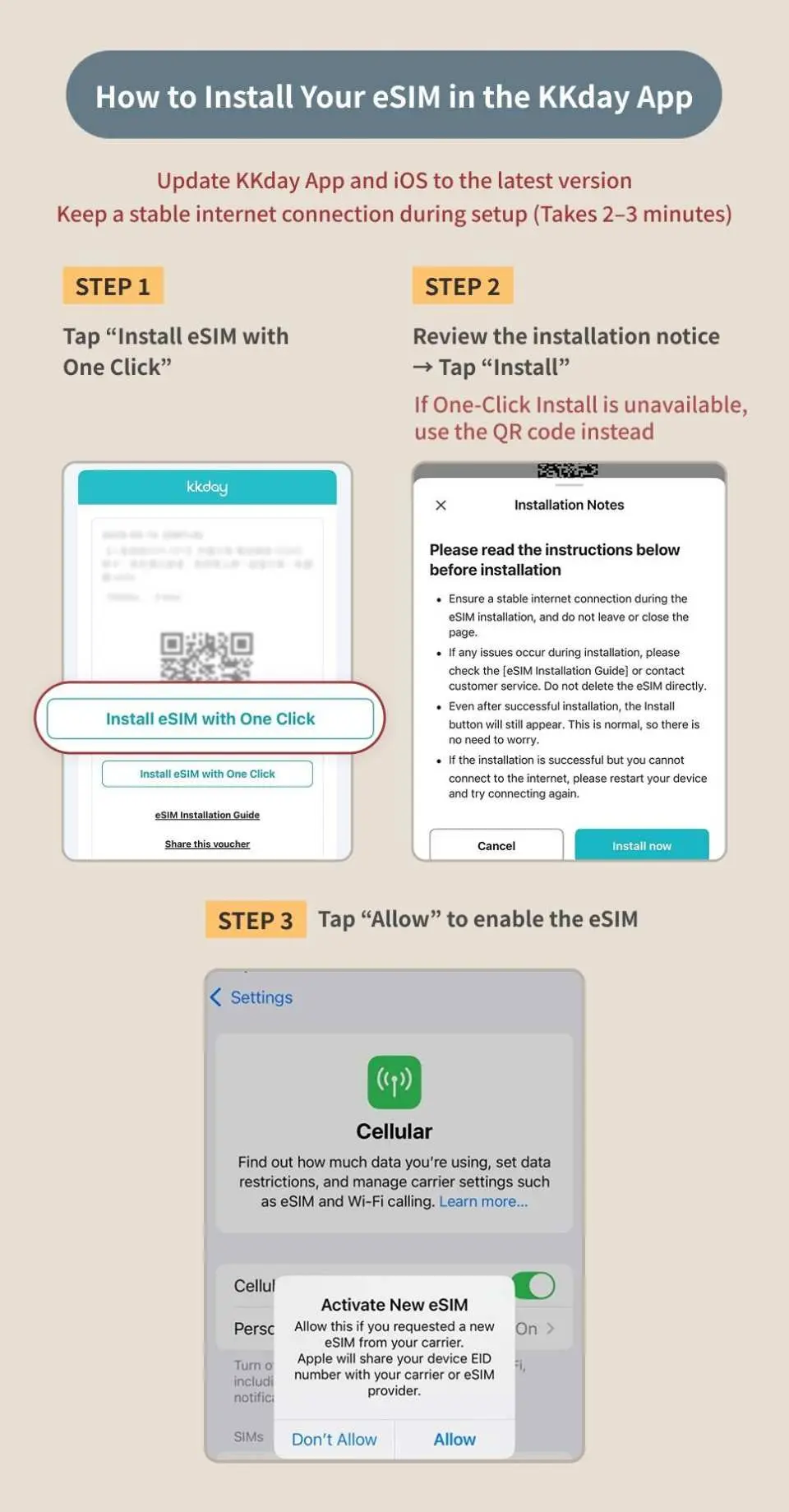
- Support iOS one-click installation: Update to iOS 17.4 or newer to install the eSIM in one click!
- Connect to Vinaphone/Viettel local network for stable signal and low latency
- Book and get online immediately! Get the eSIM QR code right after booking, no wait, no hassle
- Keep your original phone number, never miss important calls and texts
Pumili ng opsyon
Product Info
- eSIM (virtual SIM card) allows you to bind your eSIM to your phone by simply scanning the QR code on your voucher. Enjoy local internet access with fast, convenient, environmentally friendly, and zero consumables. It's your best choice for travel internet access.
- Please make sure that your phone has eSIM function and there are no SIM card restrictions. No refunds or cancellations will be accepted after placing an order for any reason.


SIM Card Specifications
| Data Usage Specifications | Unlimited data, 500MB, 1GB, 2GB, 3GB, 5GB, 10GB, 20GB, 30GB |
| Transmission Specifications | 5G/4G |
| Signal Coverage Area | Vietnam |
| Mobile Carrier | Vinaphone / Viettel |
| Supported Sizes | eSIM |
| Hotspot Sharing | Available |
| Supported Frequencies(4G) | B1(2100 MHz), B3(1800 MHz), B8(900 MHz), B28(700 APT) |
| Supported Frequencies(5G) | n7(2600 MHz) |
| Top-Up Availability | Top-up unavailable |
| Not Supported | SIM-locked device, Carrier-customized device, Pocket WiFi |
| Network Type | Local |
Purchase Notice
- Once an order is placed, cancellations and refunds are not possible. Please ensure your phone supports eSIM before purchasing
- eSIM can be activated within 30 days from the order date. The date selected when placing the order is for system reference only; you can use the eSIM any day within the validity period
- Wi-Fi/Mobile data is required for eSIM installation. It is recommended to complete the installation before departure or use the free Wi-Fi at the airport upon arrival
- Different countries have different base stations, signal coverage, terrain, and data traffic. If you experience unstable connections, we suggest you try moving to a different location or switching on and off airplane mode to regain a signal. If the situation persists, please contact online customer service for assistance
- For eSIM FAQs, see the Help Center
Includes/Excludes
- eSIM
Reminders
eSIMs must be activated within 30 days of issuance. It is recommended to activate them immediately upon arrival to ensure proper use. Or install in advance and turn on the eSIM after arriving at the destination
If you need to manually add an eSIM, please refer to the detailed information in the "Pre-departure Reminder" and copy and paste the SM-DP Address and Activation Code into the designated box. You do not need to enter the confirmation code.
If you install an eSIM before arriving at your destination and see "Activating" or "Unable to activate eSIM," do not delete the eSIM. Instead, temporarily disable the eSIM and then re-enable it after you arrive.
If an error message appears when scanning the QR Code, it does not mean that the eSIM has expired. Please go to "Settings → Mobile Services" to confirm whether another SIM card option appears.
No refund will be provided if some applications are unavailable due to device compatibility or regional restrictions; no additional compensation will be provided, including roaming fees, transportation fees, etc.
The Viettel eSIM QR Code is for single-use installation only. After installation, please do not delete the eSIM. If it becomes invalid due to deleting the eSIM, resetting the phone, or changing devices, it cannot be reinstalled or reissued.
How to check your data use:
Vinaphone: Enter your order number starting with 26KK on https://search.t-sim.hk/dataplan/order
Viettel: Send "KTTK" to 191
How to Use
Installing an eSIM
- iPhone: Settings → Mobile Services → Add eSIM
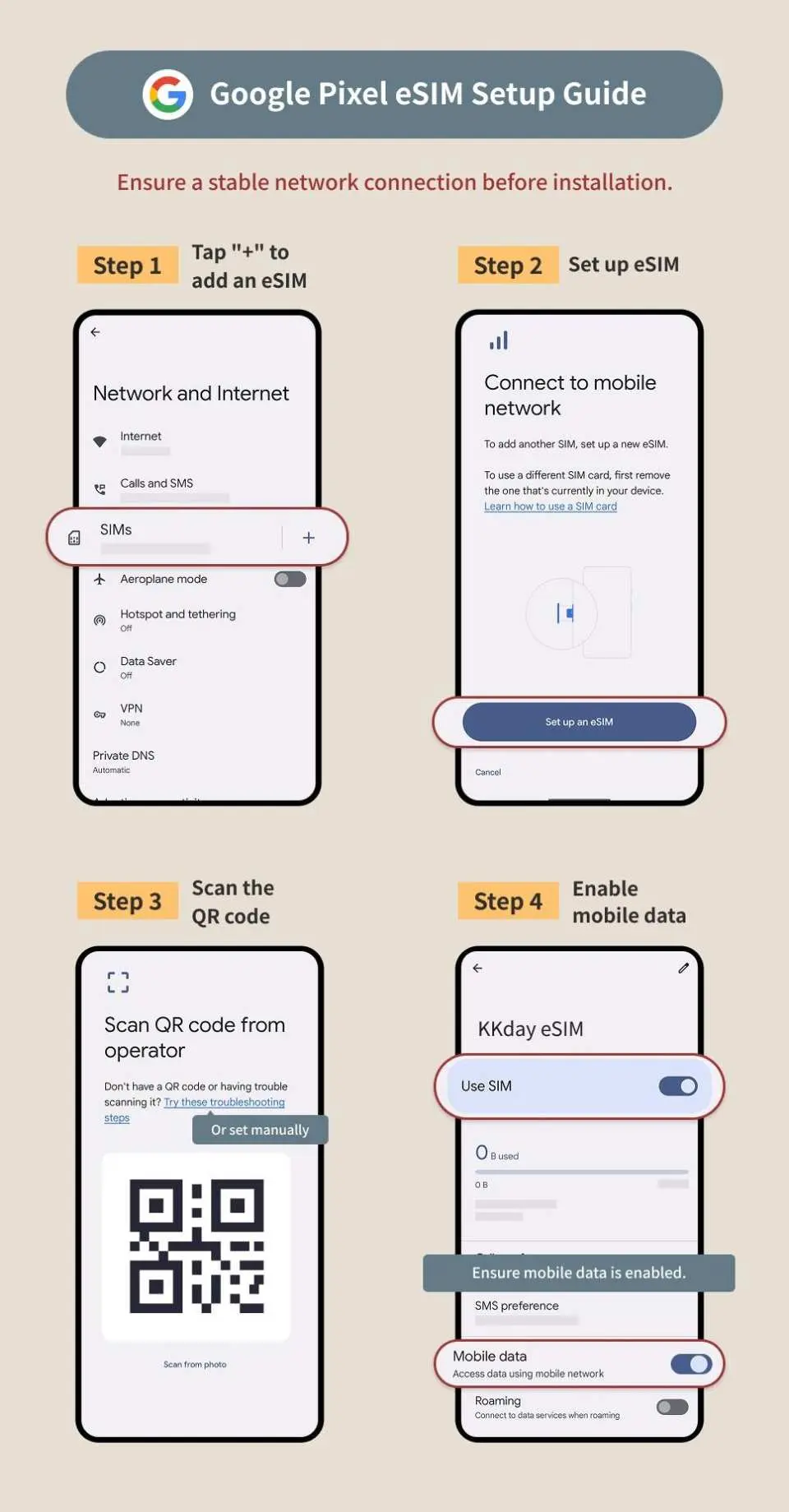
- Android: Settings → Network & Internet → SIM Card → Add eSIM (the operation path may vary slightly depending on the brand)
Using eSIM
- Turn off the mobile data of the original SIM card, confirm that the eSIM is enabled and set as the default card for mobile data
- If you cannot access the Internet or share the hotspot, please refer to the APN settings and restart your phone.
- If the connection is unstable or the speed is slow, it is recommended to turn on and off airplane mode, or turn off automatic network selection and manually select a supported telecom operator.
How to check your data use:
- Vinaphone: Go to this page and enter your order number starting with 26KK
- Viettel: Send "KTTK" to 191
Cancellation Policy
- Once the order has been completed, it cannot be canceled, modified, or refunded
- Due to time zone differences, the confirmed cancellation date is based on the supplier’s local time. Please allow 2–5 business days to process your cancellation request, after which the cancellation fee will be charged according to the product’s cancellation policy. Once your refund request is confirmed, KKday will initiate the refund to your original payment method within 15 days. The actual refund timing depends on your card-issuing bank’s policy.


