

【75% Diskwento】eSIM ng Europa | Pang-Europa na Maraming Bansa, Pang-araw-araw na High-Speed/Unlimited Data Plan eSIM
- Ang serbisyong data roaming ng eSIM na ito ay ibinibigay ng CMHK China Mobile Hong Kong
- KKday European eSIM card, personal na nasubukan ni Tim, ang eksperto sa 3C, para sa pagtukoy ng eSIM card sa paglabas ng bansa!
- KKday European eSIM card, sumusuporta sa iOS at maraming Android na telepono (hindi sumusuporta sa mga Samsung na telepono)
- KKday European eSIM card, sumusuporta sa isang-click na pag-install sa iOS: i-update sa pinakabagong bersyon ng iOS App at iOS 17.4 pataas, upang magawa ang isang-click na pag-install ng eSIM sa KKday App
Pumili ng opsyon
Impormasyon ng produkto
-Signal Coverage Area-
Austria、Belhika、Bulgarya、Kroasya、Siprus、Czech、Denmark、Estonya、Finland、Pransiya、Alemanya、Gresya、Hungarya、Irlanda、Italya、Latbya、Liechtenstein、Lituwanya、Luxemburg、Malta、Olanda、Norwega、Polonya、Portuges、Romania、Slobakya、Espanya、Suweko、Swisa、United Kingdom、Turkya

eSIM Self-Detection (Mangyaring kumpirmahin kung sinusuportahan ng iyong telepono ang eSIM bago bumili)
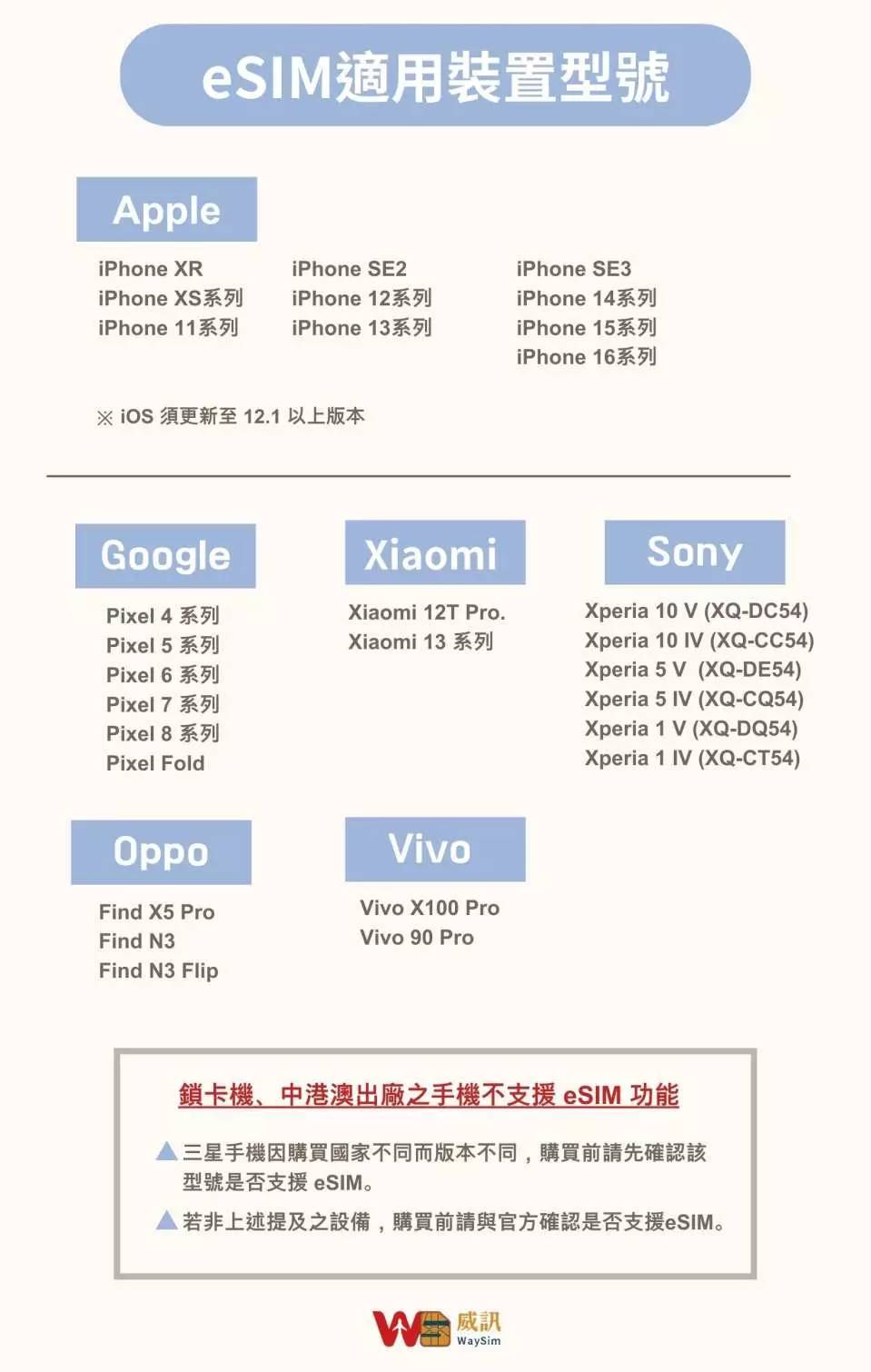
Mga modelong akma sa eSIM
《Inirerekomenda ng 3C Expert na si Tim Ge》

Mga hakbang sa pag-install ng iOS eSIM para sa sanggunian
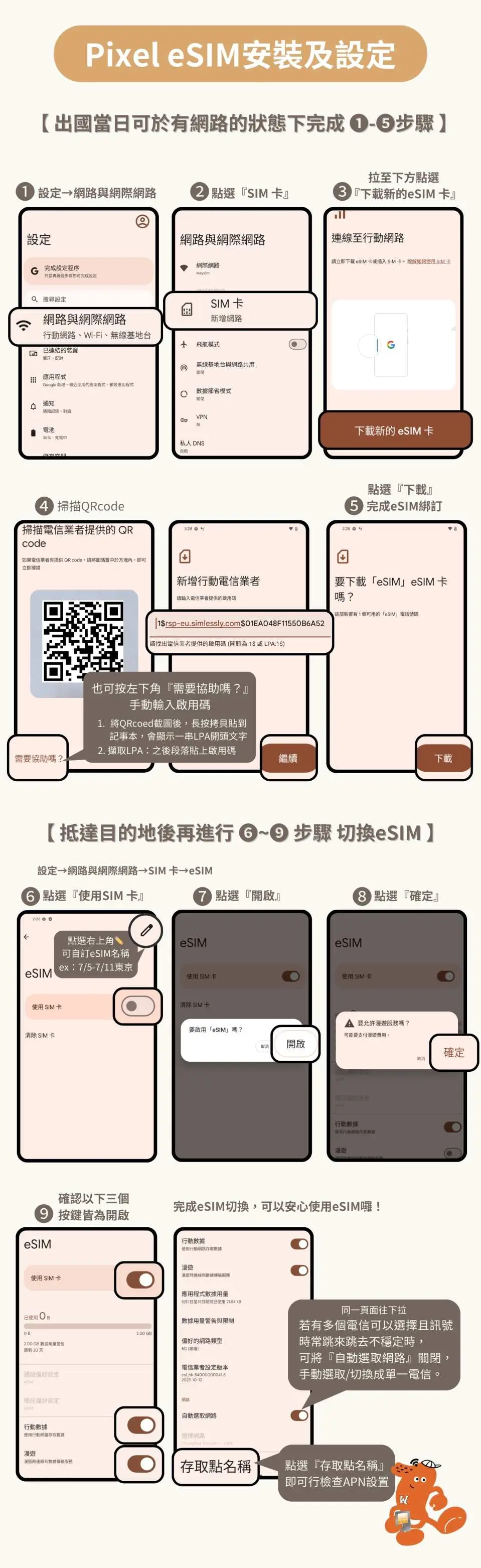
Mga Sanggunian sa Hakbang sa Pag-install ng Android eSIM
Paalala sa pagbili
- Dapat i-activate ang eSIM sa loob ng 30 araw mula nang matanggap ito
- Ang QR code ng eSIM ay isang beses lang maaaring i-scan. Kung may lalabas na mensahe na makipag-ugnayan sa telecom o iba pang abiso, patayin at buksan muli ang telepono o makipag-ugnayan sa technical support
- Paraan ng pagbilang ng araw: Pagkatapos i-install, patayin ang eSIM. Buksan ito pagdating sa Europe, at tiyaking naka-on ang mobile data at data roaming. Mula sa pagbukas ng eSIM pagdating sa bansang bibisitahin hanggang 23:59 ng araw na iyon ay itinuturing na unang araw. Mawawalan ng bisa ang card sa ika-12 ng gabi (oras ng Taiwan) sa huling araw ng napiling bilang ng araw
- Sa araw ng pag-alis, i-scan at i-bind ang eSIM sa airport ng Taiwan, pagkatapos ay patayin ito. Buksan muli ang eSIM roaming pagkalapag upang maiwasan ang pagkakaiba ng oras. Ang oras ay batay sa oras ng France. Itakda lamang ang eSIM sa araw ng pag-alis. Kung mag-expire ang QR code dahil sa maagang pag-scan, ito ay personal na dahilan at hindi na maaaring mag-isyu muli o mag-refund
- Bago i-install ang eSIM, siguraduhing konektado sa WiFi o mobile network, pagkatapos ay i-scan ang QR code upang idagdag ang mobile plan
- Itago nang mabuti ang QR code na ito. Kapag na-scan na, mawawalan ito ng bisa at hindi na maaaring mag-isyu muli. Sundin ang mga tagubilin sa pag-install at huwag lumabas sa screen sa proseso upang maiwasang matanggal ang eSIM plan dahil sa maling pag-detect ng telepono
- Pagkatapos ng matagumpay na pag-bind, huwag tanggalin ang eSIM nang mag-isa dahil hindi na ito magagamit muli. Kung may anumang problema sa operasyon, makipag-ugnayan muna sa customer service (tingnan ang mga tala ng order para sa contact details)
- Upang mapanatili ang kalidad ng network, sinusunod ng telecom company ang patakaran ng Fair Usage Policy (FUP). Ang malaking paggamit ng data sa maikling panahon ay madaling ma-auto-restrict, na maaaring magdulot ng kawalan ng internet o pagbagal ng bilis. Kung na-throttle dahil sa FUP, makipag-ugnayan sa technical support
- Ang network ay nagbabago depende sa bilang ng gumagamit, panahon, sagabal ng gusali, at lokasyon. Kung hindi stable ang signal, makipag-ugnayan sa technical support
- Ang kalidad ng telecom network ay nag-iiba-iba sa bawat bansa. Ang pagtatayo ng base station ay hindi kasing siksik ng sa Taiwan. May pagkakaiba sa rehiyon at imprastraktura ng telecom sa bawat bansa. Hindi maaaring humingi ng refund dahil sa signal condition sa ilang lugar
Mga paalala
Para sa mga isyu sa paggamit at operasyon ng eSIM, mangyaring makipag-ugnayan sa technical support ng supplier (tingnan ang mga tala ng order para sa contact details), at ibigay ang KKday order number upang mabilis na makakuha ng tulong mula sa isang kinatawan.
Paano gamitin
Mga hakbang sa pag-activate ng eSIM
- Settings → Mobile Services
- Idagdag ang eSIM
- I-scan ang "QR code" at idagdag ang mobile plan
- I-set bilang secondary → pindutin ang "Continue"
*Inirerekomenda na palitan ang label ng mobile plan sa lokal na pangalan (halimbawa: New Zealand)
5. Mobile Services → Mobile Data
6. Piliin ang secondary (halimbawa: New Zealand)
→ Patayin ang payagan ang paglipat ng mobile data
7. I-activate ang numerong ito
→ I-on ang roaming
8. Tapusin ang settings
Voucher redemption period
- Valid para sa redemption sa loob ng 30araw mula sa petsa ng pag-isyu; Hindi valid pagkatapos mag-expire
Patakaran sa pagkansela
- Kapag nakumpleto na ang order, hindi na ito maaaring kanselahin, baguhin, o i-refund
- Dahil sa pagkakaiba ng time zone, ang kumpirmadong petsa ng pagkansela ay batay sa lokal na oras ng supplier. Mangyaring magbigay ng 2–5 business days para maproseso ang cancellation request, pagkatapos nito ay sisingilin ang cancellation fee ayon sa policy ng produkto. Kapag nakumpirma na ang pagkansela, matatanggap mo ang refund sa loob ng 14 working days.


