

Japan eSIM | Daily / Total / Unlimited Data Plans | Docomo / Rakuten Mobile / KDDI Multi-Carrier Roaming
- Supports iOS one-tap installation: Update to the latest version of the KKday App and iOS 17.4 or above to install your eSIM with a single tap via the KKday App.
- KKday Japan eSIM provides 4G service and supports hotspot sharing.
- KKday Japan eSIM utilizes Docomo / Rakuten Mobile / KDDI multi-carrier roaming resources, with various options for daily high-speed data or total data plans.
- For eSIM FAQs, please refer to the Help Center instructions.
Pumili ng opsyon
Paglalarawan ng Produkto

Please confirm that your device is suitable for eSIM before purchasing. This product is non-refundable after sending the eSIM QR code.

eSIM applicable mobile phone models

eSIM iOS installation instructions
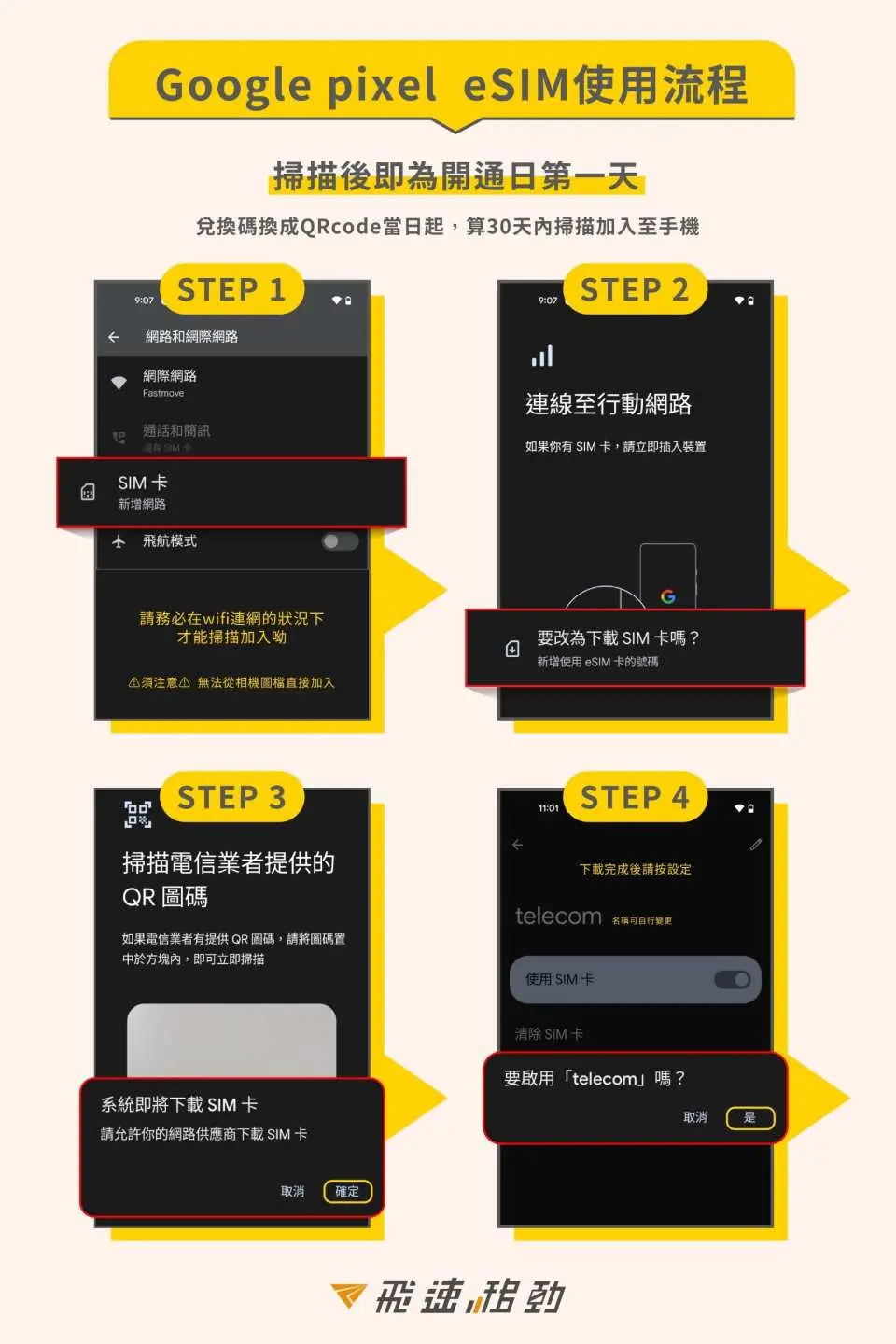
eSIM android installation instructions
Mga Paalala sa Pagbili
Reminders
Please install it before departure or after arriving at your destination to avoid premature activation which may affect your rights and interests.
Support iOS one-click installation: Update to the latest iOS App version and iOS 17.4 or above, you can install eSIM in one click on the KKday App
Before installing eSIM, please make sure to connect to WiFi or mobile network to scan the QRcode or enter it manually to join the mobile plan (if you need to enter it manually, please contact customer service to obtain the activation code)
Please be sure to save the QRcode. Once scanned, it will be bound. Please install according to the instructions. Do not jump out of the screen during the process to avoid misjudgment by the phone and causing the eSIM plan to be deleted.
After the same QRcode is bound, it can only be scanned again with the same mobile phone. It cannot be reissued or manually input to another mobile phone.
If the eSIM plan is not used completely or is deleted without the judgment of customer service personnel, causing the plan to be abnormal, reissue and refund will not be possible.
The quality of telecommunications networks in different countries varies, and the base station construction is not as dense as in Taiwan. The region and telecommunications construction of each country are different. Refunds cannot be requested due to signal conditions in a few areas.
Fair Usage Policy (Fair Usage Policy) is a standard implemented by governments and telecommunications companies to protect the rights and interests of local users in using the Internet. If you have concerns about FUP control, please choose a daily fixed traffic or total traffic plan.
How to Use
- When joining the eSIM mobile plan, please confirm that you are connected to WiFi first
- Installation steps:
1. Settings->Mobile Services->Add Mobile Plan->Use Mobile Barcode
2. Scan the QR Code above, or manually enter the address and confirmation code, then click "Next"
3. Click to confirm the "Certification Action Plan"
4. After the addition is completed, the eSIM plan label (secondary) will appear, and you can change the name yourself.
5. After arriving at the destination, open the new plan tab
- Enablement steps:
1. Please activate the new eSIM plan service after arriving at your destination.
2. Change the label name in "Mobile Data" to the added label scheme
3. Turn on "Data Roaming" and you will be able to access the Internet in about 3 to 5 minutes.
Cancellation Policy
- Once the order has been completed, it cannot be canceled, modified, or refunded
- Due to time zone differences, the confirmed cancellation date is based on the supplier’s local time. Please allow 2–5 business days to process your cancellation request, after which the cancellation fee will be charged according to the product’s cancellation policy. Once your refund request is confirmed, KKday will initiate the refund to your original payment method within 15 days. The actual refund timing depends on your card-issuing bank’s policy.


