

[50% Off% off] South Korea Daily Data/Total eSIM
- Supports iOS one-click installation: Update to the latest version of the iOS App and iOS 17.4 or above to install eSIM with one click in the KKday App.
- Quickly receive the eSIM after placing the order without worrying about any delivery problems
- Just scan the QR code to enjoy 4G Internet access, no physical card is needed
- Using the local telecom, enjoy high network coverage
- This eSIM supports iOS and various Android phones (for Samsung phones, you need to confirm whether they support eSIM)
Package Options
Product Info
The content of this product is provided by machine translation and may not reflect the actual information, please take this into consideration before booking.
- eSIM Installation Notes -
- Installing an eSIM requires a stable internet connection (WiFi or cellular data).
- After installing an eSIM, the activation period only begins after you switch to the eSIM and have network access upon arrival in your destination. It is recommended to install/set up the eSIM before traveling abroad and then switch to it upon arrival (with data roaming enabled).
- If you encounter an "Invalid code" message during scanning or installation, it's usually due to a duplicate scan. Please go to "Settings" > "Mobile Services" and check if new plans such as "Personal," "Travel," "Business," "Secondary," or "Mobile Data" have appeared in the list. If they are displayed (usually at the bottom), the installation was successful and you do not need to scan or install again.
Please confirm your device supports eSIM


Please take note of the eSIM applicable models


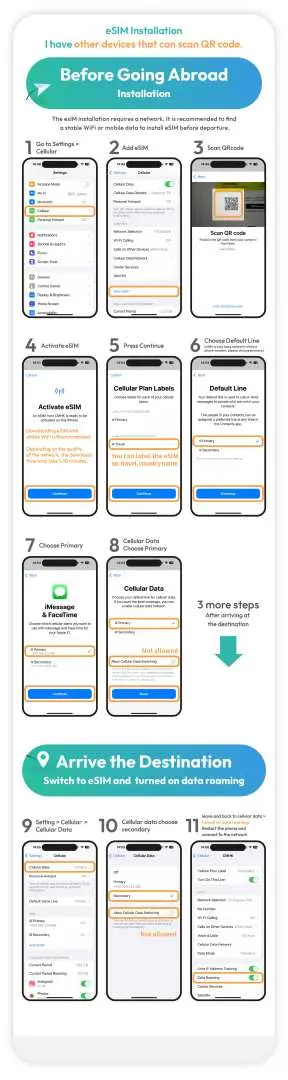
Please take note of the eSIM installation steps for iOS

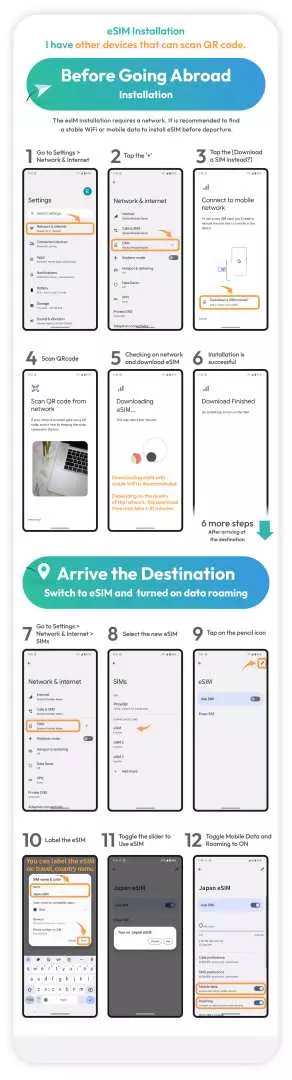
Please take note of the eSIM installation steps eSIM installation steps for Google

Please take note eSIM installation setup tutorial
Purchase Notice
- Please confirm your phone's eSIM compatibility before purchasing. Samsung phones purchased in Taiwan do not support eSIM. For Samsung phones purchased overseas, please check the Samsung website first.
- Each QR code can only be downloaded and installed once. Once the product's QR code has been scanned, returns and refunds are not possible.
- Activation period: Calculated from the time when network traffic begins to be used, with 24 hours as one day (not calculated in calendar days).
* Daily data plan: After the data allowance is used up, the speed will be reduced to 128kbps. 24 hours after activation counts as 1 day, and the data allowance will be reset at 00:00 (UTC+8) every day.
* Total data allowance plan: Network disconnection after data usage is exhausted. - It is recommended to download and install the app on the day of departure, and then switch to eSIM and enable data roaming upon arrival at your destination.
- Hotspot sharing is possible (but not recommended for optimal internet quality).
- Internet speed will vary depending on factors such as terrain, climate, building obstruction, number of users, and location. If you experience unstable reception, please contact technical support.
- To maintain network connection quality and ensure fair usage, telecommunications companies worldwide sometimes impose data rationing on customers who consume excessive amounts of data within a short period. This may result in internet access disruptions or slower speeds. To ensure uninterrupted service, please avoid prolonged periods of watching videos or updating software that consumes large amounts of data.
- Telecommunications network quality varies from country to country, and base station coverage is not as dense as in Taiwan. Each country also has its own regional and telecommunications infrastructure differences. Therefore, refunds cannot be requested based on signal conditions in a few specific areas.
Includes/Excludes
- eSIM
Reminders
For questions about eSIM operation and use, please contact the supplier's technical customer service and provide the KKday order number, KKday voucher screenshot (including ICCID) and mobile phone settings screenshot (see order notes for contact/provision details) to quickly obtain dedicated assistance.
Cancellation Policy
- Once the order has been completed, it cannot be canceled, modified, or refunded
- Due to time zone differences, the confirmed cancellation date is based on the supplier’s local time. Please allow 2–5 business days to process your cancellation request, after which the cancellation fee will be charged according to the product’s cancellation policy. Once the cancellation is confirmed, you will receive your refund within 14 working days.
FAQ
South Korea eSIMs typically offer two main types of data plans: daily data plans and total data plans. Daily data plans provide a set amount of high-speed data per day for a specified duration, while total data plans offer a fixed amount of data to be used throughout your entire trip, regardless of daily consumption. You can choose the plan that best suits your travel duration and data usage habits.
An eSIM is an excellent choice for tourists in South Korea due to its convenience and immediate connectivity. It eliminates the need for a physical SIM card, allowing for instant activation by scanning a QR code. This ensures you stay connected from the moment you arrive, access 4G internet, and benefit from the high network coverage provided by local telecommunication providers, making navigation and communication seamless.
A South Korea eSIM is compatible with most modern iOS and various Android smartphones. For iOS users, devices running iOS 17.4 or above can even utilize a one-click installation feature within the app. For Samsung phones and other Android devices, it's recommended to confirm eSIM support directly with the manufacturer to ensure compatibility before purchasing, as not all models support eSIM functionality.
Travelers can quickly obtain a South Korea eSIM by purchasing it through KKday, a reliable online platform. After placing an order, you will promptly receive the eSIM's QR code via email. This digital delivery method means there are no physical items to wait for, eliminating concerns about shipping or delivery issues. You can activate the eSIM by scanning the QR code, ensuring instant internet access upon arrival and a hassle-free start to your trip.
Yes, a South Korea eSIM primarily provides data-only connectivity, offering instant access to 4G internet services. This means you can browse the web, use navigation apps, stream content, and communicate via messaging apps or VoIP services. However, it typically does not include a local phone number for traditional calls or SMS messages. For voice calls, you would use apps like WhatsApp, Line, or Messenger over the data connection.
Using a South Korea eSIM generally offers a more predictable and often more cost-effective solution compared to international roaming. With an eSIM, you typically pre-pay for a specific data plan, avoiding unexpected charges. It leverages local telecom networks, ensuring stable and high-speed 4G coverage. Roaming services, while convenient, can sometimes incur higher per-usage fees and may have slower speeds depending on your home provider's agreements.
When selecting a South Korea eSIM data plan, consider your trip duration, estimated daily data consumption, and whether you prefer a fixed daily allowance or a total data package for your entire stay. Think about how much you'll use apps for navigation, social media, streaming, or video calls. Ensure your device is eSIM compatible and review the network coverage to match your travel itinerary and destination areas within South Korea.
With a South Korea eSIM, you can expect excellent network coverage, as it utilizes major local telecom providers. This ensures reliable 4G internet access across cities like Seoul, Busan, and popular tourist destinations. You'll experience high-speed connectivity, allowing for smooth browsing, navigation, and communication, making it easy to stay connected throughout your travels in South Korea.
Get Help


