

Taiwan eSIM: High-Speed per day plan / Total usage plan
- Supports iOS one-click installation: Update to the latest version of the iOS App and iOS 17.4 or above to install eSIM with one click in the KKday App.
- Enjoy swift, hassle-free 4G internet access with our eSIM solution
- No need to juggle between devices - simply scan the eSIM QR code to get started
- With no physical card involved, save on shipping and reduce the risk of loss
- According to Taiwan's latest policy, the CMHK plan requires real-name registration after receiving the eSIM before it can be used in Taiwan.
Package Options
Product Info
The content of this product is provided by machine translation and may not reflect the actual information, please take this into consideration before booking.
- According to Taiwan's latest policy, the CMHK plan requires real-name registration after receiving the eSIM before it can be used in Taiwan. It can be authenticated immediately after purchase, and activated by scanning the QR code and installing it after arriving in Taiwan.
- Before purchasing, ensure your device and its OS support eSIM functionality.
- In case of incompatibility leading to cancellation, no refunds will be granted iOS requires version 12.1 or higher. eSIM is not supported by iPhones sold in mainland China. In Hong Kong and Macau, only iPhone 13 mini, iPhone 12 mini, iPhone SE 2020, and iPhone XS support eSIM (Please refer to Apple official website)
- Please check with Samsung's official website for eSIM compatibility in different regions
- Each QR code can be scanned only once. Once bound to a device, the eSIM cannot be transferred or deleted Deletion leads to the inability to re-scan the code and a new purchase is required
Please make sure your device supports eSIM before purchasing


eSIM-Compatible Devices


eSIM Installation Instructions


eSIM Installation Instructions (Android) - Example: Google Pixel 3A

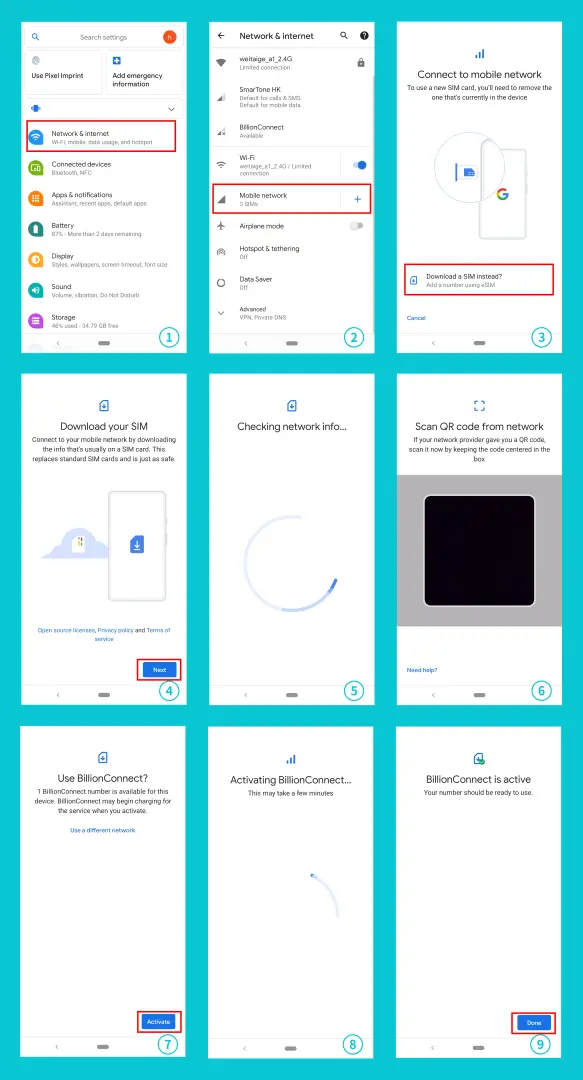
SIM Card Specifications
| Data Usage Specifications | 1GB, 2GB, 3GB, 5GB, 6GB, 10GB, 20GB |
| Transmission Specifications | 4G |
| Signal Coverage Area | Taiwan |
| Mobile Carrier | 【Roaming Resources】Chunghwa Telecom |
| Supported Sizes | eSIM |
| Hotspot Sharing | Available |
| Supported Frequencies(4G) | B1(2100 MHz) |
| Top-Up Availability | Top-up unavailable |
| Excludes | Voice calls, Texts |
| Not Supported | SIM-locked device, Carrier-customized device, Mobile hotspotCustomized mobile phones, 3G mobile phones, portable translators, devices without eSIM capabilities |
| Reminders | This product is provided by WEITAIGE TECHNOLOGY CO., LIMITED. |
| Network Type | Roaming |
Purchase Notice
- According to Taiwan's latest policy, the CMHK plan requires real-name registration after receiving the eSIM before it can be used in Taiwan. It can be authenticated immediately after purchase, and can be activated after arriving in Taiwan by scanning the QR code to install it.
- Before purchasing, ensure your device and its OS support eSIM functionality. In case of incompatibility leading to cancellation, no refunds will be granted
- iOS requires version 12.1 or higher. eSIM is not supported by iPhones sold in mainland China. In Hong Kong and Macau, only iPhone 13 mini, iPhone 12 mini, iPhone SE 2020, and iPhone XS support eSIM (Please refer to Apple official website)
- Please check with Samsung's official website for eSIM compatibility in different regions
- Each QR code can be scanned only once. Once bound to a device, the eSIM cannot be transferred or deleted
- Deletion leads to the inability to re-scan the code and a new purchase is required
Includes/Excludes
Reminders
According to Taiwan's latest policy, the CMHK plan requires real-name registration after receiving the eSIM before it can be used in Taiwan. It can be authenticated immediately after purchase, and can be activated after arriving in Taiwan by scanning the QR code to install it. https://realname.billionconnect.com
Real-name authentication only accepts the following identity documents: passport (excluding Hong Kong SAR passport and British National (Overseas) passport), Hong Kong ID card, Hong Kong and Macau pass, and Macau ID card.
Please ensure your device and its operating system support eSIM functionality before purchasing. In case of incompatibility, no refunds will be granted
iOS must be version 12.1 or higher. iPhones sold in mainland China do not support eSIM. In Hong Kong and Macau, only iPhone 13 mini, iPhone 12 mini, iPhone SE 2020, and iPhone XS support eSIM
eSIM must be installed and activated within the valid period, otherwise, it becomes unusable
Each QR code can be scanned only once. No changes can be made once the QR code is scanned
An active internet connection is required for eSIM installation. Please ensure access to WiFi or mobile data before installation
To terminate eSIM service, select "Remove Cellular Plan"
Signal quality may be affected by location, terrain, building obstructions, user quantity, and weather
Remember to disable data roaming on the original SIM Card to avoid excessive roaming charges
How to Use
After placing the order, you will receive an email "eSIM Information and Quick start guide", which will prompt you with the latest installation time and installation method.
- installation steps:
Method 1: Scan QR Code
Method 2: Manually add SM-DP_Address and Activation Code - Enable activation steps:
1. After arriving at the destination, turn off other SIM cards and only turn on eSIM and its data roaming.
2. Set the APN of eSIM (usually the APN will be automatically recognized, if it cannot be automatically recognized, you need to set it manually)
CMHK Daily High Speed Plan APN: cmhk
3HK Daily High Speed/Total Plan APN: mobile.three.com.hk
8-day 6GB plan APN: internet
- Other notes:
- The eSIM starts timing when using the regional package to generate traffic.
- Installing eSIM requires an Internet connection. Please confirm that there is available WiFi or available mobile data in the environment before installation.
- Please do not use your camera or other APP to scan the QR code, it must be done through your phone's settings
- Each QR Code can only be scanned and installed once. After binding, the device cannot be changed or deleted. Once deleted, it cannot be rescanned and installed and needs to be purchased again.
- If you need to check whether your phone supports the eSIM function, please dial "*#06#". Usually, if EID is displayed, it means it supports eSIM. (Depending on the OS system or manufacturer, it may not be usable even with an EID.)
- Please refer to the email content for detailed setting methods.
- If you encounter any problems, please contact customer service and we will do our best to serve you
Cancellation Policy
- Once the order has been completed, it cannot be canceled, modified, or refunded
- Due to time zone differences, the confirmed cancellation date is based on the supplier’s local time. Please allow 2–5 business days to process your cancellation request, after which the cancellation fee will be charged according to the product’s cancellation policy. Once the cancellation is confirmed, you will receive your refund within 14 working days.
Get Help


