

Unleash the Power of Connectivity: Australia & New Zealand High-Speed Per Day Plan / Total Data Plan eSIM
Are you tired of the hassle and inconvenience of traditional SIM cards? Say hello to a world of endless possibilities with eSIMs! Imagine booking and setting up your eSIM in minutes with just a simple QR code scan. And with the ability to search for helpful information on attractions in Australia and New Zealand, planning your next adventure has never been easier! Get ready to experience the freedom and flexibility of eSIM technology!
- Unleash the power of lightning-fast internet speeds and seamless connectivity with the cost-effective eSIM as you embark on an adventure in Australia and New Zealand
- Say goodbye to the installation hassles of traditional SIM cards and hello to the ultimate convenience of the eSIM
- Experience effortless connectivity and a user-friendly design with the eSIM, ensuring you stay connected throughout your journey and capture every moment
Package Options
Product Info
The content of this product is provided by machine translation and may not reflect the actual information, please take this into consideration before booking.
Please confirm that your device is suitable for eSIM before purchasing. This product is non-refundable after sending the eSIM QR code.
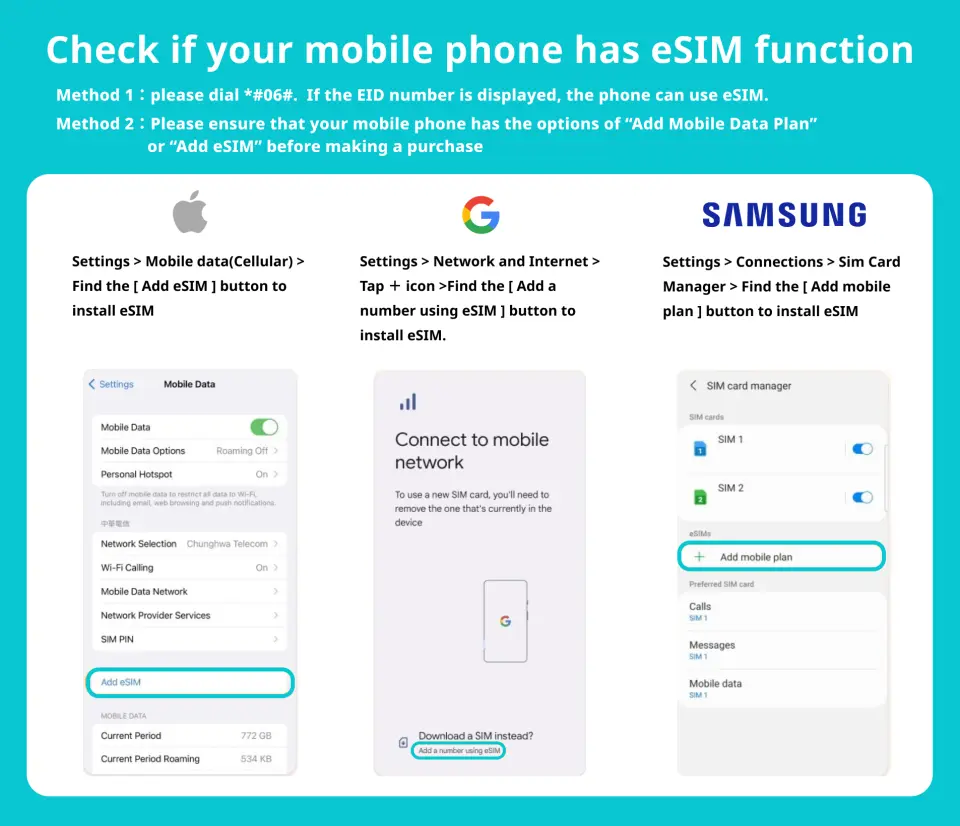

Unlock a world of possibilities with eSIM-compatible devices and say goodbye to the hassle of traditional SIM cards


Get ready to experience the future of wireless connectivity with the eSIM installation process


We have made the installation process even easier for Android users with our step-by-step eSIM installation instructions, using the powerful Google Pixel 3A as an example. Don't miss out on this cutting-edge technology, and start your eSIM journey today!


SIM Card Specifications
| Data Usage Specifications | 1GB, 2GB, 10GB, 20GB |
| Transmission Specifications | 4G |
| Signal Coverage Area | Australia, New Zealand |
| Mobile Carrier | 【Roaming resources】Vodafone |
| Supported Sizes | eSIM |
| Hotspot Sharing | Available |
| Supported Frequencies(4G) | B1(2100 MHz) |
| Top-Up Availability | Top-up unavailable |
| Excludes | Voice calls, Texts |
| Not Supported | SIM-locked device, Carrier-customized device, Mobile hotspot, customized mobile phone, 3G mobile phone, translator, phones without eSIM |
| Network Type | Roaming |
Purchase Notice
- Verify that your mobile device and operating system are compatible with eSIM to avoid activation failures. Refunds will not be granted for incompatible devices
- Check with Samsung's official website to confirm eSIM compatibility for Samsung mobile phones, as it varies by country. Samsung mobile phones purchased in Taiwan do not support eSIM
- Check that your iOS version is 12.1 or above and confirm that iPhones sold in mainland China do not support eSIM. In Hong Kong and Macau, only specific iPhone models (13 mini, 12 mini, SE 2020, XS) have eSIM capabilities
- Each QR code can only be scanned once and cannot be modified after scanning
Includes/Excludes
- eSIM
Reminders
Verify that your mobile device and operating system are compatible with eSIM to avoid activation failures. Refunds will not be granted for incompatible devices
Check that your iOS version is 12.1 or above and confirm that iPhones sold in mainland China do not support eSIM. In Hong Kong and Macau, only specific iPhone models (13 mini, 12 mini, SE 2020, XS) have eSIM capabilities
The eSIM must be installed and activated within the validity period. Otherwise, it will become invalid and cannot be used
Each QR code can only be scanned once and cannot be modified after scanning
eSIM can be used after activation but requires a stable network or Wi-Fi connection during the installation
To end the eSIM function, select "Remove Cellular Plan"
External factors such as surrounding landforms, weather, building obstruction, number of users, or location may affect communication quality, internet speed, and quality
To avoid high roaming fees, turn off the data roaming function of the original SIM card
How to Use
After ordering, you will receive an email containing "eSIM Information and Quick Start Guide" with instructions on installing the eSIM. The email will also include the latest installation time and available methods. There are two methods of installation:
- Scanning a QR code.
- Manually adding the SM-DP address and activation code.
- It is important to note that an internet connection is required for eSIM installation and to ensure you have access to Wi-Fi or mobile data.
- The QR code must be scanned through the phone's "Network Settings" and not through other apps or the camera. Each QR code can only be scanned once and cannot be modified after scanning.
- The eSIM can be installed in advance and then deactivated, but not deleted. When you reach your destination and turn on data roaming, it can be re-enabled.
- The eSIM package will start counting only after arriving at the destination.
Cancellation Policy
- Once the order has been completed, it cannot be canceled, modified, or refunded
- Due to time zone differences, the confirmed cancellation date is based on the supplier’s local time. Please allow 2–5 business days to process your cancellation request, after which the cancellation fee will be charged according to the product’s cancellation policy. Once the cancellation is confirmed, you will receive your refund within 14 working days.
FAQ
An eSIM is a digital SIM embedded in your device, eliminating the need for a physical SIM card. For Australia and New Zealand travel, it simplifies mobile data access by allowing instant activation via a QR code scan. This offers flexibility to switch plans easily, ensuring seamless high-speed internet connectivity without the hassle of swapping cards, making travel planning and on-the-go information access much more convenient.
eSIMs for Australia and New Zealand typically offer various data plan types to suit different traveler needs. These often include 'Per Day Plans' where you get a fixed amount of high-speed data daily, and 'Total Data Plans' which provide a lump sum of data to be used over the plan's duration. This flexibility allows travelers to choose based on their internet usage habits and trip length.
eSIMs for Australia and New Zealand generally leverage major local network providers, ensuring wide and reliable coverage in urban centers and popular tourist areas. While coverage in remote or rural regions might vary, the primary goal is to offer stable, high-speed connectivity for navigation, communication, and searching local attractions throughout your journey. Travelers can usually check specific coverage maps from the provider for detailed information.
Yes, many eSIM plans are designed for multi-country functionality, allowing seamless connectivity across both Australia and New Zealand with a single eSIM. This eliminates the need to purchase separate SIMs for each country, providing continuous high-speed internet access as you travel between the two destinations without interruption, enhancing the overall travel experience.
Activating an eSIM for Australia and New Zealand is straightforward. First, ensure your device is eSIM compatible and unlocked. After purchasing, you'll usually receive a QR code via email. Scan this QR code using your phone's camera in the cellular settings. Follow the on-screen prompts to install the data plan. Once installed, select the new eSIM for mobile data and enable data roaming if necessary. Activation typically takes just minutes.
To check eSIM compatibility, first ensure your smartphone is unlocked by your carrier. Then, consult your device manufacturer's specifications or your phone's settings. Most newer iPhone models (XR/XS and later), Google Pixel phones (3 and later), and select Samsung Galaxy models (S20 and later) support eSIMs. Look for 'Add Cellular Plan' or 'eSIM' options in your phone's cellular settings menu.
You can generally expect high-speed internet connectivity with an eSIM in Australia and New Zealand, often comparable to local physical SIM cards. This means sufficient speeds for browsing, streaming, social media, and using navigation apps. Actual speeds may vary based on network congestion, location, and the specific local network partner, but the focus is on providing reliable and fast data access for a smooth travel experience.
Beyond device compatibility and being unlocked, setting up an eSIM requires a stable internet connection (Wi-Fi is ideal) to download the eSIM profile via the QR code. Ensure your device's software is up to date. After scanning, you might need to label the new cellular plan (e.g., 'Australia & NZ Travel') and set it as your primary data line. Data roaming should be enabled in your device settings for the eSIM profile to work internationally.
Get Help


