

KDDI (au) Jepun eSIM | Data Tanpa Had, Internet Berkelajuan Tinggi 5G | Pengalaman Internet Terbaik Dunia
- Rangkaian mudah alih Jepun yang disediakan oleh KDDI (au), syarikat telekomunikasi nombor satu dunia seperti yang dinilai oleh Opensignal.
- Menyokong alatan AI seperti ChatGPT dan menawarkan data tanpa had serta rangkaian mudah alih berkelajuan tinggi 5G yang dikawal kelajuannya.
- Bergantung pada bilangan hari yang dibeli, anda boleh menikmati tambahan 3GB hingga 21GB data perkongsian hotspot.
- Pemasangan mudah, tiada penggantian kad SIM diperlukan, hanya imbas kod QR untuk mengaktifkannya.
—KDDI memenangi tempat pertama dalam Anugerah Pengalaman Rangkaian Mudah Alih Global Opensignal 2025 untuk pengalaman permainan, aplikasi suara dan kebolehpercayaan rangkaian.—
Pilih pakej
Maklumat produk
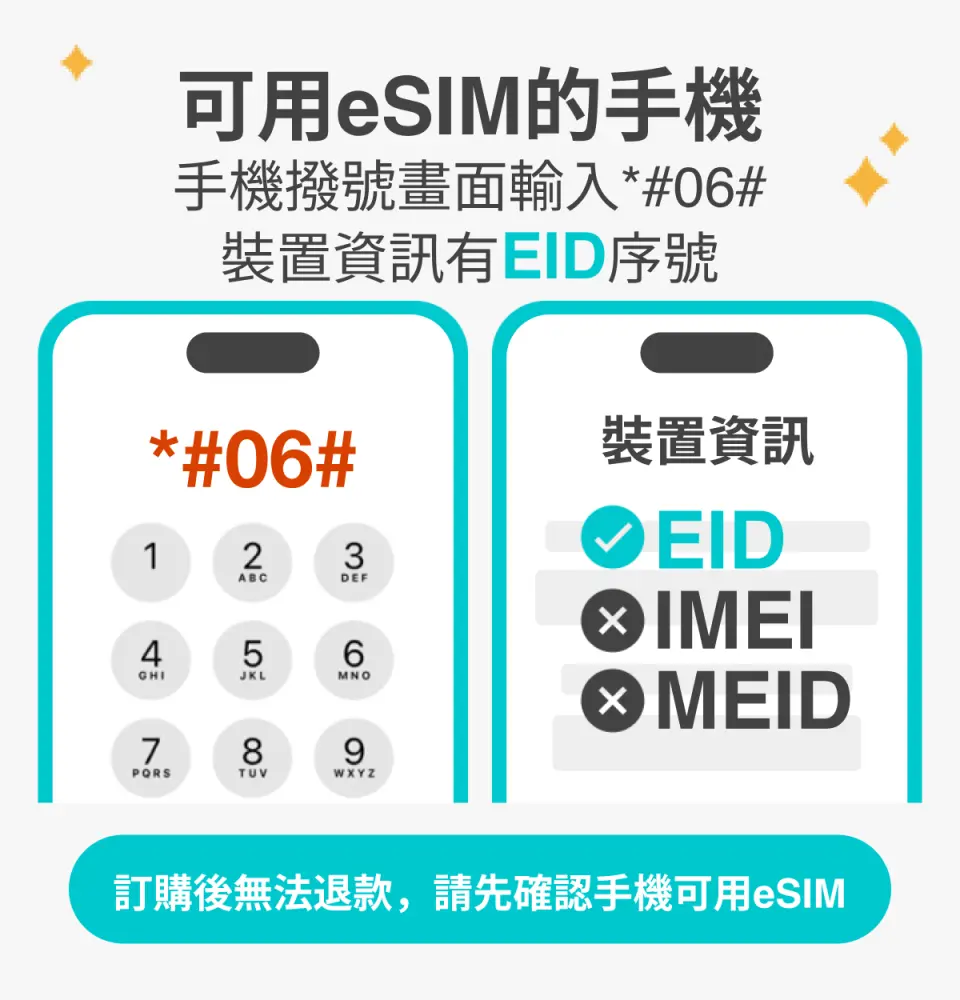
Sila sahkan telefon anda serasi dengan eSIM sebelum membeli. Pesanan tidak boleh dibatalkan atau dikembalikan wang selepas pembelian.

Sebelum mendayakan eSIM, sila kemas kini iOS anda kepada versi terkini dan sambungkan ke rangkaian WiFi yang stabil. Versi iOS yang lebih lama dan rangkaian yang tidak stabil adalah sebab biasa kegagalan pengaktifan eSIM.

Buka kamera anda untuk mengimbas eSIM, kemudian ketik "Pelan Tindakan".

Masa permulaan adalah kira-kira 2-3 minit, dan pemasangan mungkin gagal jika skrin permulaan muncul.

Anda boleh menyesuaikan nama eSIM untuk memudahkan pengurusan berbilang eSIM.

Memilih nombor pratetap membolehkan anda menentukan nombor mudah alih utama anda untuk menerima mesej (anda perlu memohon kepada pengendali telekomunikasi asal anda untuk mengaktifkan perayauan antarabangsa bagi nombor mudah alih utama anda sebelum anda boleh menerima mesej SMS).

Anda boleh menentukan nombor telefon utama untuk menggunakan ciri iMessage dan FaceTime.
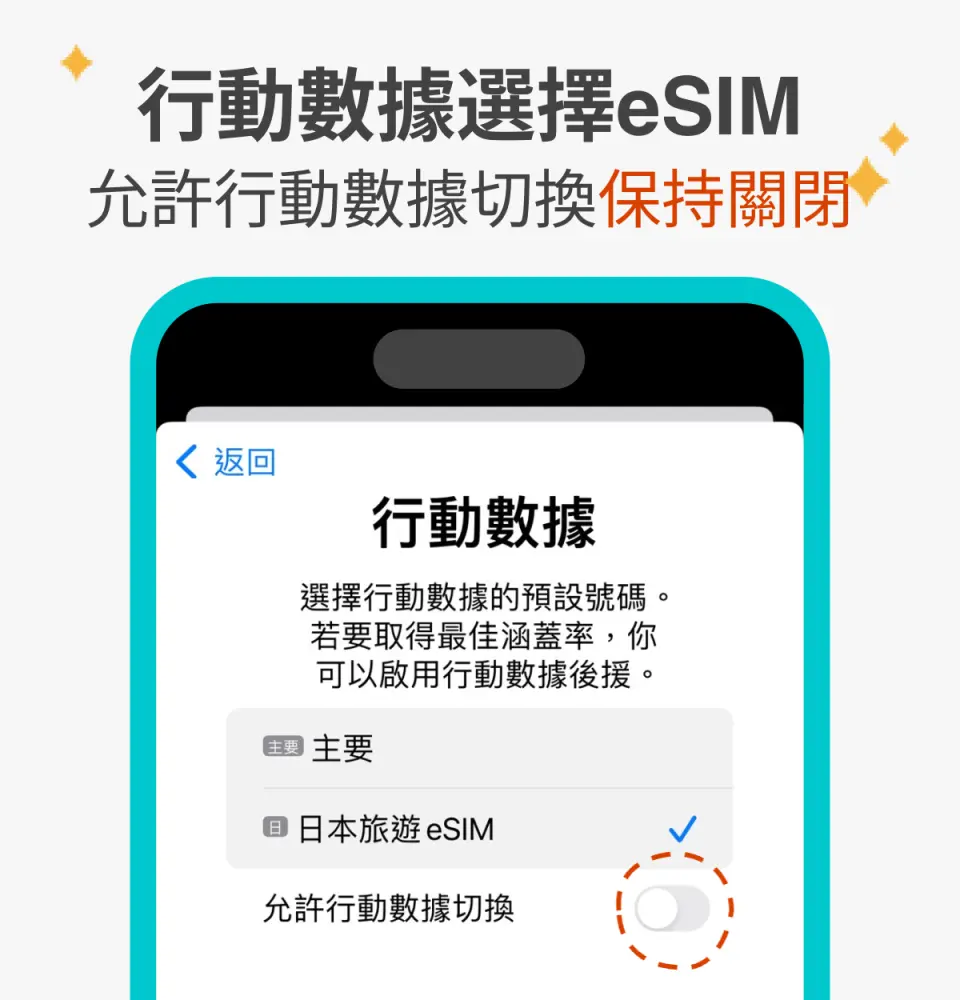
Apabila memilih untuk menggunakan data mudah alih eSIM, "data mudah alih eSIM tidak diaktifkan" merupakan sebab biasa mengapa tidak dapat mengakses internet.

Anda juga boleh menambah eSIM secara manual jika anda tidak dapat mengimbas kod QR.

Selepas menyalin kod pengaktifan eSIM, sila ikuti langkah-langkah untuk menambah maklumat eSIM secara manual.
Spesifikasi kad SIM
| Spesifikasi penggunaan data | 12GB, 21GB |
| Spesifikasi transmisi | 5G/4G |
| Kawasan liputan isyarat | Japan |
| Pembekal telekom | KDDI |
| Saiz disokong | eSIM |
| Perkongsian hotspot | Tersedia |
| Jenis rangkaian | Tempatan |
Notis pembelian
- Pesanan tidak boleh dibatalkan dan bayaran balik tidak boleh dikeluarkan selepas eSIM dihantar. Sila pastikan telefon anda menyokong eSIM terlebih dahulu (iPhone dan telefon Android yang dijual di China, Hong Kong dan Macau tidak menyokong eSIM; kebanyakan telefon Android yang dijual di Taiwan tidak menyokong eSIM).
- Bagi telefon Android yang menyokong eSIM, sila rujukRajah 1 dan2 untuk langkah-langkah memasukkan kod pengaktifan secara manual.
Peringatan
Sebelum membeli, sila masukkan "*#06#" pada pad dail telefon anda. Jika nombor siri EID dipaparkan, anda boleh menggunakan eSIM.
Kod QR hanya boleh diimbas sekali dan tidak menyokong pemasangan berulang. Sila jangan padamkannya selepas pemasangan untuk memastikan perkhidmatan normal.
Sila sambungkan ke rangkaian Wi-Fi yang stabil sebelum memasang dan mengaktifkan eSIM bagi mengelakkan kegagalan pengaktifan akibat ketidakstabilan rangkaian. Sebaik sahaja eSIM tamat tempoh, ia tidak boleh dikeluarkan semula.
Tempoh sah laku bermula selepas eSIM dipasang dan diaktifkan. Hari pertama adalah dari masa pemasangan dan pengaktifan sehingga jam 24:00 waktu Jepun.
Adalah perkara biasa bagi sistem untuk memaparkan "Mengaktifkan" atau "Pengaktifan gagal" semasa mengaktifkan eSIM di luar Jepun. Anda boleh menggunakan rangkaian selepas mengaktifkan eSIM sebaik sahaja anda tiba di Jepun.
Trafik perkongsian hotspot untuk pelbagai pelan: jumlah 3GB selama 3-4 hari, jumlah 6GB selama 5-7 hari, jumlah 9GB selama 8-10 hari dan jumlah 15GB selama 15 hari.
Polisi pembatalan
- Setelah pesanan selesai, ia tidak boleh dibatalkan, diubah, atau dikembalikan
- Disebabkan perbezaan zon waktu, tarikh pembatalan yang disahkan adalah berdasarkan waktu tempatan pembekal. Sila beri 2–5 hari bekerja untuk memproses permintaan pembatalan anda, selepas itu yuran pembatalan akan dikenakan mengikut polisi pembatalan produk. Setelah pembatalan disahkan, anda akan menerima pemulangan wang dalam 14 hari bekerja.


