
Muat turun App untuk nikmati tawaran istimewa
Nombor produk #185116

South Africa Daily Traffic/Total eSIM
3.8Baik
Tidak boleh dibatalkan
- Supports iOS one-click installation: Update to the latest version of the iOS App and iOS 17.4 or above to install eSIM with one click in the KKday App.
- After placing the order, you can receive the eSIM quickly without worrying about shipping issues.
- Scan the QRcode to enjoy 4G Internet access, which is convenient and environmentally friendly without a physical card
- Use local telecommunications providers, high network coverage
- Supports iOS and multiple Android phones (Samsung phones need to confirm whether they support eSIM)
Pilih pakej
Lihat lebih banyak pilihan
Product Info
- eSIM Installation Notes -
- Installing an eSIM requires a stable internet connection (WiFi or cellular data).
- After installing an eSIM, the activation period only begins after you switch to the eSIM and have network access upon arrival in your destination. It is recommended to install/set up the eSIM before traveling abroad and then switch to it upon arrival (with data roaming enabled).
- If you encounter an "Invalid code" message during scanning or installation, it's usually due to a duplicate scan. Please go to "Settings" > "Mobile Services" and check if new plans such as "Personal," "Travel," "Business," "Secondary," or "Mobile Data" have appeared in the list. If they are displayed (usually at the bottom), the installation was successful and you do not need to scan or install again.
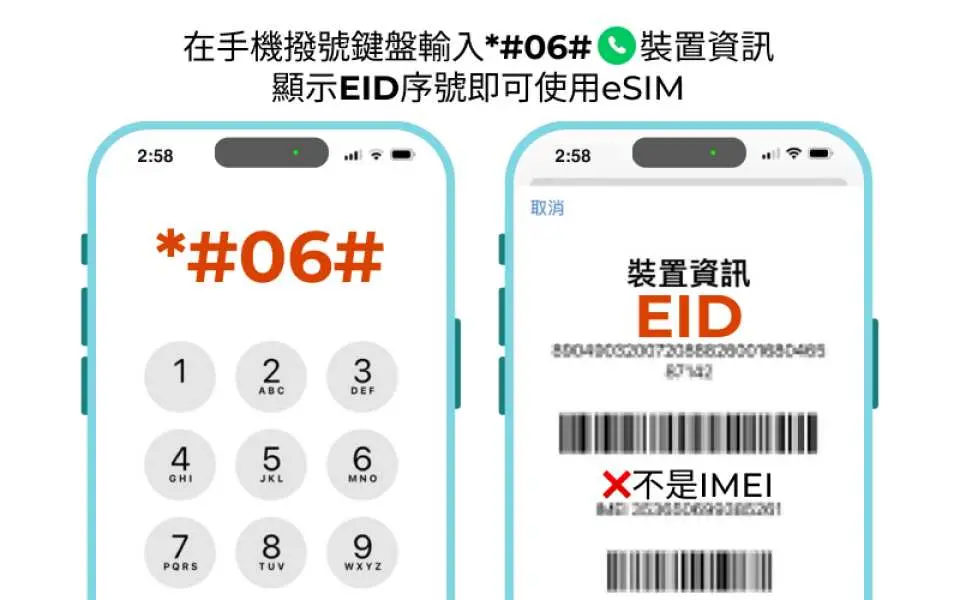
Please confirm that your device is suitable for eSIM before purchasing. This product is non-refundable after sending the eSIM QR code.

eSIM installation and activation process

How to enter the enabler code manually
eSIM installation, setting and usage tutorial
Purchase Notice
- Before purchasing, please confirm whether your mobile phone supports eSIM. Samsung mobile phones purchased in Taiwan do not support eSIM. For Samsung mobile phones purchased abroad, please confirm on the Samsung official website first.
- iOS version 12.1 or above is required. Card lock machines and mobile phones purchased from China, Hong Kong and Macao do not support the eSIM function.
- Each QR code can only be downloaded and installed once. Once the QR code of this product is scanned, it cannot be returned or refunded.
- Activation validity period: Calculated from the time when network traffic starts to be used, and one day is calculated as 24 hours (not calculated as a calendar day)
- It is recommended to download and install it at the place of departure on the day you go abroad, and then switch to eSIM and enable data roaming after arriving at the destination.
- Hotspot sharing is possible (in order to enjoy the best quality of Internet access, hotspot sharing is not recommended)
- Network speed will vary depending on factors such as terrain, climate, building coverage, number of users, location, etc. If reception is unstable, please be sure to contact technical customer service
- In order to maintain the quality of Internet connections and the principle of fair use, telecommunications companies around the world sometimes implement traffic control for customers who use a large amount of Internet traffic in a short period of time. This may result in the inability to access the Internet or reduce the Internet speed. To ensure normal use , please try to avoid watching videos for a long time or updating software and other tools that consume a lot of data.
- The quality of telecommunications networks in different countries varies, and the base station construction is not as dense as in Taiwan. The region and telecommunications construction of each country are different. Refunds cannot be requested due to signal conditions in a few areas.
Includes/Excludes
- eSIM
Reminders
For questions about eSIM operation and use, please contact the supplier's technical customer service and provide the KKday order number, KKday voucher screenshot (including ICCID) and mobile phone settings screenshot (see order notes for contact/provision details) to quickly obtain dedicated assistance.
Cancellation Policy
- Once the order has been completed, it cannot be canceled, modified, or refunded
NOTE
- Due to time zone differences, the confirmed cancellation date is based on the supplier’s local time. Please allow 2–5 business days to process your cancellation request, after which the cancellation fee will be charged according to the product’s cancellation policy. Once your refund request is confirmed, KKday will initiate the refund to your original payment method within 15 days. The actual refund timing depends on your card-issuing bank’s policy.


