


Japan eSIM | DOCOMO, KDDI native 4G/5G network | 4~31 days eSIM
- Using native Japanese DOCOMO and KDDI telecommunications lines, the signal is stable and guaranteed!
- You can receive an eSIM using a KKday certificate, without having to travel to pick it up or wait for a physical SIM card to be mailed to you.
- Simply scan the QR code to install and activate, saving you the trouble of changing your SIM card.
Pilih paket
Deskripsi Produk
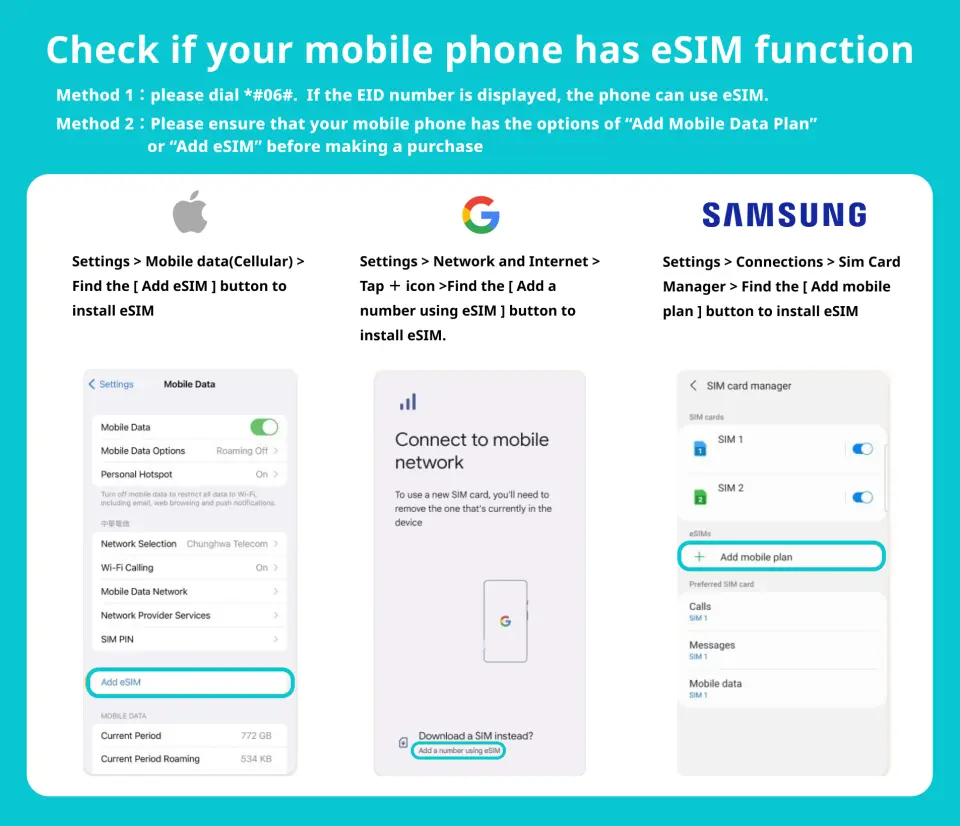
Please make sure your phone supports eSIM before purchasing

eSIM installation process (ios)
Purchase Notice
- Before ordering, please make sure your phone is not locked and is compatible with local Japanese frequency bands.
- This product is for internet access only and does not include call or SMS functionality.
- This product cannot be upgraded to extend its usage period or add additional data.
- The validity period is calculated in calendar days. The first day is from the time the eSIM is activated until 23:59 on the same day.
- To maintain network quality, telecommunications companies strictly adhere to the Fair Use of Network (FUP) principle. Excessive data usage in a short period may be subject to automatic throttling, potentially resulting in internet access disruptions or slower speeds.
- Internet connectivity varies depending on factors such as the number of users, climate, building obstruction, and location. Furthermore, the quality of telecommunications networks differs from country to country, and each country has its own regional characteristics and telecommunications infrastructure. Therefore, refunds cannot be requested due to signal conditions in a few areas.
- If you are arriving at Kansai International Airport, you can ask the counter staff for assistance with installing an eSIM upon arrival (this service is not available at other Japanese airports).
Reminders
Before inserting this card, please make sure that your mobile phone is not a card lock machine and is compatible with the Japanese local frequency band.
This product cannot be recharged to extend the usage period or add traffic.
Before installing eSIM, please make sure to connect to WiFi or mobile network, scan the QR Code to join the mobile plan
The eSIM QRcode can only be scanned once. If you are prompted to contact your telecommunications provider or otherwise, please shut down your phone and restart it or contact customer service.
Please save this QR Code. Once scanned, it will become invalid and cannot be reissued. Please install it according to the instructions and do not jump out of the screen during the process to avoid misjudgment by the phone and causing the eSIM plan to be deleted.
DOCOMO plans use native local resources from DOCOMO Telecom in Japan. Please configure the APN (Access Point Name) before using the network. APN: m-air.jp
If you arrive at Kansai International Airport, you can ask the counter staff to assist in installing the eSIM after arriving at the airport (this service is not available at other Japanese airports)
In order to maintain network quality, telecommunications companies strictly abide by the Fair Usage Principle (FUP) for network communications. Large amounts of traffic in a short period of time can easily be automatically controlled, which may result in the inability to access the Internet or slower network speeds.
The network will change depending on factors such as the number of users, climate, building shelter, and location. The quality of telecommunications networks in different countries varies. The region and telecommunications construction of each country are different. The requirements cannot be determined due to the signal conditions in a few areas. Refund.
Redemption Location
Bandar Udara Internasional Kansai (KIX) T1
"Global WiFi x NINJA WiFi" Counter - 1st Floor International Arrival Hall
Monday 06:30 - 22:30
Tuesday 06:30 - 22:30
Wednesday 06:30 - 22:30
Thursday 06:30 - 22:30
Friday 06:30 - 22:30
Saturday 06:30 - 22:30
Sunday 06:30 - 22:30
If necessary, Kansai Airport counter staff can assist in installing eSIM (services are provided in Chinese and English)
How to Use
eSIM activation steps
- Settings → Mobile Services
- Join eSIM
- Scan the QR code to join the action plan
- Set as secondary → Click "Continue"
*It is recommended to change the action plan label to the local name (e.g., Japan).
5. Mobile Services → Mobile Data
6. Select the secondary option (e.g., Japan)
→ Disable enabling action data switching
7. Activate this number
8. Complete settings
*Please configure the APN (Access Point Name) before using the DOCOMO solution on the network. APN: m-air.jp
Validity Period
- The voucher must be used on the selected date and within operating hours; Invalid after expiration
Cancellation Policy
- Once the order has been completed, it cannot be canceled, modified, or refunded
- Due to time zone differences, the confirmed cancellation date is based on the supplier’s local time. Please allow 2–5 business days to process your cancellation request, after which the cancellation fee will be charged according to the product’s cancellation policy. Once your refund request is confirmed, KKday will initiate the refund to your original payment method within 15 days. The actual refund timing depends on your card-issuing bank’s policy.


