


Beli Sekarang, Gunakan Sekarang | Voucher Hadiah Digital 7-ELEVEN | Berlaku di Seluruh Uni-President Group
- E-tiket dapat dibeli dan digunakan segera, dan Anda juga dapat mengumpulkan KKday Points!
- Banyak cabang di seluruh Taiwan, banyak pilihan lokasi, dan dapat ditukarkan antar cabang.
- Setelah voucher hadiah produk digital 7-ELEVEN ditambahkan ke aplikasi OPENPOINT, tidak ada masa berlaku dan dapat digunakan berkali-kali.
- Diskon hingga $900! Lihat detail penawaran waktu terbatas untuk akomodasi di seluruh Taiwan + tiket kereta cepat di siniSitus web acara liburan kereta api berkecepatan tinggi, pesan sekarang!
Pilih paket
Info produk
- Pengenalan Merek -
Uni-President Enterprises Corporation adalah pemimpin industri makanan dan raksasa ritel di Taiwan. Merek-merek di bawah naungannya meliputi 7-Eleven, Starbucks Taiwan (Uni-President Coffee), Uni-President Resort, Mister Donut, Cosmed, 21 Century, Dream Mall Kaohsiung, DUSKIN, Uni-President Department Store, Cold Stone Creamery, Semeur, Santa Cruz, BEING spa, dan Smile Gas Station. Kami menyediakan produk dan layanan yang lebih beragam dan cepat bagi konsumen, membuat hidup lebih bervariasi dan memungkinkan keluarga menikmati kualitas hidup yang lebih tinggi.
- Petunjuk Penggunaan -
Untuk menggunakan voucher ini, Anda harus mengunduh aplikasi OPENPOINT dan menyelesaikan pendaftaran (OPENPOINT hanya dapat digunakan di wilayah Taiwan dan hanya mendukung pendaftaran dengan nomor ponsel wilayah Taiwan) sebelum dapat mengaitkan Voucher Produk Digital 7-ELEVEN ke aplikasi OPENPOINT, lalu membuka aplikasi OPENPOINT untuk melakukan transaksi.
Halaman input nomor seri:https://systexticket.azurewebsites.net/
Proses Kaitkan ke Aplikasi OPENPOINT
LANGKAH 1: Klik Pesanan > Setelah mengonfirmasi isi pesanan, lihat 'Voucher' > Klik URL di pengingat sebelum keberangkatan > Salin 16 digit nomor seri voucher di bawah kode batang satu dimensi ke halaman input nomor seri:https://systexticket.azurewebsites.net/. (Kode batang satu dimensi di halaman ini tidak dapat digunakan di toko.)
LANGKAH 2: Masukkan nomor seri voucher dan alamat email untuk menerima kode verifikasi, lalu klik 'Kaitkan ke Aplikasi OPENPOINT'. (Setelah diklik, pesanan tidak dapat dibatalkan lagi.)
LANGKAH 3: Anda akan diarahkan ke aplikasi OPENPOINT, masukkan kode verifikasi yang diterima untuk menyelesaikan pengaitan Voucher Produk Digital.
LANGKAH 4: Buka aplikasi OPENPOINT > Layanan (tombol di bawah) > Layanan Populer > Voucher Digital. Buka voucher digital yang telah dikaitkan dan tunjukkan kode batang di toko yang ditentukan untuk digunakan.
Disarankan untuk menyalin URL halaman input nomor seri:https://systexticket.azurewebsites.net/, lalu buka di browser web dan tempel URL tersebut untuk menggunakannya.
Jika Anda mencoba mengaitkan beberapa kali namun tetap gagal atau memiliki masalah saat penukaran, silakan hubungi saluran layanan pelanggan Systex Information di (02)8798-6963.
Layanan pengaitan sedang dalam pemeliharaan rutin sistem setiap hari dari pukul 23:30 hingga 00:30 keesokan harinya. Selama periode ini, layanan pengaitan atau layanan terkait akan dihentikan sementara. Untuk menghindari dampak pada hak Anda, harap hindari penggunaan pada periode waktu tersebut.
Harap salin 16 digit nomor seri voucher elektronik terlebih dahulu sebelum menuju ke halaman input nomor seri untuk menggunakannya.
Untuk menggunakan voucher ini, Anda harus mengunduh aplikasi OPENPOINT dan menyelesaikan pendaftaran sebelum dapat mengaitkan Voucher Produk Digital ke aplikasi OPENPOINT, lalu membuka aplikasi OPENPOINT untuk melakukan transaksi.
Halaman input nomor seri:https://systexticket.azurewebsites.net/Masukkan atau tempel nomor seri voucher ini di halaman input nomor seri, klik 'Kaitkan ke Aplikasi OPENPOINT', kode verifikasi pengaitan akan diberikan. Harap klik salin kode verifikasi, lalu tekan tombol 'Lanjutkan ke Pengaitan' untuk secara otomatis diarahkan ke aplikasi OPENPOINT. Tempel kode verifikasi di dalam aplikasi OPENPOINT dan klik konfirmasi untuk menyelesaikan pengaitan Voucher Produk Digital. Anda dapat memeriksa Voucher Produk Digital yang telah dikaitkan di aplikasi OPENPOINT → tombol di bawah (Layanan) → Layanan Populer → Voucher Digital.
Voucher Produk Digital 7-ELEVEN dapat ditukarkan dengan produk atau layanan bernilai setara di saluran berikut: 7-Eleven, Starbucks, Mister Donut, Cosmed, 21Plus, Dream Mall, Uni-President Department Store, Cold Stone Creamery, Semeur, Santa Cruz, Uni-President Resort, BEING spa, dan Smile Gas Station.
Saat menukarkan produk atau layanan bernilai setara di toko, harap tunjukkan Voucher Digital di dalam aplikasi OPENPOINT → halaman Kartu Saya untuk digunakan.
Voucher ini tidak dapat digunakan untuk transaksi yang tidak mengeluarkan faktur pajak Uni-President 7-Eleven dan saluran penggunaan voucher ini, serta tidak berlaku untuk layanan penagihan dan layanan lainnya.
Voucher Produk Digital 7-ELEVEN tidak dapat ditukarkan dengan uang tunai. Berdasarkan ketentuan Undang-Undang Pencegahan Bahaya Tembakau, voucher ini tidak dapat digunakan untuk membeli produk tembakau di toko.
. Sesuai dengan IFRS (Standar Pelaporan Keuangan Internasional) dan peraturan perpajakan, empat kategori bisnis berikut: kartu poin game (termasuk poin virtual, kartu hadiah InComm), pengiriman paket (Takkyubin), kartu isi ulang telekomunikasi (bukan merek 7-11), kurir internasional (DHL), serta layanan 'Action Anytime' (pembelian massal), i-Preorder, 7-ELEVEN Online Shopping Center, dan produk konsinyasi lainnya yang dijual di toko (berdasarkan pemindaian mesin kasir) tidak dapat ditukarkan dengan Voucher Produk Digital.
Voucher Produk Digital 7-ELEVEN tidak memiliki masa berlaku, dapat digunakan secara bertahap dan digabungkan, namun tidak dapat diisi ulang.
Voucher Produk Digital 7-ELEVEN diterbitkan tanpa nama. Jika voucher telah digunakan, dicuri, disalahgunakan, hilang, atau ponsel rusak yang menyebabkan kode batang dan nomor kartu tidak dapat dikenali, voucher tidak dapat ditukarkan dengan uang tunai, dilaporkan hilang, atau diterbitkan kembali.
Setelah voucher ini dikaitkan, tanggung jawab serta hak dan kewajiban terkait akan dialihkan kepada Uni-President Enterprises Corp. dan Systex Information Co., Ltd. Jumlah yang tertera pada voucher ini telah dijamin sepenuhnya oleh MUFG Bank, Ltd., Cabang Taipei. Setelah masa jaminan berakhir, tanggung jawab jaminan akan berakhir secara otomatis. Pemegang Voucher Produk Digital dapat memeriksa keabsahan jaminan di situs web MUFG Bank menggunakan nomor seri voucher yang dimiliki. Namun, setelah masa jaminan berakhir, penerbit tetap bertanggung jawab atas pelaksanaan kewajiban.
Faktur pajak telah dikeluarkan saat Voucher Produk Digital 7-ELEVEN dijual. Saat menukarkan produk di toko, rincian transaksi bernilai nol akan dikeluarkan.
Jika terdapat tindakan pemalsuan, pengubahan, atau pelanggaran hukum atau ketentuan penggunaan terkait voucher ini, unit terkait akan menuntut tanggung jawab sesuai hukum.
Jika ada masalah saat penukaran, silakan hubungi saluran layanan pelanggan Systex Information di (02)8798-6963 (Jam layanan: Senin hingga Jumat, pukul 09:00 hingga 18:00, tidak termasuk hari libur nasional dan hari libur yang diumumkan oleh instansi pemerintah).
Pengecekan toko yang tidak berpartisipasi:https://www.7-11.com.tw/service/isharinggift.aspx
* Halaman penukaran voucher ini saat ini hanya dapat diakses melalui jaringan internet di Taiwan. Harap buka halaman ini setelah tiba di Taiwan, atau gunakan setelah beralih ke lingkungan jaringan Taiwan.
Informasi Penerbit:
Nama Perusahaan: SYSTEX Corporation
Alamat Perusahaan: No. 318, Ruiguang Rd., Taipei City
Nomor Identitas Pajak (Tax ID): 97311466
Penanggung Jawab: Lin Long-fen
Modal Disetor: 2.693.933.040 TWD (per 05/01/2021)
Nomor Layanan Pelanggan: 02-8798-6963
Email Layanan Pelanggan: [email protected]
Jam Layanan Pelanggan: 【Jam Layanan Pelanggan SYSTEX】 Senin hingga Jumat, 09:00 - 18:00, tidak termasuk hari libur nasional dan hari libur resmi yang diumumkan oleh pemerintah

Alur Pengembalian Akun Aplikasi OPENPOINT|Langkah 1
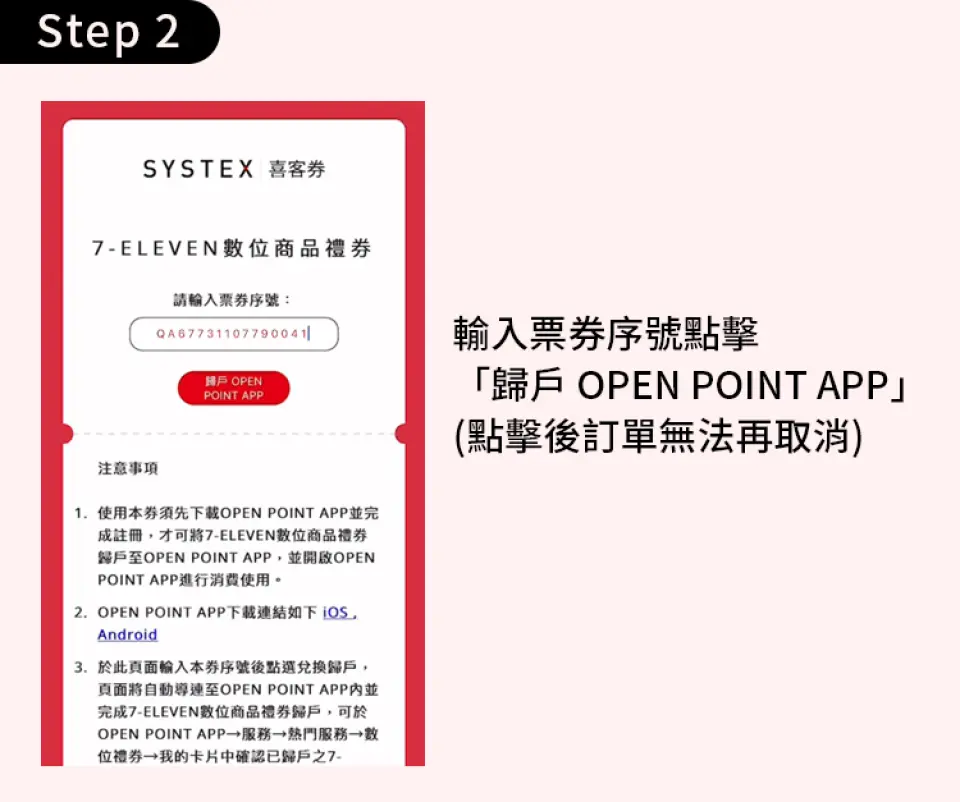
Alur Pengembalian Akun Aplikasi OPENPOINT|Langkah Kedua

Alur Pengembalian Akun Aplikasi OPENPOINT|Langkah Tiga

Alur Pengembalian Akun Aplikasi OPENPOINT|Langkah Empat
Ketentuan Pembelian
Pengingat
Masa penukaran voucher ini adalah 90 hari sejak tanggal pembelian. Jika tidak ditukarkan dalam jangka waktu tersebut, penukaran tidak dapat dilakukan setelah kedaluwarsa.
Setelah kupon ini dikaitkan dengan akun, tanggung jawab dan hak serta kewajiban terkait akan dialihkan ke Uni-President Chain Store Corporation dan Anyuan Information Co., Ltd. Jumlah yang tertera pada kupon hadiah digital 7-ELEVEN telah dijamin sepenuhnya oleh Australia and New Zealand Banking Group Limited Cabang Taipei. Setelah masa jaminan berakhir, semua tanggung jawab jaminan akan secara otomatis dibatalkan. Namun, setelah masa jaminan berakhir, penerbit tetap bertanggung jawab atas pelaksanaan kewajiban.
Jika voucher ini tidak digunakan atau melebihi periode penyediaan produk/layanan yang ditentukan (masa berlaku nomor seri), pembeli asli dapat mengembalikan produk ke saluran online tempat pembelian dengan menunjukkan faktur. Jika Anda memutuskan untuk mengembalikan produk, silakan hubungi layanan pelanggan KKday. Pengembalian dana akan diproses setelah dikurangi biaya penanganan sebesar 3%. Mohon diperhatikan.
Setiap anggota hanya dapat membeli 40 tiket dalam 2 bulan. Jika melebihi batas pembelian, KKday berhak membatalkan pesanan dan mengembalikan dana. Mohon diperhatikan.
Harap diperhatikan, jika KKday menemukan bahwa Anda telah menyalahgunakan atau menggunakan kupon diskon atau kode promo KKday secara tidak benar (misalnya, promosi terbatas untuk kewarganegaraan tertentu, menggunakan diskon dengan mengubah kewarganegaraan; promosi terbatas untuk pemegang kartu bank, satu orang membuat beberapa akun anggota untuk menikmati diskon berulang kali, dll.), KKday akan, sesuai dengan penilaian kami, membatalkan pesanan yang dibuat dengan kupon diskun atau kode promo yang disalahgunakan atau tidak benar, dan dapat menghapus akun anggota KKday Anda kapan saja tanpa pemberitahuan sebelumnya, serta dapat meminta ganti rugi dari Anda. Mohon para wisatawan untuk memperhatikan aturan penggunaan aktivitas terkait sebelum menggunakan kupon diskon atau kode promo, agar tidak memengaruhi hak-hak Anda.
Halaman penukaran voucher ini saat ini hanya dapat diakses melalui jaringan internet di Taiwan. Harap buka halaman penukaran setelah tiba di Taiwan, atau gunakan dengan beralih ke lingkungan jaringan Taiwan.
Cara menggunakan
Cara menggunakan voucher Anda
- Harap tunjukkan e-voucher di lokasi
Periode penukaran voucher
- Berlaku untuk penukaran dalam 90hari sejak tanggal penerbitan; Tidak berlaku setelah kedaluwarsa
Kebijakan pembatalan
- Pembatalan gratis!
- Karena perbedaan zona waktu, tanggal pembatalan yang dikonfirmasi didasarkan pada waktu setempat pemasok. Harap beri waktu 2–5 hari kerja untuk memproses permintaan pembatalan Anda, setelah itu biaya pembatalan akan dikenakan sesuai kebijakan pembatalan produk. Setelah pembatalan dikonfirmasi, Anda akan menerima pengembalian dana dalam 14 hari kerja.


