

[50% की छूट | तुरंत उपयोग करें] यूएस ईसिम (हवाई सहित) | 5G नेटवर्क, टी-मोबाइल, एटी एंड टी, वेरिज़ोन के सभी नेटवर्क पर गारंटीकृत | चैटजीपीटी/जेमिनी/टिकटॉक को सपोर्ट करता है
- सिम कार्ड बदलने या किसी भी उपभोग्य वस्तु का उपयोग करने की कोई आवश्यकता नहीं है, ई-सिम तुरंत उपयोग के लिए तैयार है, तेज और निर्बाध 5जी इंटरनेट एक्सेस का आनंद लें, समय की बचत करें और पर्यावरण के अनुकूल बनें।
- इसका इस्तेमाल TikTok, ChatGPT, Instagram, Google Maps और Facebook जैसे लोकप्रिय ऐप्स के साथ किया जा सकता है।
- यह तीन नेटवर्क को सपोर्ट करता है, जिससे आप किसी भी समय स्विच कर सकते हैं और बेहतरीन नेटवर्क क्वालिटी का आनंद ले सकते हैं।
- कई डेटा प्लान उपलब्ध हैं।
- iOS 17.4 और उससे ऊपर के संस्करणों पर वन-क्लिक इंस्टॉलेशन समर्थित है।
- चौबीसों घंटे ग्राहक सेवा आपकी सेवा में तत्पर है।
आपकी संतुष्टि हमारी सर्वोच्च प्राथमिकता है! यदि आपको हमारे उत्पादों के बारे में कोई भी चिंता है, तो कृपया हमसे तुरंत संपर्क करें। हम आपकी सहायता करने और आपको चिंतामुक्त खरीदारी का अनुभव दिलाने के लिए हर संभव प्रयास करेंगे!
विकल्प चुनें
उत्पाद जानकारी
सिम कार्ड बदलने या किसी भी उपभोग्य वस्तु का उपयोग करने की कोई आवश्यकता नहीं है, ई-सिम तुरंत उपयोग के लिए तैयार है, तेज और निर्बाध 5जी इंटरनेट एक्सेस का आनंद लें, समय की बचत करें और पर्यावरण के अनुकूल बनें।
इसका इस्तेमाल TikTok, ChatGPT, Instagram, Google Maps और Facebook जैसे लोकप्रिय ऐप्स के साथ किया जा सकता है।
यह तीन नेटवर्क को सपोर्ट करता है, जिससे आप किसी भी समय स्विच कर सकते हैं और बेहतरीन नेटवर्क क्वालिटी का आनंद ले सकते हैं।
कई डेटा प्लान उपलब्ध हैं।
iOS 17.4 और उससे ऊपर के संस्करणों पर वन-क्लिक इंस्टॉलेशन समर्थित है।
चौबीसों घंटे ग्राहक सेवा आपकी सेवा में तत्पर है।
आपकी संतुष्टि हमारी सर्वोच्च प्राथमिकता है! यदि आपको हमारे उत्पादों के बारे में कोई भी चिंता है, तो कृपया हमसे तुरंत संपर्क करें। हम आपकी सहायता करने और आपको चिंतामुक्त खरीदारी का अनुभव दिलाने के लिए हर संभव प्रयास करेंगे!

कृपया खरीदारी करने से पहले पुष्टि कर लें कि आपका डिवाइस eSIM के अनुकूल है।
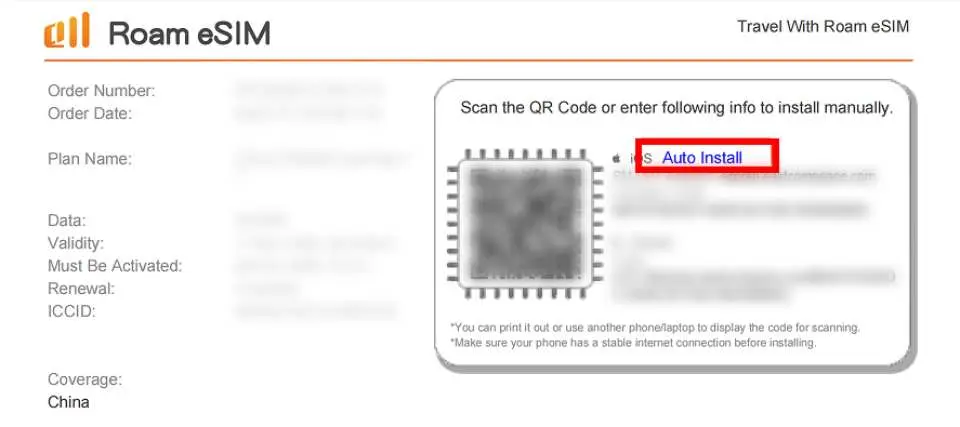
सर्टिफिकेट के अंदर ही एक क्लिक से एक्टिवेशन की सुविधा उपलब्ध है (केवल iOS सिस्टम के लिए)।

eSIM इंस्टॉलेशन निर्देश (iOS)


खरीद सूचना
- केवल मोबाइल डेटा का उपयोग किया जा सकता है; वॉइस कॉल और एसएमएस सुविधा समर्थित नहीं है।
- इसका उपयोग TikTok, ChatGPT, Instagram, Google Maps और Facebook जैसे एप्लिकेशन के साथ किया जा सकता है।
- iOS संस्करण 12.1 या उससे बाद का संस्करण आवश्यक है। कृपया ध्यान दें: चीन में बिकने वाले iPhones में eSIM सपोर्ट नहीं करता है। हांगकांग और मकाऊ में, केवल iPhone 13 मिनी, 12 मिनी, SE 2020 और XS ही eSIM सुविधा को सपोर्ट करते हैं।
- सैमसंग फोन देश के अनुसार अलग-अलग होते हैं। ताइवान में खरीदे गए सैमसंग फोन eSIM को सपोर्ट नहीं करते हैं। अन्य क्षेत्रों के लिए, कृपया पहले सैमसंग वेबसाइट देखें।
- कृपया अपने फ़ोन के डायल पैड पर *#06# डायल करके देखें कि eSIM सपोर्ट करता है या नहीं। यदि EID प्रदर्शित होता है, तो इसका मतलब है कि eSIM सपोर्ट करता है; यदि नहीं, तो eSIM सपोर्ट नहीं करता है।
- नेटवर्क कनेक्शन की गुणवत्ता बनाए रखने और उचित उपयोग नीति (FUP) का पालन करने के लिए, दुनिया भर की दूरसंचार कंपनियां कभी-कभी कम समय में अधिक डेटा उपयोग करने वाले उपयोगकर्ताओं पर डेटा राशनिंग लागू करती हैं, जिसके परिणामस्वरूप इंटरनेट एक्सेस में रुकावट या धीमी गति हो सकती है। स्थिर इंटरनेट कनेक्शन सुनिश्चित करने के लिए, कृपया लंबे समय तक वीडियो देखने या डाउनलोड करने, सॉफ़्टवेयर अपडेट करने, अपना हॉटस्पॉट दूसरों के साथ साझा करने या अत्यधिक डेटा खपत करने वाली अन्य गतिविधियों से बचें।
अनुस्मारक
एक बार क्यूआर कोड स्कैन हो जाने और ऑर्डर सफलतापूर्वक डाउनलोड हो जाने के बाद, ऑर्डर रद्द करना और रिफंड प्राप्त करना संभव नहीं है।
ई-सिम इंस्टॉल करने के लिए इंटरनेट कनेक्शन आवश्यक है। कृपया इसे तब इंस्टॉल करें जब आपके पास स्थिर वाई-फाई या मोबाइल डेटा कनेक्शन हो (कुछ हवाई अड्डों पर वाई-फाई की समस्या के कारण इंस्टॉलेशन विफल हो सकता है)।
कृपया अपने गंतव्य पर पहुंचने के बाद ही अपनी ई-सिम को स्कैन और इंस्टॉल करें ताकि ई-सिम की वैधता अवधि की गणना समय से पहले शुरू न हो।
ई-सिम का उपयोग करने से पहले, कृपया अपने घरेलू सिम कार्ड पर डेटा रोमिंग को बंद करना सुनिश्चित करें ताकि गलती से आपके घरेलू सिम कार्ड के मोबाइल डेटा नेटवर्क का उपयोग न हो और आपको भारी अंतरराष्ट्रीय रोमिंग शुल्क न देना पड़े। इससे संबंधित सभी खर्चों की जिम्मेदारी आपकी होगी; रोमिंग शुल्क, विदेश में सिम कार्ड/ई-सिम खरीदने की लागत और परिवहन खर्च सहित कोई अतिरिक्त सब्सिडी प्रदान नहीं की जाएगी।
iOS संस्करण 12.1 या उससे बाद का होना आवश्यक है। कृपया ध्यान दें कि चीन में बिकने वाले iPhones में eSIM सपोर्ट नहीं करता है। हांगकांग और मकाऊ में, केवल iPhone 13 मिनी, iPhone 12 मिनी, iPhone SE 2020 और iPhone XS में ही eSIM की सुविधा उपलब्ध है।
सैमसंग फोन देश के अनुसार अलग-अलग होते हैं। ताइवान में खरीदे गए सैमसंग फोन eSIM को सपोर्ट नहीं करते हैं। अन्य क्षेत्रों के लिए, कृपया पहले सैमसंग वेबसाइट देखें।
कृपया ध्यान दें कि सिग्नल की गुणवत्ता स्थान, भूभाग, भवन अवरोध, उपयोगकर्ताओं की संख्या और मौसम जैसे कारकों से प्रभावित हो सकती है।
नेटवर्क कनेक्शन की गुणवत्ता बनाए रखने और उचित उपयोग नीति (FUP) का पालन करने के लिए, दुनिया भर की दूरसंचार कंपनियां कभी-कभी कम समय में अधिक डेटा उपयोग करने वाले उपयोगकर्ताओं पर डेटा राशनिंग लागू करती हैं, जिसके परिणामस्वरूप इंटरनेट एक्सेस में रुकावट या धीमी गति हो सकती है। स्थिर इंटरनेट कनेक्शन सुनिश्चित करने के लिए, कृपया लंबे समय तक वीडियो देखने या डाउनलोड करने, सॉफ़्टवेयर अपडेट करने, अपना हॉटस्पॉट दूसरों के साथ साझा करने या अत्यधिक डेटा खपत करने वाली अन्य गतिविधियों से बचें।
प्लान का समय रोमिंग सक्रिय करने और समर्थित नेटवर्क से कनेक्ट होने के बाद शुरू होगा, 24 घंटे को एक दिन माना जाएगा।
TikTok, ChatGPT, Instagram, Google Maps, Facebook जैसे लोकप्रिय ऐप्स का समर्थन करता है।
उपयोग कैसे करें
- अपना ऑर्डर देने के बाद, आपको एक ईमेल प्राप्त होगा जिसमें लिखा होगा "आपका eSLM तैयार है", साथ ही नवीनतम इंस्टॉलेशन समय और इंस्टॉलेशन निर्देश भी होंगे।
- स्थापित करने के लिए कैसे:
iOS: सेटिंग्स > मोबाइल सेवाएं > प्रोग्राम में शामिल हों > क्यूआर कोड स्कैन करें > प्रोग्राम में शामिल हों
एंड्रॉइड: सेटिंग्स > इंटरनेट (कनेक्टिविटी) > सिम कार्ड एडमिनिस्ट्रेटर > सिम कार्ड जोड़ें (कार्य योजना में शामिल हों) > क्यूआर कोड स्कैन करें
- सक्रियण चरण को सक्षम करें:
1. अपने गंतव्य पर पहुंचने के बाद, अन्य सभी सिम कार्ड बंद कर दें और केवल ई-सिम और उसके डेटा रोमिंग को सक्रिय करें।
2. ई-सिम का एपीएन कॉन्फ़िगर करें (आमतौर पर एपीएन स्वचालित रूप से पहचाना जाता है; यदि यह स्वचालित रूप से पहचाना नहीं जा सकता है, तो आपको इसे मैन्युअल रूप से सेट करना होगा)।


