

Japan eSIM | KDDI (au) Unlimited 5G/4G Native Data eSIM
- Uses KDDI (au) network for full coverage across Japan with stable, lag-free connectivity.
- 5G/4G unlimited data ensures smooth performance for ChatGPT, video streaming, navigation, and social media.
- Quick and easy activation process; simply scan the voucher before departure to complete installation.
- Available in Ultra/Lite 5G/4G unlimited plans to suit your travel needs.
- Uses local KDDI network for faster and more stable performance compared to standard roaming eSIMs.
विकल्प चुनें
Product Info
【eSIM Specifications】
- KDDI (au) 5G/4G Unlimited Data Native eSIM Ultra Plan (No Speed Throttling)
- Data: Unlimited 5G/4G local data
- Voice Calls & SMS: Not supported
- eSIM Setup Guide & FAQ: https://psce.pw/79utdh
- Coverage: Nationwide in Japan
- Duration: 3 / 4 / 5 / 6 / 7 / 8 / 9 / 10 / 15 / 20 / 30 days
- Usage Calculation: Based on calendar days starting from the moment you connect to the Japanese KDDI (au) network. (e.g., If activated at 22:00 Japan time, it counts as 1 day until 24:00 midnight)
- Validity: eSIM must be installed and used within 30 days of purchase
- Hotspot Sharing: Supported (subject to plan-specific limitations)
- 【3, 4 days: 3GB / 5 days: 4GB / 6 days: 5GB / 7 days: 6GB / 8 days: 7GB / 9 days: 8GB / 10 days: 9GB / 15 days: 15GB / 20 days: 19GB / 30 days: 30GB】
- KDDI (au) 5G/4G Unlimited Data Native eSIM Lite Plan
- Data: Unlimited 5G/4G local data (speed capped at 10Mbps)
- Voice Calls & SMS: Not supported
- eSIM Setup Guide & FAQ: https://psce.pw/79utdh
- Coverage: Nationwide in Japan
- Duration: 3 / 4 / 5 / 6 / 7 / 8 / 9 / 10 days
- Usage Calculation: Based on calendar days starting from the moment you connect to the Japanese KDDI (au) network. (e.g., If activated at 22:00 Japan time, it counts as 1 day until 24:00 midnight)
- Validity: eSIM must be installed and used within 30 days of purchase
- Hotspot Sharing: Supported (subject to plan-specific limitations)
- 【3, 4 days: 3GB / 5 days: 4GB / 6 days: 5GB / 7 days: 6GB / 8 days: 7GB / 9 days: 8GB / 10 days: 9GB】

How to check if your phone supports eSIM

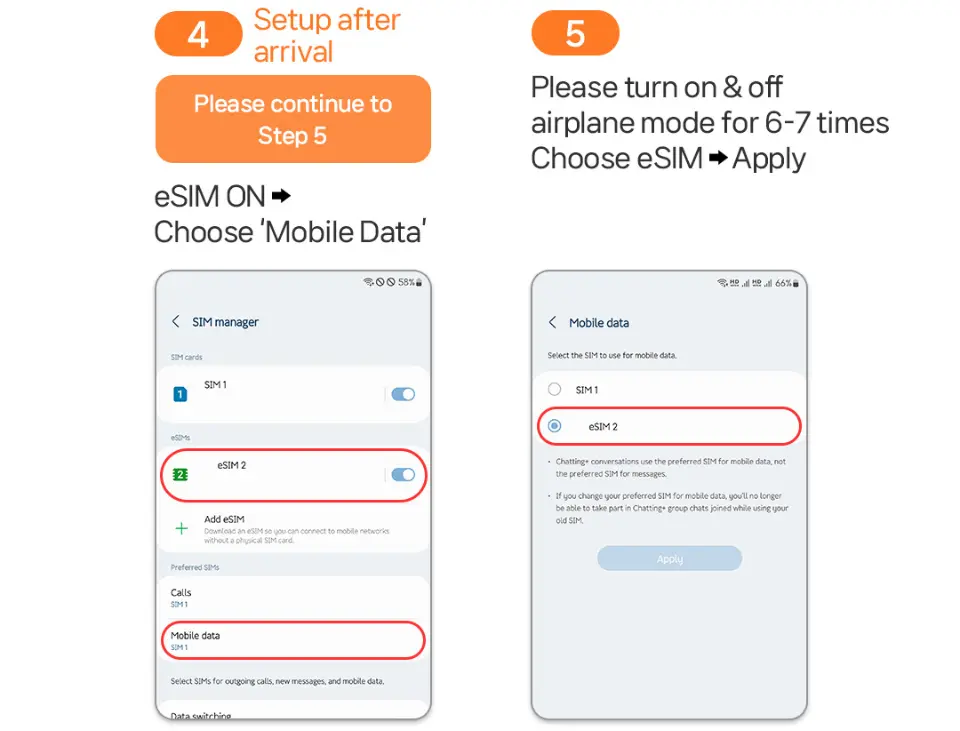
eSIM Setup Method

.

.
.
SIM Card Specifications
| Data Usage Specifications | Unlimited data |
| Transmission Specifications | 4G |
| Signal Coverage Area | Japan |
| Mobile Carrier | KDDI (au) |
| Supported Sizes | eSIM |
| Hotspot Sharing | Available |
| Supported Frequencies(4G) | B3(1800 MHz) |
| Top-Up Availability | Top-up unavailable |
| Excludes | Voice calls, Texts |
| Not Supported | SIM-locked device, Carrier-customized device, Pocket WiFi |
| Reminders | Before purchasing, please verify that your device supports eSIM installation; no refunds will be provided if your device is found to be incompatible after purchase. |
| Network Type | Local |
Purchase Notice
- Even for the same model, eSIM support may vary by region; please verify that your device supports eSIM.
- Once the eSIM QR Code is sent, it cannot be canceled, exchanged, or refunded.
- The eSIM QR Code must be activated and used within its validity period; no refunds will be provided if it expires.
- After a successful order, the voucher containing the eSIM QR Code will be sent within 24 hours.
- Please note that 5G signals may switch to 4G depending on your location (e.g., indoors, subways, or crowded areas), which is normal.
- Hotspot speeds may be affected by your location, and minimum speeds cannot be guaranteed. Please verify before ordering.
- To maintain network quality, the carrier may impose traffic management on users who consume excessive data in a short period, which may result in network disconnection or slower speeds.
- If your device was purchased in the US, Canada, Japan, or the Philippines, please check with your local carrier to ensure the device is unlocked (Country Lock).
Includes/Excludes
- eSIM QR Code
- Installation Guide
Reminders
This eSIM provides local data in Japan only; voice calls and SMS services are not supported.
The duration is calculated based on calendar days, starting from the moment you connect to the Japanese network. (e.g., If activated at 22:00 Japan time, it counts as 1 day until 24:00.)
Once the eSIM QR Code is sent, it cannot be canceled, exchanged, or refunded.
The eSIM QR Code must be installed and activated within 30 days of purchase.
If the eSIM is deleted by mistake, it cannot be canceled, exchanged, or refunded; once deleted, it cannot be recovered or re-scanned.
Please note that 5G signals may switch to 4G depending on your location (e.g., indoors, subways, or crowded areas), which is normal.
Do not save the eSIM QR Code on the phone you intend to use; please print the QR code or save it on another device for scanning.
The eSIM can only be used on one device and must be installed on the device it will be used on; it cannot be transferred to other devices or used on multiple devices simultaneously.
When activating the eSIM, please ensure that roaming on your home SIM card is turned off. (Incorrect operation may result in international roaming charges, for which you will be responsible.)
To avoid unnecessary international roaming charges, please contact your home carrier to disable international roaming services before departure.
If the eSIM cannot be scanned or used, or if the product is defective, please contact customer support before returning home for verification and potential refund.
To maintain network quality, the carrier may impose traffic management on users who consume excessive data in a short period, which may result in network disconnection or slower speeds.
Network coverage and data speeds may vary depending on the communication environment of the destination country.
No additional compensation will be provided, including roaming fees, overseas USIM purchase costs, or transportation expenses.
How to Use
1. eSIM Setup & FAQ:https://psce.pw/79utdh
2. If you see 'Invalid Code' or 'Cannot Activate SIM' after scanning, please go to [Settings] → [Cellular] to check if another SIM option appears.
3. eSIM can be installed 1-2 days before departure; it will only connect to the local network and start counting usage time upon arrival at your destination.
4. It is normal for the eSIM to show 'Activating' or 'Activation Failed' during setup before departure, as it cannot detect the destination network.
5. If you encounter issues, do not delete the eSIM; contact the supplier immediately via KKday messages for assistance.
Cancellation Policy
- Once the order has been completed, it cannot be canceled, modified, or refunded
- Due to time zone differences, the confirmed cancellation date is based on the supplier’s local time. Please allow 2–5 business days to process your cancellation request, after which the cancellation fee will be charged according to the product’s cancellation policy. Once your refund request is confirmed, KKday will initiate the refund to your original payment method within 15 days. The actual refund timing depends on your card-issuing bank’s policy.


