

[50% छूट] फिलीपींस 5G eSIM इंटरनेट कार्ड | दैनिक हाई-स्पीड असीमित डेटा | तुरंत खरीदें और उपयोग करें | अप्रयुक्त धनवापसी
- स्थानीय दूरसंचार सिग्नल द्वारा समर्थित नेटवर्क सेवा, स्थिर सिग्नल की गारंटी
- फिलीपींस में घूमें, तेज़ी से खूबसूरत तस्वीरें अपलोड करें, रोज़ चेक-इन करना न भूलें
- ऑर्डर करने के बाद तुरंत eSIM प्राप्त करें, डिलीवरी की चिंता न करें
- QR कोड स्कैन करते ही 4G इंटरनेट का आनंद लें, कोई भौतिक कार्ड नहीं, सुविधाजनक और पर्यावरण के अनुकूल
- यह eSIM फिलीपींस दूरसंचार डेटा रोमिंग सेवा China Mobile International Limited (चाइना मोबाइल इंटरनेशनल लिमिटेड) द्वारा प्रदान की जाती है
विकल्प चुनें
उत्पाद विवरण

जाँच करें कि फ़ोन eSIM को सपोर्ट करता है या नहीं।
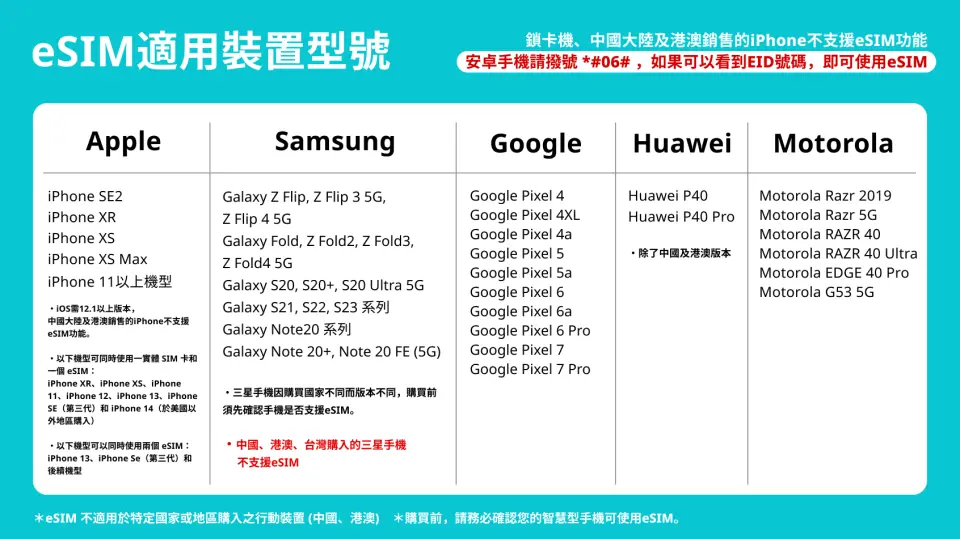
ईसिम संगत मॉडल

ईसिम इंस्टॉलेशन प्रक्रिया 1

eSIM इंस्टॉलेशन प्रक्रिया 2
खरीदारी संबंधी जानकारी
अनुस्मारक
eSIM की वैधता 180 दिन है, जो ऑर्डर देने के दिन से शुरू होती है। कृपया इसे वैधता अवधि के भीतर उपयोग करें। यदि यह समाप्त हो जाती है, तो कोई वापसी या विस्तार संभव नहीं होगा।
eSIM स्थापित करने से पहले, कृपया सुनिश्चित करें कि आप इंटरनेट-सक्षम WiFi या मोबाइल नेटवर्क से जुड़े हैं, फिर मोबाइल योजना जोड़ने के लिए QR कोड स्कैन करें।
eSIM को पहले ताइवान में स्थापित किया जा सकता है, और गंतव्य पर पहुंचने के बाद इसे सक्रिय किया जा सकता है। यदि यह ताइवान में पहले सक्रिय हो जाता है और नेटवर्क का समय से पहले उपयोग समाप्त हो जाता है, तो कोई धनवापसी नहीं की जाएगी।
दिनों की गणना: "गंतव्य देश में आगमन" के बाद, ताइवान के समय (GMT+8) के अनुसार, जब आप डेटा रोमिंग चालू करते हैं और सफलतापूर्वक नेटवर्क से जुड़ जाते हैं, तो ताइवान के मध्यरात्रि 00:00 बजे के बाद एक दिन गिना जाएगा, न कि 24 घंटे की अवधि के अनुसार।
एक QR कोड को केवल एक मोबाइल फोन द्वारा एक बार स्कैन किया जा सकता है। बाइंडिंग के बाद इसे बदला नहीं जा सकता है। यदि कोई संदेश दिखाई देता है जैसे कि दूरसंचार ऑपरेटर से संपर्क करना या अन्य संकेत, कृपया फोन बंद करें और पुनरारंभ करें या ग्राहक सेवा से संपर्क करें।
कृपया इस QR कोड को सुरक्षित रखें, एक बार स्कैन होने पर यह अमान्य हो जाएगा और इसे पुनः जारी नहीं किया जा सकता। कृपया निर्देशों के अनुसार इंस्टॉल करें, प्रक्रिया के दौरान स्क्रीन से बाहर न निकलें, ताकि फ़ोन द्वारा गलत समझे जाने पर eSIM योजना हटने या त्रुटि होने से बचा जा सके।
हॉटस्पॉट शेयरिंग बैंडविड्थ का उपयोग करेगी, और नेटवर्क की गति अंतिम उपकरण और भौगोलिक स्थिति के अनुसार भिन्न हो सकती है, इसलिए न्यूनतम गति की गारंटी नहीं दी जाती है। कृपया ऑर्डर देने से पहले पुष्टि कर लें।
विभिन्न देशों में दूरसंचार नेटवर्क की गुणवत्ता भिन्न होती है, और बेस स्टेशन का निर्माण ताइवान जितना घना नहीं है। प्रत्येक देश में क्षेत्रीय और दूरसंचार निर्माण भिन्न होते हैं, इसलिए हम कुछ क्षेत्रों में सिग्नल की स्थिति के कारण धनवापसी का अनुरोध स्वीकार नहीं कर सकते हैं।
इस कार्ड का वास्तविक सिग्नल और कनेक्शन गति क्षेत्र, स्थलाकृति, जलवायु, इमारतों के अवरोध, उपयोगकर्ताओं की संख्या, नेटवर्क सिस्टम या टर्मिनल उपकरण जैसे कारकों से प्रभावित होकर भिन्न होगी। यदि स्थानीय क्षेत्र या मोबाइल फोन 4G नेटवर्क का समर्थन नहीं करता है, तो यह स्वचालित रूप से 3G सिग्नल में बदल जाएगा।
इसके अलावा, भूकंप, टाइफून और अन्य अप्रत्याशित घटनाओं के कारण नेटवर्क अस्थिरता, डिस्कनेक्शन या अनुपलब्धता के मामले में, वापसी या विनिमय का अनुरोध नहीं किया जा सकता है।
बड़ी फ़ाइलों (अपलोड/डाउनलोड) को स्थानांतरित करने, वीडियो देखने, लाइव स्ट्रीम देखने, मोबाइल गेम खेलने आदि की अनुशंसा नहीं की जाती है; साथ ही, स्वचालित अपडेट और बैकअप फ़ंक्शन, सोशल मीडिया ऑटो-प्ले फ़ंक्शन, सैटेलाइट मैप नेविगेशन मोड (सामान्य मोड नेविगेशन के लिए इस्तेमाल किया जा सकता है) और क्लाउड ड्राइव डेटा ट्रांसमिशन फ़ंक्शन को बंद करने की भी सलाह दी जाती है।
नेटवर्क के उचित उपयोग के सिद्धांत के अनुसार, जो उपयोगकर्ता थोड़े समय में बड़ी मात्रा में डेटा का उपयोग करते हैं, दूरसंचार कंपनियां अपने डेटा को सीमित कर सकती हैं, कृपया लंबे समय तक ऑनलाइन वीडियो देखने या थोड़े समय में बड़ी मात्रा में डेटा का उपयोग करने से बचें।
उपयोग कैसे करें
eSIM सक्रियण चरण
- सेटिंग्स → सेलुलर
- eSIM जोड़ें
- 'QRcode' स्कैन करें और सेलुलर प्लान जोड़ें
- सेकेंडरी के रूप में सेट करें → 'जारी रखें' पर क्लिक करें
*सेलुलर प्लान का लेबल स्थानीय नाम में बदलने की सलाह दी जाती है
5. सेलुलर → सेलुलर डेटा
6. सेकेंडरी (जैसे: कनाडा) पर टैप करें
→ सेलुलर डेटा स्विचिंग की अनुमति दें बंद करें
7. इस नंबर को चालू करें
→ रोमिंग चालू करें
8. सेटअप पूरा करें


