

सऊदी अरब और कतर और ओमान और कुवैत असीमित डेटा eSIM - 500MB/दैनिक से 10GB तक हाई-स्पीड डेटा
- अपना कीमती समय बचाएं और सिम कार्ड डिलीवरी की प्रतीक्षा किए बिना तुरंत अपना eSIM QR कोड प्राप्त करें।
- eSIM (एम्बेडेड-सिम) सेट करने के लिए QRCode स्कैन करें, जिससे सिम कार्ड बदलने के जटिल चरण समाप्त हो जाते हैं।
- स्थानीय कैरियर के माध्यम से हाई स्पीड मोबाइल नेटवर्क का आनंद लें।
विकल्प चुनें
उत्पाद विवरण

जांचें कि आपके मोबाइल फोन में eSIM फ़ंक्शन है या नहीं
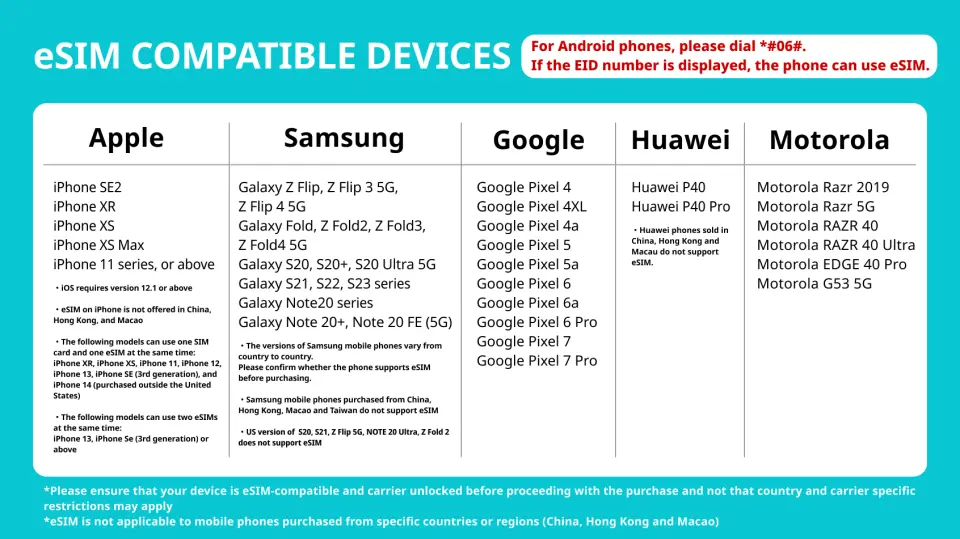
eSIM-संगत डिवाइस

eSIM इंस्टॉलेशन गाइडलाइन
सिम कार्ड विनिर्देश
| डेटा उपयोग विनिर्देश | असीमित डेटा, 500MB, 1GB, 2GB, 5GB, 10GB |
| ट्रांसमिशन विनिर्देश | 4G |
| सिग्नल कवरेज क्षेत्र | Qatar, Saudi Arabia, Oman, Kuwait |
| मोबाइल वाहक | Mobily / Ooredoo |
| समर्थित आकार | eSIM |
| हॉटस्पॉट साझाकरण | उपलब्ध |
| समर्थित आवृत्तियां (4G) | B4(AWS), B1(2100 MHz), B5(850 MHz), B12(700 MHz), B2(1900 MHz), B30(2300 MHz) |
| टॉप-अप उपलब्धता | टॉप-अप अनुपलब्ध |
| शामिल नहीं | वॉइस कॉल, टेक्स्ट संदेश |
| समर्थित नहीं | डुअल-सिम डिवाइस, सिम-लॉक्ड डिवाइस, वाहक-अनुकूलित डिवाइस, मोबाइल हॉटस्पॉट |
| अनुस्मारक | यह eSIM केवल डेटा के लिए है। इसमें फ़ोन कॉल करने या SMS संदेश भेजने के लिए कोई फ़ोन नंबर शामिल नहीं है। |
खरीद सूचना
- eSIM इंस्टॉल होने पर डेटा प्लान की वैधता तुरंत शुरू हो जाती है।
- कृपया सुनिश्चित करें कि आपका मोबाइल फ़ोन और उसका ऑपरेटिंग सिस्टम eSIM के साथ संगत है, ऐसा न करने पर सक्रियण विफल हो सकता है, और रिफंड नहीं दिया जाएगा।
- iOS के लिए संस्करण 12.1 या उसके बाद का वर्शन आवश्यक है; कृपया ध्यान दें कि चीन में बेचे जाने वाले iPhones eSIM का समर्थन नहीं करते हैं और हांगकांग और मकाऊ में बेचे जाने वाले कुछ मोबाइल फ़ोन eSIM का समर्थन नहीं करते हैं।
शामिल/शामिल नहीं
- eSIM
अनुस्मारक
यह eSIM केवल डेटा के लिए है। इसमें फ़ोन कॉल करने या SMS संदेश भेजने के लिए कोई फ़ोन नंबर शामिल नहीं है।
पूरे समय हाई-स्पीड डेटा, कोई दैनिक डेटा सीमा नहीं है, एक बार डेटा उपयोग हो जाने पर, 128 kbps तक की कम गति के साथ असीमित डेटा। (मैसेजिंग ऐप्स)
आपकी बुकिंग की पुष्टि होने पर eSIM QRCode आपके ईमेल पते पर भेज दिया जाएगा।
कृपया सुनिश्चित करें कि आपके पास eSIM-संगत और नेटवर्क-अनलॉक डिवाइस है, और यात्रा कार्यक्रम की पुष्टि हो चुकी है।
संगतता समस्याओं, यात्रा कार्यक्रम में बदलाव या समाप्ति तिथि बीत जाने के कारण कोई रिफंड या रद्दीकरण नहीं।
आप यात्रा से पहले (अपनी उड़ान से पहले) या अपने गंतव्य पर जब आवश्यकता हो, eSIM इंस्टॉल कर सकते हैं।
eSIM केवल एक बार इंस्टॉल किया जा सकता है। सफल इंस्टॉलेशन के बाद अपने डिवाइस से eSIM को हटाएँ/डिलीट न करें।
समाप्ति तिथि - खरीद तिथि से 45 दिन।
उपयोग कैसे करें
इंस्टॉल करने के लिए इंटरनेट कनेक्शन आवश्यक है
उपयोग करने की चरण-दर-चरण विधि:
- iOS- सेटिंग्स > सेल्युलर/मोबाइल डेटा > eSIM > डेटा प्लान जोड़ें, QR स्कैन करें और उचित नाम दें। (उदाहरण, देश eSIM)
- एंड्रॉइड- सेटिंग्स > नेटवर्क > सिम कार्ड मैनेजर > eSIM > मोबाइल प्लान जोड़ें > QR स्कैन करें और उचित नाम दें।
चरण 1 और चरण 2 पूरा करें।
- iOS
चरण 1. सेटिंग्स > सेल्युलर डेटा/मोबाइल डेटा > अपना eSIM चालू करें > डेटा रोमिंग चालू करें
चरण 2. सेटिंग्स > सेल्युलर डेटा/मोबाइल डेटा > मोबाइल डेटा में > अपना eSIM चुनें
- एंड्रॉइड
चरण 1. कनेक्शन > सिम कार्ड मैनेजर > (eSIM) चालू करें > नीचे स्क्रॉल करें > मोबाइल डेटा > अपना eSIM चुनें
चरण 2. कनेक्शन > मोबाइल नेटवर्क > डेटा रोमिंग चालू करें
रद्दीकरण नीति
- ऑर्डर पूरा हो जाने के बाद, इसे रद्द, संशोधित या वापस नहीं किया जा सकता
- समय क्षेत्र अंतर के कारण, पुष्ट रद्दीकरण तिथि आपूर्तिकर्ता के स्थानीय समय पर आधारित है। आपके रद्दीकरण अनुरोध को संसाधित करने में 2–5 कार्य दिवस लगेंगे, इसके बाद उत्पाद की रद्दीकरण नीति के अनुसार रद्दीकरण शुल्क लिया जाएगा। रद्दीकरण की पुष्टि होने पर, आपको 14 कार्य दिवसों के भीतर धनवापसी मिलेगी।


