

eSIM 5G Europa|Válida en 50 regiones|Datos ilimitados en Reino Unido・Hasta 300 minutos de llamadas
- [Preferido por usuarios de iOS: ¡Instalación con un clic, diga adiós a la entrada manual!]
Actualiza a iOS 17.4 o superior y usa la última versión de la app KKday para completar la instalación de la eSIM rápidamente, ahorrándote la entrada manual de datos y facilitando la conexión a internet en el extranjero.
⚠️ Los usuarios de Android cuyo teléfono sea compatible con eSIM pueden contactar al servicio de atención al cliente para obtener un enlace de instalación con un solo clic exclusivo. - Admite compartir zona Wi-Fi, llamadas entrantes gratuitas y recepción de SMS
- Válido en 50 regiones de Europa, y cubre destinos populares como Australia, Turquía y Suiza.
- Ofrece 20GB/30GB de datos de roaming de alta velocidad, con datos ilimitados adicionales en el Reino Unido.
- Compatible con aplicaciones de IA como ChatGPT, Gemini y Claude, asistente inteligente para usar sobre la marcha.
- Compra y usa al instante, conexión automática, navegar en el extranjero más fácil.
- Envío gratuito, sin necesidad de cambiar la tarjeta, no pierda ninguna llamada con su número original, tranquilidad para viajes y viajes de negocios.
Seleccionar plan
Información del producto
- eSIM (tarjeta SIM virtual): solo necesita escanear el código QR en el comprobante para vincular la eSIM a su teléfono y disfrutar de la conexión a la red local. Rápida, conveniente, ecológica y sin consumibles, es la mejor opción de internet para sus viajes.
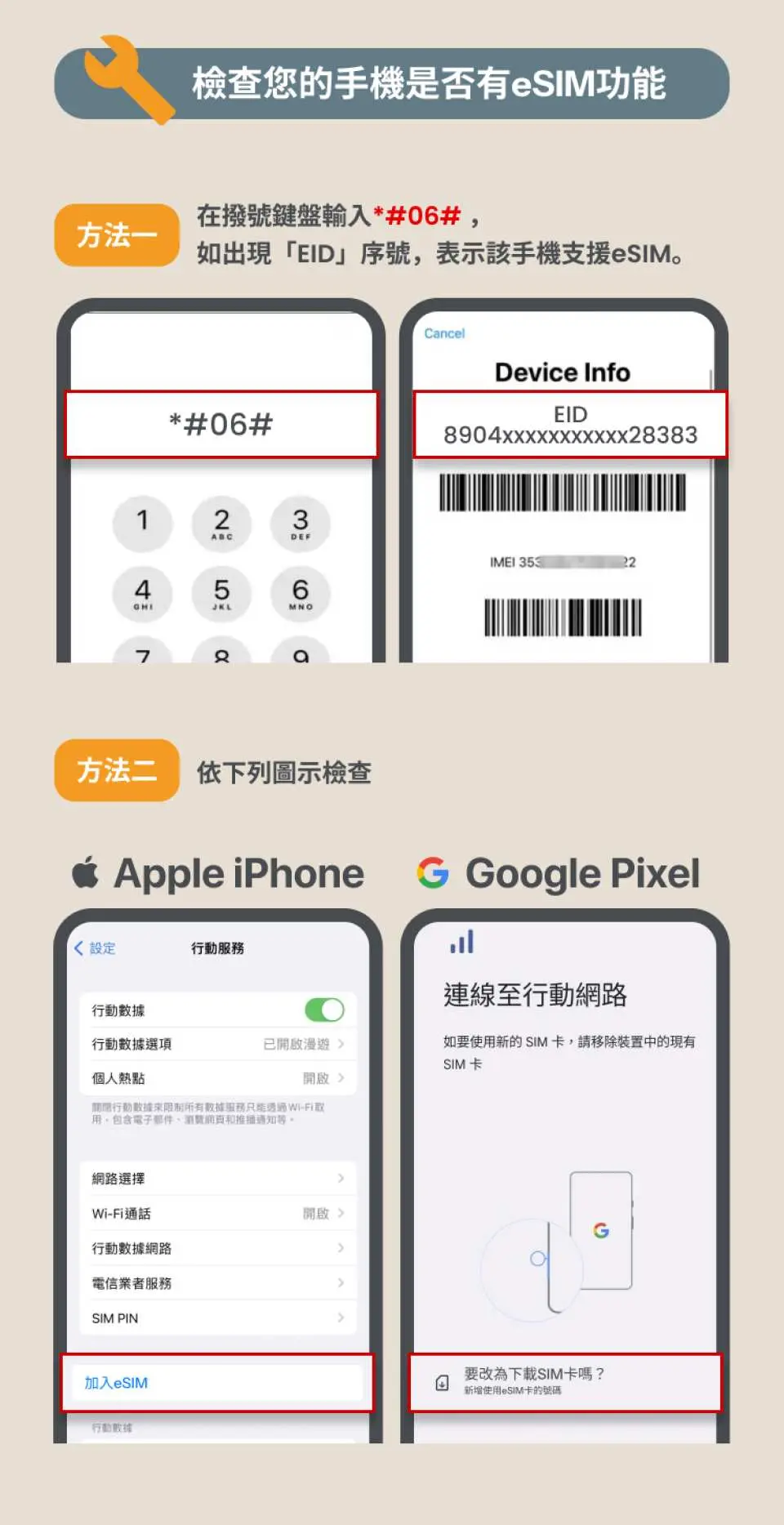
- Asegúrese de que su teléfono sea compatible con eSIM y no tenga restricciones de tarjeta SIM. Una vez realizado el pedido, no se aceptarán devoluciones, cambios ni cancelaciones por ningún motivo.




Especificaciones de la tarjeta SIM
| Especificaciones de uso de datos | Datos ilimitados, 20GB, 30GB |
| Especificaciones de transmisión | 5G/4G |
| Área de cobertura de señal | United Kingdom, Austria, Belgium, Bulgaria, Croatia, Cyprus, Czechia, Denmark, Estonia, Finland, France, Germany, Greece, Hungary, Ireland, Italy, Latvia, Lithuania, Luxembourg, Malta, Netherlands, Poland, Portugal, Romania, Slovenia, Slovakia, Spain, Sweden, French Guiana, Gibraltar, Guadeloupe, Iceland, Liechtenstein, Martinique, Mayotte, Monaco, Norway, Réunion, Saint Barthélemy, Saint Martin (France), Switzerland, Turkey, Vatican City, AustraliaIslas Azores, Islas Madeira |
| Operador móvil | Según la región |
| Tamaños compatibles | eSIM |
| Compartir conexión (hotspot) | Disponible |
| Disponibilidad de recarga | Recarga no disponible |
| No compatible | Dispositivo bloqueado por SIM, Dispositivo personalizado por el operador, Punto de acceso móvil |
| Tipo de red | Itinerancia |
Aviso de compra
- Este producto es emitido por CMLink UK y utiliza la red oficial de EE en el Reino Unido; en algunos dispositivos se muestra como CMLINK.
- Una vez agotados los datos, la tarjeta dejará de funcionar. No se admite recarga por el momento; deberá comprar una tarjeta nueva y el comprobante se enviará automáticamente.
- Compatible con uso compartido de conexión (hotspot), pero su disponibilidad depende del modelo de teléfono y del sistema operativo; no se reembolsará si no se puede compartir.
- La velocidad de internet y la señal pueden verse afectadas por la ubicación, el terreno, la cobertura de edificios, la cantidad de usuarios y el clima; en áreas sin 5G, se cambiará automáticamente a 4G/LTE.
- Antes de realizar el pedido, confirme el plan de datos. Una vez enviado el comprobante, no se aceptarán cancelaciones. Si no recibe el código QR inmediatamente después del pedido, comuníquese con el servicio de atención al cliente para obtener ayuda.
- El código QR solo se puede escanear una vez. La cuenta de tiempo comenzará inmediatamente después de la instalación. No lo escanee con anticipación para no afectar su derecho de uso.
Incluye/No incluye
- eSIM
Recordatorios
Para añadir manualmente la eSIM, consulte los detalles de la eSIM en "Recordatorios antes del viaje", copie y pegue <SM-DP_Address> y <Activation Code> en los campos correspondientes. No es necesario introducir el <código de confirmación>.
El día en que se escanea el código QR cuenta como el primer día de uso. Se recomienda instalarlo antes del despegue o después de llegar al destino para evitar una activación anticipada
La eSIM solo admite una única instalación mediante escaneo. No la elimine después de una instalación exitosa
La eSIM debe activarse dentro de los 90 días posteriores a su asignación. Se recomienda activarla lo antes posible después de llegar al destino para garantizar los derechos de uso
Para usar la eSIM fuera del Reino Unido, active la itinerancia de datos
Tras la instalación, el sistema enviará un SMS notificando que la eSIM se ha activado correctamente. Para consultar el saldo de datos restante, envíe «check» al 10086
Si no puede realizar llamadas, compruebe primero que su teléfono tiene activada la función VoLTE
Si no puede usarlo pero no se ha puesto en contacto con el servicio de atención al cliente para solucionar la avería, no se reembolsará si no se puede determinar la causa
Cómo usar
【Instalar eSIM】
• iPhone: Ajustes → Datos móviles → Añadir eSIM
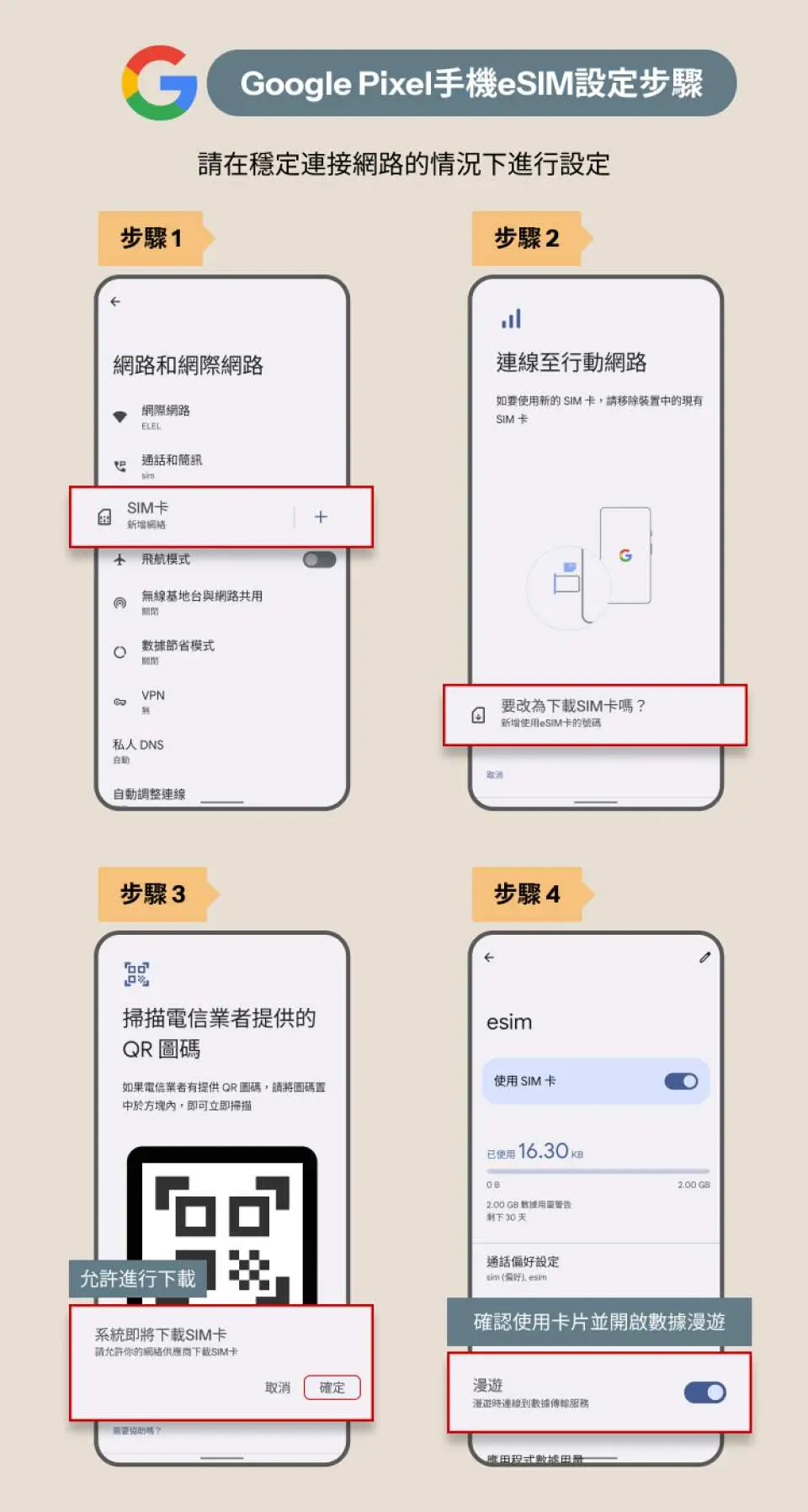
• Android: Ajustes → Red e Internet → SIM → Añadir eSIM (la ruta puede variar según la marca)
【Usar eSIM】
1. Desactive los datos móviles de su SIM original, asegúrese de que la eSIM esté activada, active el roaming de datos y establezca la eSIM como su tarjeta de datos móviles predeterminada.
2. Si no puede acceder a Internet o compartir un punto de acceso, consulte la configuración de APN y reinicie su teléfono.
3. Si la conexión es inestable o la velocidad de Internet es lenta, se recomienda activar y desactivar el modo avión, o desactivar la selección automática de red y seleccionar manualmente un operador compatible.
【Configuración de APN】
※ La APN generalmente se configura automáticamente. Si no puede conectarse o compartir un punto de acceso, configure la APN manualmente y reinicie su teléfono (la ruta puede variar según la marca).
• iPhone: Ajustes → Datos móviles → Toque su eSIM → Red de datos móviles → Introduzca "everywhere" en el campo APN → Vuelva a la página anterior.
• Android: Ajustes → Red e Internet → SIM → Seleccione la eSIM correspondiente → Nombres de puntos de acceso → Toque "Nuevo" en la esquina superior derecha → Introduzca APN: everywhere → Guardar y volver.
Política de cancelación
- Una vez completado el pedido, no se puede cancelar, modificar ni reembolsar
- Debido a las diferencias horarias, la fecha de cancelación confirmada se basa en la hora local del proveedor. Espere de 2 a 5 días hábiles para procesar su solicitud de cancelación, tras lo cual se cobrará la tarifa de cancelación según la política del producto. Una vez confirmada la cancelación, recibirá su reembolso en un plazo de 14 días hábiles.


