

eSIM de KDDI (au) para Japón | Internet de alta velocidad 5G | La mejor experiencia de red del mundo
- Red móvil en Japón proporcionada por KDDI (au), la operadora número uno del mundo según Opensignal
- Red móvil 5G de alta velocidad sin límites de velocidad, compatible con herramientas de IA como ChatGPT
- Instalación sencilla, sin necesidad de cambiar la tarjeta SIM; solo escanea el código QR para activar
—KDDI obtuvo el 1er lugar en los Premios de Experiencia de Red Móvil Global 2025 de Opensignal en las categorías de experiencia en juegos, aplicaciones de voz y fiabilidad de red—
Seleccionar plan
Descripción del producto
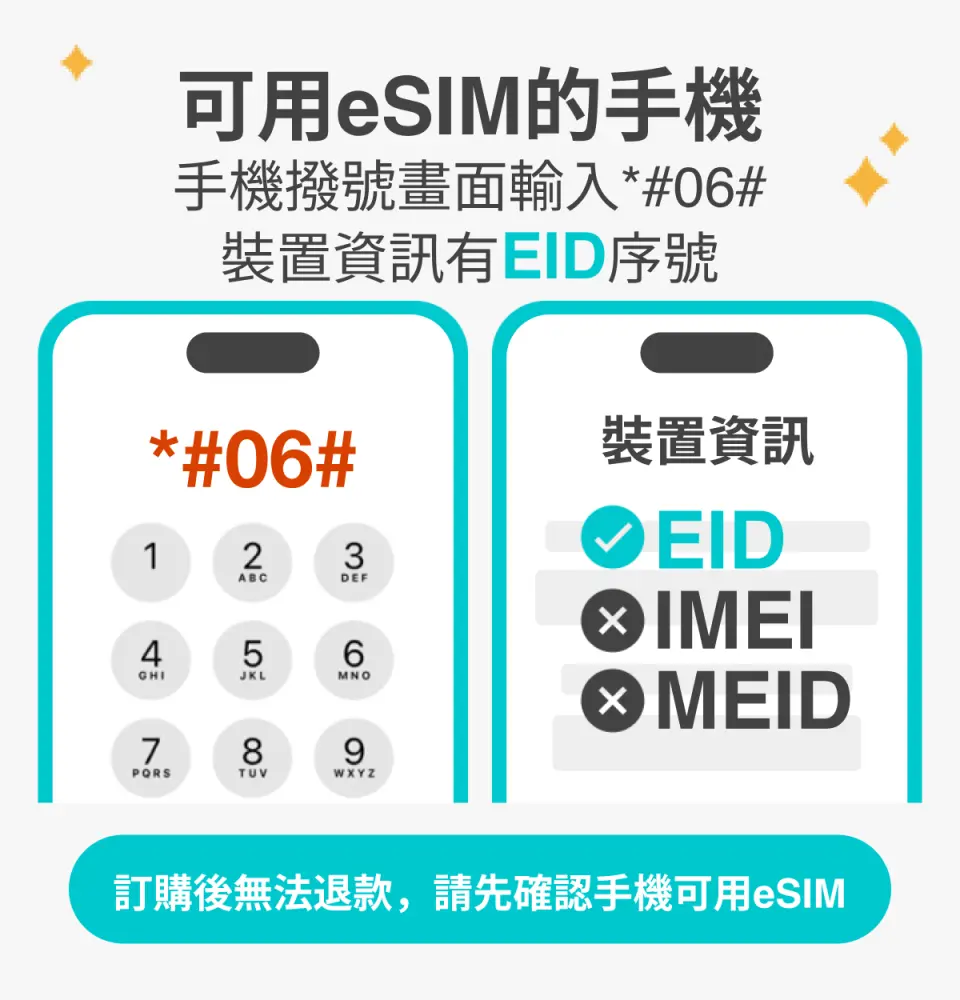
Por favor, confirme que su teléfono es compatible con eSIM antes de comprar. Los pedidos no se pueden cancelar ni reembolsar después de la compra.

Antes de activar la eSIM, actualice su dispositivo iOS a la última versión y conéctese a una red Wi-Fi estable. Las versiones antiguas de iOS y las redes inestables suelen provocar fallos en la activación de la eSIM.

Abre la cámara para buscar la eSIM y, a continuación, pulsa "Plan de acción".

El tiempo de arranque es de aproximadamente 2-3 minutos, y la instalación puede fallar si aparece la pantalla de inicio.

Puedes personalizar el nombre de la eSIM para gestionar fácilmente varias eSIM.

Seleccionar un número preestablecido le permite especificar su número de teléfono móvil principal para recibir mensajes (debe solicitar a su operador de telecomunicaciones original la activación del roaming internacional para su número de teléfono móvil principal antes de poder recibir mensajes SMS).

Puedes especificar el número de teléfono principal para usar las funciones de iMessage y FaceTime.
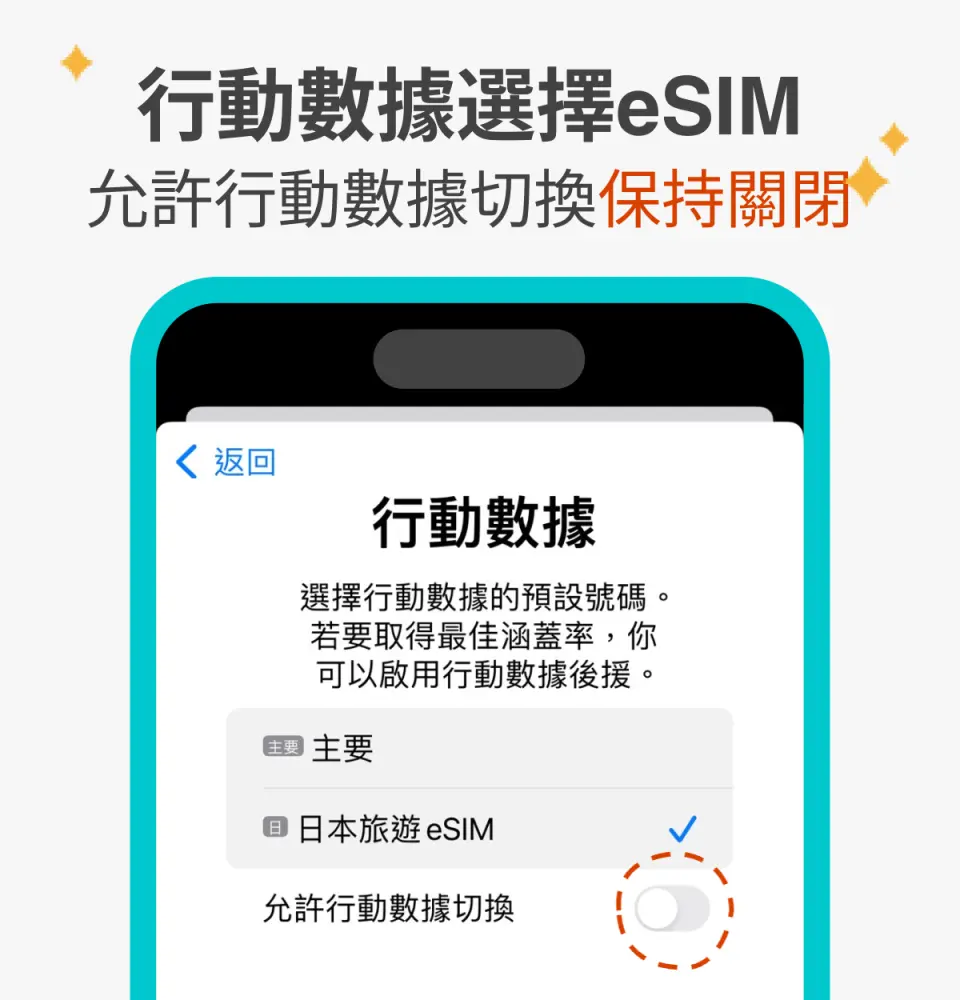
Al optar por usar datos móviles eSIM, el mensaje "Los datos móviles eSIM no están habilitados" es una razón común por la que no se puede acceder a Internet.

También puedes añadir manualmente una eSIM si no puedes escanear el código QR.

Tras copiar el código de activación de la eSIM, siga los pasos para añadir manualmente la información de la eSIM.
Especificaciones de la tarjeta SIM
| Especificaciones de uso de datos | 12GB, 21GB |
| Especificaciones de transmisión | 5G/4G |
| Área de cobertura de señal | Japan |
| Operador móvil | KDDI |
| Tamaños compatibles | eSIM |
| Compartir conexión (hotspot) | Disponible |
| Tipo de red | Local |
Aviso de compra
- Una vez enviada la eSIM, no se admiten cancelaciones ni reembolsos. Asegúrese de que su teléfono sea compatible con eSIM (los iPhones y teléfonos Android vendidos en China, Hong Kong y Macao no son compatibles con eSIM; la mayoría de los teléfonos Android vendidos en Taiwán tampoco lo son).
- Para teléfonos Android compatibles con eSIM, consulte lasfiguras 1 y2 para ver los pasos a seguir para introducir manualmente el código de activación.
Recordatorios
Antes de comprar, marque "*#06#" en el teclado de su teléfono. Si aparece el número de serie EID, podrá usar la eSIM.
El código QR solo se puede escanear una vez y no admite instalaciones repetidas. No lo elimine después de la instalación para garantizar un funcionamiento normal.
Conéctese a una red Wi-Fi estable antes de instalar y activar la eSIM para evitar fallos de activación por inestabilidad de la red. Una vez que la eSIM caduca, no se puede volver a emitir.
El periodo de validez comienza una vez instalada y activada la eSIM. El primer día se cuenta desde el momento de la instalación y activación hasta las 24:00, hora de Japón.
Es normal que el sistema muestre "Activando" o "Error de activación" al activar la eSIM fuera de Japón. Podrá usar la red una vez que llegue a Japón.
Compartir datos mediante punto de acceso Wi-Fi ofrece diferentes planes: 3 GB en total durante 3-4 días, 6 GB en total durante 5-7 días, 9 GB en total durante 8-10 días y 15 GB en total durante 15 días.
Política de cancelación
- Una vez completado el pedido, no se puede cancelar, modificar ni reembolsar
- Debido a las diferencias horarias, la fecha de cancelación confirmada se basa en la hora local del proveedor. Espere de 2 a 5 días hábiles para procesar su solicitud de cancelación, tras lo cual se cobrará la tarifa de cancelación según la política del producto. Una vez confirmada la cancelación, recibirá su reembolso en un plazo de 14 días hábiles.


