

【50% OFF】New Zealand and Australia Internet Card|Australia and New Zealand Daily High Speed 500MB/1GB/2GB/3GB eSIM
- No need to swap cards; enjoy fast and seamless 4G internet without the hassle.
- Install and use immediately upon receiving the eSIM QR code; no need to pick up a physical card or wait for shipping.
- Eco-friendly with no waste, free shipping, and zero risk of loss.
- Compatible with iPhone and various Android smartphones.
*Please note that Samsung phone compatibility varies by region; please check if your device supports eSIM before purchasing (Samsung phones purchased in Taiwan do not support eSIM functionality).
Seleccionar plan
Descripción del producto
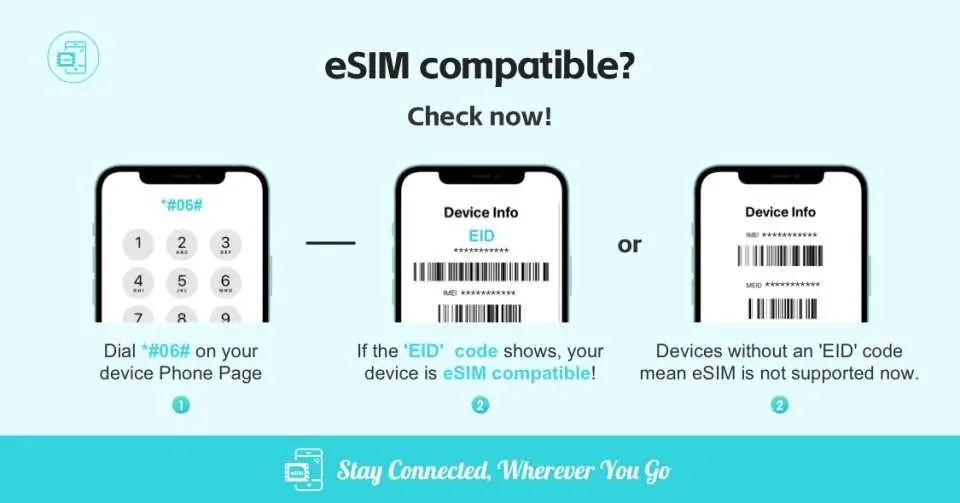
Please confirm that your phone supports eSIM before purchasing

eSIM applicable models

eSIM installation process
SIM Card Specifications
| Data Usage Specifications | 500MB, 1GB, 2GB, 3GB |
| Transmission Specifications | 4G |
| Signal Coverage Area | Australia, New Zealand |
| Mobile Carrier | Two Degrees |
| Supported Sizes | eSIM |
| Hotspot Sharing | Available |
| Supported Frequencies(4G) | B1(2100 MHz) |
| Excludes | Voice calls, Texts |
| Not Supported | SIM-locked device, Carrier-customized device, Pocket WiFi, Modified phones, 3G mobile phones, translators, mobile phones without eSIM function |
| Reminders | ・The eSIM must be installed and activated at the destination within 90 days after ordering, otherwise the eSIM will become invalid and unused data within the period will not be refunded. |
| Network Type | Roaming |
| Mobile Virtual Network Operator (MVNO) | 澳門電訊 CTM |
Purchase Notice
- Before purchasing, please make sure that your mobile phone and its operating system support the eSIM function and are not SIM card locked. If the order is canceled due to device incompatibility, no refunds will be issued.
- iOS requires version 12.1 or higher; please note that iPhones sold in mainland China do not support eSIM. In Hong Kong and Macau, only iPhone 13 mini, iPhone 12 mini, iPhone SE 2020 and iPhone XS have eSIM functionality. (Please go to Apple’s official website to check)
- The versions of Samsung mobile phones vary from country to country. Samsung mobile phones purchased in Taiwan do not support eSIM. For other regions, please check with Samsung’s official website first.
- Each QR code can only be scanned and installed once. After binding, the device cannot be changed or deleted. Once deleted, it cannot be rescanned and installed and needs to be purchased again.
- The eSIM and usage guide will be sent to your email address by the supplier after ordering. If you do not receive the email, please check your spam folder or contact customer service.
- The eSIM must be installed and activated at the destination within 90 days after ordering, otherwise the eSIM will become invalid and unused data within the period will not be refunded.
- Provide customer service in Chinese, English and Cantonese
Reminders
Before purchasing, please make sure that your mobile phone and its operating system support the eSIM function and are not SIM card locked. If the order is canceled due to device incompatibility, no refunds will be issued.
iOS requires version 12.1 or higher; please note that iPhones sold in mainland China do not support eSIM. In Hong Kong and Macau, only iPhone 13 mini, iPhone 12 mini, iPhone SE 2020 and iPhone XS have eSIM functionality.
The eSIM and usage guide will be sent to your email address by the supplier after ordering. If you do not receive the email, please check your spam folder or contact customer service.
Installing eSIM requires an Internet connection. Please confirm that there is available WiFi or available mobile data in the environment before installation.
The eSIM must be installed and activated at the destination within 90 days after ordering, otherwise the eSIM will become invalid and unused data within the period will not be refunded.
Please install the eSIM after arriving at your destination to avoid activating it in advance to calculate the validity period.
Please select this eSIM as your primary data plan and make sure roaming is turned on.
Each QR code can only be scanned once. After binding, the device cannot be changed or deleted. Once deleted, it cannot be rescanned and installed.
To end using the eSIM plan available on your phone, click [Remove Action Plan] at the bottom to remove it.
Please be aware that the signal may affect the quality of the Internet depending on factors such as location, terrain, building coverage, number of users, weather, etc.
How to Use
*This product provides customer service in Chinese, English and Cantonese*The eSIM and usage guide will be sent to your email address by the supplier after ordering. If you do not receive the email, please check your spam folder or contact customer service.
- installation steps:
Method 1: Scan QR Code
Method 2: Manually add SM-DP_Address and Activation Code
- Enable activation steps:
1. After arriving at the destination, turn off other SIM cards and turn on only this eSIM and its data roaming
- Other notes:
- Installing eSIM requires an Internet connection. Please confirm that there is available WiFi or available mobile data in the environment before installation.
- Please do not use your camera or other APP to scan the QR code, it must be done through your phone's settings
- Each QR Code can only be scanned and installed once. After binding, the device cannot be changed or deleted. Once deleted, it cannot be rescanned and installed and needs to be purchased again.
- If you need to check whether your phone supports the eSIM function, please dial "*#06#". Usually, if EID is displayed, it means it supports eSIM. (Depending on the OS system or manufacturer, it may not be usable even with an EID.)
- If you encounter any problems, please contact customer service immediately
Cancellation Policy
- Once the order has been completed, it cannot be canceled, modified, or refunded
- Due to time zone differences, the confirmed cancellation date is based on the supplier’s local time. Please allow 2–5 business days to process your cancellation request, after which the cancellation fee will be charged according to the product’s cancellation policy. Once your refund request is confirmed, KKday will initiate the refund to your original payment method within 15 days. The actual refund timing depends on your card-issuing bank’s policy.


