

eSIM de tarjeta de datos de Camboya | Tipo de alta velocidad diaria / Tipo de volumen total
- Soporte para instalación con un clic en iOS: actualice a la última versión de la aplicación de iOS y a iOS 17.4 o superior para instalar eSIM con un clic en la aplicación KKday.
- Disfrute de Internet 4G de forma rápida y sencilla sin cambiar de tarjeta, sin complicaciones.
- Escanee el código QR de la eSIM recibido para instalarlo y usarlo, sin necesidad de ir y venir para recoger una tarjeta física o esperar el envío físico.
- Ecológico, sin consumibles, sin gastos de envío, sin riesgo de pérdida.
- Compatible con Apple y muchos teléfonos con sistema Android.
*Debido a las diferentes versiones compradas en cada país, los teléfonos Samsung deben confirmar si admiten eSIM antes de comprar (los teléfonos Samsung comprados en Taiwán no admiten la función eSIM).
Seleccionar plan
Descripción del producto

Antes de comprar, asegúrese de que su dispositivo sea compatible con eSIM
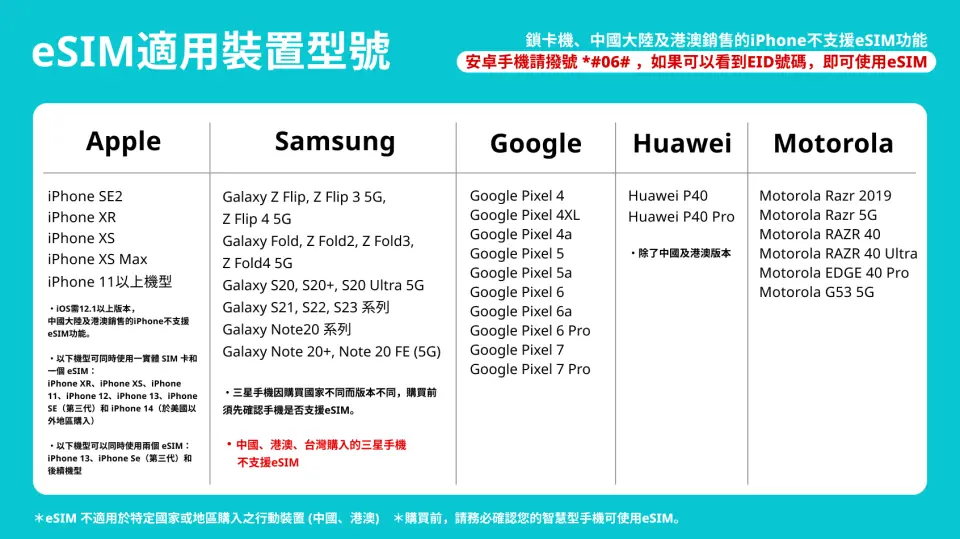
Modelos de teléfono compatibles con eSIM

Instrucciones de instalación de eSIM (iOS)
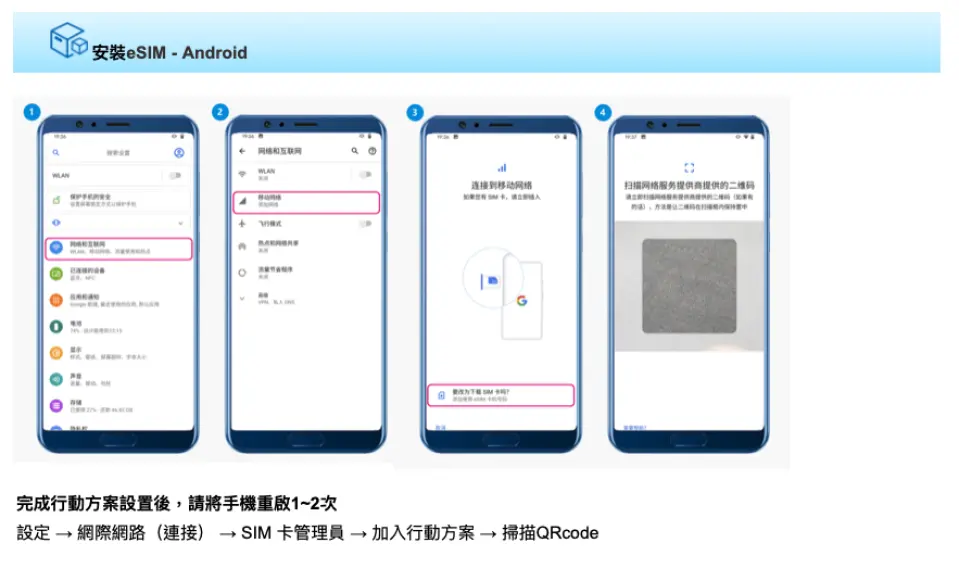
Instrucciones de instalación de eSIM (Android)
Especificaciones de la tarjeta SIM
| Especificaciones de uso de datos | Datos ilimitados, 500MB, 1GB, 2GB, 3GB, 5GB, 10GB, 20GB, 30GB, 50GB |
| Especificaciones de transmisión | 4G |
| Área de cobertura de señal | Cambodia |
| Operador móvil | CamGSM / Smart / Metfone |
| Tamaños compatibles | eSIM |
| Compartir conexión (hotspot) | Disponible |
| Frecuencias compatibles (4G) | B1(2100 MHz), B8(900 MHz), B3(1800 MHz), B7(2600 MHz) |
| Disponibilidad de recarga | Recarga no disponible |
| No incluye | Llamadas de voz, Mensajes de texto |
| No compatible | Dispositivo bloqueado por SIM, Dispositivo personalizado por el operador, Punto de acceso móvil, teléfonos modificados, teléfonos 3G, traductores, teléfonos sin función eSIM |
Información de compra
Recordatorios
Una vez escaneado el código QR y descargado el pedido, no se podrá cancelar el pedido ni solicitar reembolso.
Para instalar la eSIM se necesita conexión a internet; antes de la instalación, asegúrese de tener disponible una red WiFi o datos móviles.
Cada código QR se puede escanear 2 veces; una vez vinculado, no se puede cambiar de dispositivo ni eliminar.
Se recomienda usar la eSIM dentro de los 60 días posteriores a su recepción.
Se recomienda escanear e instalar la eSIM después de llegar al destino para evitar que el período de validez comience antes de tiempo.
iOS requiere la versión 12.1 o superior; tenga en cuenta que los iPhone vendidos en China continental no son compatibles con eSIM. En Hong Kong y Macao, solo los iPhone 13 mini, iPhone 12 mini, iPhone SE 2020 y iPhone XS tienen función eSIM.
Las versiones de los teléfonos Samsung varían según el país; los teléfonos Samsung comprados en Taiwán no son compatibles con eSIM. En otras regiones, consulte primero el sitio web oficial de Samsung.
La calidad de la señal puede verse afectada por la ubicación, el terreno, la obstrucción de edificios, el número de usuarios y las condiciones climáticas. Por favor, tome nota.
De acuerdo con la política de uso justo de datos de comunicación internacional, se recomienda desactivar la reproducción automática de videos de Facebook, la actualización automática de aplicaciones o la función de sincronización automática para evitar el uso excesivo de datos. Si debido a la visualización prolongada de televisión en línea, videos, descarga de archivos de gran tamaño o juegos en línea, la velocidad de internet se vuelve lenta o no se puede acceder a internet, no se podrá solicitar reembolso ni compensación. Por favor, tome nota.
Cómo usar
- Cómo instalar:
iOS: Ajustes > Datos móviles > Añadir plan de datos > Escanear código QR > Añadir plan de datos
Android: Ajustes > Internet (conexión) > Administrador de SIM > Añadir SIM (Añadir plan de datos) > Escanear código QR - Configurar el APN de la eSIM:
Normalmente el APN se reconoce automáticamente; si no se reconoce, debe configurarse manualmente.
APN: mobile.three.com.hk
Política de cancelación
- Una vez completado el pedido, no se puede cancelar, modificar ni reembolsar
- Debido a las diferencias horarias, la fecha de cancelación confirmada se basa en la hora local del proveedor. Espere de 2 a 5 días hábiles para procesar su solicitud de cancelación, tras lo cual se cobrará la tarifa de cancelación según la política del producto. Una vez confirmada la cancelación, recibirá su reembolso en un plazo de 14 días hábiles.


