

Philippines 4G LTE Portable Travel Wi-Fi (Pick Up and Delivery in Metro Manila)
Explore the Philippines while keeping you and your friends online. Secure high-speed internet access throughout your trip. Bring 4G LTE technology with you to easily upload photos, search for restaurants, and send messages! NO SECURITY DEPOSIT REQUIRED!
- Access unlimited 4G LTE technology as you explore the Philippines
- Enjoy the benefits of your portable Wi-Fi, from ease of use to supreme 4G speed
- Hotspot your device and share with fellow travelers
Package Options
Product Info
- What You Can Expect -
With unlimited Wi-Fi, you won’t miss the news, updates, and messages from friends while traveling in the Philippines. Your portable 4G LTE technology is powered by Virtual Sim technology, receiving support from the strongest and fastest local network signal in your area.
Stay connected while visiting tourist spots, shopping at the markets, or exploring beaches. Ditch unsecured public Wi-Fi and connect up to five devices to your pocket-sized router.
Enjoy fast internet connection and peace of mind while traveling in Asia. Book your 4G LTE Portable Travel Wi-Fi now.
- Important Info -
- Battery Life: 16 hours, 5000 mah
- Devices Supported: Up to 5 devices (recommended 3 devices for efficient speed)
- Internet Speed: 4G / LTE
- Signal Coverage: Philippines
- Delivery Info -
- Delivery will be coordinated directly by service provider. Please make sure to put your updated contact details upon check out
- Delivery Option for Metro Manila excluding CaMaNaVa area is available via 3rd party courier which must be paid to the rider directly, outside of service area might cause the booking cancelled
- Pick-Up and Return Info -
- Location: Ninoy Aquino International Airport (NAIA) Terminal 3
- Operating hours: 6:00am to 11:00pm, Daily
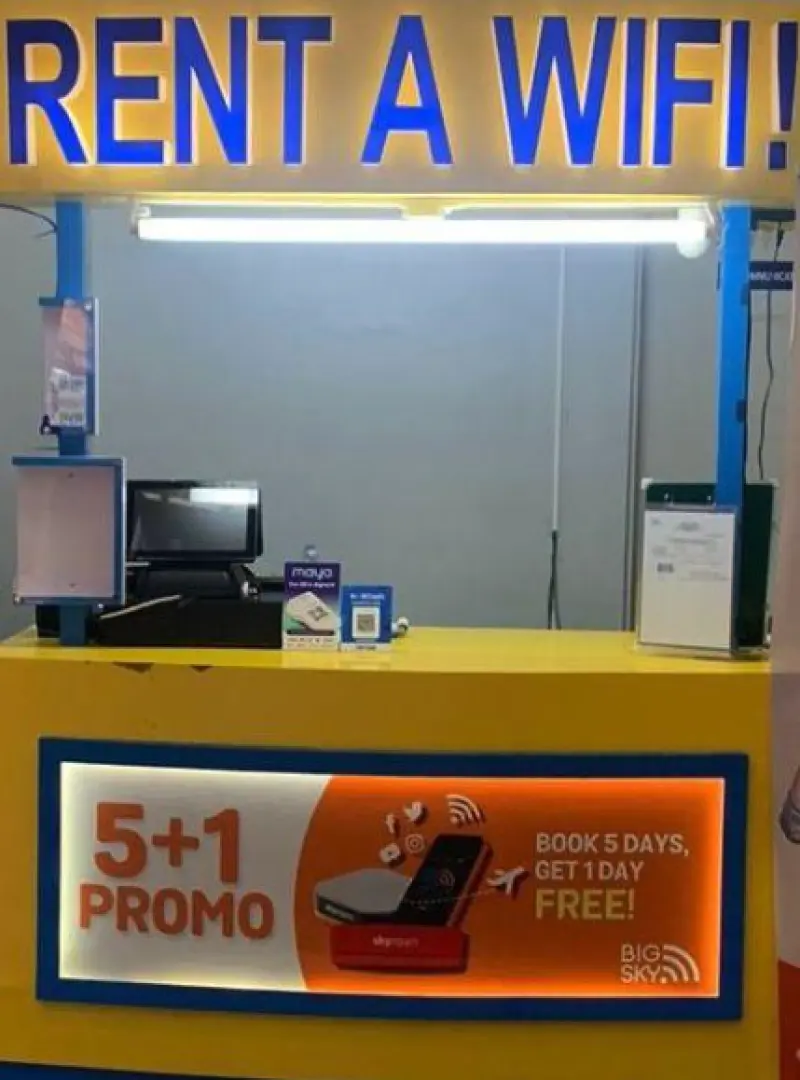
- Pick Up Information: Proceed to the international pre-departure area, after final security check beside Man Hann. Locate the booth with a “RENT A WIFI” sign and pick up your device (Present your voucher when you pick up the device)
- Return Information: Proceed to Arrival Bay 8, locate the BIG SKY drop box and return the device (Please pay for any extra days you rented the device)
- Any fees incurred from late returns or uninsured lost/damaged devices will be charged to your credit card
- If you have concerns please contact +63 918 9647626 (Viber/WhatsApp) or send email at info@bigskynation.com
- Compensation Policy -
- Late Return Fee: PHP 500.00
- Loss or damage to Wi-Fi router: PHP 4,000.00
- Loss or damage of manual: PHP 200.00
- Loss or damage of USB cable: PHP 300.00
- Loss or damage of protective casing: PHP 500.00
- Additional Info -
- Present two (2) valid IDs to waive the security deposit
- The quality of reception may be affected by outside conditions; surrounding landforms (i.e. mountains), weather, obstruction by buildings, the number of users, or locations will affect the speed and quality of internet
- Telecommunications providers reserve the right to restrict or throttle data usage of customers in accordance with their Fair Usage Policy. If a customer consumes a large volume of data within a short period of time, they may be subject to further limits on their data usage without prior warning. This policy is implemented across all countries in order to ensure equitable and fair access to telecommunications services for all users
Map for the location of the booth


The Ninoy Aquino International Airport (NAIA) Terminal 3 booth

The Bay 8 BIG SKY drop box


Purchase Notice
- Present two (2) valid IDs to waive the security deposit
- 4G LTE Global Hotspot will be delivered 2-3 days before the trip date.
- Delivery Option for Metro Manila excluding CaMaNaVa area is available via 3rd party courier which must be paid to the rider directly
- After the customer’s booking period (travel period) the customer must return / surrender the 4G LTE Global Hotspot. Courier will coordinate and pick-up device from customer
- You will not be required to place a security deposit but your credit card will be charged if you do not return the hotspot
- In the event that the Customer or an authorized representative is not present in the delivery and/or pick-up address indicated on the Booking Portal to receive the Device, a Delivery / Pick- Up No Show Fee shall be charged to the Customer
Includes/Excludes
How to Redeem Your Voucher
How to Use Your Voucher
- Please present the e-voucher on-site
Validity Period
- The voucher must be used on the selected date and within operating hours; Invalid after expiration
Pickup Point
Location Name: Metro Manila
Address: Metro Manila PhilippinesCancellation Policy
- Once the order has been completed, it cannot be canceled, modified, or refunded
- Due to time zone differences, the confirmed cancellation date is based on the supplier’s local time. Please allow 2–5 business days to process your cancellation request, after which the cancellation fee will be charged according to the product’s cancellation policy. Once the cancellation is confirmed, you will receive your refund within 14 working days.
FAQ
Travelers can rent a portable Wi-Fi device for the Philippines through various online travel platforms. For convenient booking and flexible pickup/delivery options, including airport pickup or delivery within Metro Manila, securing your device in advance through an online platform is highly recommended.
Using a Philippines 4G LTE portable Wi-Fi offers several advantages, including the ability to share internet access with multiple devices and travel companions without needing to swap SIM cards. It typically provides a consistent high-speed connection, is easy to set up, and eliminates the hassle of registering local SIM cards, making it ideal for groups or frequent device users.
When choosing a portable Wi-Fi for the Philippines, travelers should prioritize devices offering 4G LTE speed for fast and reliable internet. Look for unlimited data to avoid unexpected charges, multi-device connectivity for sharing, and a long battery life to ensure continuous service throughout your day's activities. Ease of use and clear pickup/return instructions are also beneficial.
A 4G LTE portable Wi-Fi device functions by connecting to local cellular networks and creating a private Wi-Fi hotspot. Your personal devices, such as smartphones, tablets, or laptops, then connect to this hotspot, providing high-speed internet access. This setup allows you to use your devices as usual without needing a local SIM card, offering seamless connectivity.
Setting up your portable Wi-Fi device is straightforward. Once you pick it up, simply power it on. The device will generate a Wi-Fi network name (SSID) and password, usually found on a sticker on the device itself. On your smartphone or other devices, select this Wi-Fi network and enter the password to connect to the internet.
Yes, a single Philippines 4G LTE portable Wi-Fi device is designed to function as a hotspot, allowing multiple devices and users to connect simultaneously. This feature makes it highly convenient for group travel, as everyone can stay connected using just one device, sharing the high-speed internet access.
With a 4G LTE portable Wi-Fi, you can generally expect high-speed internet access in major cities, popular tourist destinations, and well-developed areas across the Philippines. While coverage is robust in these locations, speeds may vary slightly in very remote or rural regions. The 4G LTE technology ensures a fast and stable connection for browsing, streaming, and communication.
Booking a portable Wi-Fi device typically involves selecting your rental dates and preferred pickup/return method online. You might choose airport pickup upon arrival or delivery to your accommodation in Metro Manila. Booking through KKday offers a seamless process, allowing you to easily manage your rental details and ensuring your device is ready for a hassle-free start to your trip.
Get Help


