

【30% OFF】Japan Unlimited 4G/LTE Pocket WiFi Rental | Pickup at Thailand Airport/Bangkok Samurai Office
- Unlimited 4G/LTE Data: Enjoy fast and reliable internet with no data caps while traveling in Japan
- Convenient Pickup Options: Collect your WiFi device at Thailand Airport or at the Samurai Office in Bangkok
- Seamless Connectivity: Connect multiple devices and stay online for work or leisure with ease
- Portable and Easy to Use: Compact design with long-lasting battery, perfect for keeping you connected on the go
Package Options
Purchase Notice
- Fair Usage Policy (Policy for fair use of data communications)
- Samurai WiFi and MUAY THAI WiFi, our flat-rate data communication products, provide sufficient data capacity for general use through direct use of local lines.
- However, in order to maintain network quality and fair use of radio waves, domestic and international telecommunications companies may limit the amount of communication to users who communicate large amounts of data in a short period of time.
- In this case, you may not be able to connect to the Internet or your communication speed may be extremely slow.
- For the above reasons, if communication restrictions occur, you will not be able to recover during the period of use of the product.
- Please refrain from viewing videos, making internet calls, downloading large files, and online games as much as possible.
- Even if there is a restriction on use, there will be a charge for the period.
- About Refund in case of trouble
- If the service cannot be used due to malfunction, if you do not contact and report a defect we will not be able to provide a refund. No refund will be given even if you purchase equipment at your own discretion.
- It will take minimum 1 month for are supplier to check data usage during a refund application.
Includes/Excludes
Equipment Damage & Loss Fee Policy
Damage, Water Damage, Loss
1. Pocket WiFi Device: 5,000THB
2. Charger Set: 400THB
3. Bag: 400THB
4. Power Bank Battery: 2,000THB
Pickup/Return Point
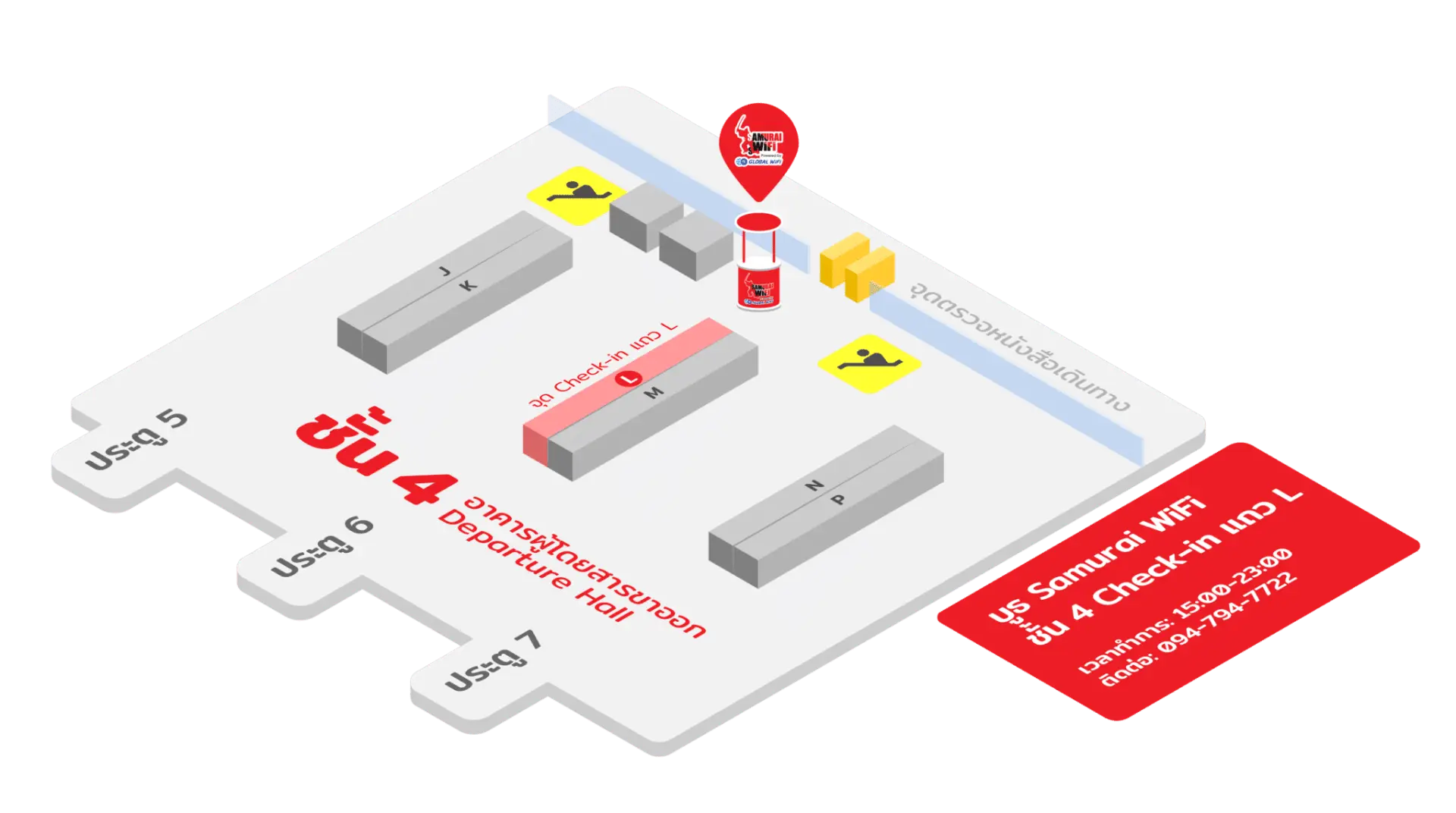
Suvarnabhumi International Airport (BKK) -
Samurai WiFi Booth

Monday 15:00 - 23:00
Tuesday 15:00 - 23:00
Wednesday 15:00 - 23:00
Thursday 15:00 - 23:00
Friday 15:00 - 23:00
Saturday 15:00 - 23:00
Sunday 15:00 - 23:00

Bangkok Samurai co.,ltd. (Head Office)
Address Info: 73/7 Soi Ruamrudee 2, Lumpini Subdistrict, Pathumwan District, Bangkok 10330
Monday 09:00 - 18:00
Tuesday 09:00 - 18:00
Wednesday 09:00 - 18:00
Thursday 09:00 - 18:00
Friday 09:00 - 18:00
Saturday 09:00 - 18:00
Sunday 09:00 - 18:00


How to Use
When you arrive at your destination, Just turn on the pocket WiFi, and please enjoy the high-speed internet.
How to Use Your Voucher
- Please present your e-voucher and passport on-site
Voucher Redemption Period
- The voucher must be redeemed on the selected date and within operating hours; Invalid after expiration
Cancellation Policy
- Cancellations 4 day(s) (inclusive) before the selected date are allowed. Unused orders can be canceled for free
- Cancellation is not allowed between 0–3 days from the selected date. Orders cannot be canceled or modified, and refunds will not be granted.
- Due to time zone differences, the confirmed cancellation date is based on the supplier’s local time. Please allow 2–5 business days to process your cancellation request, after which the cancellation fee will be charged according to the product’s cancellation policy. Once the cancellation is confirmed, you will receive your refund within 14 working days.
FAQ
When selecting a Japan pocket WiFi, prioritize unlimited 4G/LTE data for uninterrupted high-speed internet. Look for services with convenient pickup and return options, such as at international airports or local offices. Ensure the device supports multiple simultaneous connections for all your devices or travel companions. A compact, portable design with a long-lasting battery is also crucial for staying connected on the go without frequent recharging.
For a pocket WiFi rental in Japan, consider your daily internet habits. If you plan to heavily stream videos, make frequent video calls, or use cloud services, unlimited 4G/LTE data is highly recommended to avoid slow speeds or extra charges. For typical usage like navigation, social media, messaging, and light browsing, a plan with sufficient data will suffice. This particular service offers unlimited 4G/LTE data, ensuring you won't need to monitor your usage.
The rental duration for a Japan pocket WiFi service is typically calculated based on the number of days you intend to use the device. This usually starts from the day you pick up the device until the day you return it. Some services might offer specific packages for a set number of days (e.g., 5-day, 7-day rentals). It's important to clarify the exact start and end times with your chosen provider to ensure accurate calculation and avoid unexpected charges for extended usage.
A Japan pocket WiFi allows multiple devices to connect simultaneously, making it ideal for groups or travelers with several gadgets. It's also easy to set up, requiring no phone settings changes. A local SIM card, on the other hand, is inserted directly into one phone, providing a local number and data, but typically only for that single device. Pocket WiFi keeps your home phone number active for calls, while a SIM changes your number.
Public WiFi in Japan can be found in major cities, airports, train stations, and some cafes or convenience stores. However, its availability can be inconsistent, especially in more rural areas or during travel between cities. Connections may also require registration, time limits, or have varying security levels. For guaranteed, secure, and uninterrupted internet access throughout your journey, a dedicated pocket WiFi device is generally more reliable.
For this Japan pocket WiFi rental service, you can conveniently pick up your device at two primary locations. Travelers departing from Thailand can collect their device directly at Thailand Airport. Alternatively, if you are in Bangkok, you have the option to pick up the device at the Samurai Office located in Bangkok. These options provide flexibility depending on your travel plans from Thailand.
Yes, a key advantage of a Japan pocket WiFi rental is its ability to support multiple devices connecting simultaneously. This means you and your travel companions can connect your smartphones, tablets, and laptops to the same portable WiFi device, sharing the internet connection. This feature is particularly convenient for groups or individuals needing to keep several gadgets online without needing separate connections for each.
Get Help


