


Japanese SIM Cards | DOCOMO, KDDI Native 4G/5G Networks, Daily High-Speed Data/Total Data/Unlimited Data eSIM
- Using native Japanese DOCOMO and KDDI telecommunications lines, the signal is stable and guaranteed!
- You can receive an eSIM using a KKday certificate, without having to travel to pick it up or wait for a physical SIM card to be mailed to you.
- Simply scan the QR code to install and activate, saving you the trouble of changing your SIM card.
Package Options
Product Info
The content of this product is provided by machine translation and may not reflect the actual information, please take this into consideration before booking.
Please make sure your phone supports eSIM before purchasing
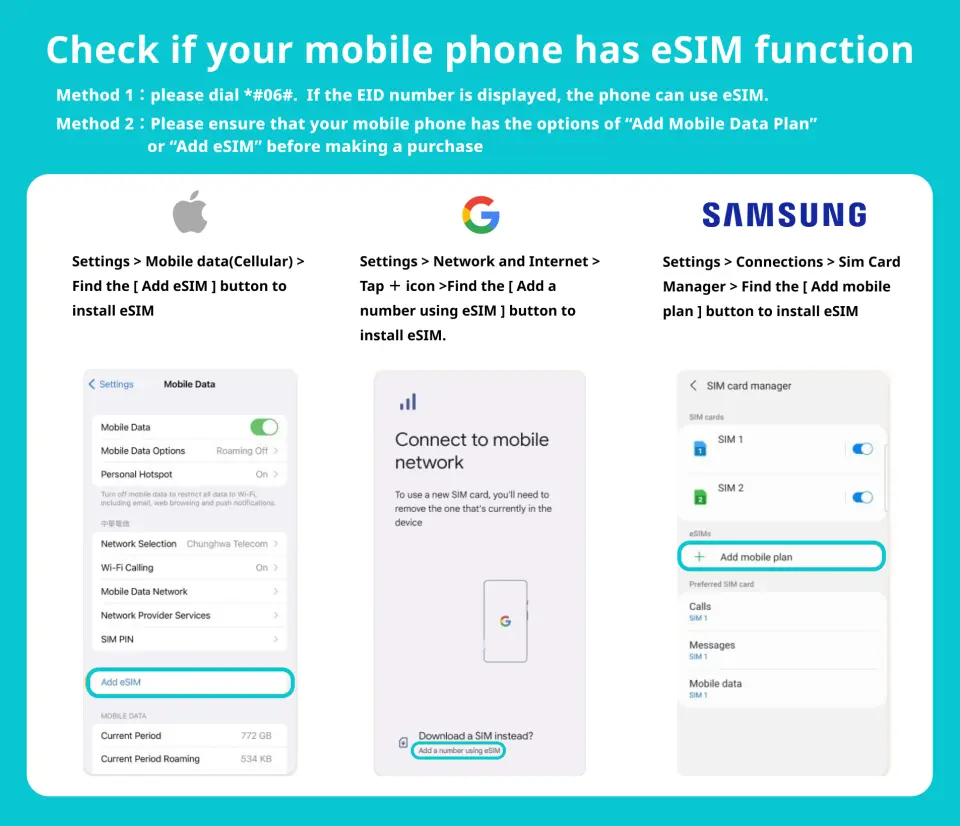

eSIM installation process (ios)


Purchase Notice
- Before ordering, please make sure your phone is not locked and is compatible with local Japanese frequency bands.
- This product is for internet access only and does not include call or SMS functionality.
- This product cannot be upgraded to extend its usage period or add additional data.
- The validity period is calculated in calendar days. The first day is from the time the eSIM is activated until 23:59 on the same day.
- To maintain network quality, telecommunications companies strictly adhere to the Fair Use of Network (FUP) principle. Excessive data usage in a short period may be subject to automatic throttling, potentially resulting in internet access disruptions or slower speeds.
- Internet connectivity varies depending on factors such as the number of users, climate, building obstruction, and location. Furthermore, the quality of telecommunications networks differs from country to country, and each country has its own regional characteristics and telecommunications infrastructure. Therefore, refunds cannot be requested due to signal conditions in a few areas.
- If you are arriving at Kansai International Airport, you can ask the counter staff for assistance with installing an eSIM upon arrival (this service is not available at other Japanese airports).
Reminders
Before inserting this card, please make sure that your mobile phone is not a card lock machine and is compatible with the Japanese local frequency band.
This product cannot be recharged to extend the usage period or add traffic.
Before installing eSIM, please make sure to connect to WiFi or mobile network, scan the QR Code to join the mobile plan
The eSIM QRcode can only be scanned once. If you are prompted to contact your telecommunications provider or otherwise, please shut down your phone and restart it or contact customer service.
Please save this QR Code. Once scanned, it will become invalid and cannot be reissued. Please install it according to the instructions and do not jump out of the screen during the process to avoid misjudgment by the phone and causing the eSIM plan to be deleted.
DOCOMO plans use native local resources from DOCOMO Telecom in Japan. Please configure the APN (Access Point Name) before using the network. APN: m-air.jp
If you arrive at Kansai International Airport, you can ask the counter staff to assist in installing the eSIM after arriving at the airport (this service is not available at other Japanese airports)
In order to maintain network quality, telecommunications companies strictly abide by the Fair Usage Principle (FUP) for network communications. Large amounts of traffic in a short period of time can easily be automatically controlled, which may result in the inability to access the Internet or slower network speeds.
The network will change depending on factors such as the number of users, climate, building shelter, and location. The quality of telecommunications networks in different countries varies. The region and telecommunications construction of each country are different. The requirements cannot be determined due to the signal conditions in a few areas. Refund.
Redemption Location
Kansai International Airport (KIX) T1
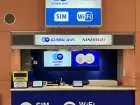
"Global WiFi x NINJA WiFi" Counter - 1st Floor International Arrival Hall
Monday 06:30 - 22:30
Tuesday 06:30 - 22:30
Wednesday 06:30 - 22:30
Thursday 06:30 - 22:30
Friday 06:30 - 22:30
Saturday 06:30 - 22:30
Sunday 06:30 - 22:30
If necessary, Kansai Airport counter staff can assist in installing eSIM (services are provided in Chinese and English)


How to Use
eSIM activation steps
- Settings → Mobile Services
- Join eSIM
- Scan the QR code to join the action plan
- Set as secondary → Click "Continue"
*It is recommended to change the action plan label to the local name (e.g., Japan).
5. Mobile Services → Mobile Data
6. Select the secondary option (e.g., Japan)
→ Disable enabling action data switching
7. Activate this number
8. Complete settings
*Please configure the APN (Access Point Name) before using the DOCOMO solution on the network. APN: m-air.jp
Validity Period
- The voucher must be used on the selected date and within operating hours; Invalid after expiration
Cancellation Policy
- Once the order has been completed, it cannot be canceled, modified, or refunded
- Due to time zone differences, the confirmed cancellation date is based on the supplier’s local time. Please allow 2–5 business days to process your cancellation request, after which the cancellation fee will be charged according to the product’s cancellation policy. Once the cancellation is confirmed, you will receive your refund within 14 working days.
FAQ
The DOCOMO eSIM is compatible with most unlocked smartphones and tablets that support eSIM technology. This typically includes newer models of iPhone (XS, XR, 11 series and later), Google Pixel (3 series and later), Samsung Galaxy (S20 series and later), and other eSIM-enabled devices. It's important to verify your specific device's eSIM compatibility before purchasing to ensure seamless use in Japan.
The DOCOMO eSIM utilizes Japan's native DOCOMO 4G telecommunications lines, ensuring stable and reliable high-speed internet access throughout the country. DOCOMO is known for its extensive coverage, including major cities, rural areas, and popular tourist destinations, offering a consistent connection for navigation, communication, and various online activities.
To purchase a DOCOMO eSIM, you can place an order through an online travel platform like KKday. After completing your purchase, you will receive your eSIM digitally, typically in the form of a QR code via a voucher. This eliminates the need for physical card collection or waiting for postal delivery, allowing for quick and convenient acquisition. KKday simplifies the booking process, providing a hassle-free way to secure your connectivity before your trip.
DOCOMO eSIM data plans provide high-speed 4G internet access either with a daily data allowance or a total data allocation, depending on the specific plan chosen. Once activated, the eSIM connects you to the robust DOCOMO network, enabling seamless browsing, streaming, and app usage. These plans are specifically for internet connectivity and do not typically include local voice calls or SMS services.
Before selecting a DOCOMO eSIM, ensure your mobile device is eSIM-compatible and unlocked. While eSIMs offer great convenience for data, they primarily provide internet access, so you should plan for alternative communication methods if you require local calls or SMS. Additionally, consider your travel duration and data usage needs to choose a plan with an appropriate validity period and data limit.
Installing the DOCOMO eSIM is a simple process. After receiving your digital eSIM via QR code, you typically scan it using your smartphone's camera or enter the activation details manually in your device's cellular or mobile data settings. Once the eSIM profile downloads, it activates automatically, providing instant access to the DOCOMO network upon your arrival in Japan.
The DOCOMO eSIM for Japan primarily provides data services, offering high-speed 4G internet access for your device. It typically does not include traditional voice call or SMS (text message) functionalities. For communication needs, you can easily use internet-based calling and messaging applications like WhatsApp, Line, or FaceTime over the stable data connection provided by your eSIM.
Using a DOCOMO eSIM offers several advantages over a physical SIM card. It eliminates the need to physically swap cards, which is highly convenient and prevents the risk of losing your primary SIM. Installation is instant via a QR code, allowing for quick activation. This digital solution provides flexibility and hassle-free connectivity, making it an efficient choice for staying online during your Japan trip.
Get Help


