

Japan eSIM | KDDI(au) Unlimited Local 5G/4G Data eSIM
- Powered by KDDI (au) for stable and reliable coverage across Japan
- Enjoy 5G/4G unlimited data for smooth access to ChatGPT, video streaming, maps, and social media
- Simply scan your voucher before your trip — fast and hassle-free activation
- Choose between two options: Ultra or Lite plan to match your travel needs
- Utilizes KDDI (au)’s native network for faster and more reliable connectivity than typical roaming eSIMs
Package Options
Product Info
The content of this product is provided by machine translation and may not reflect the actual information, please take this into consideration before booking.
[eSIM Specifications]
- Option 1. KDDI(au) 5G/4G Unthrottled Local Data eSIM Ultra
- Data: Unlimited 5G/4G Local Data (No Throttling)
- Voice & SMS: N/A
- eSIM Setup Guide & FAQ: https://psce.pw/79uszq
- Coverage Area: Japan
- Plan Duration: 3 / 4 / 5 / 6 / 7 / 8 / 9 / 10 / 15 / 20 / 30 days
- Usage Calculation: Calculated based on calendar days, starting from the first connection to the KDDI(au) network in Japan. (e.g., Activation at 10 PM Japan time counts as 1 full day by midnight.)
- eSIM QR code Validity: Must be installed and activated within 30 days of purchase
- Hotspot: Supported with limitations depending on the selected plan.
- 【3、4-day: 3GB / 5-day: 4GB / 6-day: 5GB / 7-day: 6GB / 8-day: 7GB / 9-day: 8GB / 10-day: 9GB / 15-day: 15GB / 20-day: 19GB / 30-day:30GB】
- Option 2. KDDI(au) 5G/4G Unlimited Local Data eSIM Lite
- Data: Unlimited 5G/4G Local Data (Max. data speed 10Mbps)
- Voice & SMS: N/A
- eSIM Setup Guide & FAQ: https://psce.pw/79uszq
- Coverage Area: Japan
- Plan Duration: 3 / 4 / 5 / 6 / 7 / 8 / 9 / 10 days
- Usage Calculation: Calculated based on calendar days, starting from the first connection to the KDDI(au) network in Japan. (e.g., Activation at 10 PM Japan time counts as 1 full day by midnight.)
- eSIM QR code Validity: Must be installed and activated within 30 days of purchase
- Hotspot: Supported with limitations depending on the selected plan.
- [3、4-day: 3GB / 5-day: 4GB / 6-day: 5GB / 7-day: 6GB / 8-day: 7GB / 9-day: 8GB / 10-day: 9GB]
How to confirm whether your phone can use eSIM


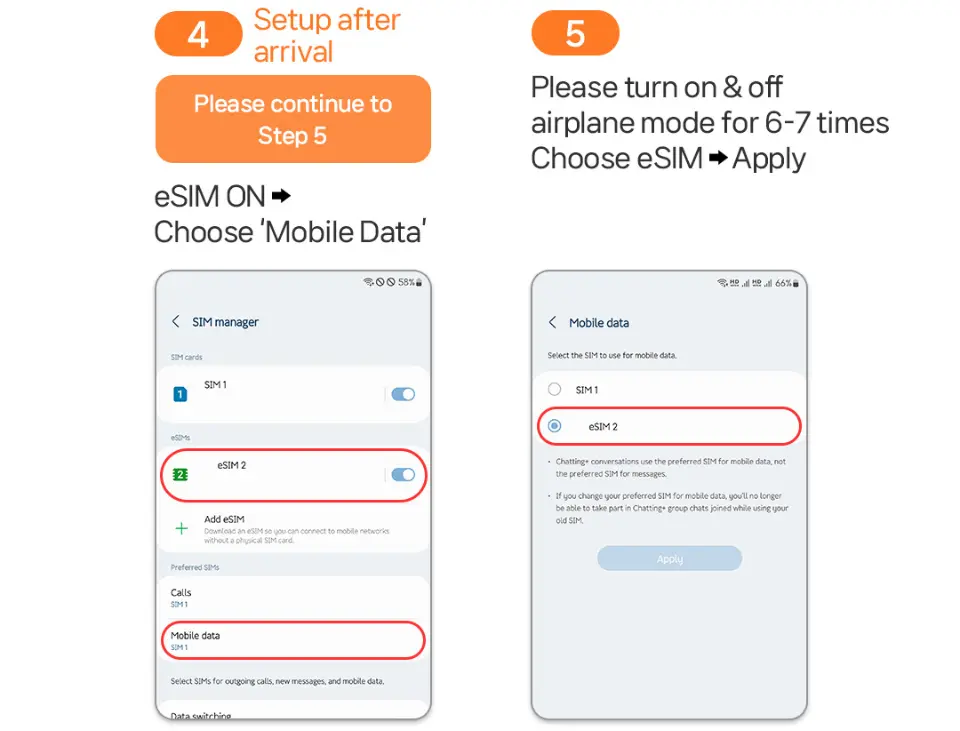
eSIM setup method


.


.


.

SIM Card Specifications
| Data Usage Specifications | Unlimited data |
| Transmission Specifications | 4G |
| Signal Coverage Area | Japan |
| Mobile Carrier | KDDI (au) |
| Supported Sizes | eSIM |
| Hotspot Sharing | Available |
| Supported Frequencies(4G) | B3(1800 MHz) |
| Top-Up Availability | Top-up unavailable |
| Excludes | Voice calls, Texts |
| Not Supported | SIM-locked device, Carrier-customized device, Mobile hotspot |
| Reminders | Before purchasing, you must confirm whether your phone supports the installation of eSIM. If you find that your phone does not support installation after purchase, no refund will be given. |
| Network Type | Local |
Purchase Notice
- Even if it is the same phone model, the versions provided by different countries are different. Please make sure that the phone supports eSIM.
- Once the eSIM QR Code is sent out, it cannot be cancelled, exchanged or refunded.
- The eSIM QR Code needs to be activated and used within the validity period; if it cannot be used after expiration, it will not be cancelled, replaced or refunded.
- After the order is successful, the voucher containing the eSIM QR Code will be sent within 24 hours.
- Please note that the 5G signal may be affected by the location (such as inside a building, on the subway or in a crowded place) and turn into a 4G signal, which is normal.
- When sharing a hotspot, the Internet speed may be affected by your location, so the minimum Internet speed cannot be guaranteed. Please confirm before ordering.
- To maintain network quality, telecommunications companies will impose traffic restrictions on users who use excessive traffic in a short period of time, which may result in network interruption or slower network speed.
- If the phone was purchased from the United States, Canada, Japan or the Philippines, please confirm with the local carrier that the phone has been unlocked (Country Lock).
Includes/Excludes
Reminders
This eSIM only provides local data in Japan, and does not provide all voice call and SMS services.
The days for this product are calculated from the time you connect to the Japanese network, and the days are calculated naturally. (Example: Start at 22:00 Japan time, and one day ends at 24:00 in the morning)
Once the eSIM QR Code is sent out, it cannot be cancelled, exchanged or refunded.
eSIM QR Code must be installed and activated within 30 days of purchase.
If the eSIM is deleted by mistake, there will be no cancellation, replacement or refund. Once the eSIM is deleted, it cannot be restored or scanned again.
Please note that the 5G signal may be affected by the location (such as inside a building, on the subway or in a crowded place) and turn into a 4G signal, which is normal.
Do not save the eSIM QR Code on the phone you are going to use; please print a paper QR Code in advance or save it on another device for easy scanning.
An eSIM can only be used on one mobile phone and the mobile phone where it is installed for the first time. It cannot be changed to another device or registered on the same eSIM on multiple devices.
When activating eSIM, be sure to turn off the roaming function provided by your home country SIM card. (Incorrect operation may result in international roaming charges, which will be borne by the user.)
If you are concerned about incurring unnecessary international roaming charges, please proactively apply to your home country's telecommunications company to turn off international roaming services before traveling abroad.
If the eSIM shows that it cannot be scanned and used, or the product is defective, just contact the customer service center before returning to your country, and a refund will be made after confirmation.
To maintain network quality, telecommunications companies will impose traffic restrictions on users who use excessive traffic in a short period of time, which may result in network interruption or slower network speed.
Mobile network coverage and data speeds may vary depending on the communication environment in the country you are traveling to.
No additional compensation is provided, including roaming charges, overseas USIM purchase fees, transportation costs, etc.
How to Use
- eSIM Setup Guide & FAQ: https://psce.pw/79uszq
- If you see a message such as “Invalid code” or “Unable to activate SIM card” after scanning, go to Settings > Cellular(iOS) or SIM Manager(Android) and check if another SIM profile has appeared.
- You may pre-install the eSIM 1–2 days before departure. Activation starts only when the device detects a local signal at your travel destination.
- If installed before departure, it's normal to see messages like “Activating” or “Activation failed” due to no local signal.
- If the eSIM does not work, DO NOT delete it. Please contact the supplier via KKDAY messages immediately for assistance.
Cancellation Policy
- Once the order has been completed, it cannot be canceled, modified, or refunded
- Due to time zone differences, the confirmed cancellation date is based on the supplier’s local time. Please allow 2–5 business days to process your cancellation request, after which the cancellation fee will be charged according to the product’s cancellation policy. Once the cancellation is confirmed, you will receive your refund within 14 working days.
FAQ
The Japan eSIM (Embedded-SIM) is a digital SIM that allows travelers to access the internet without needing a physical SIM card. Once activated, it connects your compatible device to local networks, like KDDI (au), for stable 5G/4G data. This technology eliminates complicated physical card changes, offering a seamless and convenient way to stay connected for navigation, communication, and entertainment throughout your trip in Japan.
The KDDI(au) Japan eSIM is compatible with most newer smartphone models that support eSIM technology. This typically includes recent iPhone models (XS, XR, 11 series and later), Google Pixel phones (3 series and later), and select Samsung Galaxy devices. It's crucial to confirm your specific device model supports eSIM functionality and is unlocked for international use before purchasing to ensure successful activation.
Activating your KDDI(au) Japan eSIM is designed to be fast and hassle-free. After purchasing, you will receive a digital voucher with a QR code. You simply scan this QR code with your compatible device before or upon arrival in Japan. This straightforward setup bypasses the need for physical SIM card installation, allowing for quick network connection to the local 5G/4G data services.
While highly convenient, potential considerations for a Japan eSIM include ensuring your mobile device is eSIM compatible and unlocked for international use. Older phone models may not support eSIM technology. Also, some users might find managing multiple eSIM profiles on their device takes some adjustment. Confirming these details beforehand ensures a smooth and uninterrupted internet experience.
The Japan eSIM utilizes KDDI (au)'s native network, which is renowned for its stable and reliable coverage throughout Japan. This ensures consistent 5G/4G unlimited data access for travelers, whether in bustling city centers or more remote areas. Leveraging a native network provides superior connection speeds and dependability compared to typical roaming eSIMs, offering a high-quality internet experience.
The KDDI(au) Japan eSIM offers both Ultra and Lite plan options, tailored to different travel needs. While both provide 5G/4G unlimited data, the specific terms often vary regarding the fair usage policy or the amount of high-speed data allocated before potential speed adjustments. Travelers should review the details of each plan carefully to select the one that best suits their expected data consumption for activities like video streaming or extensive social media use.
With the Japan eSIM's unlimited 5G/4G data on the reliable KDDI(au) network, travelers can smoothly perform a wide range of online activities. This includes using navigation applications like Google Maps, high-definition video streaming, connecting with friends and family on social media platforms, making video calls, accessing communication apps such as WhatsApp or LINE, and even utilizing AI tools like ChatGPT without interruptions.
To purchase the KDDI(au) Japan eSIM, you can conveniently book it through KKday. After completing your order, you will receive a digital voucher containing a QR code via email, typically within 12 hours. There's no need to pick up a physical SIM card; you simply scan the QR code to set up your eSIM on your compatible device, ensuring a hassle-free and quick activation before you even depart for Japan.
Get Help


