

[50% Off% off] Philippines 5G eSIM | Unlimited daily high-speed data | Purchase and Use Immediately| Unused data refund
- Use local telecommunications signals to support network services, with stable and guaranteed signals
- Travel around the Philippines, upload beautiful photos quickly, and check in daily
- You can receive the eSIM quickly after placing an order without worrying about shipping issues
- Scan the QR code to enjoy 4G Internet access, no physical card required, convenient and environmentally friendly
- The Philippine Telecom data roaming service of this eSIM is provided by China Mobile International Limited.
Package Options
Product Info
The content of this product is provided by machine translation and may not reflect the actual information, please take this into consideration before booking.
Check if your phone supports eSIM


eSIM compatible models


eSIM Installation Process 1


eSIM Installation Process 2

Important Info
Reminders
The eSIM is valid for 180 days, starting from the first day of ordering. Please use it within the validity period. No refund or extension will be given if the expiration date is exceeded.
Before installing the eSIM, please make sure you are connected to a Wi-Fi or mobile network and scan the QR code to join the mobile plan.
eSIM can be installed in Taiwan first and activated at your destination. If you activate it in Taiwan first and the network is used up early, no refund will be given.
Days are calculated based on the Taiwan time system. After you have arrived at your destination and enabled data roaming and successfully connected to the internet, the day is counted as one day after midnight Taiwan time (GMT+8). This is not a 24-hour system.
A QR code can only be scanned once with one mobile phone. Once bound, it cannot be changed. If you are prompted to contact your carrier or other prompts, please turn your phone off and back on or contact customer service.
Please save this QR Code. Once scanned, it will become invalid and cannot be reissued. Please follow the installation instructions and do not exit the screen during the installation process to avoid the phone misjudging and causing the eSIM plan to be deleted or incorrect.
Hotspot sharing will occupy bandwidth, and the network speed will vary depending on the terminal device and location, so the minimum network speed is not guaranteed. Please confirm before placing an order
The quality of telecommunications networks varies from country to country, and the base station construction is not as dense as in Taiwan. Each country has different geographical locations and telecommunications construction. We cannot request a refund due to signal conditions in a few areas.
The actual signal and connection speed of this card may vary due to factors such as location, terrain, climate, building obstruction, number of users, network system, and terminal devices. If the local area or mobile phone does not support 4G network, it will automatically switch to 3G signal.
In addition, no returns or exchanges will be accepted due to force majeure events such as earthquakes and typhoons that cause network instability, disconnection or unavailability.
It is not recommended to transfer large amounts of files (upload/download), watch videos, live broadcasts, play mobile games, etc.; it is also recommended to turn off the automatic update and backup functions, the automatic play function of social software, the satellite map navigation mode (normal navigation mode can be used), and the cloud hard drive data transfer function.
In accordance with the principle of fair internet usage, telecommunications companies may, at their discretion, restrict the data usage of users who use large amounts of data in a short period of time. Please avoid watching online videos for extended periods of time or using large amounts of data in a short period of time.
How to Use
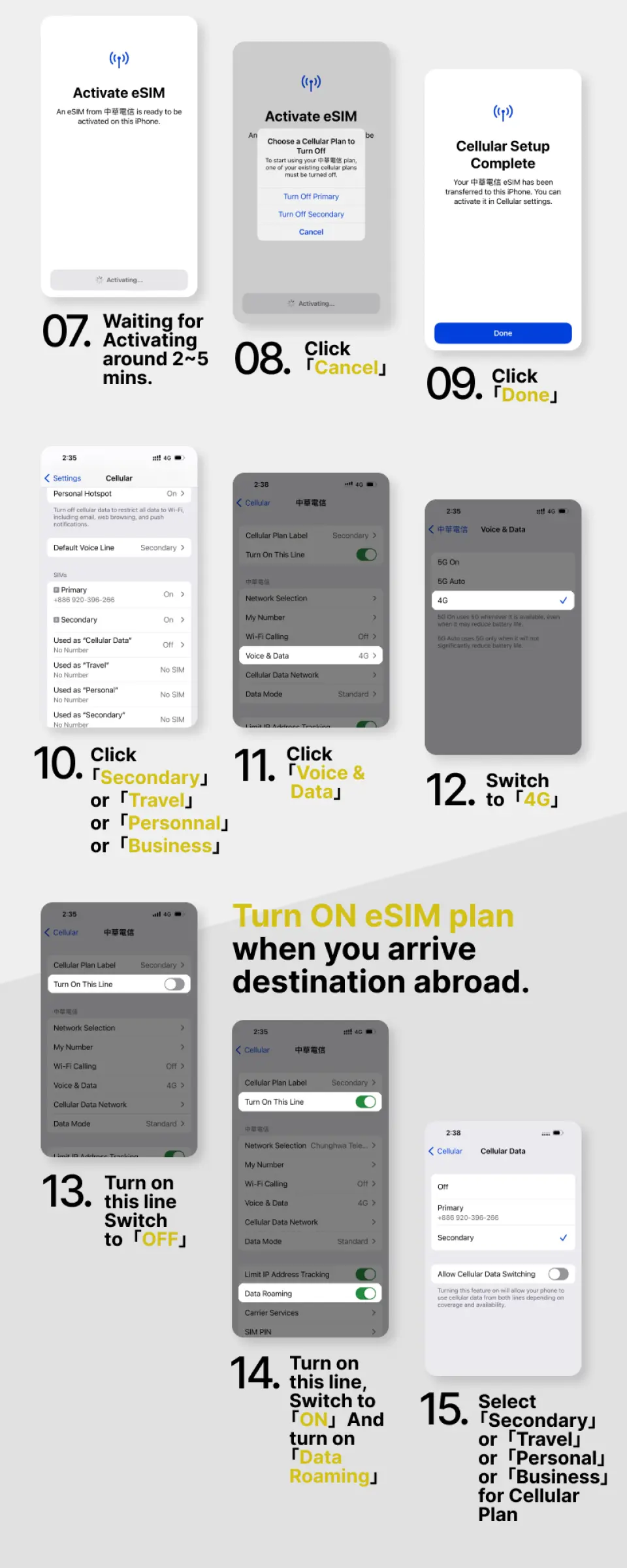
eSIM activation steps
- Settings → Mobile Services
- Add eSIM
- Scan the QR code to join the action plan
- Set as secondary → Click ''Continue''
*Suggest changing the action plan label to the local name
5. Mobile Services → Mobile Data
6. Select Secondary (e.g. Canada)
→ Turn off the Allow mobile data switch
7. Open this number
→Start roaming
8. Complete the setup
FAQ
Yes, the Philippines 5G eSIM is designed for quick acquisition and activation. After purchase, you typically receive a QR code almost instantly via email. Scanning this code on a compatible device allows for immediate setup and connection to the internet, eliminating waiting times and enabling you to use data as soon as you arrive.
This Philippines 5G eSIM offers unlimited daily high-speed data, ensuring you stay connected without worrying about data limits. It utilizes strong local telecommunication signals for stable service, supports 5G connectivity for fast uploads, and allows for instant activation via a QR code. There is no physical card required, which adds to convenience and eliminates the risk of loss.
The Philippines 5G eSIM primarily utilizes the Globe network, which is known for its extensive coverage across the country. This ensures stable and guaranteed signals in major cities like Manila and Cebu, popular tourist destinations, and many islands, allowing for reliable internet access throughout your travels.
Users can expect high-speed data connectivity, including 5G where available, ensuring quick uploads, smooth streaming, and efficient browsing. The eSIM is designed for stable and guaranteed signals through strong local telecommunications networks, providing reliable internet access for daily activities and seamless sharing of travel experiences.
Yes, the Philippines 5G eSIM offers unlimited daily high-speed data. While it provides generous data, users should be aware that excessive usage beyond a certain daily threshold might lead to a temporary reduction in speed, often referred to as a Fair Usage Policy, implemented to ensure equitable network quality for all users.
Using a Philippines 5G eSIM offers greater convenience and can be more cost-effective compared to traditional international roaming. You can avoid high roaming charges, activate service immediately upon arrival without changing your primary SIM, and easily manage your data plan through your device settings, preventing unexpected fees.
The Philippines 5G eSIM offers a hassle-free digital alternative to physical SIM cards. It eliminates the need for physical swapping, supports multiple mobile plans on one device, and can be activated instantly via a QR code. This avoids the risk of losing your primary SIM card and offers a more environmentally friendly solution.
You can easily acquire the Philippines 5G eSIM through KKday's user-friendly platform, which provides a seamless purchasing experience. After booking, you will receive an instant QR code via email. To activate, simply scan the QR code on your eSIM-compatible smartphone to install the profile, and then enable it in your phone's settings to start using the data service immediately upon arrival.
Get Help


