

【50% OFF】Malaysian Internet Card | Maxis Malaysia Total 1GB/2GB/3GB/5GB/10GB/20GB eSIM
- No need to change cards, enjoy 4G Internet access quickly and neatly, no need to rush around
- Once you receive the eSIM QRcode, you can scan, install and use it. There is no need to run back and forth to pick up the physical card or wait for physical delivery.
- Environmentally friendly, no consumables, free shipping, zero risk of loss
- Supports Apple and multiple Android phones * Samsung phones purchased in different countries have different versions, so you must first confirm whether they support eSIM before purchasing (Samsung phones purchased in Taiwan do not support the eSIM function)
Package Options
Product Info
The content of this product is provided by machine translation and may not reflect the actual information, please take this into consideration before booking.
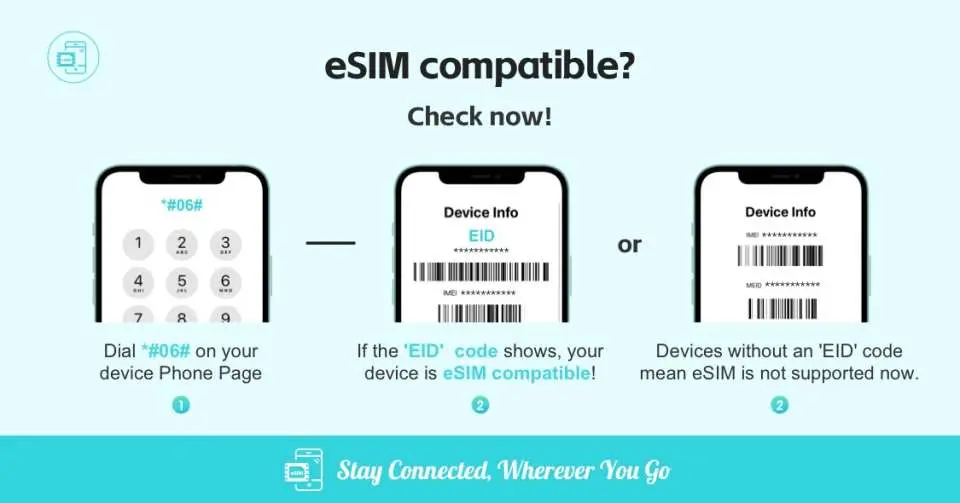
Please confirm that your phone supports eSIM before purchasing

eSIM applicable models


eSIM installation process


Query traffic usage


SIM Card Specifications
| Data Usage Specifications | 1GB, 2GB, 3GB, 5GB, 10GB, 20GB |
| Transmission Specifications | 4G |
| Signal Coverage Area | Malaysia |
| Mobile Carrier | Maxis |
| Supported Sizes | eSIM |
| Hotspot Sharing | Available |
| Supported Frequencies(4G) | B1(2100 MHz) |
| Top-Up Availability | Top-up unavailable |
| Excludes | Voice calls, Texts |
| Not Supported | SIM-locked device, Carrier-customized device |
| Network Type | Roaming |
| Mobile Virtual Network Operator (MVNO) | 澳門電訊 CTM |
Purchase Notice
- Before purchasing, please make sure that your mobile phone and its operating system support the eSIM function and are not SIM card locked. If the order is canceled due to device incompatibility, no refunds will be issued.
- iOS requires version 12.1 or higher; please note that iPhones sold in mainland China do not support eSIM. In Hong Kong and Macau, only iPhone 13 mini, iPhone 12 mini, iPhone SE 2020 and iPhone XS have eSIM functionality. (Please go to Apple’s official website to check)
- The versions of Samsung mobile phones vary from country to country. Samsung mobile phones purchased in Taiwan do not support eSIM. For other regions, please check with Samsung’s official website first.
- Each QR code can only be scanned and installed once. After binding, the device cannot be changed or deleted. Once deleted, it cannot be rescanned and installed and needs to be purchased again.
- The eSIM and usage guide will be sent to your email address by the supplier after ordering. If you do not receive the email, please check your spam folder or contact customer service.
- The eSIM needs to be installed and activated at the destination within 90 days after ordering, otherwise the eSIM will become invalid and unused data within the period will not be refunded.
- Provide customer service in Chinese, English and Cantonese
Reminders
3GB/5GB/10GB/20GB 4G high-speed Internet access is the total traffic, and the total traffic will become invalid after it is used up (Note: If the traffic has been used up but the time limit has not expired, the Internet traffic still cannot be used)
The eSIM and usage guide will be sent to your email address by the supplier after ordering. If you do not receive the email, please check your spam folder or contact customer service
Installing eSIM requires an Internet connection. Please confirm that there is available WiFi or available mobile data in the environment before installation.
The eSIM must be installed and activated at the destination within 90 days after ordering, otherwise the eSIM will become invalid and unused data within the period will not be refunded.
Please install the eSIM after arriving at your destination to avoid activating it in advance to calculate the validity period.
Please select this eSIM as your primary data plan and make sure roaming is turned on
Each QR code can only be scanned once. After binding, the device cannot be changed or deleted. Once deleted, it cannot be rescanned and installed.
To end the use of the eSIM plan that can be used on the phone, click [Remove Action Plan] at the bottom to remove it.
Please note that the signal may affect the quality of the Internet depending on factors such as location, terrain, building coverage, number of users, weather, etc.
How to Use
*This product provides customer service in Chinese, English and Cantonese
*The eSIM and usage guide will be sent to your email address by the supplier after ordering. If you do not receive the email, please check your spam folder or contact customer service.
- installation steps:
Method 1: Scan QR Code
Method 2: Manually add SM-DP_Address and Activation Code
- Enable activation steps:
1. After arriving at the destination, turn off other SIM cards and turn on only this eSIM and its data roaming
- Other notes:
- Installing eSIM requires an Internet connection. Please confirm that there is available WiFi or available mobile data in the environment before installation.
- Please do not use your camera or other APP to scan the QR code, it must be done through your phone's settings
- Each QR Code can only be scanned and installed once. After binding, the device cannot be changed or deleted. Once deleted, it cannot be rescanned and installed and needs to be purchased again.
- If you need to check whether your phone supports the eSIM function, please dial "*#06#". Usually, if EID is displayed, it means it supports eSIM. (Depending on the OS system or manufacturer, it may not be usable even with an EID.)
- Enter the ICCID card number to check the traffic flow , which is clear at a glance and has no worries when surfing the Internet.
- If you encounter any problems, please contact customer service immediately
Cancellation Policy
- Once the order has been completed, it cannot be canceled, modified, or refunded
- Due to time zone differences, the confirmed cancellation date is based on the supplier’s local time. Please allow 2–5 business days to process your cancellation request, after which the cancellation fee will be charged according to the product’s cancellation policy. Once the cancellation is confirmed, you will receive your refund within 14 working days.
FAQ
The Maxis Malaysia eSIM offers a convenient and efficient way for tourists to stay connected. It provides 4G internet access without the need for a physical SIM card, allowing immediate online access upon scanning a QR code. This means no hassle with finding local stores or changing cards, making it ideal for travelers seeking seamless connectivity throughout their trip.
Foreigners can easily purchase a Maxis Malaysia eSIM through KKday. KKday offers a straightforward online booking process, providing the convenience of receiving your eSIM QR code via email. This allows for immediate setup upon arrival or even before your trip, ensuring you have internet access without needing to visit local stores or deal with physical card registration.
Yes, the Maxis Malaysia eSIM is designed specifically for data-only internet access. It provides mobile data connectivity, allowing you to use apps, browse the web, and stay in touch through messaging services. It does not typically include a local phone number for calls or SMS, focusing purely on internet access for your travels.
Setting up your Maxis Malaysia eSIM is straightforward. After purchasing, you will receive a QR code via email. Simply scan this QR code with your compatible smartphone. Follow the on-screen prompts to add the eSIM to your device's cellular settings. Once activated, you will have immediate 4G internet access, eliminating any physical installation steps and allowing you to connect quickly.
To use the Maxis Malaysia eSIM, your smartphone must support eSIM functionality. Most Apple iPhones (XR and later models) and a range of Android phones from brands like Samsung (excluding some models sold in Taiwan) and Google Pixel are compatible. It is crucial to confirm your specific phone model's eSIM support before purchasing to ensure seamless usage.
The Maxis Malaysia eSIM is an embedded digital SIM profile, meaning there's no physical card to insert or swap. You simply activate it by scanning a QR code, which downloads the network profile directly to your device. This process saves time and prevents the hassle of carrying multiple physical SIM cards or dealing with potential loss while traveling.
The Maxis Malaysia eSIM product typically offers various data packages with specific GB limits, such as 1GB, 2GB, 3GB, 5GB, 10GB, or 20GB. While these plans provide ample data for most travel needs, true unlimited data options may vary. It's recommended to choose a package that best suits your anticipated data usage during your trip.
With the Maxis Malaysia eSIM, you can expect to enjoy 4G high-speed internet access. This allows for smooth browsing, reliable navigation, streaming, and video calls in areas with good network coverage. Performance may vary based on your specific location within Malaysia, network congestion, and the capabilities of your device.
Get Help


