

Taiwan Network Card|Daily High Speed 1GB/3GB Unlimited Total eSIM
- A new choice for Internet access, no need to change cards, enjoy 4G Internet access quickly and neatly, no need to rush around
- Once you receive the voucher, you can scan it and install it. You don’t have to run back and forth to get the physical card or wait for physical delivery.
- Environmentally friendly, no consumables, free shipping, zero risk of loss
Package Options
Product Info
The content of this product is provided by machine translation and may not reflect the actual information, please take this into consideration before booking.
This product requires real-name registration on the supplier's website before it can be used. (Real-name information will be sent to PCCW Hong Kong Limited pccw)
- Introduction to eSIM
eSIM (Embedded-SIM), also known as "embedded SIM card" or "virtual SIM card". Unlike traditional network cards, which are removable and need to be inserted into the card slot of the mobile device to use them, eSIM adopts a "virtual" form. Users only need to scan the exclusive QR Code to set up, and the card can be directly implanted into the mobile phone. , you can download the traffic plan to your phone without inserting another physical card. Book now on KKday to add another layer of fun to your trip!
- Things to know before buying
- Please make sure your mobile phone and its operating system support the eSIM function before purchasing. No refunds will be issued if the order is canceled due to device incompatibility.
- iOS requires version 12.1 or higher; please note that iPhones sold in mainland China do not support eSIM. In Hong Kong and Macau, only iPhone 13 mini, iPhone 12 mini, iPhone SE 2020 and iPhone XS have eSIM functionality. (Please go to Apple’s official website to check)
- The versions of Samsung mobile phones vary from country to country. Samsung mobile phones purchased in Taiwan do not support eSIM. For other regions, please check with Samsung’s official website first.
- Each QR code can only be scanned and installed once. After binding, the device cannot be changed or deleted. Once deleted, it cannot be rescanned and installed and needs to be purchased again.
- The customer service hours for this product are 9:30~18:00 (GMT+8), please be informed.
Please confirm that your device supports eSIM before purchasing.


Applicable models


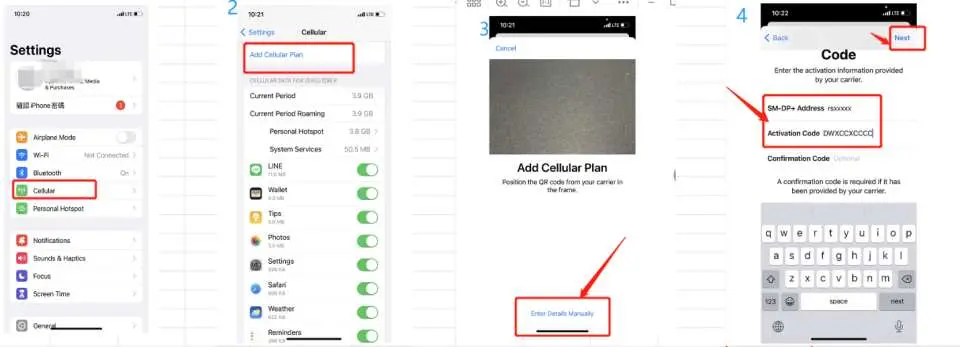
eSIM installation instructions (ios)


Method Two

eSIM installation instructions (android)


SIM Card Specifications
| Data Usage Specifications | 1GB, 3GB |
| Transmission Specifications | 4G |
| Signal Coverage Area | Taiwan |
| Mobile Carrier | Chunghwa |
| Supported Sizes | eSIM |
| Hotspot Sharing | Unavailable |
| Supported Frequencies(4G) | B1(2100 MHz) |
| Top-Up Availability | Top-up unavailable |
| Excludes | Voice calls, Texts |
| Not Supported | SIM-locked device, Carrier-customized device, Mobile hotspot, Modified phones, 3G mobile phones, translators, mobile phones without eSIM function |
| Network Type | Roaming |
| Mobile Virtual Network Operator (MVNO) | CMI |
Purchase Notice
- Please make sure your mobile phone and its operating system support the eSIM function before purchasing. No refunds will be issued if the order is canceled due to device incompatibility.
- iOS requires version 12.1 or higher; please note that iPhones sold in mainland China do not support eSIM. In Hong Kong and Macau, only iPhone 13 mini, iPhone 12 mini, iPhone SE 2020 and iPhone XS have eSIM functionality. (Please go to Apple’s official website to check)
- The versions of Samsung mobile phones vary from country to country. Samsung mobile phones purchased in Taiwan do not support eSIM. For other regions, please check with Samsung’s official website first.
- Each QR code can only be scanned and installed once. After binding, the device cannot be changed or deleted. Once deleted, it cannot be rescanned and installed and needs to be purchased again.
- The customer service hours for this product are 9:30~18:00 (GMT+8), please be informed.
- This product requires real-name registration before it can be used. (Real-name information will be sent to PCCW Hong Kong Limited) If you have any doubts about real-name registration, please refer to the physical SIM card products provided at Taiwan airports.
Reminders
Please make sure that your mobile phone and its operating system support the eSIM function before purchasing. No refunds will be issued if the order is canceled due to incompatibility of the device.
iOS requires version 12.1 or higher; please note that iPhones sold in mainland China do not support eSIM. In Hong Kong and Macau, only iPhone 13 mini, iPhone 12 mini, iPhone SE 2020 and iPhone XS have eSIM functionality.
Each QR code can only be scanned once. After binding, the device cannot be changed or deleted. Once deleted, it cannot be rescanned and installed.
Installing eSIM requires an Internet connection. Please confirm that there is available WiFi or available mobile data in the environment before installation.
It must be installed and activated at the destination within 90 days of ordering, otherwise the eSIM will become invalid and cannot be used.
Please remember to turn off data roaming on the original SIM card to avoid using the mobile network of the original SIM card and incurring high roaming charges.
To end using the eSIM plan available on your phone, click [Remove Action Plan] at the bottom to remove it.
Please be aware that the signal may affect the quality of the Internet depending on factors such as location, terrain, building coverage, number of users, weather, etc.
The customer service hours for this product are 9:30~18:00 (GMT+8), please be informed.
This product requires real-name registration before it can be used. (Real-name information will be sent to PCCW Hong Kong Limited) http://simreg.south.com.hk
How to Use
- ios
1) Select the "Settings" page and select "Mobile Network" 2) Click "Add Mobile Network" 3) When the scanning box appears, scan the QRcode 4) After the download is completed, make some basic settings to start using it - Android
1) On the "Settings" page, select "Network and Internet" 2) Select "Mobile Network" 3) Select "Do you want to download the SIM card instead?" 4) When the scanning screen appears, scan the QRcode - If the APN does not load automatically, please set the APN manually.
APN: mobile - The customer service hours for this product are 9:30~18:00 (GMT+8), please be informed.
- common problem
- How to check ICCID?
If the mobile network is turned on, you can check the ICCID in "Settings - About This Mac - ESIM". - I have successfully activated the eSIM service, but the applicable device cannot connect to the Internet. What should I do?
Please shut down and restart your device and update the iOS version before trying again. - The problem of eSIM not being able to share hotspots. If the eSIM can be used normally but cannot share hotspots, please refer to the following guidelines to try to see if it can be restored:
1) Whether the mobile phone is a contract phone or a card lock machine
2) Whether the VPN has been turned off
3) Whether data roaming is turned on
4) Whether to set eSIM as the main phone number
5) Whether the phone is updated to the latest iOS version (iOS13.6)
6) Please use a physical card to access the Internet, turn on the hotspot sharing function on your phone (make sure the hotspot is available), then do not turn off the hotspot, and then switch your phone to eSIM to access the Internet. Please try several times and turn on and off the machine.
7) If the above problems have been eliminated, please contact customer service
Cancellation Policy
- Once the order has been completed, it cannot be canceled, modified, or refunded
- Due to time zone differences, the confirmed cancellation date is based on the supplier’s local time. Please allow 2–5 business days to process your cancellation request, after which the cancellation fee will be charged according to the product’s cancellation policy. Once the cancellation is confirmed, you will receive your refund within 14 working days.
FAQ
Yes, a Taiwan eSIM is highly suitable for international tourists. It provides immediate internet access upon arrival without needing to find a local store or physically swap SIM cards. This eliminates the hassle of changing cards and the risk of losing your primary SIM. Tourists can enjoy seamless 4G high-speed connectivity for navigation, communication, and sharing travel experiences throughout their journey.
You can easily purchase a Taiwan eSIM online through KKday. The process is straightforward: simply select your desired data plan (e.g., daily 1GB/3GB options), complete the purchase, and you will receive a QR code via email immediately. Scanning this QR code allows for quick setup and activation, offering the convenience of instant connectivity upon arrival without any physical redemption or delivery waits, streamlining your travel preparations.
The Taiwan eSIM offers daily high-speed data limits, such as 1GB or 3GB per day. Once you reach this daily limit, your data speed will be temporarily reduced to a lower speed. However, you can continue to use data at this throttled speed until the start of the next day, when your high-speed quota resets. This ensures continuous connectivity throughout your trip, even after exceeding the daily high-speed allowance.
The main advantages of using a Taiwan eSIM include exceptional convenience, as there is no need to physically change SIM cards or wait for delivery. Activation is quick via QR code scan, getting you online faster. It also prevents the risk of losing your home SIM card. You can maintain your original phone number for calls and texts while using the eSIM for data, making it a seamless and environmentally friendly option.
One common limitation is device compatibility; not all older smartphone models support eSIM technology. Additionally, transferring an eSIM to a new device can sometimes be a more involved process than simply swapping a physical SIM. Some users may also find it a limitation if they need a local Taiwanese phone number for calls and texts, as many data-only eSIMs do not include this feature.
A Taiwan eSIM offers excellent value for travelers primarily seeking data connectivity, especially considering its unparalleled convenience. While traditional physical SIMs might offer call/text options, eSIMs eliminate physical card hassle, shipping fees, and collection waits. Its ease of setup and immediate activation provides significant value in time and effort saved, making it a cost-effective choice for data-focused travel needs.
After purchasing your Taiwan eSIM online, you will instantly receive a QR code in your email or voucher. To activate, simply access your phone's settings, navigate to the cellular or mobile data section, and choose "Add eSIM" or "Add Data Plan." You will then scan the provided QR code. Follow the on-screen prompts to complete the installation, and your eSIM will be ready for use, typically within minutes of setup.
Get Help


