

[ Up to 20% off ] Korea eSIM Card|SK Telecom 5G Network|Daily Data / Unlimited Data eSIM
- The data roaming service of SKT Telecom in South Korea for this eSIM is provided by CMHK China Mobile Hong Kong
- KKday Korean eSIM card, 3C expert Tim personally tested the 5G network speed, and the eSIM card is the designated card for traveling abroad!
- KKday Korean eSIM card, supports iOS and various Android phones (not Samsung phones)
- KKday Korean eSIM card supports iOS one-click installation: Update to the latest iOS App version and iOS 17.4 or above, you can install the eSIM in one click on the KKday App
Package Options
Product Info
The content of this product is provided by machine translation and may not reflect the actual information, please take this into consideration before booking.
- eSIM installation precautions -
- When installing the eSIM, interrupting or exiting the installation program will cause the eSIM installation to fail and the eSIM cannot be reissued.
- To install the eSIM, you must be connected to a stable network (WiFi or mobile network). It is recommended to complete the installation before boarding the plane and turn on the phone when you arrive at your destination to get the best user experience.
eSIM self-detection (please confirm whether your phone supports eSIM before purchasing)


eSIM compatible models
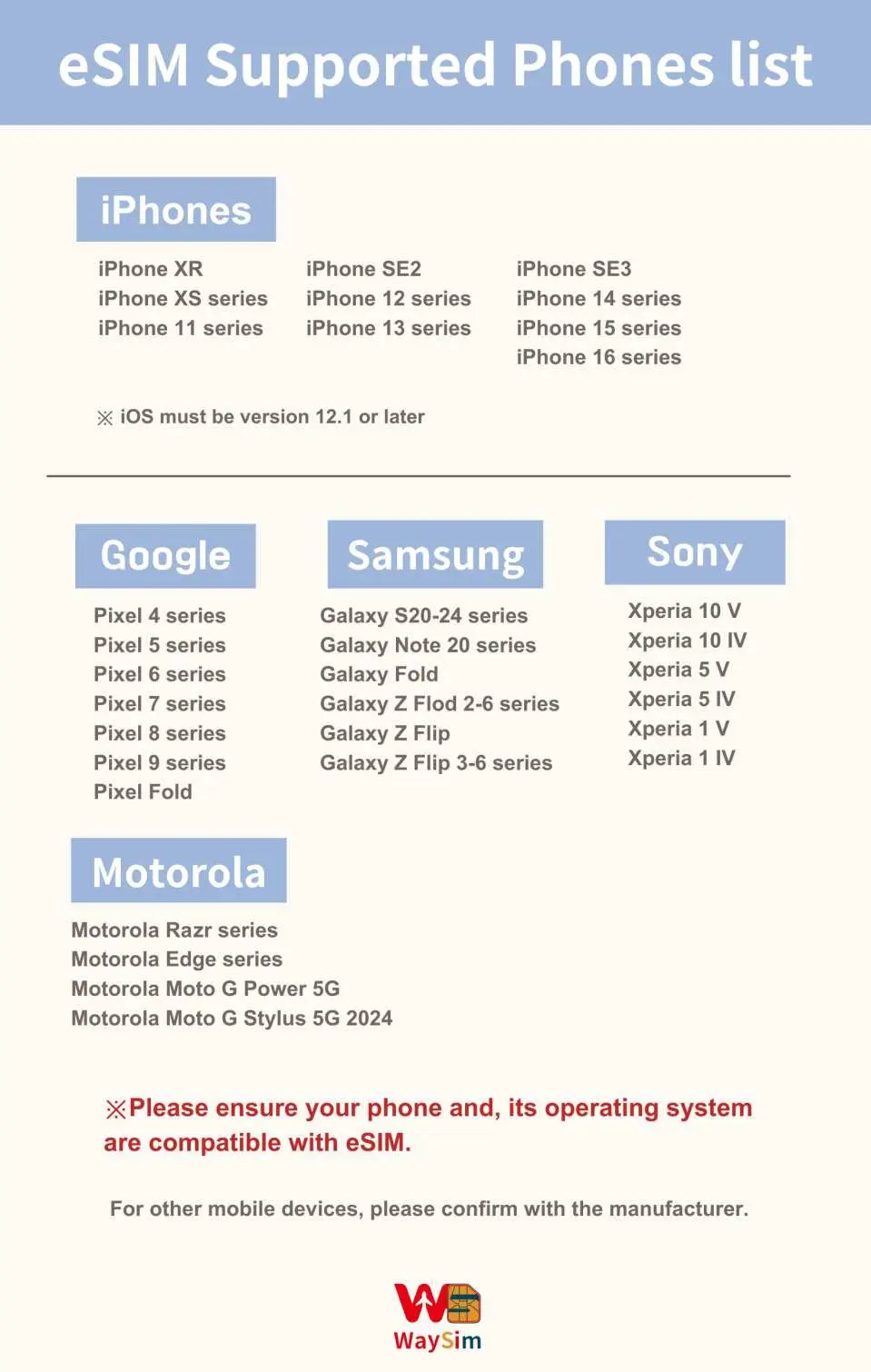

《3C expert Tim recommends》
iOS eSIM installation steps reference


Android eSIM installation steps reference


Purchase Notice
- Please activate the eSIM within 30 days of receiving it.
- The eSIM QR code can only be scanned once. If you are prompted to contact your carrier or other prompts appear, please turn your phone off and back on or contact technical support.
- Days calculation method: After arriving at the tourist country and turning on the eSIM, the first day is 23:59 on the day of your trip. The card will expire at 12:00 in the evening of the selected day (time calculation is based on Taiwan time)
- Please turn off the eSIM number after scanning and binding at the Taiwan airport on the day of departure, and then turn on the eSIM number and eSIM roaming after landing, otherwise there will be a time difference, and the time calculation is based on Taiwan time. Please set up the eSIM again on the day of departure. If the eSIM QR code expires due to early scanning, it is a personal factor and cannot be reissued or refunded.
- Before installing the eSIM, please make sure you are connected to WiFi or mobile network, then scan the QR code to join the mobile plan.
- Please save this QR Code. Once scanned, it will become invalid and cannot be reissued. Please follow the instructions to install it. Do not exit the screen during the process to avoid the phone misjudging and causing the eSIM plan to be deleted.
- Telecommunications companies adhere to the Fair Use Principles (FUP) to maintain network quality. Large amounts of traffic in a short period of time are easily automatically regulated, which may result in inability to access the Internet or slow network speeds. If your speed is reduced due to the Fair Use Principles (FUP), please contact technical customer service.
- The network will change with factors such as the number of users, climate, building shadows, and location. If the reception is unstable, please be sure to contact technical customer service.
- The quality of telecommunications networks in different countries varies. The base station construction is not as dense as that in Taiwan. The regionality and telecommunications construction of each country are different. We are sorry that we cannot request a refund due to the signal conditions in a few areas.
Includes/Excludes
Reminders
For any questions regarding eSIM operation and use, please contact the supplier's technical customer service (please refer to the order notes for contact information) and provide the KKday order number to obtain quick assistance from a dedicated person.
How to Use
eSIM activation steps
- Settings → Mobile Services
- Add eSIM
- Scan the ''QR code'' to join the action plan
- Set as secondary → press ''Continue''
*It is recommended to change the action plan label to the local name (eg: Korea)
5. Mobile Services → Mobile Data
6. Select Secondary (eg. Korea)
→ Turn off the Allow mobile data switch
7. Open this number
→ Turn on roaming
8. Complete the setup
Cancellation Policy
- Once the order has been completed, it cannot be canceled, modified, or refunded
- Due to time zone differences, the confirmed cancellation date is based on the supplier’s local time. Please allow 2–5 business days to process your cancellation request, after which the cancellation fee will be charged according to the product’s cancellation policy. Once the cancellation is confirmed, you will receive your refund within 14 working days.
FAQ
This Korean eSIM card offers flexible data plans ranging from 1 to 30 days, operating on SK Telecom's 5G network in South Korea through CMHK China Mobile Hong Kong. It's designed for high-speed internet access, ensuring reliable connectivity for navigation, communication, and social media sharing throughout your trip.
Yes, Korean eSIM cards are readily available for tourists and can be conveniently purchased and managed online. You can acquire your eSIM through KKday, which facilitates a smooth and quick activation process, allowing you to connect to the network efficiently upon your arrival in South Korea without needing a physical SIM card.
Generally, most data-focused Korean eSIM cards do not come with a local Korean phone number. Their primary function is to provide mobile data for internet access. For communication needs, travelers typically use internet-based messaging and calling applications like WhatsApp or KakaoTalk, which rely on the eSIM's data connection.
Using a Korean eSIM card is often a more economical choice compared to incurring international roaming charges. Roaming fees from home providers can be quite high and unpredictable, whereas an eSIM allows you to select a specific, pre-paid data plan for your travel duration, offering clear and generally lower costs for mobile data services.
While a Korean eSIM primarily provides data connectivity, you can easily use it for making calls and sending texts through various internet-based applications. Popular options include WhatsApp, Line, and KakaoTalk, which utilize your eSIM's data connection for voice and text communication, allowing you to stay in touch without extra charges.
A Korean eSIM offers several advantages over pocket WiFi, including eliminating the need to carry, charge, or return a separate device. It provides a more personal and secure connection as it's directly integrated into your phone, reducing shared network risks, and allows for immediate activation, offering seamless connectivity right after landing.
This Korean eSIM card supports various Android phones (excluding Samsung devices) and most iOS devices. For Apple users, if your device is updated to iOS 17.4 or above, you can enjoy a convenient one-click installation through the latest app version, making the setup process notably straightforward and quick.
The Korean eSIM card utilizes the SK Telecom 5G network in South Korea, with the data roaming service provided by CMHK China Mobile Hong Kong. This ensures access to a high-speed and reliable 5G network, which has been personally tested by a 3C expert, confirming its excellent performance for travelers.
Get Help


