


Purchase and Use Immediately |7-ELEVEN digital product vouchers|Universal in Uni-President Group
- Electronic tickets Purchase and Use Immediately, and you can also accumulate KKday Points!
- The chain has many branches across Taiwan, with many locations to choose from and can be redeemed across branches
- 7-ELEVEN digital product vouchers will be invalid after being returned to the OPENPOINT APP and can be used in multiple times
- Discount up to $900! For limited-time offers on accommodation and high-speed rail tickets throughout Taiwan, please visit the High-Speed Rail Holiday Event website and book now!
Package Options
Product Info
The content of this product is provided by machine translation and may not reflect the actual information, please take this into consideration before booking.
- Brand Introduction -
Uni-President Enterprises Corporation is a leading food company and a retail giant in Taiwan. Its brands include Uni-President Convenience Stores, Uni-President Lifestyle Services, Uni-President Resorts, Uni-President Donuts, Cosmed Pharmacy, 21st Century Flavor Shop, Kaohsiung Dream Mall, Yueqing DUSKIN, Uni-President Department Store, Cool Stone Ice Cream, Saint Nadoburg Bakery, Saint Deco, BEING Spa, Uni-President Fitness Club, and Supermax Gas Center. Uni-President aims to provide consumers with more diverse and faster products and services, enriching their lives and enabling families to enjoy a higher quality of life.
- User Manual -
To use this voucher, you must first download the OPENPOINT APP and complete the registration (OPENPOINT is only valid in Taiwan and only supports registration with a "Taiwan region" mobile phone number) before you can add the 7-ELEVEN digital merchandise voucher to the OPENPOINT APP and open the OPENPOINT APP to make purchases.
Serial number input page: https://systexticket.azurewebsites.net/
OPENPOINT APP Home Visit Process
STEP 1: Select Order > Confirm Order Details and View "Voucher" > Click the URL provided in the pre-order reminder > Copy the ticket serial number (the 16-digit code below the 1D barcode) to the serial number input page: https://systexticket.azurewebsites.net/ . (The 1D barcode on this page cannot be used in physical stores.)
STEP 2: Enter the ticket serial number and the email address to receive the verification code, then click "Open Point App". (Once clicked, the order cannot be cancelled.)
STEP 3: Connect to the OPENPOINT APP, enter the received verification code to complete the digital gift certificate transfer.
STEP 4: Open the OPENPOINT APP > Services (button below) > Popular Services > Digital Vouchers. Activate the digital voucher you have registered and present the barcode at the designated store.
- We recommend copying the serial number and entering it into the page URL: https://systexticket.azurewebsites.net/ . Then, open a new web browser, paste the URL, and access the page.
- If you fail to revert to your account after multiple attempts or encounter any problems during the redemption process, please contact the Jingcheng Information Customer Service Hotline at (02) 8798-6963.
- The account closure service undergoes routine system maintenance from 23:30 daily to 00:30 the following day. During this period, account closure or related services will be suspended. To avoid affecting your rights, please avoid using the service during the above-mentioned time period.
- Please copy the 16-digit electronic ticket serial number first, then use it on the serial number input page.
- To use this voucher, you must first download the OPENPOINT APP and complete the registration process before you can add the digital gift voucher to your OPENPOINT APP account and use it for purchases.
Serial number input page: https://systexticket.azurewebsites.net/ - Enter or paste the voucher number on the serial number input page, and select "Assign to OPENPOINT APP". A verification code will be provided. Copy the verification code and press the "Go to Assignment" button. This will automatically redirect you to the OPENPOINT APP. Paste the verification code into the OPENPOINT APP and click "Confirm" to complete the assignment of the digital gift voucher. You can check the assigned digital gift voucher in the OPENPOINT APP → bottom button (Services) → Popular Services → Digital Gift Vouchers.
- 7-ELEVEN digital gift certificates can be redeemed for goods or services of equivalent value at the following retailers: Uni-President Convenience Store, Starbucks, Uni-President Donut, Cosmed, 21Plus, Dream Mall, Uni-President Department Store, Cool Stone Ice Cream, St. Nadoburg, St. Tesco, Uni-President Resort, BEING Spa, Uni-President Fitness Club, and Supermax Gas Center.
- When redeeming goods or services of equivalent value at participating stores, please present the digital voucher in the OPENPOINT APP → My Cards page.
- This voucher cannot be used for any transactions other than those involving uniform invoices issued by 7-Eleven and other channels through which this voucher is used, or for any collection services or other related matters.
- 7-ELEVEN digital gift certificates cannot be exchanged for cash, and in accordance with the Tobacco Hazards Prevention Act, 7-ELEVEN digital gift certificates cannot be used to purchase tobacco products at our stores.
- In accordance with IFRS (International Financial Reporting Standards) and tax regulations, the following four categories of business have been changed to consignment sales (where the proceeds are collected on behalf of the customer) and mobile instant pickup, iPre-order, 7-ELEVEN online shopping mall, and other consignment sales sold in stores (subject to cash register swipes). These products cannot be redeemed with digital gift certificates.
- 7-ELEVEN digital gift certificates have no expiration date and can be used in multiple transactions or combined, but cannot be topped up repeatedly.
- 7-ELEVEN digital gift certificates are issued anonymously. In cases where the barcode and card number cannot be identified due to use, theft, misappropriation, loss, or mobile phone malfunction, refunds, suspension of payment, or reissue are not possible.
- Upon settlement of this voucher, all related responsibilities, rights, and obligations will be transferred to Uni-President Enterprises Corporation and An-Yuan Information Technology Co., Ltd. The amount stated on this voucher has been fully guaranteed by Bank of Mitsubishi UFJ Financial Group, Taipei Branch. Upon expiration of the guarantee period, all guarantee liabilities will be automatically released. Holders of digital gift vouchers can check the validity of the guarantee on the Bank of Mitsubishi UFJ Financial Group website using the serial number of their digital gift voucher. However, after the guarantee period, the issuer shall still be liable for performance.
- When 7-ELEVEN digital merchandise vouchers are sold, a uniform invoice is issued. When redeeming goods at the store, a zero-value transaction statement is issued.
- If this voucher is forged, altered, or otherwise violates laws or regulations, the relevant authorities will pursue legal action.
- If you encounter any problems during the exchange process, please contact the Jingcheng Information Customer Service Hotline at (02) 8798-6963 (Service hours: Monday to Friday, 9:00 AM to 6:00 PM, excluding public holidays and days off announced by government agencies).
- Not applicable for store location locator: https://www.7-11.com.tw/service/isharinggift.aspx
- Publisher Information:
Company Name: Jingcheng Information Co., Ltd. Company Address: No. 318, Ruiguang Rd., Taipei City IOU: 97311466
Person in charge: Lin Longfen; Paid-in capital: RMB 2,693,933,040 (as of January 5, 2021)
Customer service hotline: 02-8798-6963
Customer service email: giftshop@systex.com
Customer service hours: [Jingcheng Information Customer Service Hours] Monday to Friday, 09:00 - 18:00, excluding national holidays and days off announced by government agencies.
OPENPOINT APP Registration Process|Step 1


OPENPOINT APP Registration Process|Step 2
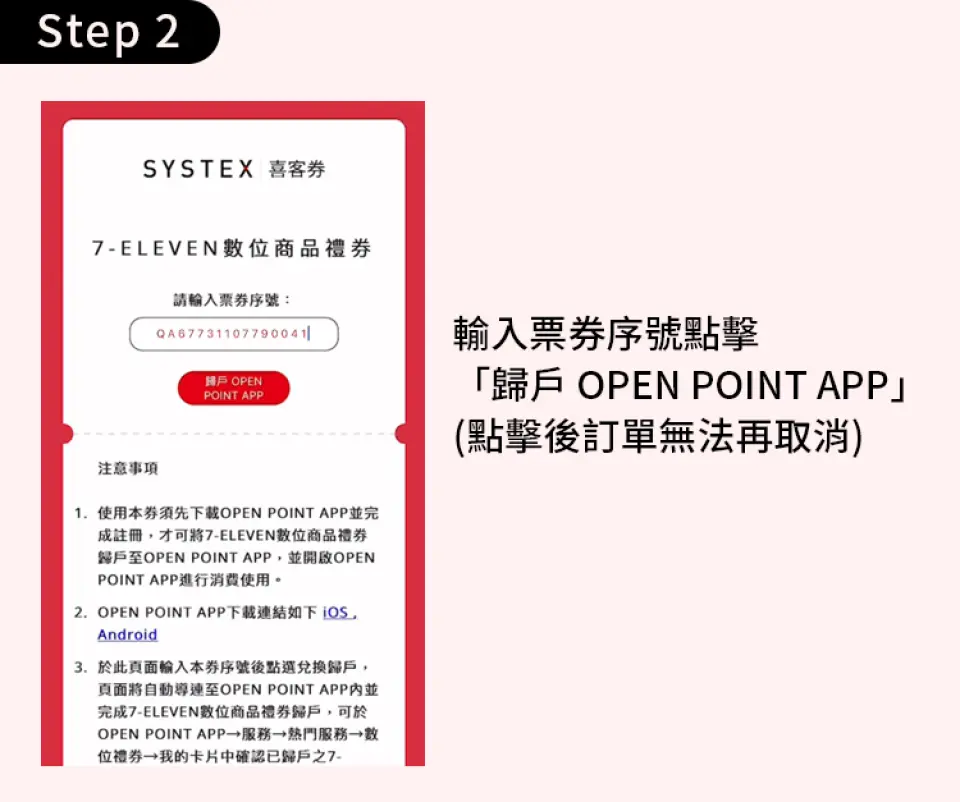

OPENPOINT APP Registration Process|Step 3

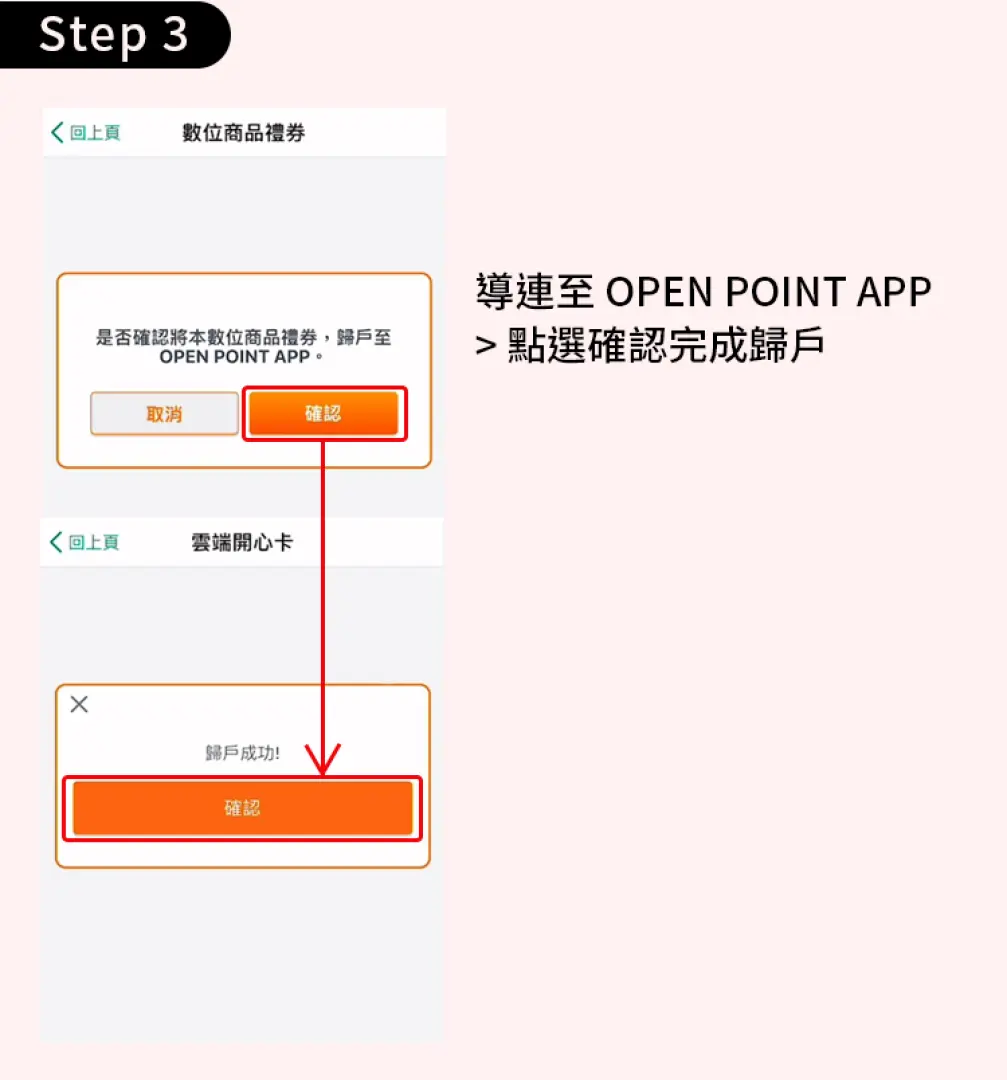
OPENPOINT APP Registration Process|Step 4


Important Info
Reminders
The redemption period for this voucher is 90 days from the date of purchase. If it is not redeemed within the time limit, it will not be redeemed after the expiration date.
Once the coupons are transferred to the account holder, the relevant responsibilities, rights and obligations will be transferred to 1President Enterprises Corporation and Anyuan Information Corporation. The amount stated on the face of the 7-ELEVEN digital gift voucher has been fully guaranteed by ANZ Banking Corporation, Taipei Branch. Upon expiration of the guarantee period, all guarantee liabilities will be automatically released. However, after the guarantee period, the issuer is still responsible for performance of the contract.
If the coupon is not used or exceeds the specified supply period (serial number validity period) of the product/service, the original purchaser can return the product to the online channel where the product was purchased with the invoice. If you decide to return the product, please contact KKday customer service. A 3% handling fee will be charged for the refund. Please be advised.
A single member can only purchase 40 tickets within 2 months. If the purchase quantity exceeds the limit, KKday has the right to cancel the order and refund the money. Please be advised.
Please note that if KKday discovers that you have used KKday discount coupons or discount codes maliciously or improperly (such as nationality-limited discounts, using discounts by changing nationality, bank cardholder-limited discounts, one person creating multiple member accounts to enjoy discounts repeatedly, etc.), KKday will cancel the orders established by your malicious or improper discount coupons or discount codes at our discretion, and may remove your KKday membership account at any time without prior notice to you, and may request compensation from you. Before using discount coupons or discount codes, please pay attention to the relevant activity rules to avoid affecting your rights and interests.
How to Redeem Your Voucher
How to Use Your Voucher
- Please present the e-voucher on-site
Voucher Redemption Period
- Valid for redemption within 90day(s) from the date of issue; Invalid after expiration
Cancellation Policy
- Once the order has been completed, it cannot be canceled, modified, or refunded
- Due to time zone differences, the confirmed cancellation date is based on the supplier’s local time. Please allow 2–5 business days to process your cancellation request, after which the cancellation fee will be charged according to the product’s cancellation policy. Once the cancellation is confirmed, you will receive your refund within 14 working days.
Get Help


